
Imagine this: you land on a beautifully designed website, yet something feels off. The text is either too tiny to read comfortably or overwhelmingly large.
This common problem often stems from improper font size settings in WordPress themes. It’s something you might not think about, but it can drastically affect how users engage with your content. If you’ve ever struggled with what base font size headers should be in your WordPress theme, you’re not alone.
This article is your go-to guide for understanding the impact of font sizes on readability and user experience. You’ll discover how to choose the perfect base font size for your headers, ensuring your site is both visually appealing and easy to navigate. Get ready to enhance your site’s look and feel while keeping your audience engaged. Let’s dive into the secrets of optimizing font sizes in WordPress themes for maximum impact.
Importance Of Base Font Size
Choosing the right base font size is crucial for readability. A font size that’s too small can make text hard to read. Larger fonts help readers understand content easily. The base font size affects all headers and text. It sets the tone for your WordPress theme. Consistency in font size across your theme is vital. This ensures a smooth reading experience.
Adjusting the base font size can also impact design. If the font is too big, it may clutter the page. Smaller fonts could be overlooked. A balanced font size helps in maintaining visual appeal. It contributes to the overall look of your website. It guides how users interact with your content. Thus, making a wise choice is important.
Choosing The Right Base Font Size
Base font size matters a lot in web design. It affects how readers see text. Many choose 16px as a starting point. It is easy to read. It works well on most screens. You can change this size to fit your theme.
Keeping font size consistent is key. It helps users read your site easily. Too small makes reading hard. Too big can be overwhelming. Find a balance that suits your content.
Changing font size in WordPress is simple. Go to theme settings. Look for typography options. Here, you can set your base size. Test on different devices for best results.
Check your font size on phones and computers. Make sure it looks good everywhere. This ensures users have a pleasant experience.
Impact On Readability And Accessibility
Font size in headers matters a lot. It helps people read better. Small fonts can be hard to see. Big fonts are easier for everyone. People with weak eyes need bigger fonts.
Headers help organize content. They guide readers. Big headers make finding parts easy. They break up text nicely. This helps people understand better. It keeps them engaged.
Choosing the right font size is key. Use a size that looks good on all screens. Test it on phones and computers. Make sure it’s clear and easy to read. This improves the experience for all users.

Credit: theme.co
Adjusting Font Size In WordPress
The Theme Customizer in WordPress is very useful. It lets you change the font size easily. Go to Appearance, then click Customize. Find the Typography option there. Adjust the font size slider to see changes. Make sure to save your changes.
CSS files control how your site looks. Open your theme’s style.css file. Search for the header tags like h1, h2, h3. Change their font-size values. Save the file to apply changes. Be careful when editing CSS. Mistakes can break your site.
Plugins can help with fonts too. Install a font plugin from the WordPress plugin store. Popular plugins include Easy Google Fonts. These plugins let you change fonts without coding. Always check plugin reviews before installing. This ensures you pick a good one.
Responsive Design Considerations
Mobile users need a website that works well. Text should be easy to read. Use a base font size of at least 16px. This makes text clear on small screens. Keep headers larger for emphasis.
Images should fit the screen. Use responsive images that adjust to the device size. This helps with faster loading times.
Test your website on different devices. Smartphones, tablets, and desktops all matter. Ensure buttons are easy to tap. Small buttons can frustrate users.
Check for any layout issues. Sometimes, text or images can overlap. Fix these to keep your site neat.
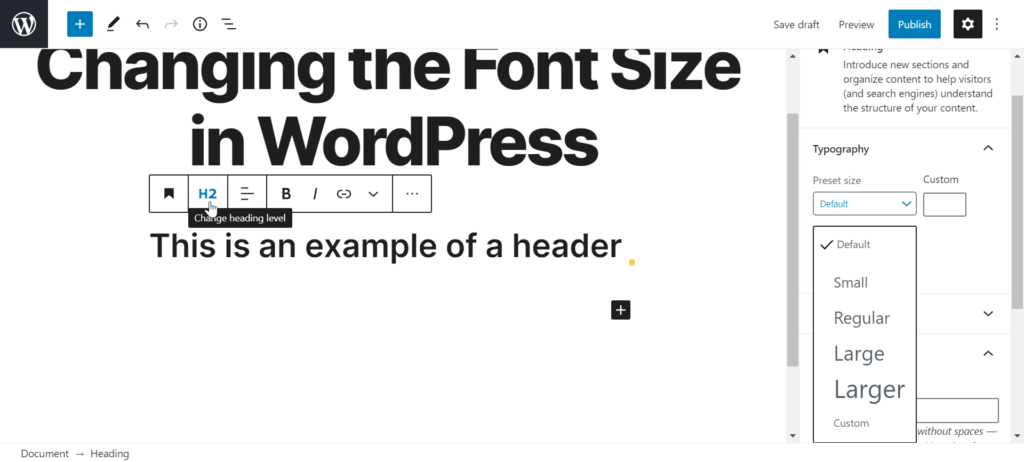
Credit: www.inmotionhosting.com
Common Mistakes To Avoid
Many people choose the wrong base font size for headers. This can make text hard to read. Headers need to stand out. If they are too small, readers might miss them. Consistency is key. Use the same size for all headers. This helps readers follow the content. Avoid using a font that is too fancy. Fancy fonts look nice but can be hard to read. Choose simple fonts. These are better for clarity.
Many themes have default settings. Check these settings carefully. Some themes might use small fonts for headers. Adjust them for better readability. Use the preview feature. This allows you to see changes before publishing. Make sure your headers look good on all devices. This helps with user experience. Remember, simple and readable is best.
Best Practices For Font Size Management
Choose the right font size for your site. It helps readers. A base font size of 16px is a good start. This size is easy to read. For headers, use sizes like 24px for H1, 20px for H2, and 18px for H3. This makes your text clear and organized.
Remember to check on different screens. Sizes may look different on phones. Adjust sizes for each device if needed. This keeps your site looking good everywhere. Your readers will thank you.
Tools And Resources For Font Optimization
Choosing the right tools can help with font optimization. Google Fonts is a popular option. It offers many free fonts. You can try different styles easily. Adobe Fonts is another great choice. It provides a large library of fonts. These fonts are high quality.
WordPress plugins can also help. Easy Google Fonts is a useful plugin. It allows you to add custom fonts. You don’t need coding skills. WP Google Fonts is another helpful plugin. It lets you use Google Fonts in your theme.
Online tools like Font Squirrel are handy. They offer free font generators. These help with optimizing web fonts. Use them to convert fonts into web-friendly formats.

Credit: www.interserver.net
Frequently Asked Questions
What Is The Ideal Base Font Size For WordPress?
The ideal base font size for WordPress is typically 16px. This size ensures readability across devices. It’s a standard size that balances aesthetics and functionality. Adjusting based on your theme’s design is crucial. Larger fonts can enhance readability for visually impaired users.
Always consider your audience and their needs.
How Do I Change Header Font Size In WordPress?
To change header font size in WordPress, use the Customizer. Navigate to Appearance > Customize. Then, select Typography or Additional CSS. Adjust the font size settings for headers. Save your changes to see the effect. Some themes offer specific settings for header fonts, making customization easier.
Why Is Font Size Important In Themes?
Font size impacts readability and user experience. It ensures content is accessible to all users. Proper font size improves engagement and reduces bounce rates. It also aligns with your brand’s aesthetics. Consistent sizing across devices maintains professionalism. Selecting the right font size is crucial for effective communication.
Can I Use Different Fonts For Headers?
Yes, you can use different fonts for headers. WordPress themes often support various fonts. Use the Customizer to select fonts for headers. Consistent header fonts enhance branding and readability. Ensure font choices complement the overall theme design. Test across devices for optimal presentation.
Conclusion
Choosing the right font size for WordPress headers matters. It impacts your site’s readability and overall design. A balanced font size improves user experience and helps your content stand out. Remember to keep your audience in mind. Test different sizes to find what works best for your theme.
Small adjustments can make a big difference. So, experiment with font sizes and styles. Your site will look better and feel more professional. Visitors will appreciate clear and easy-to-read headers. This ensures they stay longer and explore more. Happy designing!


