
Are you looking to boost your WordPress website’s performance and reliability? Amazon Web Services (AWS) might be your answer.
Navigating through the vast array of AWS services can be overwhelming, but identifying the right ones can transform your website’s capabilities. Imagine faster load times, enhanced security, and seamless scalability—all possible with the right AWS tools. In this guide, you’ll discover which AWS services are essential for your WordPress site and how they can revolutionize your online presence.
Dive in to learn how to optimize your website with AWS, ensuring it meets your needs and exceeds expectations. Ready to elevate your WordPress site to new heights? Let’s explore the must-have AWS services!

Credit: martech.zone
Ec2 For Hosting
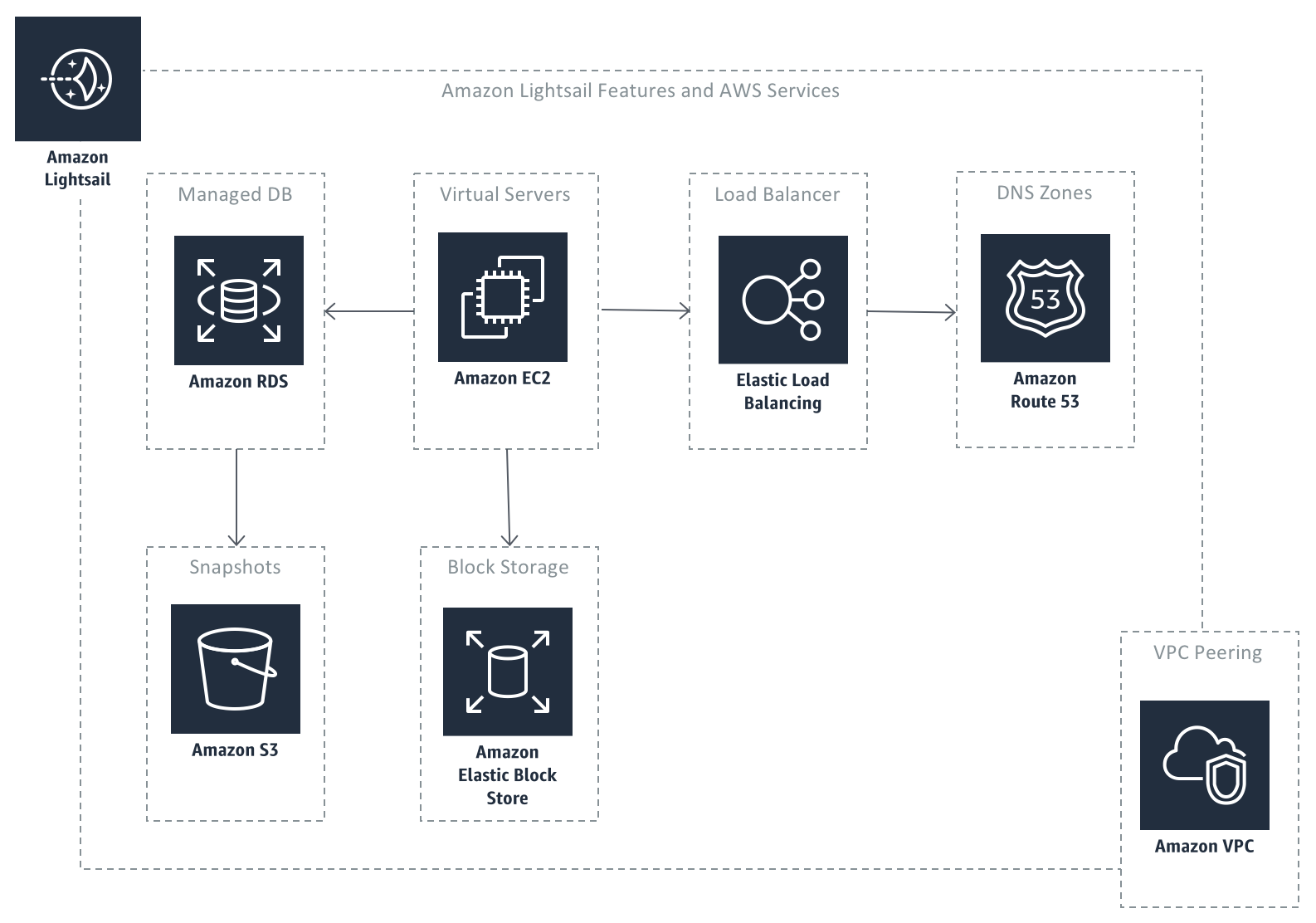
Picking the right Instance Type is key for your website. Each type has different power and speed. For small sites, a t2.micro may work well. Bigger sites need more power, like a t3.large. Think about your needs before choosing.
Security Groups act like a guard for your server. They block bad traffic and let good traffic through. Always set them up carefully. Allow only the ports you need. This keeps your site safe.
An Elastic IP helps keep your site reachable. It gives your server a fixed address. Even if you restart your server, it stays the same. This is important for stability. Always have one for public-facing websites.
Credit: aws.amazon.com
Rds For Database
AWS RDS offers many database options for WordPress. Choose from MySQL, PostgreSQL, and more. Each option is reliable and easy to use. They provide strong security for your data.
Backup is crucial for website safety. RDS has automatic backup features. These backups protect your data from loss. Recovery is quick and simple. You can restore your data without hassle.
Websites grow over time. RDS helps with scaling. It adjusts resources as your site grows. This ensures your site runs smoothly even with more visitors. No need to worry about slowdowns.
S3 For Media Storage
Set up a bucket for storing media files. Choose a name for the bucket. Select the region where the bucket will be. This helps with speed.
Amazon S3 uses object storage for files. Each file gets a unique key. This makes finding files easy. Store images, videos, and more.
Control who can see the files. Set permissions for users. Use access control lists (ACLs). Make sure only trusted users can change files.
Cloudfront For Content Delivery
Setting up CloudFront distribution helps deliver content quickly. Choose the best Origin Domain Name. Then, select the distribution method. This helps send data fast. Use edge locations for better speed. CloudFront can handle many users. It’s great for busy websites.
Distribution Setup
Configure settings carefully. Pick the right cache behavior. This keeps content fresh. Set default root object for easy navigation. Use custom error responses to guide users. Make your site user-friendly.
Caching Strategies
Caching improves speed. Set cache duration wisely. Choose Cache-Control headers. This manages content updates. Use cookies to personalize experiences. Optimize cache for better performance.
Ssl/tls Encryption
SSL/TLS encryption secures data. Protects users. Helps build trust. Use certificates for encryption. Keep data safe. Encrypt traffic to stop data theft. Important for online security.
Route 53 For Domain Management
AWS Route 53 helps in managing DNS settings. It links your domain to the website. This service makes sure users reach the right place. It works by directing the traffic. It acts like a phonebook for the web. You can easily update and change settings.
You can buy domain names using Route 53. This means you own the website’s name. It’s simple and quick. You get a list of available domains. Pick the one that suits your needs. Registration is fast and secure. You also get privacy protection.
Route 53 offers traffic policies. This helps in directing users efficiently. It balances the load on servers. It keeps your site fast and reliable. You can create rules for traffic flow. This ensures users get the best experience. No more slow websites.
Elastic Load Balancing
Load balancers help websites manage traffic. AWS offers different types. The Application Load Balancer is great for web applications. It routes traffic based on content. The Network Load Balancer is best for fast and reliable connections. It handles millions of requests. The Classic Load Balancer is older but still useful. It balances traffic across multiple servers.
Health checks ensure everything works fine. They test if servers are healthy. If a server fails, the load balancer stops sending traffic to it. This keeps the website running smoothly. AWS lets you customize these checks. You can decide how often they happen. And what to test for.
Auto Scaling helps your website grow with traffic. It adds more servers when needed. This keeps your website fast. When traffic decreases, it reduces servers. This saves money. You set rules for scaling. AWS does the rest. It’s smart and efficient.
Iam For Access Management
AWS IAM helps manage user roles. It’s important to set clear roles for each user. Admins have full access. Editors can change content. Viewers can only see the site. Setting roles keeps the website safe. This prevents unwanted changes. Always review who has access.
Policies are like rules for users. They decide what users can do. It’s wise to have strict policies. This helps in controlling actions. You can create custom policies. Use AWS templates for quick setup. Review policies often. Ensure they fit your needs.
Security is very important. Use strong passwords for IAM users. Turn on multi-factor authentication. This adds an extra layer of safety. Regularly update your security settings. Always monitor user activity. Look out for any suspicious actions. Keeping your site secure is a must.
Cloudwatch For Monitoring
CloudWatch keeps track of your website’s health. It shows important numbers. These numbers are called metrics. Metrics tell you if your site is okay. If something goes wrong, CloudWatch can let you know. This alert is called an alarm. Alarms help you fix problems quickly.
Logs are like a diary for your website. They record everything that happens. With CloudWatch, you can store these logs safely. You can also search them easily. This helps you understand issues better. You can solve them faster.
CloudWatch gives you tips on how well your site is doing. These tips are called insights. Insights help you see slow parts of your site. You can work on making them faster. A speedy site makes visitors happy.

Credit: aws.amazon.com
Frequently Asked Questions
What Aws Services Are Essential For WordPress?
To run a WordPress website on AWS, essential services include EC2 for hosting, RDS for database management, and S3 for media storage. Additionally, CloudFront can be used for content delivery, while Route 53 manages DNS. These services ensure scalability, reliability, and performance for WordPress sites.
How Does Aws Ec2 Benefit WordPress Hosting?
AWS EC2 provides scalable computing power for WordPress hosting. It allows users to choose instance types based on their needs. EC2 ensures high availability and flexibility. Users can easily scale resources up or down. This flexibility makes it a popular choice for hosting dynamic websites like WordPress.
Why Use Aws Rds For WordPress Databases?
AWS RDS offers managed database services, ideal for WordPress. It automates database management tasks, ensuring high availability and security. RDS supports multiple database engines, including MySQL, commonly used for WordPress. This reduces administrative overhead and enhances performance, making RDS a preferred choice for WordPress databases.
Is Aws S3 Useful For WordPress Media Storage?
AWS S3 is highly beneficial for storing WordPress media files. It provides scalable, secure, and durable storage. S3 allows for easy access and distribution of media content. It reduces the load on the main server, enhancing website performance. This makes S3 a cost-effective solution for large media libraries.
Conclusion
AWS offers essential tools for WordPress websites. These services ensure smooth performance. Secure hosting with EC2 keeps your site live. RDS handles your database needs effectively. Use S3 for storing media files safely. CloudFront speeds up content delivery, improving user experience.
Route 53 manages domain settings, ensuring site accessibility. With AWS, your WordPress site runs efficiently. The right services enhance security and reliability. Choose wisely based on your needs. AWS supports growth as your site expands. Keep your WordPress site optimized with the right AWS solutions.
Simple choices lead to successful online presence.


