
Imagine you’re about to dive into your favorite book, and suddenly, a few pages start to look blurry. This is similar to what happens when you neglect WordPress updates.
You might wonder why your website isn’t performing as well as it used to. Understanding WordPress updates is crucial for keeping your site running smoothly and securely. These updates not only enhance functionality but also protect your site from vulnerabilities.
By the end of this article, you’ll see how these updates can transform your digital presence, making it more robust and efficient. Get ready to unlock the secrets behind WordPress updates, and discover why they are essential for your website’s success.
Importance Of Updates
WordPress updates keep your site safe. They fix bugs and improve features. Without updates, your site can become weak. Hackers like weak sites. They can cause damage. Updates add new tools. These tools help you manage your site better.
Updates also make your site faster. A fast site is good for users. Slow sites drive users away. Updates help with search engine rankings. A well-ranked site gets more visitors. More visitors mean more success.
Always check for updates. It is easy to do. You can set updates to happen automatically. This makes life easier. Keep your WordPress updated for best results.
Credit: www.hostinger.com
Types Of WordPress Updates
WordPress Core Updates keep the platform running smoothly. They often fix bugs and improve security. These updates come from WordPress itself. It’s crucial to install them for better performance. Sometimes, new features are added too. Core updates ensure WordPress stays safe and reliable. Always check for these updates regularly.
Themes make your site look nice. Theme Updates add new designs or fix problems. They keep your site looking fresh. Updated themes can work better with new WordPress versions. Using outdated themes can cause issues. Always update to enjoy the latest features.
Plugins add extra features to your site. They need regular updates too. Plugin updates fix glitches and improve functionality. They make sure plugins work well with the latest WordPress version. Using updated plugins can prevent errors. Check plugin updates often for the best experience.
Security Enhancements
WordPress updates are vital for security. Hackers seek weak spots. Updates fix these weak spots. This keeps your site safe. New security features come with updates. They block new threats. Regular updates are important for this reason.
Old plugins can be risky. Updates often fix these risks. A secure site needs updated plugins. Strong passwords also matter. Updates may suggest this. They help you keep your site safe.
Backup your site often. Before updating, backups are a must. They save your data. If something goes wrong, you can restore. Security updates are not optional. They protect your hard work.
Performance Improvements
WordPress updates help your site run faster and smoother. They fix bugs and add new features. Your site can handle more visitors. This means less waiting time for pages to load. Everyone likes a quick site. It keeps people happy. Faster sites rank better in search engines. This helps more people find you online.
Updates also improve security. They protect your site from hackers. Old software can have holes. Hackers can use these holes to attack. New updates close these holes. Keep your site safe with updates.
New Features
WordPress brings new features with every update. These features make websites better and safer. Users can find more themes and plugins. These tools help make websites look nice. The update process is easy. Just a few clicks and it’s done. Users notice faster speed after updates. This makes browsing fun. New features also include better security. This keeps websites safe from harm.
Another change is improved user experience. This means visitors have a good time on the site. Updates often fix old problems. Bugs get removed and things work smoothly. New tools make content creation easier. This is great for beginners. WordPress updates bring many benefits. Users should keep their sites updated. This ensures they enjoy all features.

Credit: www.greengeeks.com
Compatibility And Bug Fixes
WordPress updates often focus on compatibility with other tools. New versions help your site work better. They solve many bugs that can cause problems. Developers find and fix these issues. This makes your website run smoothly.
Updates also support new themes and plugins. They ensure everything works well together. Using old versions can create errors. Updates prevent this by keeping your site current.
Security is another key reason for updates. Fixes help protect against threats. Keeping your site safe is very important. Regular updates are a simple way to do this.
Automatic Vs. Manual Updates
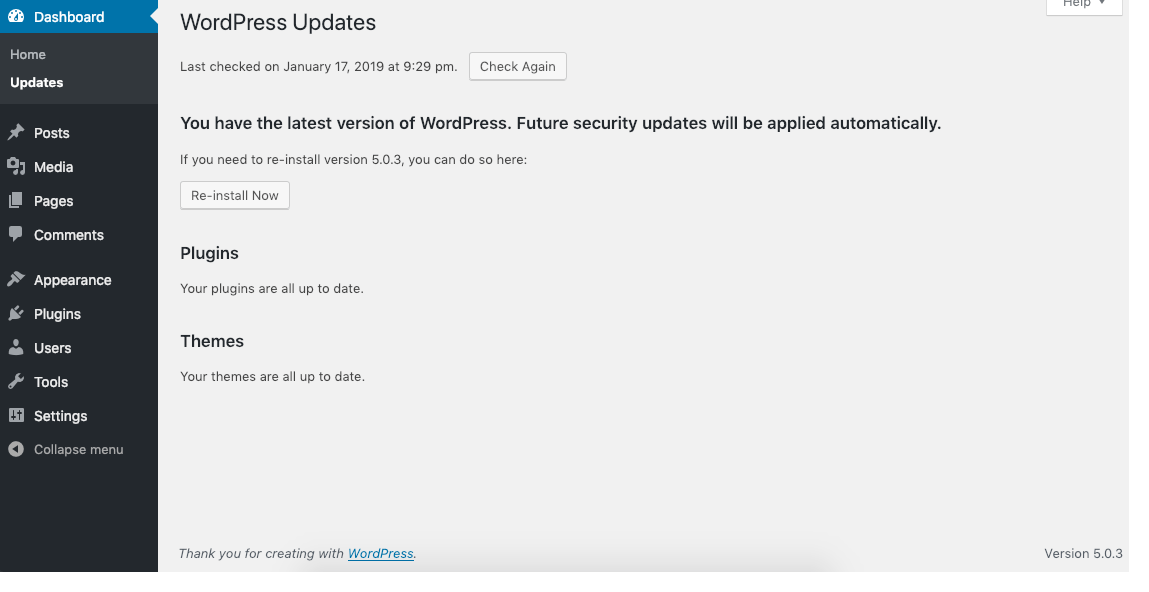
Automatic updates keep your WordPress site fresh. They happen by themselves. This saves time. You do not need to press any buttons. This is great for new users. Security patches are updated quickly. But, sometimes things break. Themes or plugins might not work well.
Manual updates give you more control. You choose what to update. This is good for big sites. You can test changes first. Some people like this control. Yet, it takes more time. You must remember to check for updates. Some users find this hard.
Credit: learn.wordpress.org
Best Practices For Updating
Always make a backup of your site. This ensures you don’t lose important data. Use a plugin for easy backups. Save files to a safe location. You can use cloud storage for this. Check backup files to make sure they work.
Test updates on a staging site first. This is a copy of your site. Testing ensures everything works well. Fix any problems you find before updating the real site. This keeps your site safe and running smoothly.
Set a schedule for updates. This keeps your site secure. Weekly or monthly updates are good. Put reminders in your calendar. Regular updates can stop hackers. Your site will run better and faster.
Troubleshooting Common Issues
Updates can cause plugins to stop working. A plugin may not be compatible with the new version. Check if the plugin has an update. If not, consider finding an alternative. Themes can also cause trouble. An update may change the look of your site. Always back up your site before updating. This keeps your data safe. Speed issues can arise after an update. Clear your cache to fix this. Sometimes, updates lead to a white screen. This is often due to memory issues. Increase your PHP memory limit to solve this.
Broken links can appear after updates. Use tools to find and fix them. Frequent updates can confuse users. Keep a record of changes. This helps track what has been updated. Remember, updates are important. They keep your site secure and fast.
Frequently Asked Questions
What Are WordPress Updates For?
WordPress updates enhance functionality, improve security, and fix bugs. They ensure your website runs smoothly and is protected against vulnerabilities. Regular updates keep your site compatible with plugins and themes, offering better performance and new features. Keeping WordPress updated is crucial for maintaining a secure, efficient, and user-friendly website.
How Often Should WordPress Be Updated?
WordPress should be updated whenever a new version is released. This ensures your site benefits from the latest features and security patches. Typically, updates occur a few times a year. Always check for updates regularly and apply them promptly to maintain optimal site performance and security.
Are WordPress Updates Safe To Install?
Yes, WordPress updates are generally safe to install. They are thoroughly tested by developers before release. However, it’s always wise to back up your site before updating. This prevents data loss in case of unexpected issues. Regular updates enhance security and functionality, making your site safer and more efficient.
What Happens If You Ignore WordPress Updates?
Ignoring WordPress updates can expose your site to security risks. Older versions may have vulnerabilities that hackers exploit. Additionally, outdated software may cause compatibility issues with themes and plugins. Regular updates ensure your website stays secure, functions properly, and benefits from the latest enhancements.
Conclusion
WordPress updates are essential for smooth website performance. They enhance security and fix bugs. Regular updates keep your site safe from threats. These updates also improve features and user experience. Always check for updates and install them promptly. Staying current helps avoid issues and ensures optimal functionality.
Embrace updates as part of your website care routine. They are vital for keeping your site running smoothly. Remember, updated sites offer better experiences for visitors. Stay proactive with updates to maintain a healthy, efficient website.


