
Imagine your favorite blog post being front and center every time someone visits your site. Sounds like a dream, doesn’t it?
Well, with WordPress sticky posts, this dream can become your reality. Sticky posts are a powerful tool to ensure your most important content always gets the spotlight it deserves. Whether you’re promoting a special event, sharing your latest news, or showcasing an evergreen piece, sticky posts can help keep your audience engaged and informed.
Picture this: you’re scrolling through a blog, and one particular post catches your attention time and time again. That’s the magic of sticky posts—they’re designed to grab your reader’s focus and hold it. By the end of this article, you’ll understand how to wield this feature to your advantage, boosting your site’s visibility and ensuring that your must-see content never gets lost in the shuffle. Stick around to discover how you can make the most of this handy WordPress feature and elevate your blogging game.

Credit: docs.presscustomizr.com
WordPress Sticky Posts Explained
WordPress has a feature called Sticky Posts. These posts stay at the top of your blog. Even when you publish new content. Sticky posts are useful for important announcements. Or popular articles. They grab the reader’s attention first.
To make a post sticky, check the option in your editor. It’s easy. This feature helps in organizing content. And brings focus to key topics. Remember, sticky posts should be used wisely. Too many can confuse readers.
Credit: qodeinteractive.com
Benefits Of Sticky Posts
Sticky posts stay at the top of your blog. This means they get more eyes on them. People see them first. This boosts their visibility. Regular posts may get lost. But not sticky ones. They are like stars on your blog page.
Readers love finding important posts easily. Sticky posts help with this. Users click more on sticky posts. This means more engagement. Happy readers come back often. They enjoy easy navigation.
Want to show off your best work? Sticky posts are perfect for this. They highlight your key content. Readers will not miss out on it. Important updates can stay sticky too. This keeps them in the spotlight.
How To Create A Sticky Post
WordPress sticky posts keep important content at the top of your blog. To create one, go to your post’s edit screen. Check the “Stick to the front page” option in the visibility settings. Your post stays highlighted, ensuring readers see it first.
Using The Classic Editor
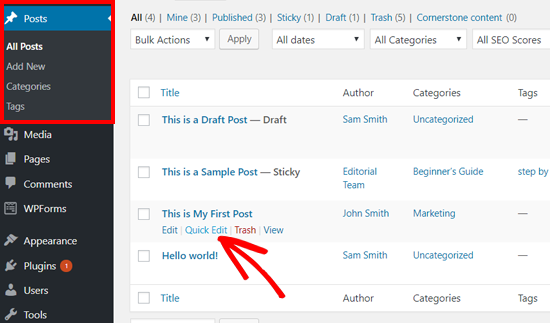
Open your WordPress dashboard. Go to Posts and click All Posts. Find the post you want. Click Edit. Look for Post Settings on the right. Check the box labeled Stick to the Front Page. Click Update to save.
Using The Block Editor
Start by opening the WordPress dashboard. Navigate to Posts and select All Posts. Choose your post and click Edit. On the right, find the Post tab. Scroll to Visibility settings. Check Stick to the Front Page. Press Update to make it sticky.
Sticky Post Use Cases
Sticky posts are great for sharing important news. They keep announcements at the top. Everyone sees them first. This ensures no one misses key information. Use sticky posts for urgent updates. They are perfect for keeping people informed. Users can easily find vital details. This saves time and avoids confusion. Always keep important messages sticky.
Highlight top articles with sticky posts. They showcase your best content. Readers see them as soon as they visit. This boosts your engagement and attracts more attention. Sticky posts let you focus on popular topics. This enhances user experience. It helps visitors find high-quality articles. Keep your best work at the top.
Promote events with sticky posts. Keep event details visible. This helps people plan ahead. Sticky posts make events easy to spot. They stay at the top for all to see. This increases attendance. Use sticky posts for special occasions. They help you reach your audience better. Ensure everyone knows about your events.
Managing Sticky Posts
WordPress sticky posts help keep important content at the top of your blog. This feature ensures your highlighted posts remain visible. Managing sticky posts allows easy prioritization of key articles for your audience.
Editing And Updating
Sticky posts need updating to stay fresh. Click on the post to edit it. Make sure you save changes. Check if your updates look right. Preview them before finalizing. Keep your content relevant and engaging. This helps readers stay interested. Regular updates can improve post quality.
Removing Sticky Status
To remove sticky status, go to the post settings. Find the sticky option. Uncheck it to make the post normal again. This change is simple. It helps manage your content better. Always ensure the changes are saved. This keeps your site organized. Regular checks are helpful.
Best Practices
- Use sticky posts wisely for important content.
- Don’t overuse stickiness; it can clutter the homepage.
- Regularly update sticky posts for freshness.
- Check analytics to see post engagement.
- Consider audience needs when choosing sticky posts.
Plugins For Enhanced Sticky Post Features
Many plugins add features to sticky posts. Sticky Posts Widget is one of them. It lets you display sticky posts in a widget. WP Sticky helps make any post sticky. Sticky Posts Slider creates a slide show of sticky posts. These plugins are easy to use. They are popular among users.
Installing plugins is simple. Go to the WordPress dashboard. Click on “Plugins” and then “Add New”. Search for the plugin name. Click “Install Now” and then “Activate”. Setup is also easy. Most plugins have settings in the dashboard. Follow the steps shown there.
Advanced users can customize plugins. They can change how sticky posts look. Some plugins allow CSS changes. Others let you add custom fields. This makes sticky posts unique. Customization is fun and gives you control. You can make your blog look special.
Common Issues And Troubleshooting
Sticky posts might not show up sometimes. This can confuse users. First, check if your theme supports sticky posts. Some themes do not support this feature. Also, ensure that your post is marked as sticky in the settings.
Sometimes themes or plugins can cause issues. They might stop sticky posts from showing up. Try disabling plugins one by one. This helps find the troublemaker. You can switch to a default theme temporarily. This checks if the theme is the problem.
Sticky posts should appear at the top. But sometimes they don’t. This can happen if there are many sticky posts. Only the latest sticky post may show up. Check the order settings in your WordPress dashboard. Make sure the right post is set as sticky.
Credit: www.wpbeginner.com
Frequently Asked Questions
What Is A Sticky Post In WordPress?
A sticky post is a feature that lets you keep a post at the top of your blog. It’s useful for highlighting important content. This ensures your visitors see this post first, regardless of your blog’s chronological order.
How To Make A Post Sticky In WordPress?
To make a post sticky, edit the post in WordPress. In the Publish section, check the “Stick to the front page” option. Save your changes, and the post will remain at the top.
Why Use Sticky Posts In WordPress?
Sticky posts help emphasize important or popular content. They ensure visitors notice key posts and increase engagement. This is especially useful for announcements or evergreen content.
Can Sticky Posts Impact Seo?
Sticky posts can enhance SEO by increasing visibility of key content. They improve user engagement, potentially increasing time spent on the site. This can positively affect search rankings.
Conclusion
Sticky posts in WordPress keep important content visible. They enhance user engagement by highlighting key articles. This feature ensures crucial information stays at the top. Readers find it easier to access relevant content quickly. Sticky posts are simple to set up and use.
They help in organizing content effectively. By utilizing sticky posts, you manage your blog better. This leads to a more enjoyable reader experience. Remember, consistency in content can attract more visitors. Try sticky posts to improve your blog’s structure. Your audience will appreciate the easy navigation.


