
Have you ever wondered what those sleek, simple icons in your WordPress dashboard are? If you’ve been navigating your site, tweaking settings, or adding new posts, you’ve likely encountered them.
They’re called Dashicons, and they play a crucial role in making your WordPress experience smoother and more intuitive. Imagine having a visual cue that helps you quickly identify functions and features without needing to decipher text-heavy menus. Dashicons do just that, streamlining your interactions and enhancing your productivity.
Dive into this article to uncover the secrets behind these icons and learn how they can transform your WordPress management experience.
Credit: tidyrepo.com
What Are Dashicons?
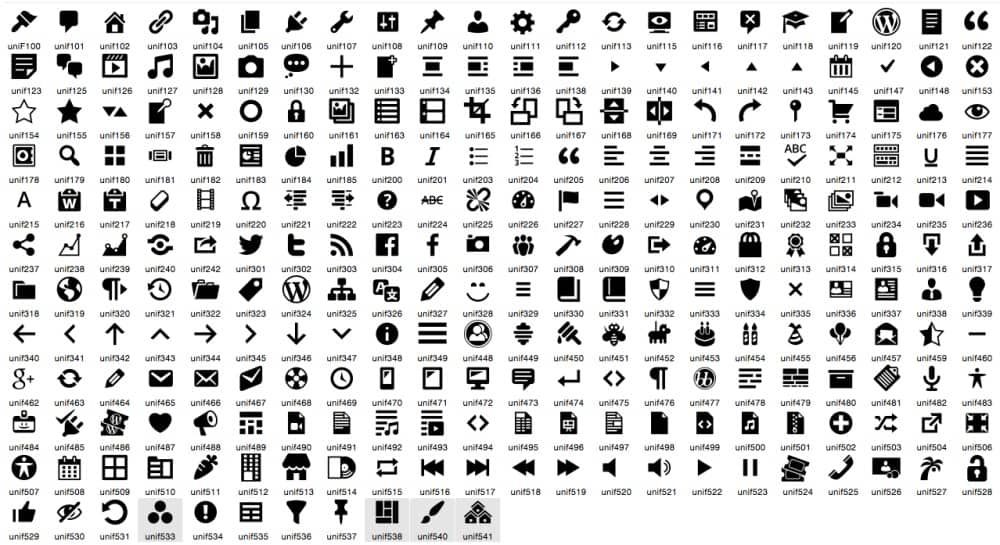
Dashicons are small icons used in WordPress. They make the site look nice. Dashicons help users understand buttons and links. Each icon represents a different action. You see them in the admin area. They are easy to use. You don’t need to be an expert. Just add them with a simple code. They come in many shapes and sizes. Some look like pencils. Others look like gears. These icons are built-in. No need to download anything extra. They are part of WordPress itself. Dashicons make tasks easier. They save time. And they look good too!
History Of Dashicons
Dashicons are icons in WordPress. They started in WordPress version 3.8. These icons make the admin area look better. Designers wanted a set of simple icons. They used Dashicons because they are easy to understand. Icons help users navigate the dashboard quickly. The first set had 94 icons. Now, there are more than 160 icons. They are open-source and free to use. Many websites use Dashicons today. Developers love them because they are flexible. You can change their size and color easily. Dashicons help users find things faster. They improve the user experience in WordPress. Icons are important for web design. They make things clear and simple.
Benefits Of Using Dashicons
Dashicons make websites look better. They are small icons. They are easy to see. They make the site look neat. A site with Dashicons feels more professional. Visitors like sites that look nice. They stay longer. This can be good for your site.
Dashicons keep the look consistent. No matter the theme, Dashicons fit in. This gives a site a uniform look. A uniform look is important. It makes the site easy to use. Visitors find what they need quickly. This is a big plus for any site owner.
How To Add Dashicons To Your Site
WordPress Dashicons are built-in icon fonts used to enhance the visual appeal of sites. Adding Dashicons involves activating the WordPress admin area, enabling developers to integrate them into themes or plugins seamlessly. This process enriches user experience with sleek and modern icons.
Enqueuing Dashicons
Dashicons are built-in icons for WordPress. They make sites look good. To add them, use enqueue script. First, open your functions.php file. Next, copy this code:
wp_enqueue_style('dashicons');
This code loads Dashicons on your site. Dashicons are ready to use. Just call them in your HTML.
Using In Custom Themes
Custom themes can use Dashicons too. Find the HTML class for each Dashicon. Use class names like dashicons-admin-site. Add class to your HTML. Dashicons will show on your site.
Dashicons look best with CSS styling. Customize the size and color. Make your theme unique. Dashicons are easy to use. They make your site fun.
Customizing Dashicons
WordPress Dashicons are small, vector-based icons used in the WordPress admin interface. Customizing these icons allows users to tailor the visual appearance of their dashboard. This enhances the user experience and makes navigation more intuitive.
Using Css For Modifications
You can easily change Dashicons with CSS. First, find the icon’s class. Then, use this class in your CSS file. You can change the color, size, or style of the icon. Try using font-size to make the icon bigger or smaller. Use color to change the icon’s color. Adding text-shadow can give it a cool effect. These small changes make icons unique. Your website will look better and more personal.
Creating Custom Icons
Sometimes, you need a new icon. Dashicons offer many options, but not all. To create a new icon, design it using a vector tool. Then, convert it to a web font. Use this new font on your website. This way, your site will have its own style. Custom icons make your site special. It’s a fun way to personalize your web design.

Credit: www.bluehost.com
Popular Use Cases
WordPress Dashicons make dashboards easier to use. Icons help find tools quickly. They make the interface look neat. Dashicons are simple. They add style without clutter. Users can understand icons fast. No need to read long text. This saves time for everyone. Dashicons fit well in small spaces. Perfect for busy dashboards. They give clear visual cues. This improves navigation.
Dashicons enhance user interfaces. They make apps more friendly. Icons show actions clearly. Users feel more confident using apps. Dashicons are like visual guides. They lead users smoothly. Icons are easy to recognize. They improve the app’s look. Dashicons are flexible. They fit different styles. Icons can be customized too. This suits various themes. Dashicons boost user satisfaction. Happy users come back.
Troubleshooting Common Issues
WordPress Dashicons are small graphic icons used in the WordPress admin area. They help improve navigation and visual appeal. These icons can sometimes not display correctly, causing issues. Troubleshooting involves checking plugin conflicts or theme compatibility to resolve display problems.
Compatibility Problems
Dashicons might not show up correctly. This can happen because of theme or plugin conflicts. Check if your theme supports the latest WordPress version. If not, update it. Always keep your plugins up to date. Some old plugins might not work with new Dashicons. Disable them one by one to find the problem. Dashicons need support from your theme and plugins. Ensure they are updated.
Icon Display Errors
Icons may not display correctly. This might be due to browser cache. Clear your browser cache regularly. Sometimes, your browser might store old data. This can cause display issues. CSS conflicts can also hide icons. Check your CSS settings. Look for any code that might affect icons. JavaScript errors can stop icons from showing. Inspect and fix JavaScript issues in your browser console.
Credit: www.figma.com
Future Of Dashicons
WordPress Dashicons may get new designs. This can make them more modern. Developers could add more icons. This helps users find what they need. Dashicons might also become more colorful. Colors help users spot icons faster.
Dashicons could work with new WordPress tools. This can help make websites look better. New features could use Dashicons to show options. This makes tools easier to understand. Developers might use Dashicons to help users navigate faster.
Frequently Asked Questions
What Are WordPress Dashicons?
WordPress Dashicons are a set of scalable vector icons. They are used within the WordPress admin interface. These icons enhance visual appeal and improve user navigation. Dashicons are integrated by default in WordPress themes and plugins.
How To Use Dashicons In WordPress?
To use Dashicons, enqueue the Dashicons library in your theme or plugin. Add the Dashicons class to HTML elements. This method displays the desired icon on the website. The WordPress Codex provides detailed guidelines for implementation.
Are Dashicons Free To Use?
Yes, Dashicons are free for use in WordPress projects. They are included in the WordPress core, allowing easy access. Developers can use them without worrying about licensing issues.
Can Dashicons Be Customized?
Yes, Dashicons can be customized with CSS for color and size adjustments. Use CSS classes to change icon appearance. Customizing Dashicons is straightforward and enhances your site’s design consistency.
Conclusion
WordPress Dashicons are simple yet powerful tools. They enhance website design effortlessly. Icons add visual appeal and improve user experience. They help communicate ideas quickly. Dashicons offer consistency across WordPress themes. Easy integration makes them a favorite. Designers and developers find them useful.
Customization options allow creativity. Dashicons keep websites looking modern. Try using them to elevate your WordPress site. Explore their potential and see the difference. Let icons speak for your website. Embrace their simplicity and functionality. Dashicons are essential for any WordPress site.


