Are you curious about the different roles within WordPress? Understanding what users are and how they work can transform the way you manage your website.
Imagine having the power to control who can edit, publish, or simply read your content. By mastering WordPress user roles, you gain this control and streamline your website management. Think of it as giving the right keys to the right people, ensuring your site runs smoothly and securely.
Stay with us as we unravel the world of WordPress users, empowering you to make informed decisions and maximize your site’s potential.
Credit: easywpguide.com
User Roles
Administrators have the most power. They can do anything on the site. They manage all users. They control all settings. They can add or delete plugins and themes. They can even delete the site. It is a big role.
Editors handle content. They edit posts and pages. They can delete content. They can manage comments. Editors do not change site settings. They have less power than administrators. But they are important.
Authors write posts. They can publish their own posts. Authors cannot edit others’ posts. They cannot manage comments. Authors have less power than editors. But they help keep the site active.
Contributors write posts too. But they cannot publish them. Their posts need approval. Contributors have no access to site settings. This role is good for beginners. It helps them learn.
Subscribers have the least power. They can only read posts. Subscribers cannot edit or publish. They have a profile. This role is for regular visitors. They enjoy the site content.
Capabilities And Permissions
Users can edit, delete, or publish posts. They can also add media files. Admins have full control over all content. Editors can manage all posts but cannot change site settings. Authors can only manage their own posts.
Only Admins can install or remove plugins. They can also change themes. Other users cannot make these changes. Plugins add features to your site. Themes change how your site looks.
Admins can add new users or remove them. They set user roles and permissions. Users cannot manage others. Roles define what users can do on the site. Admins ensure security by managing users.
Adding And Managing Users
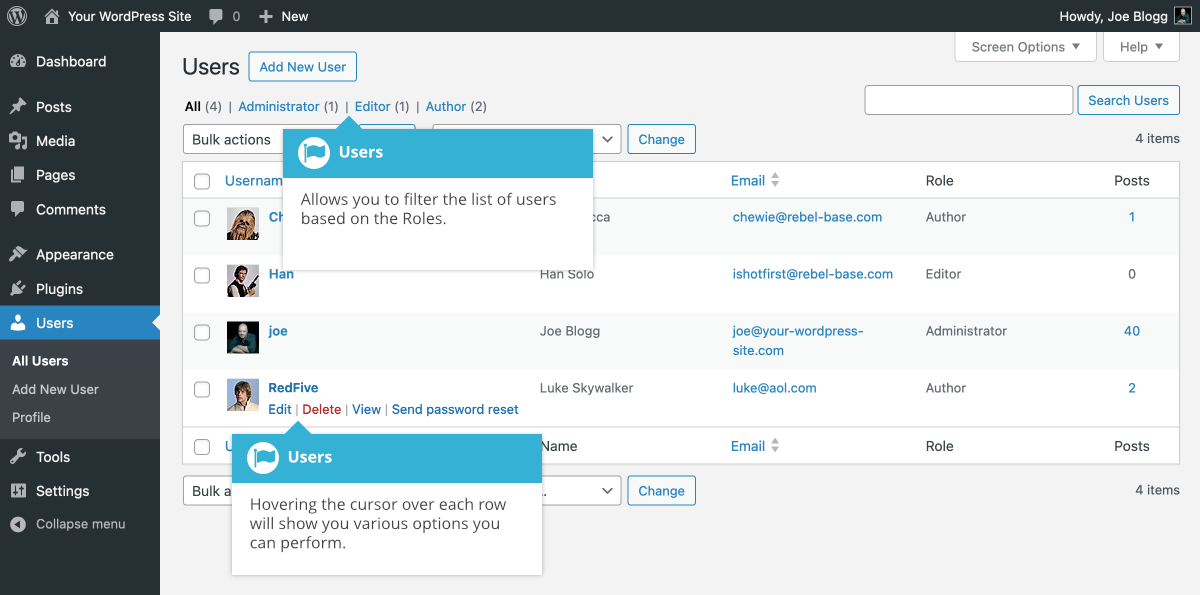
WordPress allows you to add new users easily. Go to the dashboard. Find the Users section. Click on Add New. Fill out the form. You need a username and email. Set a password. Choose a role for the user. Click Create User. Your new user is now ready.
Sometimes user details need changes. Go to Users in the dashboard. Find the user. Click on Edit next to their name. Update their profile information. You can change their name or email. Set a new password if needed. Save the changes. The user profile is now updated.
Remove users if needed. Open the Users section. Locate the user you wish to delete. Click Delete. You will see a confirmation message. Confirm the deletion. The user will be removed from your site.
Credit: wordpress.org
Customizing User Roles
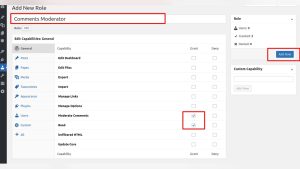
Plugins help customize user roles easily. They offer many options for changes. Install and activate a plugin. Then, choose roles you want to change. You can add new roles or edit old ones. Some plugins let you create custom capabilities. This means you decide what users can do. It’s simple and fast. Always check plugin reviews before using them. Good reviews mean the plugin works well.
Custom capabilities give users special powers. These powers are like keys. They open doors to different tasks. You can let users write posts. Or, allow them to edit pages. Decide what each user can do. It’s like building a team. Each member has a unique job. Choose wisely to keep your site safe. Too many powers can be risky. So, think before you change roles.
Best Practices For User Management
Keep your WordPress site safe by managing users wisely. Always create strong passwords. Change them regularly. Use two-factor authentication for extra protection. Limit user roles to what they need. Avoid giving admin rights unless necessary. Regularly review user accounts for any suspicious activity. Remove inactive users to reduce security risks. Keep plugins updated for enhanced security. Backup your site often. This helps in case of a breach.
Assigning roles correctly is crucial. WordPress has different roles like Subscriber, Contributor, Author, Editor, and Administrator. Each role has its own permissions. Assign roles based on what tasks users need to do. Do not give higher roles than needed. This prevents accidental changes. Regularly check and update roles as responsibilities change. Educate users about their roles and tasks. This avoids confusion and mistakes.

Credit: wpmarmite.com
Common Issues And Solutions
WordPress has different user roles like Administrator, Editor, and Author. Each role has its own set of permissions. Sometimes, these roles overlap. This can cause confusion among users. For example, an Editor might have too many or too few rights. To fix this, check the role settings in the WordPress dashboard. Adjust the permissions for each role. Make sure that each user can only do what they need to do. This prevents conflicts and keeps your site secure.
Sometimes users cannot access certain features. This is often due to permission issues. First, check if the user role is correct. Verify their permissions match their role. If not, update the role settings. If problems persist, use a plugin to manage roles. Plugins like “User Role Editor” can help. They offer a simple way to tweak permissions. Always backup your site before making changes. This ensures you can recover if something goes wrong.
Frequently Asked Questions
What Are User Roles In WordPress?
User roles in WordPress define permissions for site activities. They range from Administrator, who manages everything, to Subscriber, who can only read content. Each role has different capabilities, like editing posts or moderating comments, ensuring a structured and secure site management system.
How To Manage WordPress Users Effectively?
Managing WordPress users involves assigning appropriate roles and monitoring activity. Use plugins for enhanced control and security. Regularly update user information and review permissions to maintain site integrity. This ensures smooth operations and prevents unauthorized access.
Can WordPress Users Be Customized?
Yes, WordPress allows customization of user roles and capabilities. Use plugins like User Role Editor to modify permissions. Tailor roles to match your site’s specific needs, ensuring users have the right access. Customization helps streamline user management and enhances security.
How Do WordPress User Roles Affect Seo?
User roles affect SEO by controlling content access and publication. Administrators ensure content aligns with SEO strategies, while Editors and Authors create optimized posts. Proper role assignment prevents unauthorized changes, maintaining SEO integrity and improving search rankings.
Conclusion
Understanding WordPress users is crucial for effective site management. Each role has unique permissions. Administrators handle everything. Editors manage content. Authors write posts. Contributors suggest ideas. Subscribers engage with content. Assign roles based on trust and need. This ensures security and efficiency.
Regularly review and update user roles. This keeps your site running smoothly. Remember, a well-managed user system enhances user experience. It also helps in maintaining site integrity. Keep learning and adapting to new features. Your WordPress site will thrive with well-defined user roles.
Happy managing!