
Are you navigating the world of WordPress and trying to make sense of user levels? You’re not alone.
Understanding WordPress user levels can feel like deciphering a complex code. But it doesn’t have to be that way. Imagine having a clear map that shows you exactly who can do what on your site. Wouldn’t that make managing your WordPress website easier and more efficient?
By the end of this article, you’ll have a firm grasp on the different user roles, their capabilities, and how you can leverage them to streamline your website management. So, if you’re ready to transform confusion into clarity and take control of your WordPress site, keep reading. This could be the key to unlocking a more organized and secure website experience for you and your team.
Credit: wpengine.com
WordPress User Roles
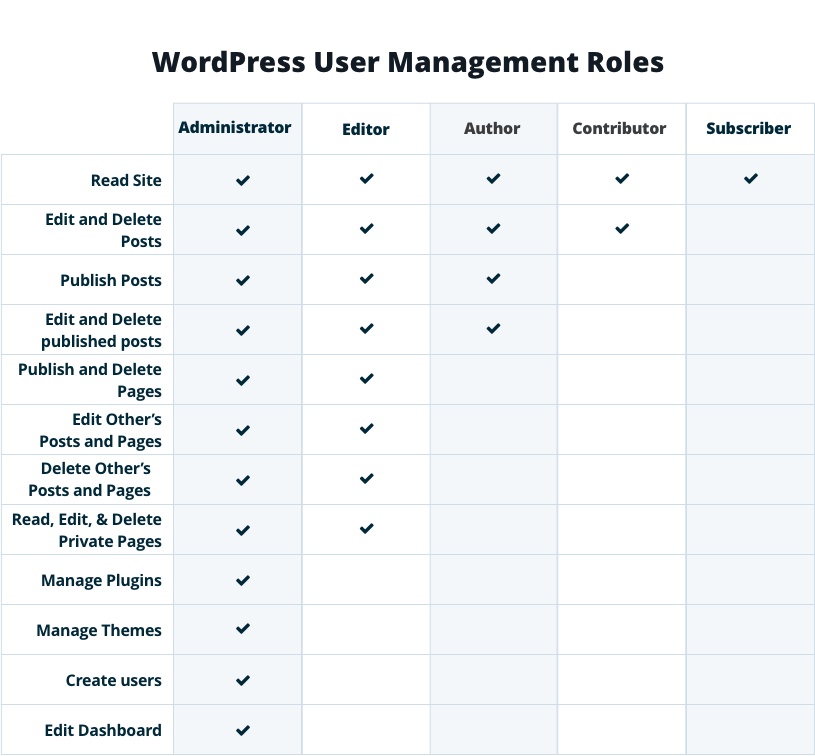
WordPress has different user roles. Each role has specific permissions. The Administrator has full control. They can manage settings and users. The Editor can edit and publish posts. Editors cannot change settings. The Author can write and publish their own posts. Authors cannot edit others’ posts. The Contributor can write but not publish. Their posts need approval. The Subscriber can only read posts. Subscribers have no editing rights. Each role plays a part in site management.
Roles help protect the website. They keep it organized. Everyone knows their limits. This is important for big sites. It helps teamwork. It prevents mistakes. WordPress roles are easy to understand. They make managing a site simple.
Credit: www.bigcloudy.com
Administrator
The Administrator has full control of the website. They can add, edit, or delete any content. Administrators can manage plugins and themes. They can also update the site settings. This role can create and remove users. Administrators approve new comments and handle spam. They can change user roles. Administrators have access to all site data.
Administrators are responsible for site security. They keep the site updated. This role ensures the site runs smoothly. Administrators solve any technical issues. They manage user permissions. Administrators also control site backups. They monitor site performance. Administrators ensure content quality. This role communicates with users. They handle site maintenance tasks.
Editor
Editors have important roles. They manage and organize content. This includes writing, editing, and updating posts. They also check for errors. Quality of content is their responsibility. They ensure everything is clear and correct.
Editors have the power to publish and edit posts. They can also remove posts if needed. They control what readers see. This role requires trust. They need to follow site rules and guidelines. Good editors keep the website looking good. They make sure content is fresh and relevant.
Author
Authors can write and edit their own posts. They cannot edit other people’s posts. They have a set of tools to help them. These tools make writing easy. They can add pictures to their posts. They can also use different styles and fonts. Authors can check their work before publishing. This helps them catch mistakes.
Authors can publish their own posts. They do not need help from others. They cannot publish other people’s posts. They can also delete their own posts. But, they cannot delete posts from others. Authors help keep the website fresh with new content. This keeps readers interested.
Contributor
A Contributor can write and edit their own posts. They do not have the right to publish. They can only save their work as a draft. This is helpful for teams. Many people can draft content. One person reviews and publishes. Contributors can see the comments on their posts. But they cannot reply.
Writing is simple and fun for them. They focus on creating good content. They do not worry about publishing. This user level is great for new writers. They learn and improve their writing skills. They work with editors to make their posts better. Contributors play a big role in content creation. They help keep the blog fresh and active.
Credit: wpamelia.com
Subscriber
Subscribers have basic profile management abilities. They can view and edit their own profile. Changing passwords is allowed. Updating email addresses is simple. Personal info can be added. No access to others’ profiles. Privacy is maintained.
Subscribers have limited access to content. Reading published posts is allowed. Commenting on posts is possible. Creating new posts is not allowed. Editing existing posts is restricted. Managing content is not possible. Subscribers enjoy reading. Interaction is encouraged. Full content control is not granted.
Custom User Roles
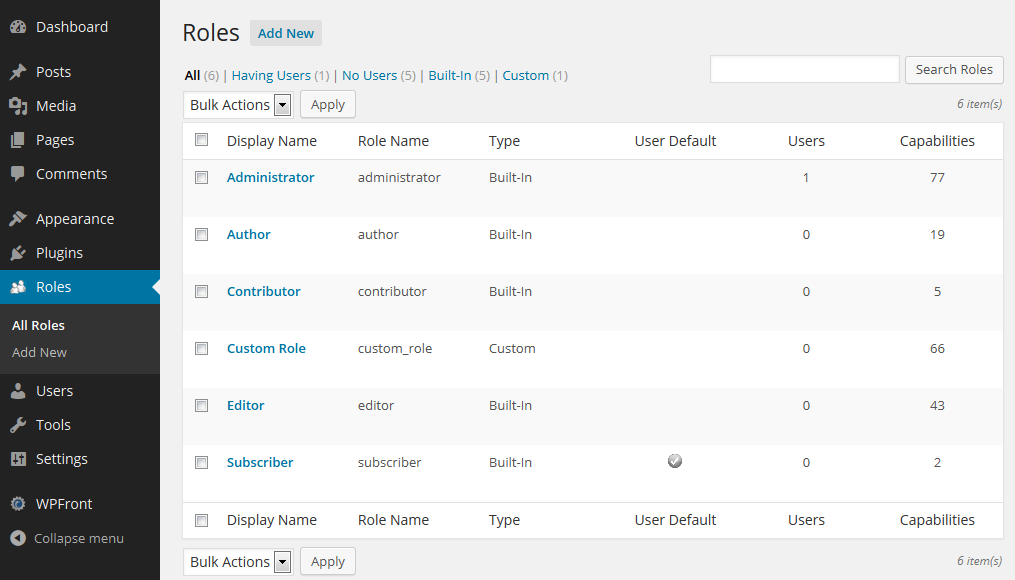
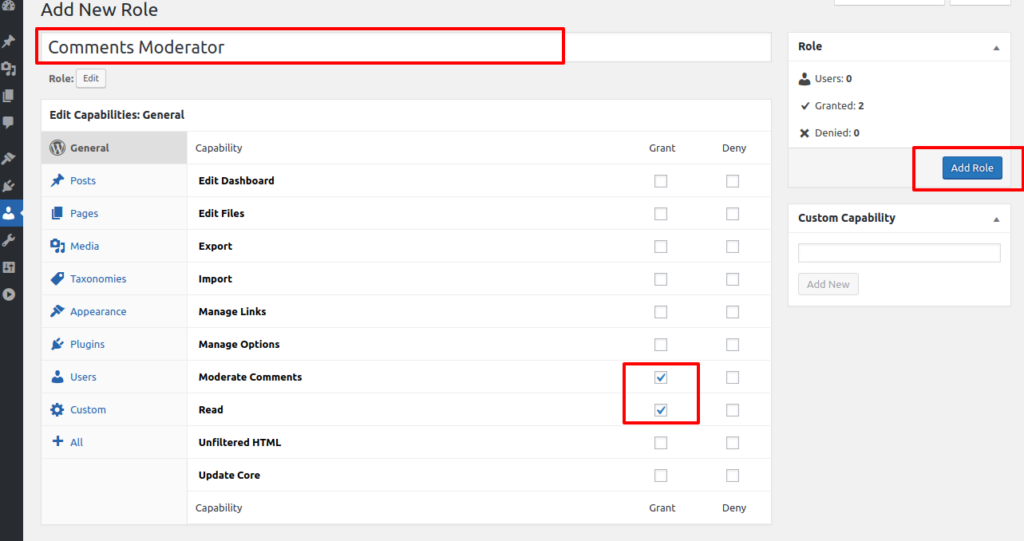
WordPress lets you make custom user roles. Custom roles help you control who does what. You can name the role anything you like. This role can have special permissions. Only you decide what they can do. You can make roles for editors, authors, or others. This keeps your site safe and organized.
Capabilities are tasks users can do. Some users can write posts. Others can edit or delete them. You choose who does what. This way, users have only the powers they need. For example, an editor can edit posts but not change site settings. This control ensures users have the right access.
Managing User Levels
WordPress lets you assign different roles to users. Each role comes with specific permissions. Admins have the highest power. They can change settings and add new users. Editors can manage and publish posts. Authors can write and publish their own posts. Contributors can write but not publish. Subscribers can only read posts.
Keeping an eye on user actions is vital. It helps in ensuring security. Use plugins to track user activity. They log who logs in and what changes they make. This helps in spotting any unusual behavior. You can then take quick action. It keeps the site safe and secure.
Frequently Asked Questions
What Are The Main WordPress User Levels?
WordPress user levels determine access and capabilities. The main levels are Administrator, Editor, Author, Contributor, and Subscriber. Each level has different permissions. Administrators have full control, while Subscribers have limited access. Understanding these levels helps manage users efficiently.
How Do User Roles Affect Site Management?
User roles define what actions users can perform. Administrators have complete control, managing settings and plugins. Editors handle content creation and publishing. Authors write posts, while Contributors submit drafts. Subscribers can only read content. Proper role assignment ensures smooth site operation.
Can I Customize WordPress User Roles?
Yes, WordPress allows role customization. Plugins like User Role Editor enable modifying capabilities for each role. You can create new roles or adjust existing ones. Customizing roles ensures tailored access for different users, enhancing site security and efficiency.
How Are User Levels Assigned In WordPress?
Administrators assign user levels based on needs. When a new user registers, the administrator selects their role. This role defines their permissions and access. Proper assignment ensures users have appropriate access, maintaining site security and order.
Conclusion
Understanding WordPress user levels is crucial for effective website management. Each level has specific roles and permissions. Admins hold full control, while editors manage content. Authors write posts, and contributors submit drafts. Subscribers have minimal access. Knowing these roles helps manage site security and workflow.
Choose the right level for each team member. This ensures smooth operation and better collaboration. Keep exploring WordPress features to enhance your site. Stay informed. Your site’s success depends on it. Proper management leads to efficient, secure websites. Happy blogging!


