
Imagine having the power to control exactly who can do what on your WordPress site. Whether you’re running a blog, an online store, or a business site, understanding the different roles in WordPress is crucial.
By knowing the roles and permissions, you can easily manage your team and safeguard your content. This knowledge keeps your site organized and secure, while also boosting productivity. Curious about who can edit, publish, or just view your posts? Want to ensure your site runs smoothly without any hiccups?
Stay with us as we delve into the roles in WordPress and discover how you can use them to your advantage. Your site’s success might just depend on it!
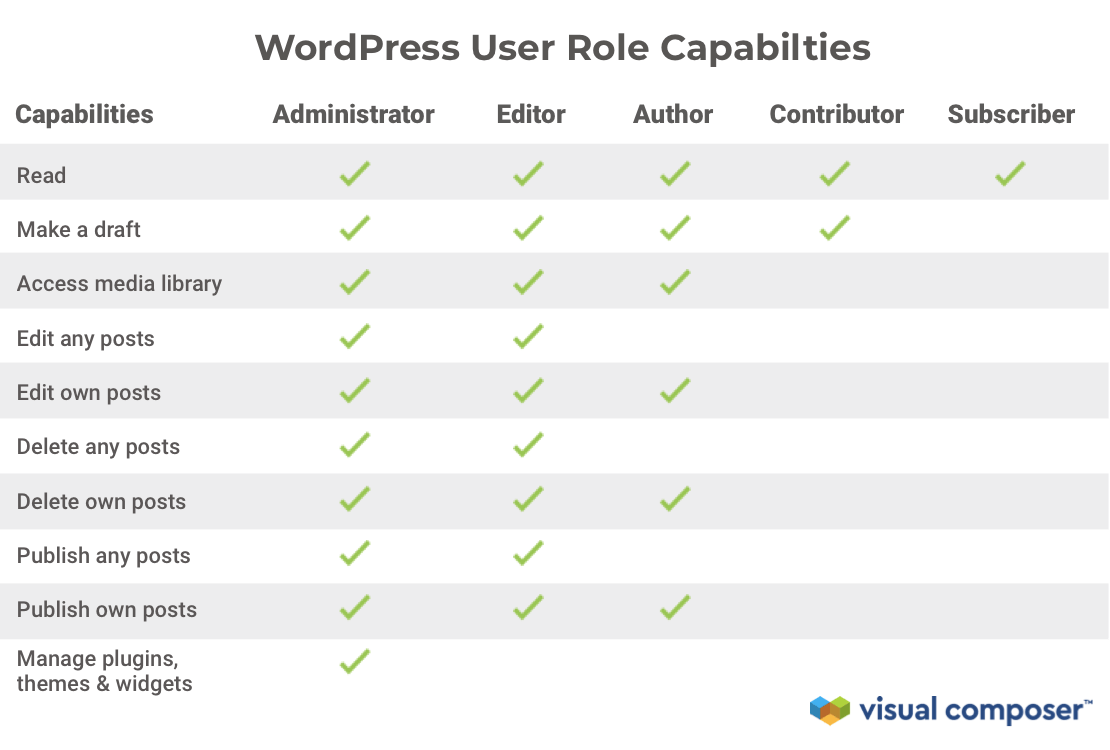
Credit: visualcomposer.com
Administrator
The Administrator is the most powerful role in WordPress. They have the ability to make big changes. Admins can add and delete plugins. They can also change themes. This means they control the look and feel of the site. They ensure everything works well together.
Admins manage the whole site. They adjust important settings. These settings affect how the site behaves. Changes can make the site faster or safer. Admins make sure the settings are just right.
User Management is another key role. Admins add new users to the site. They can also delete users. Admins give roles to each user. Roles decide what each user can do. This is important for keeping the site safe.
Editor
Editors in WordPress manage content, ensuring posts and pages are accurate and engaging. They can edit, publish, and delete content, maintaining the site’s quality. Editors also oversee contributors, guiding them to meet editorial standards.
Content Oversight
Editors check all content before it goes live. They make sure the text is clear and correct. Their job is to keep the quality high. They help avoid mistakes in posts.
Publishing Authority
Editors have the power to publish content. They decide when a post is ready. This is a big responsibility. Only editors can make this decision.
Collaboration With Authors
Editors work with authors to improve posts. They give feedback and suggest changes. This helps make the content better. Authors and editors work as a team.
Author
Authors write blog posts and articles. They craft stories and share ideas. Their main job is to make engaging content. They use simple words for all readers. This helps everyone understand.
Authors can edit their posts. They check for spelling mistakes. They fix any errors they find. They also add images. Images make posts more interesting. They ensure everything looks good.
Authors talk to editors. Editors help make posts better. They suggest changes. Authors and editors work as a team. This teamwork improves the content. Good communication is important.
Credit: wpfront.com
Contributor
Contributors help by writing drafts. They create content for posts. Their drafts are saved but not published. Contributors can write about various topics. They focus on quality and accuracy. They check for spelling and grammar.
Once content is ready, contributors submit drafts for review. Editors check each draft. They suggest changes if needed. Contributors follow feedback. They make edits before final submission. Editors approve drafts to publish.
Contributors have limited permissions. They cannot publish posts themselves. They must wait for approval. Contributors can’t change settings. They focus only on writing. They are not responsible for managing the site.
Subscriber
Subscribers can view all content on a WordPress site. They enjoy reading blog posts and articles. They cannot edit or publish anything. Their role is mainly passive. They are like an audience for the site.
Subscribers have a simple profile. They can manage their personal information. They might change their email or password. They do not have access to settings. They cannot change site details.
Subscribers might engage with others through comments. They share thoughts on posts. They can ask questions. They help create a lively community. Their comments can add value to discussions.
Credit: wpengine.com
Custom Roles
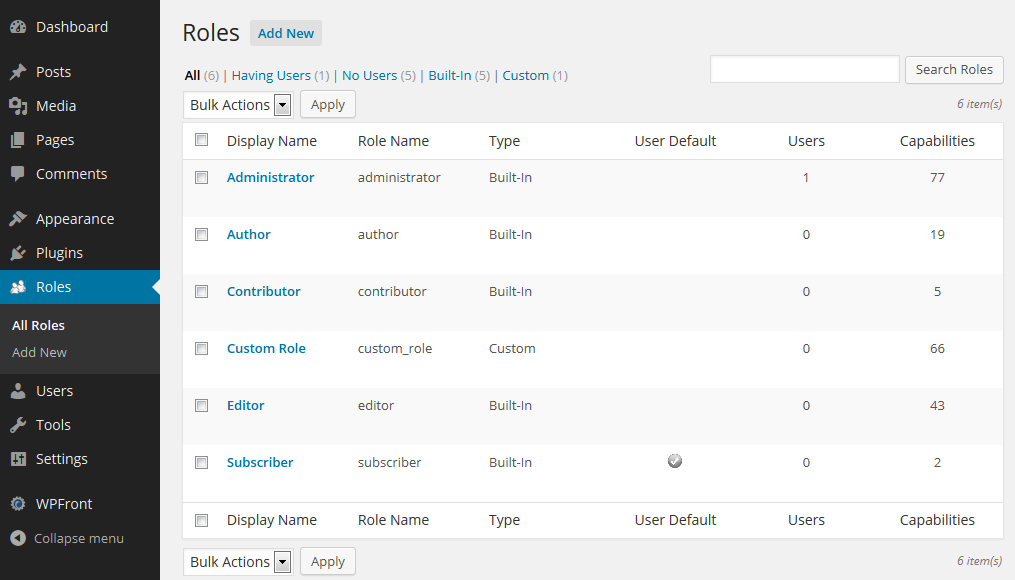
Custom roles in WordPress allow tailored access and permissions for different users. Administrators, editors, authors, and subscribers are examples of roles. Each role has unique capabilities, controlling what users can do on the site.
Creating New Roles
Creating new roles in WordPress is easy. You start by defining what the role should do. Think about what tasks the role needs to perform. Once you know, you can create it using plugins. Plugins are tools that help you add new features. Some popular plugins for this task are User Role Editor and Members. These plugins make it simple to set up new roles without coding.
Assigning Capabilities
Capabilities are tasks users can perform. Assigning capabilities is like giving users special keys. Each key opens a different door in WordPress. You decide which keys to give. Some can write posts; others can manage settings. Choosing the right capabilities is important. It keeps the site secure and organized.
Use Cases And Examples
Different roles fit different needs. Example: A shop owner may create a role for product managers. This role can add or edit products but not change site settings. Another example is a school. Teachers may have a role to update class pages. Custom roles help tailor WordPress to your needs. They make sure everyone has the right access.
Role Management Plugins
Popular Plugins help manage roles in WordPress. These plugins let users control access to different parts of the site. They are easy to use and set up. Some plugins have advanced features for better control. They can handle roles for users, editors, and more.
Extending Role Functionality is possible with these plugins. Users can add new roles or edit existing ones. This helps in tailoring the site for different users. Plugins can also limit access to certain features. This keeps the site safe and organized.
Installation and Setup is simple with most plugins. Users need to find the plugin in the WordPress store. After downloading, they must activate it. Settings can then be adjusted to fit the site’s needs. This process is quick and user-friendly.
Security Considerations
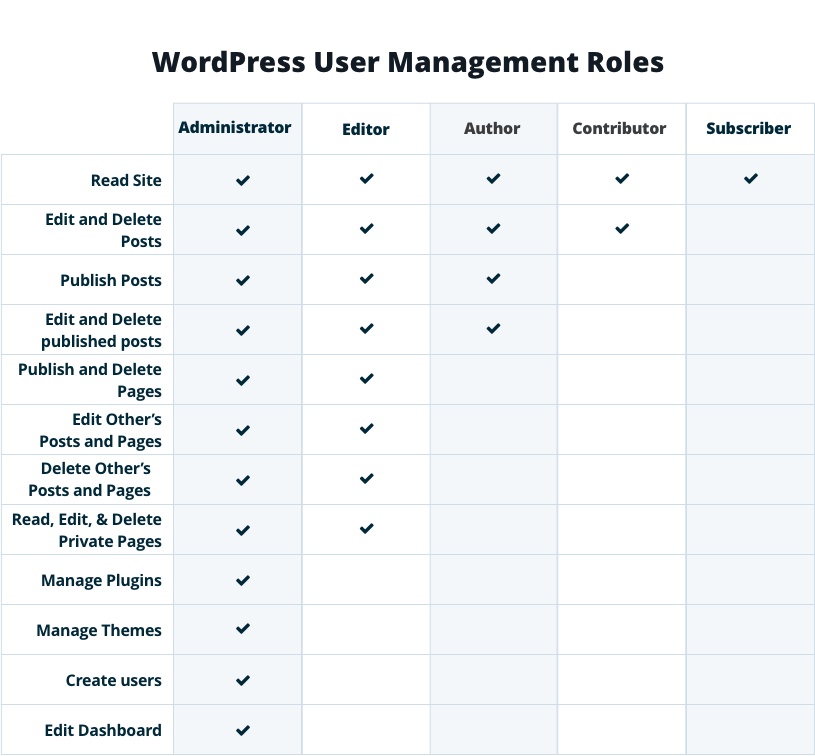
WordPress uses Role-Based Access Control. This helps manage who can do what. Each role has different permissions. Admins can do everything. Editors can edit and publish posts. Authors can write posts. Contributors can write but not publish. Subscribers can only read and comment. This keeps the site safe and organized.
Strong passwords are important. They protect against unauthorized access. Use a mix of letters, numbers, and symbols. Change passwords often. Never share passwords with anyone. Limit login attempts to stop hackers. Use two-factor authentication. This adds an extra layer of security.
Regular audits help keep your WordPress site secure. Check who has access. Remove any unused accounts. Update plugins and themes often. Look for any unusual activity. Use security plugins for extra protection. These steps keep your site safe from threats.
Frequently Asked Questions
What Are The Default Roles In WordPress?
WordPress comes with five default roles: Administrator, Editor, Author, Contributor, and Subscriber. Each role has specific capabilities, ranging from full site control to limited content interaction. Understanding these roles helps in managing permissions effectively, ensuring site security and functionality.
How To Change User Roles In WordPress?
To change user roles, navigate to the WordPress dashboard and click on ‘Users’. Select the user you wish to edit, and choose a new role from the dropdown menu. Save your changes. This process helps in efficiently managing user permissions.
What Does An Administrator Do In WordPress?
An Administrator has full control over the WordPress site. They can manage site settings, install plugins, and edit themes. They also have the ability to manage other users’ roles and permissions, ensuring smooth site operations.
Can WordPress Roles Be Customized?
Yes, WordPress roles can be customized using plugins. Plugins like User Role Editor allow you to create, modify, and delete user roles. This customization helps in tailoring permissions to fit the specific needs of your website.
Conclusion
WordPress roles help manage users effectively. They define permissions clearly. Administrators oversee everything, making big changes. Editors handle content, ensuring quality. Authors write posts, sharing their voice. Contributors submit ideas without publishing. Subscribers enjoy reading and commenting. Each role is important, keeping websites organized.
Understanding roles improves website management. It creates smooth workflows. Everyone knows their tasks and limits. This understanding enhances collaboration. It boosts productivity. WordPress roles make it easy to assign responsibilities. They ensure security and efficiency. With clear roles, websites run smoothly.
Keep roles in mind when managing your site. It leads to success.


