
Imagine you’re working on your WordPress site, crafting the perfect blog post or page. You’ve poured your heart into it, but suddenly, you realize something’s off.
Maybe you deleted a paragraph by mistake, or perhaps, the latest edits don’t quite match your original vision. Sounds familiar, right? This is where Post Revisions in WordPress come to the rescue. Post Revisions is like having a time machine for your content.
With just a few clicks, you can revisit previous versions of your work, compare changes, and restore the ideal draft. It’s a powerful feature that ensures your hard work is never lost. By understanding how Post Revisions work, you can enhance your productivity and safeguard your creative process. Dive in to discover how this WordPress feature can be a game-changer for your website management.

Credit: wpmudev.com
Post Revisions Explained
Post revisions keep track of changes. They save drafts automatically. This helps if you make mistakes. Each change creates a new copy. You can go back to an old version anytime. WordPress does this for you. It’s like a safety net. Revisions show who edited the post. They show when it was edited. You can compare different versions. This helps writers a lot. It makes writing easier. Mistakes can be fixed quickly. You can test ideas without fear. Revisions are very useful. They make writing stress-free.
Importance Of Post Revisions
Post revisions are crucial in WordPress. They help track changes. Every edit gets saved automatically. This means you won’t lose your work. Mistakes are easy to fix. Just roll back to an older version. Compare different drafts to see changes. This helps in improving your writing. Editing becomes simpler and faster. You can see who made changes too. This is useful for teams. Everyone stays on the same page. No more confusion over versions. It’s a time-saver for bloggers. Keeps content fresh and updated. Makes managing posts easier. Helps maintain quality content. Ensures consistency across your site.
How Post Revisions Work
Every time you click save, WordPress keeps a copy. It remembers all your changes. This feature is useful for writers. It helps track progress. You can always go back to an older version. No work is lost. This can be a lifesaver if you make a mistake. You can write with more confidence.
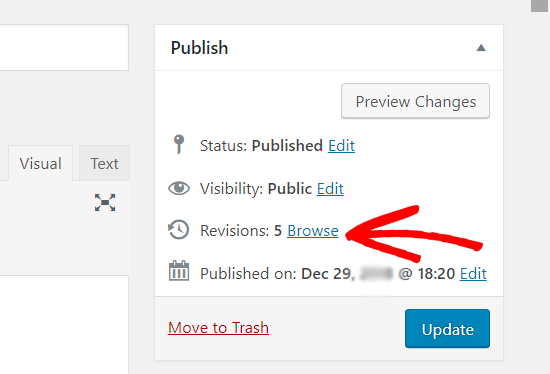
You can see all past versions. WordPress shows a history list. Each entry has a date and time. Click on any entry to view changes. It highlights what’s been added or removed. This helps in understanding edits. It’s like a timeline of your work. Easy to follow.
Want to go back? Simply choose an older version. Click restore. Your post changes back to the old version. All current edits get replaced. It’s like hitting an undo button. Useful when a change doesn’t work out. Simple and efficient.
Managing Post Revisions
WordPress saves many versions of your posts. This is called post revisions. Too many revisions can slow down your site. You can set limits for revisions. Use a plugin or add code to your site. Only keep a few revisions for each post. This helps your site run fast. It’s easy and safe to do.
Old revisions take up space. Deleting them frees up room. Use plugins to delete old revisions. Some plugins do this automatically. You can also do it manually. Clean up old revisions often. This keeps your site healthy. It also makes it faster. It’s a smart move for your site.
Post Revisions And Performance
Post revisions can make the database grow big. Each revision is a copy of the post. More revisions mean a larger database. A large database can slow down the website. It takes more time to find and load data. This can make the site less responsive. Users might leave if the site is too slow.
Limiting revisions can help. Keeping only a few revisions reduces database size. Plugins can also manage revisions. They delete old revisions. This keeps the database lean. A smaller database improves speed. Users enjoy a faster site. Faster sites make users happy.
Credit: www.wpbeginner.com
Tips For Using Post Revisions
Post Revisions in WordPress help keep track of changes made to your content. They let you restore previous versions of your posts easily. This feature is useful for fixing mistakes or comparing different edits.
Regular Review
Post revisions in WordPress help keep track of changes. Regularly checking these revisions is crucial. It ensures no important edits are missed. Review revisions after each update. This helps maintain content quality. Catch errors early and correct them. This makes your blog more reliable.
Efficient Editing Practices
Use post revisions to improve editing skills. Focus on key points when revising. Make sentences clear and concise. Avoid long and complicated phrases. Short sentences are easier to read. Trim unnecessary words to enhance clarity. This makes your writing stronger. Effective revisions make your post better.
Plugins For Enhanced Revisions
WordPress plugins help in keeping track of changes. Revision Control is a popular plugin. It helps manage post revisions easily. You can set a limit on stored revisions. This keeps your database clean and fast.
Another useful plugin is WP Revisions Control. It allows you to control the number of revisions per post type. This plugin is simple and effective. It ensures your site runs smoothly.
Simple Revisions Delete is also handy. It lets you delete specific revisions. This saves space and keeps your site efficient. Using these plugins can enhance your WordPress experience. They make managing revisions a breeze.

Credit: make.wordpress.org
Frequently Asked Questions
What Are WordPress Post Revisions?
WordPress post revisions are saved backups of each draft you edit. They allow you to revert changes anytime. This feature is helpful for tracking content history and restoring previous edits. Post revisions improve content management, offering a safety net for accidental changes or deletions.
How Can I Manage Post Revisions In WordPress?
You can manage WordPress post revisions through the editor interface. Use the “Revision” tab to view and compare versions. You can restore any previous version easily. For advanced control, plugins like WP Revisions Control help limit or customize revision settings.
Do Post Revisions Affect WordPress Site Speed?
Post revisions do not directly impact site speed. However, a large database can slow down performance. Regularly cleaning up old revisions helps maintain optimal speed. Use plugins or manual database optimization to ensure your site runs smoothly.
Can I Disable WordPress Post Revisions?
Yes, you can disable WordPress post revisions by editing the wp-config. php file. Add a code snippet to limit or disable revisions. This helps in reducing database size. However, disabling revisions removes the ability to restore previous versions.
Conclusion
Post revisions in WordPress are crucial for managing content. They allow easy tracking of changes. Mistakes get corrected quickly. Writers feel more confident. Blogs stay organized. Revisions help in maintaining quality. They give a backup when needed. Users can focus on creating content.
It’s a helpful feature for bloggers. Embrace post revisions for better workflow. Keep your content fresh and error-free. With WordPress, managing edits becomes simple. Explore this feature to enhance productivity. Happy blogging!


