
Have you ever wondered about the backbone of your WordPress website? Those default tables that quietly store and manage your site’s data play a crucial role in ensuring everything runs smoothly.
Understanding these tables can empower you to optimize your site performance and troubleshoot issues more effectively. Whether you’re a seasoned WordPress user or a curious beginner, knowing the different types of default tables can enhance your website management skills. Dive into this article to discover how these tables function and why they’re essential for your website’s success.
Unlock the secrets behind your site’s data structure and take control of your WordPress experience!

Credit: bpcustomdev.com
Core Database Tables
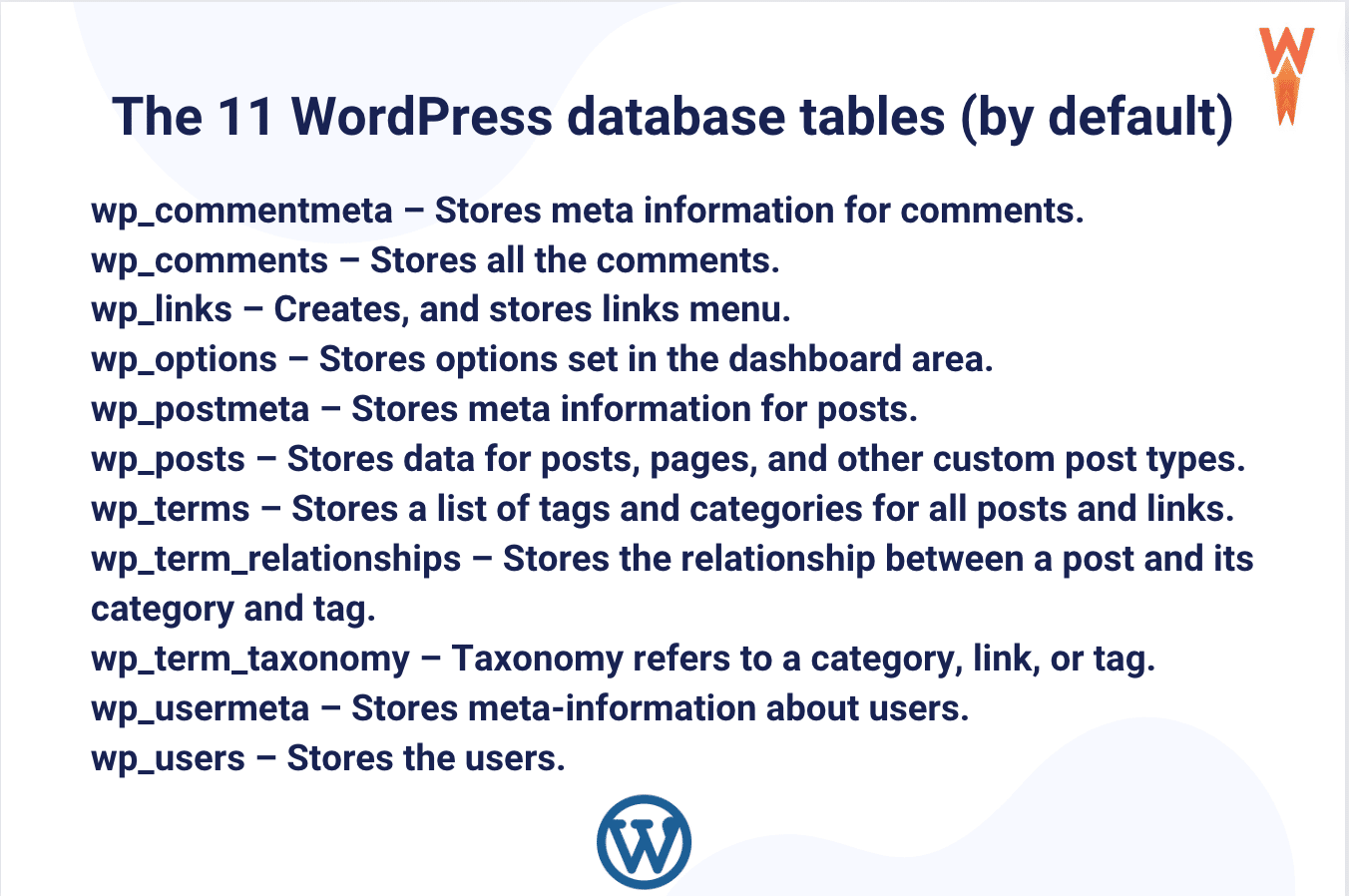
The wp_posts table holds all your content. This includes posts, pages, and revisions. Each piece has a unique ID. It also stores the post date and author. This table is vital for your website. It helps manage and display content. It also tracks content status. Draft or published. You find it all here.
The wp_users table stores user data. It keeps usernames, passwords, and emails. Each user has a unique ID. This table helps manage site members. It is essential for user authentication. Without it, users can’t log in. It also stores user roles. Admin or subscriber. All user info is here.
The wp_comments table holds all comments. It stores comment text, author, and post ID. This helps link comments to posts. It also tracks comment status. Approved or pending. This table is crucial for managing user interactions. It keeps your discussions organized. All comments live here.
Post Metadata Tables
The wp_postmeta table stores extra information about your posts. It helps keep track of details that are not in the main post table. Each entry in this table links to a specific post. This link uses a unique post ID.
The table has a simple structure. It contains four main columns: meta_id, post_id, meta_key, and meta_value. The meta_id is unique for each entry. The post_id connects the meta data to a post. The meta_key is a label for the data, while the meta_value is the actual information.
User Metadata Tables
The wp_usermeta table is key for user data. It stores extra details about users. Each row holds a user_id. This links to the main user table. It can store user preferences. Like themes or dashboard settings.
There are three main columns. meta_key is the first. It names the data type. Then, there’s meta_value. This holds the actual data. Lastly, meta_id. It is a unique ID for each row.
This table grows as you add users. It adapts to hold new types of data. It’s very flexible. You can store many kinds of user info. This helps in managing user profiles better.
Taxonomy And Terms Tables
The wp_terms table keeps information about terms. Terms are words or names for things. This table saves the term’s name, slug, and unique ID. Each term has a unique ID. The slug is the term’s URL-friendly name. It helps find a term easily.
wp_term_taxonomy table links terms to taxonomies. A taxonomy is a way to group things. This table shows which taxonomy a term belongs to. It also holds the term ID and description. The description helps understand what the term is about.
wp_term_relationships table connects terms with posts. This table holds the object ID and term taxonomy ID. The object ID is the post’s unique number. This tells which posts use a certain term. It helps organize content on a site.
Options Table
WordPress uses default tables to store important data. The Options Table holds settings for themes and plugins. Other tables include Posts, Users, and Comments, each serving specific purposes. Understanding these tables helps manage your WordPress site efficiently.
Wp_options Table
The wp_options table stores settings for your WordPress site. It holds important configuration details. These details include site name, URL, and more. Each setting has a unique option name. The option name helps find specific data. Option values are the actual data stored. WordPress uses these values to run smoothly. Autoload column decides if data loads on every page. This can affect site speed. Keep track of unused options to maintain efficiency. Clean up regularly for best performance. This table is crucial for site management.
Links Table
WordPress uses the wp_links table to store link information. This table is part of the WordPress database. It helps manage blogrolls. Blogrolls are lists of links. These links can be to friends’ websites or other blogs. Each link has several fields. The link_url field stores the URL. The link_name field keeps the name of the link. The link_description field holds a short description. There is also a link_owner field. It shows who added the link. WordPress users can view or edit links. They can add new ones too. The wp_links table is useful. It keeps links organized and easy to find.
Comment Metadata Tables
The wp_commentmeta table holds extra data about comments. It connects each piece of data to a specific comment. This table is very important for storing information. It has four main columns: meta_id, comment_id, meta_key, and meta_value.
The meta_id is a unique number for each entry. comment_id links the data to a comment. Meta_key is like a label for the data. Meta_value is the actual data. Plugins often use this table. They add special features to comments. WordPress uses this table in many ways.
Credit: wp-rocket.me
Custom Tables
Custom tables in WordPress store special data. They are not default. Developers make them for plugin-specific functions. These tables help plugins work better. Plugins can add, change, or remove tables. Each plugin has its own table needs. They may use tables to save settings, logs, or user info.
Plugin-specific Tables
Many plugins create tables when installed. These tables are unique. They store plugin data safely. For example, a e-commerce plugin might store order data in its table. A membership plugin might save member info in another table. Plugin-specific tables allow easy access to data. They keep plugin data separate from WordPress core data.
Handling Table Modifications
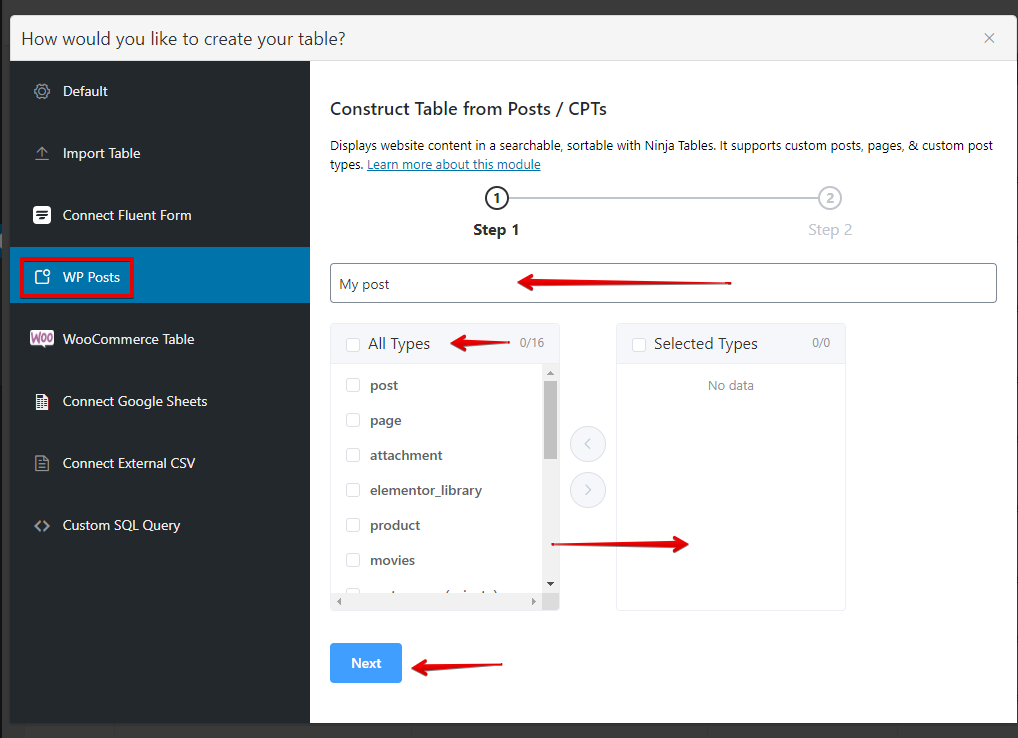
Adding new tables in WordPress is easy. Install a plugin that allows table creation. Set up the table with rows and columns. These plugins often have a drag-and-drop feature. This makes it simple for everyone. You can also choose pre-made templates. They save time and effort. Customize the table as needed. Make sure it fits your website design.
Modifying existing tables can be done through the dashboard. Navigate to the table you wish to change. Click on the edit option. You can add or remove rows and columns. Change the style if needed. Always preview changes before saving. This helps avoid mistakes. Ensure the table content is up-to-date. Properly updated tables improve user experience.
Best Practices For Table Management
Regular backups are essential for table safety. They prevent data loss. Use plugins for easy backup creation. Store backups in secure locations. Cloud storage is a good option. Schedule backups regularly. Weekly or monthly backups are ideal. This ensures data is protected.
Optimizing database performance enhances speed. Remove unused tables frequently. This frees up space. Use plugins to optimize the database. Regular cleaning is necessary. Check tables for errors often. Repair them as needed. Fast databases improve site performance.
Credit: wpmanageninja.com
Frequently Asked Questions
What Are Default Tables In WordPress?
Default tables in WordPress are pre-installed database tables. They store essential data for your website’s functionality. This includes user information, posts, and site settings. These tables are crucial for WordPress operations. They ensure data is organized and accessible.
How Many Default Tables Does WordPress Have?
WordPress comes with 12 default tables. These tables manage various data types like users, posts, and metadata. They are essential for WordPress’s core functionality. Each table has a specific purpose, ensuring efficient data management.
Why Are WordPress Default Tables Important?
WordPress default tables store critical site data. They ensure smooth operation and data retrieval. These tables help manage content, users, and settings efficiently. Proper management of these tables is crucial for site performance.
Can I Modify WordPress Default Tables?
Yes, you can modify WordPress default tables. However, caution is advised. Changes can affect site functionality. Always back up your database before making modifications. Using plugins can simplify the process.
Conclusion
Understanding WordPress default tables helps manage your website better. These tables store essential data for your site’s functionality. Knowing each table’s purpose can streamline your WordPress experience. You can customize settings, enhance performance, and troubleshoot issues. A well-managed database ensures smoother site operations.
It also aids in efficient data handling. Regular backups and updates keep your data safe. Dive into your WordPress database. Explore each table’s role. This knowledge will empower you. Keep your site running smoothly with this understanding. Engage with your database.
Make informed decisions for your WordPress site.


