
Have you ever wondered how to make your WordPress blog more organized and easy to navigate? If so, understanding tags might be your secret weapon.
Tags are small, yet powerful tools that help categorize and streamline your content, making it easier for your readers to find exactly what they’re looking for. Imagine your blog like a library; tags are the labels that guide visitors to the right sections with ease.
But tags do more than just organize—they can boost your blog’s SEO, increasing visibility and drawing more eyes to your work. You’ll discover how to use tags effectively, making your blog more user-friendly and engaging. Get ready to unlock the potential of your WordPress blog and create a seamless experience for your audience.
Purpose Of Tags
Tags help organize posts. They make searching for topics easier. Users can find related posts quickly. Tags improve the site’s navigation. They connect posts with similar themes. Readers can explore content without hassle. Tags are not the same as categories. Categories are broader than tags. Tags are more specific. They pinpoint details of the post.
Using tags boosts SEO. Search engines notice tags. This helps with ranking. More visibility means more visitors. Proper tags enhance user experience. They guide readers to similar content. Tags should be relevant and meaningful. Avoid too many tags. This can confuse users. Keep tags simple and clear.
Tags Vs Categories
Tags and categories are tools to organize posts. Tags are like labels. They describe specific details. On the other hand, categories are broader. They group posts into big sections. For example, a category might be “Books”. A tag could be “Adventure”. Both help readers find content quickly.
Categories are like folders. Every post needs one. They show the main topic. Tags are optional. They add extra details. Use many tags. But use only a few categories. This keeps your blog neat and tidy.
Creating Tags
Tags help group your blog posts. This makes it easy for readers to find content. Adding tags to your post is simple. Go to the post editor. On the right side, you will see the Tags box. Click on it and type your tag. Press enter to add the tag. You can add more than one tag.
Use tags wisely. They should relate to your post. Too many tags can confuse readers. A few well-chosen tags work best. Tags should be short. One or two words are enough. Readers will find your post quickly with the right tags.
Managing Tags
Tags help readers find content on your blog. They are like labels. Organize your posts with tags. Group similar topics together. Tags are important for your blog’s search. They make it easy for readers to find articles. Use simple words for tags. This helps everyone understand them. Keep them short and clear. Avoid too many tags. It confuses readers. Aim for five tags per post. This keeps your blog tidy.
Add tags when you write a post. Look for the tag section. It’s in the post editor. Type the tag name. Then, click add. Your tag is now linked to the post. Check your tags list. Remove duplicate tags. This keeps your tags organized. Use unique tags for each post. This helps readers find specific topics. Tags improve your blog’s navigation.
Seo Benefits
Tags help your blog get noticed. They organize content by topics. Users find what they need quickly. Tags improve search engine results. Your blog ranks higher. More people visit your site. It’s good for website traffic. Tags are simple to add. They make your blog look neat. Easy to read.
Readers like it. Search engines love it. It’s a win-win. Each tag should be clear. Related to your blog post. Avoid using too many tags. Keep it simple. Quality over quantity. Tags should be relevant. They help connect similar posts. This boosts user engagement. Makes your blog popular.

Credit: kristarella.com
Tag Best Practices
Tags help readers find content fast. Keep tags simple and clear. Use words that people search for. Tags should match the blog’s topic. Use 5 to 10 tags per post.
Avoid using too many tags. This can confuse readers. Stick to related tags. They help in grouping posts. Tags are not categories. They are specific words.
Think about your readers. What words will they search for? Choose tags that make sense. Tags are important for blog navigation. Use them wisely.
Common Mistakes
Tags should be chosen carefully. Too many tags confuse readers. They make posts look messy. Select a few relevant tags. Relevant tags improve post organization. Readers find content easily.
Tags should match your content. Irrelevant tags lead to confusion. Readers may leave your site. Choose tags that describe your post. Tags should match the main topic. This helps readers find what they seek.
Avoid using tags that mean the same thing. Duplicate tags clutter your site. They can make navigation hard. Use unique tags for each post. This keeps content organized. Organized content makes readers happy.
Using Tags In Themes
Tags help organize content on a blog. They make finding information easy. Tags are like labels for posts. Each post can have many tags. This helps readers find topics they like. Tags also improve search results. Using tags smartly is important. Not too many, not too few. Choose tags that fit your post well. Tags should be simple and clear. This helps everyone understand them. Avoid long tags. They can be confusing. Use common words for tags. This makes them easier to find. Tags help with blog navigation. They group posts by topic. Readers can explore related posts easily. Tags should match your blog theme. This keeps everything organized. Consistent tags make a blog look tidy. Make sure tags relate to your content. They should connect with your post ideas. Tags are key for managing a blog. They add structure and order.
Plugins For Tags
Tags help organize your blog. They make it easy to find posts. Some plugins can help with tags. These plugins are easy to use. They can make your blog better.
One plugin is Simple Tags. It helps manage tags. You can add, delete, or edit tags quickly. Another plugin is Tag Groups. It lets you organize tags into groups. This helps when you have many tags.
The Tag Cloud plugin is popular too. It shows tags in a cloud format. Bigger words mean popular tags. Try these plugins to keep your blog neat. They make your site look nice and work well.
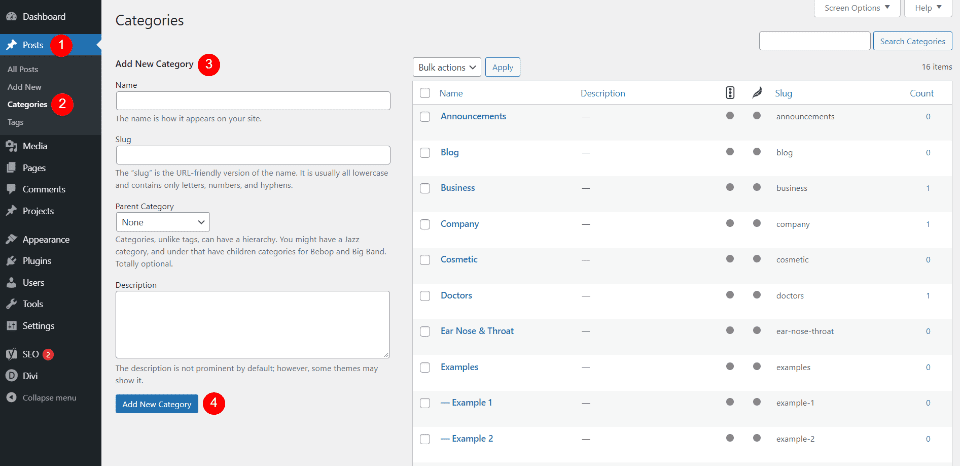
Credit: www.elegantthemes.com

Credit: visualmodo.com
Frequently Asked Questions
What Are Tags In A WordPress Blog?
Tags in a WordPress blog are keywords that categorize and organize content. They help readers find related posts easily. Tags enhance user experience by improving website navigation. Using relevant tags can boost your blog’s SEO. They are similar to categories but more specific in scope.
How Do Tags Improve Seo On WordPress?
Tags improve SEO by organizing content for search engines and users. They create additional indexable pages that increase site visibility. Relevant tags can help search engines understand your content better. This leads to improved rankings. Tags can also enhance user engagement and retention.
Can I Use Too Many Tags In A Post?
Using too many tags can lead to clutter and confusion. It can dilute the focus of your content. Ideally, use 5-10 relevant tags per post. This helps maintain clarity and improves user experience. Excessive tagging might be seen as keyword stuffing by search engines.
How To Choose Effective Tags For Posts?
Choose tags by focusing on keywords relevant to your content. Analyze your content’s main topics and themes. Use tools like Google Keyword Planner for ideas. Ensure tags are specific and not overly broad. This will help in targeting the right audience and improving SEO.
Conclusion
Tags enhance your WordPress blog’s organization. They help readers find content quickly. This boosts user experience and keeps visitors engaged. Proper tagging can improve your blog’s SEO. Search engines understand content better with clear tags. Choose relevant tags for each post.
Avoid using too many; it can confuse readers. Remember, tags should be descriptive. They should capture the essence of your content. This simple feature can make a big difference. So, use tags wisely and enjoy a more organized blog. Happy blogging!


