
Are you looking to expand your WordPress capabilities and manage multiple sites with ease? If so, you’re in the right place.
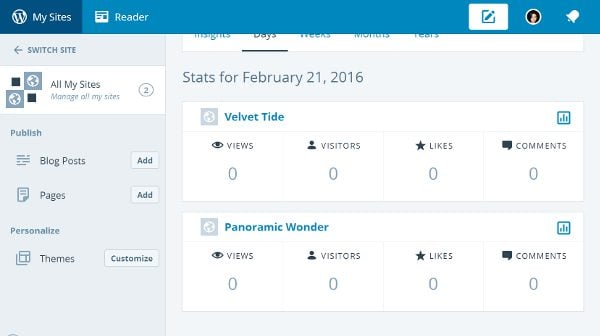
The concept of a WordPress Multisite can be a game-changer for you, offering a powerful way to streamline your website management. Imagine having the ability to control all your WordPress sites from a single dashboard, reducing the time and hassle involved in juggling multiple logins and interfaces.
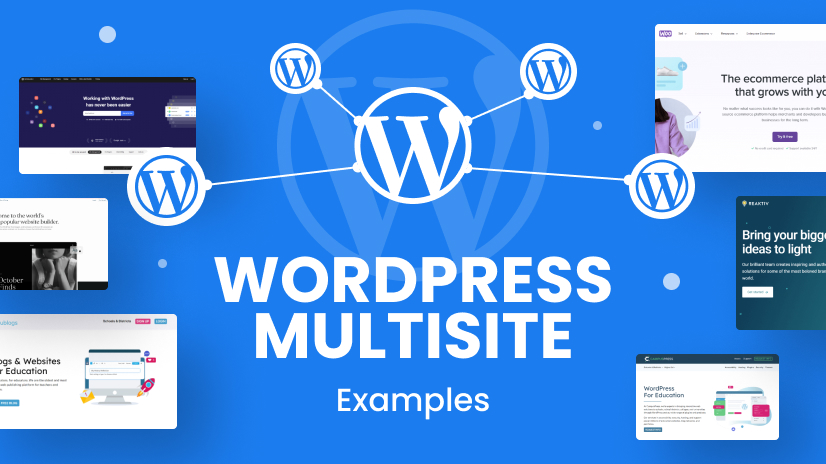
We’ll explore some compelling examples of Multi-Site WordPress setups that not only simplify your workflow but also boost your productivity. Whether you’re a business owner, a web developer, or simply someone curious about enhancing their WordPress experience, you’ll find valuable insights and practical examples that might just inspire your next digital project. So, let’s dive in and discover how WordPress Multisite can transform the way you manage your online presence.
Credit: htmlburger.com
Benefits Of Multi-site WordPress
Multi-Site WordPress offers centralized management
Using Multi-Site saves money. Host many sites on one server. Share resources between sites. No need for separate hosting plans. Reduces overall costs. Multi-Site WordPress is scalable. Add new sites quickly. Handle more traffic with ease. Expand your network easily. Grow your business without hassle.
Common Use Cases
Schools and colleges use multi-site for different departments. Each department gets its own customized website. This helps in organizing information easily. Students and teachers find information faster. Multi-site makes management simple. It saves time for IT teams. They update all sites from a single dashboard.
Companies have branches in many places. Each branch needs its own site. Multi-site helps create these easily. Each branch can have unique content. But, the brand look stays the same. It ensures consistency across all sites. Updates are faster and easier. It keeps all branches connected.
Media platforms have many sections. Each section covers different topics. Multi-site makes managing these sections easy. Editors can focus on their specific areas. They don’t worry about the whole platform. This setup allows for better content control. It also helps in targeting different audiences. Each section can have its own design and style. This keeps readers engaged.
Setting Up A Multi-site Network
Begin with a fresh WordPress install. Ensure you have the latest version. Enable the Multi-Site feature by editing the wp-config file. Add the required code snippet. This allows network setup. Follow prompts to install the network. Remember to backup your site before starting. This is crucial to prevent data loss.
After installation, set up your network settings. Adjust site titles and email addresses. Choose either sub-domains or sub-directories. Each choice has unique benefits. Sub-domains are separate URLs. Sub-directories are part of the main URL. Configure user permissions carefully. This keeps your network secure. Make sure to save changes.
Domain mapping links custom domains to your sites. Use plugins for easy mapping. Follow plugin instructions for setup. Many plugins offer user-friendly interfaces. This simplifies the process. Custom domains enhance site branding. They improve user experience. Consider cost and availability when choosing domains.

Credit: wpengine.com
Managing Multiple Sites
Each site needs different user roles. Admins can do everything. Editors can change content. Authors can write and edit their posts. Subscribers can read and comment. Setting the right permissions is key. It keeps your sites safe. Users should only access what they need.
Themes make sites look good. Plugins add features. Use the same theme for all sites. It saves time. Always update plugins. This keeps sites running well. Test plugins before using them. Some plugins may not work together.
Backups are very important. They save your data. Use a schedule to backup data. Daily backups are best. Save backups in different places. Cloud storage is safe. Check backups often. Make sure they work. Without backups, data can be lost forever.
Challenges And Solutions
Speed is vital for websites. Slow sites lose visitors. Use a content delivery network for faster loading. Optimize images to decrease size. Clean up your database often. Use caching plugins to store data. This reduces server load and speeds up access.
Keeping sites safe is crucial. Install security plugins for protection. Regularly update all themes and plugins. Use strong passwords. Limit login attempts to prevent hacking. Backup your site data often. Use SSL certificates for data safety.
Problems arise sometimes. Check plugins if the site breaks. Deactivate them one by one. This finds the problem plugin. Look at server error logs for clues. Sometimes, themes cause issues. Switch to a default theme to test. Contact your hosting provider for help.
Credit: www.elegantthemes.com
Successful Examples
Many universities use multi-site WordPress to manage their websites. It helps them keep things organized. Each department can have its own site. Yet, they all stay connected. This makes it easy to share news and events. Professors can update their pages too. Students find information quickly. It’s a smart way to handle many sites at once. Universities save time and money. They also ensure everything looks the same. So, every page feels like part of the same school. This creates a strong online presence.
Media outlets often have many sections. News, sports, and entertainment are just a few. Multi-site WordPress helps manage these sections easily. Each one can have its own team. They can update news quickly. Readers find what they want fast. Advertisers love it too. They can target ads better. Media outlets keep everything organized. This boosts their online visits. People visit their sites more often. It makes news delivery smooth and efficient. The system is reliable and flexible. It supports their growth.
Frequently Asked Questions
What Is A WordPress Multisite Network?
A WordPress Multisite network lets you manage multiple sites from a single WordPress dashboard. It’s ideal for businesses, schools, or networks needing multiple websites. Each site can have its own themes and plugins. This feature simplifies management and enhances efficiency for administrators.
How Do You Enable WordPress Multisite?
To enable WordPress Multisite, first, ensure your hosting supports it. Then, edit the wp-config. php file to include a specific line of code. After updating, navigate to the WordPress dashboard to set up the network. Follow the on-screen instructions to complete the setup.
Can Multisite WordPress Share Plugins?
Yes, WordPress Multisite can share plugins across all sites. This centralization simplifies plugin management and updates. However, individual sites can activate or deactivate plugins based on their specific needs. This flexibility provides both control and convenience for network administrators.
Are Themes Shared In Multisite WordPress?
In WordPress Multisite, themes can be shared across all sites. Network administrators can install themes for the entire network. Individual site administrators can then choose from these available themes. This setup ensures consistent design options while allowing site-specific customization.
Conclusion
Multi-site WordPress offers diverse options. Users can manage several sites. It simplifies tasks for businesses and individuals alike. Schools can create separate sites for each department. Companies can manage different project sites with ease. Bloggers can host multiple blogs under one roof.
This flexibility helps in organizing content efficiently. Easy management saves time and effort. Multi-site WordPress is suitable for varied needs. Explore its features and adapt to your goals. Ideal for anyone handling multiple web spaces. A powerful tool for streamlined management.
Consider multi-site WordPress for your projects. It enhances productivity with simple site control.


