
Imagine trying to find a book in a library without a catalog. It would be chaos, right?
That’s exactly what happens to your WordPress website without a sitemap. If you’ve ever wondered why your site isn’t showing up on search engines as you’d hoped, the answer might lie in this overlooked tool. A sitemap is like a roadmap for search engines, guiding them to every corner of your site.
By understanding and implementing sitemaps, you can dramatically improve your site’s visibility and performance. Curious how? Let’s dive in and explore the crucial role sitemaps play in making your WordPress site a search engine favorite.
Sitemaps Basics
Sitemaps are like maps for websites. They help search engines find pages. Every page has a path on this map. This makes it easier for Google and others to read your site. Without sitemaps, some pages might get lost. Lost pages don’t show up in search results. This can hurt website traffic. So, sitemaps are really important.
Sitemaps help show the structure of a site. They list all pages in order. This helps search engines understand what’s important. It also shows how pages connect. Better understanding can improve site ranking. Sitemaps also tell search engines when pages change. This means they can update results fast. Fast updates mean visitors find new content quickly.
| Type | Description |
|---|---|
| XML Sitemap | Used by search engines. Lists URLs. |
| HTML Sitemap | Made for visitors. Easy to read. |
| Visual Sitemap | Shows site layout. Helps planning. |
Credit: www.wpbeginner.com
Benefits Of Using Sitemaps
Sitemaps help search engines find your pages. This is very important for SEO. Each page gets a chance to show up in search results. Search engines crawl your site better. They know which pages to visit. This helps in getting more traffic.
Sitemaps make your site easier to explore. Users find the information they need faster. It reduces their time spent searching. This makes them happy. Happy users often come back. They might even tell others about your site.
Creating Sitemaps In WordPress
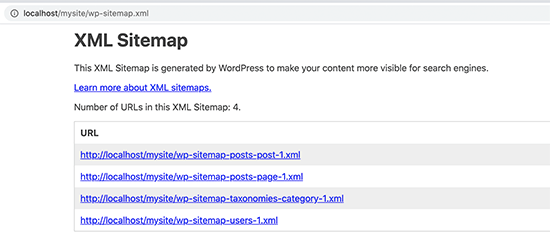
WordPress provides simple tools for creating sitemaps. Users can find these features in the settings. The XML sitemap is important for search engines. It helps them understand your site structure. WordPress automatically generates these sitemaps. This makes it easier for site owners. No need for extra coding.
Plugins offer more options for sitemaps. Yoast SEO is a popular choice. It helps customize sitemaps. Users can exclude certain pages. This keeps search engines focused. Google XML Sitemaps is another tool. It supports various settings. Users can control how often search engines check their site.
Popular Sitemap Plugins
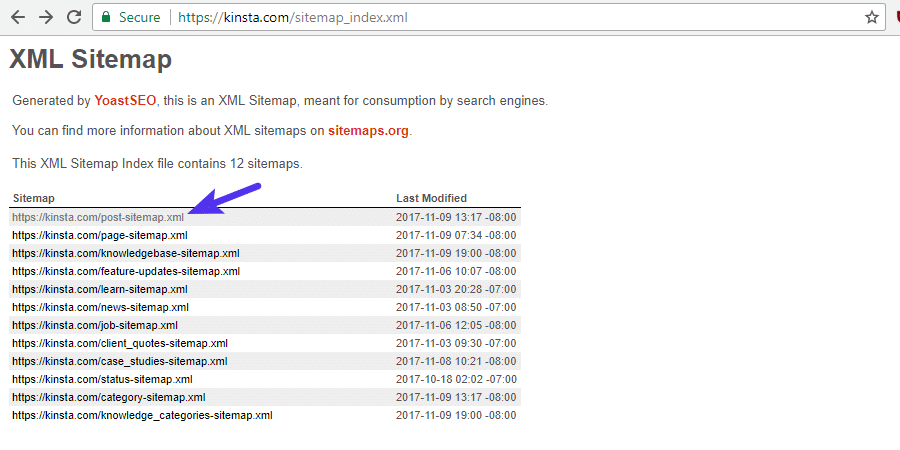
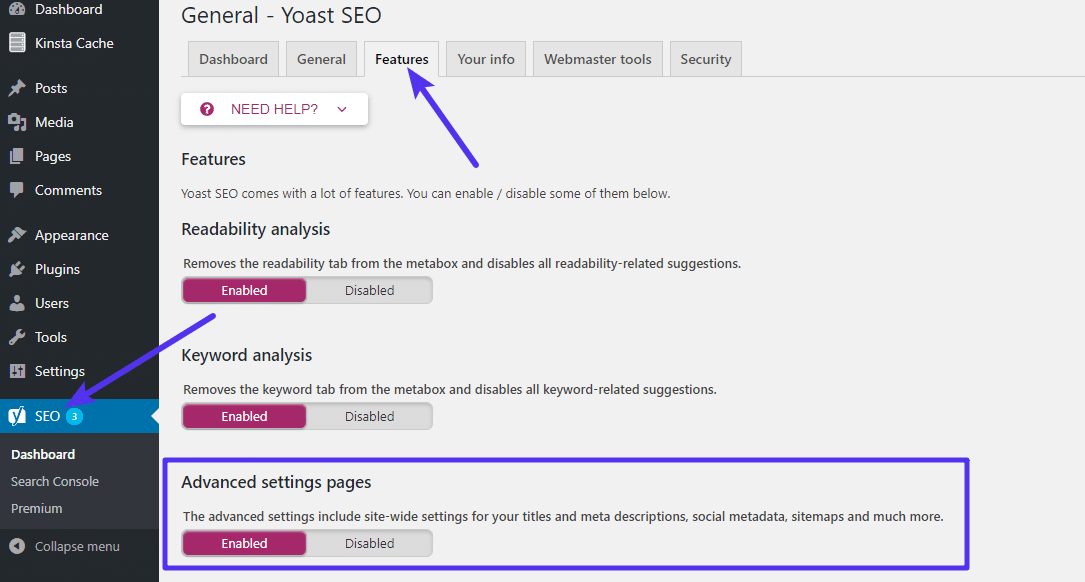
Yoast SEO is a popular plugin for creating sitemaps. It helps you with SEO. This plugin is easy to use. It automatically creates a sitemap for your website. You can see the sitemap in the settings. It updates the sitemap when you add new content. You can also customize the sitemap. This helps search engines find your pages. Yoast SEO also offers other SEO tools. Many people trust this plugin.
Google XML Sitemaps is another great plugin. It helps create a sitemap for your site. This plugin is simple to use. It generates an XML sitemap quickly. This makes it easier for search engines to read your site. It also updates the sitemap when you add new posts. Google XML Sitemaps supports all types of WordPress content. Many users like this plugin because it is reliable. It is a good choice for beginners.
Submitting Sitemaps To Search Engines
Submitting your sitemap to Google Search Console helps Google find your pages. First, sign in to Google Search Console. Then, locate the Sitemaps section. Add your sitemap URL and click Submit. This tells Google about new pages. Google will check the sitemap regularly. It helps your site get indexed faster. This means more visibility for your website.
Bing Webmaster Tools is another place to submit sitemaps. Start by logging into Bing Webmaster. Go to the Sitemap section. Enter your sitemap URL in the provided box. Click Submit to let Bing know. Bing will crawl your site soon. This improves your site’s presence on Bing. It ensures Bing knows about changes quickly. Helps your site stay updated in search results.
Troubleshooting Sitemap Issues
Sitemaps in WordPress are files that list all pages of a website, helping search engines index them efficiently. They guide search engine crawlers, improving visibility and ranking. Troubleshooting sitemap issues ensures that your site is fully discoverable, enhancing its performance and user engagement.
Common Errors
Sitemap errors can confuse users. Missing pages is a frequent problem. Sometimes, a page is not included. Check if it’s published. Broken links can occur. These links do not work. Fix them by updating URLs. Duplicate pages can confuse search engines. Remove extra pages from the sitemap. Permission issues might block access. Ensure settings allow entry. Incorrect formats might be the cause. Use XML for sitemaps. These errors need quick fixes. Regular checks help prevent them. Sitemap generators can aid in finding issues. Use them wisely.
Best Practices
Regular updates are crucial for sitemaps. They keep your site fresh. Use tools to validate sitemaps. These ensure everything works fine. Submit sitemaps to search engines often. It helps in indexing. Organize content well. Clear paths boost navigation. Use XML format for creating sitemaps. It’s preferred by search engines. Limit sitemap size. Large ones can slow down processes. Monitor errors regularly. Fix them as soon as they appear. Track performance of sitemaps. Tools can help with this. Good practices improve site visibility.
Future Of Sitemaps
Sitemaps in WordPress help search engines find and index website pages efficiently. They provide a structured list of URLs, making content easier to discover. Future advancements may enhance their functionality, ensuring faster and more accurate indexing.
Trends In Seo
Sitemaps help search engines find your pages. They are very important for SEO. Search engines change their rules often. This means sitemaps must also change. More websites use voice search now. Sitemaps must work with voice search too. Many people use mobile phones. So, sitemaps must be mobile-friendly.
Video content is growing fast. Sitemaps need to include videos. This helps videos show up in search results. Artificial Intelligence is also important. AI helps make better sitemaps. It learns from how people use websites. This makes sitemaps smarter.
Evolution Of Web Technologies
Websites today are more complex. They have many features. This makes sitemaps more important. New web technologies need new sitemap types. Interactive elements on websites are common. Sitemaps must know about these.
Websites now load faster. This is good for users. Sitemaps help search engines understand fast websites. New coding languages are coming. Sitemaps must support these languages. This keeps websites easy to find online.
Credit: kinsta.com
Credit: kinsta.com
Frequently Asked Questions
How Do Sitemaps Help In WordPress Seo?
Sitemaps enhance SEO by guiding search engines to important pages. They improve crawl efficiency, ensuring better visibility for your content. By highlighting priority pages, sitemaps help search engines index your site more effectively, boosting your site’s presence in search results.
Can WordPress Generate Sitemaps Automatically?
Yes, WordPress can generate sitemaps automatically. With plugins like Yoast SEO, sitemaps are created and updated without manual intervention. These plugins ensure your sitemap reflects current site content, helping search engines access new pages quickly.
Are Sitemaps Necessary For All WordPress Sites?
Sitemaps are essential for most WordPress sites. They improve the site’s search engine visibility. While small sites might manage without them, larger sites benefit from sitemaps for better indexing and navigation.
How Often Should I Update My WordPress Sitemap?
Update your sitemap whenever you add new content or pages. Regular updates ensure search engines index fresh content promptly. Using a plugin automates this process, keeping your sitemap current without manual updates.
Conclusion
Sitemaps in WordPress are vital for your site’s visibility. They guide search engines through your content. Help them understand your site’s structure. Improve indexing. Enhance user experience. Easy to set up and manage. Plugins like Yoast simplify the process. Regular updates keep it effective.
Boost your site’s SEO performance. Increase organic traffic. Support faster page discovery. Sitemaps are an essential tool for every WordPress site. Keep your sitemap clean and updated. Ensure search engines find your important pages. Enjoy better search rankings. Improve your site’s reach without hassle.
Start using sitemaps today.


