
Have you ever wondered who gets to do what on your WordPress site? Understanding roles in WordPress is crucial for managing your website efficiently.
Imagine the chaos of a bustling kitchen with no head chef or a newspaper without an editor. Your WordPress site can face similar confusion without clear roles. Whether you’re a solo blogger or managing a team, knowing who can publish, edit, or simply read the content is essential.
Navigating WordPress roles doesn’t have to be a puzzle. By the end of this article, you’ll have a clear picture of how roles work, empowering you to assign responsibilities and maintain control over your site. Let’s dive in and demystify the roles that keep your WordPress world organized and productive.
Credit: visualcomposer.com
WordPress Role Basics
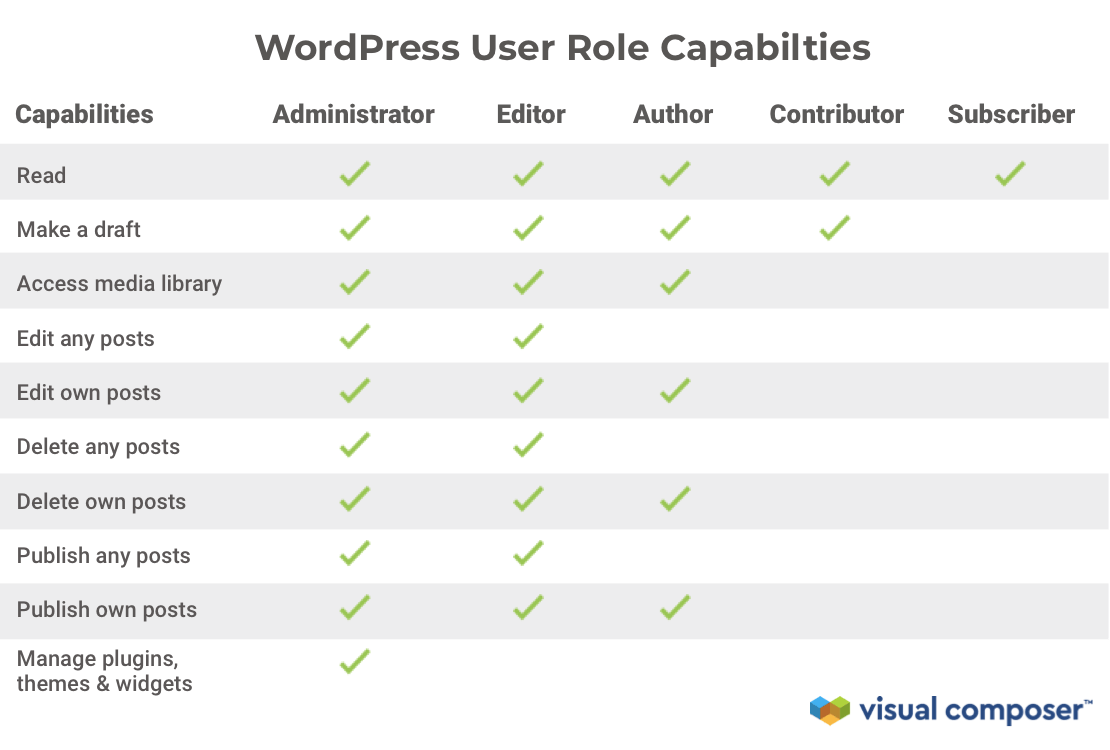
WordPress roles help control what users can do. There are five main roles. Each role has different permissions. The Administrator can do everything. They manage the site and settings. The Editor can publish and edit posts. They manage content but not settings. The Author writes and publishes their own posts. They can’t edit others’ posts. The Contributor writes posts but can’t publish them. They need approval from an Editor or Administrator. The Subscriber can only read posts and leave comments.
Roles keep the site secure and organized. They limit access to important parts. This helps prevent mistakes and protects the site. It’s important to choose the right role for each user. This way, users have access to what they need. No more and no less.
Administrator Role
The administrator role has many important tasks. They can manage users, change site settings, and install plugins. They also handle themes and updates. Administrators can create and delete content. They have the power to approve comments. Their work keeps the site running well.
Administrators have full control. They can see everything on the site. Their duties make them very important. This role needs attention to detail. They must be careful with their actions.
Security is very important for administrators. They must use strong passwords and keep them safe. Administrators should update the site often. This keeps the site secure. They need to check for security threats and take action.
Sharing admin access is risky. Only trusted people should have it. Security mistakes can cause big problems. Always be careful with login details.
Editor Role
Content Management is a key duty for editors in WordPress. They can edit, publish, and delete posts. Editors help maintain the site’s quality. They ensure content is accurate and engaging. They organize posts and pages for easy navigation.
Editors manage tags and categories to keep content structured. They check for spelling and grammar mistakes. Editors work closely with authors. They review drafts and provide feedback. They help authors improve their writing. Editors make sure every post follows the site’s guidelines.
Collaboration with Authors is vital. Editors communicate with authors regularly. They discuss ideas and plan content together. Authors rely on editors for support and guidance. Editors encourage teamwork and creativity. They help authors grow and learn new skills. This collaboration makes the site stronger and more diverse.
Author Role
Authors in WordPress can create new posts. They can also edit their own posts. An author cannot edit posts by others. This role allows them to write and format content. They can add images and media. Authors can save drafts of their work. They can preview posts before publishing.
Authors have the right to publish their own posts. They can also delete their posts. They do not have the power to publish or delete posts by others. Once published, their posts go live on the website. Authors do not need approval to publish. Their role is vital for content management. It helps keep the website updated.
Contributor Role
Contributors can write and edit their own posts. They do not have the power to publish. They can only submit for review. This makes sure content is checked before it goes live. The process is simple and easy to follow.
Editors or administrators read the submitted posts. They check for errors and accuracy. If approved, the post is published. Sometimes, they send it back for changes. Contributors then make the corrections. Teamwork is important in this role.
Credit: wpfront.com
Subscriber Role
Subscribers have limited control over their profiles. They can edit their own contact information and passwords. This role allows them to manage their profiles without affecting others. Subscribers cannot change site settings or content. Their main focus is their own account details. Keeping information updated is important for security. Subscribers may add a profile picture if allowed. This helps personalize their profiles.
Subscribers face many restrictions in WordPress. They cannot write or edit posts. Access is limited to viewing content only. They cannot manage plugins or themes. Subscribers do not have access to administrative tools. This role suits users who need to read content. The limitations ensure site security. Keeping subscribers from altering site settings is crucial. Their role is simple, yet essential.
Custom Roles
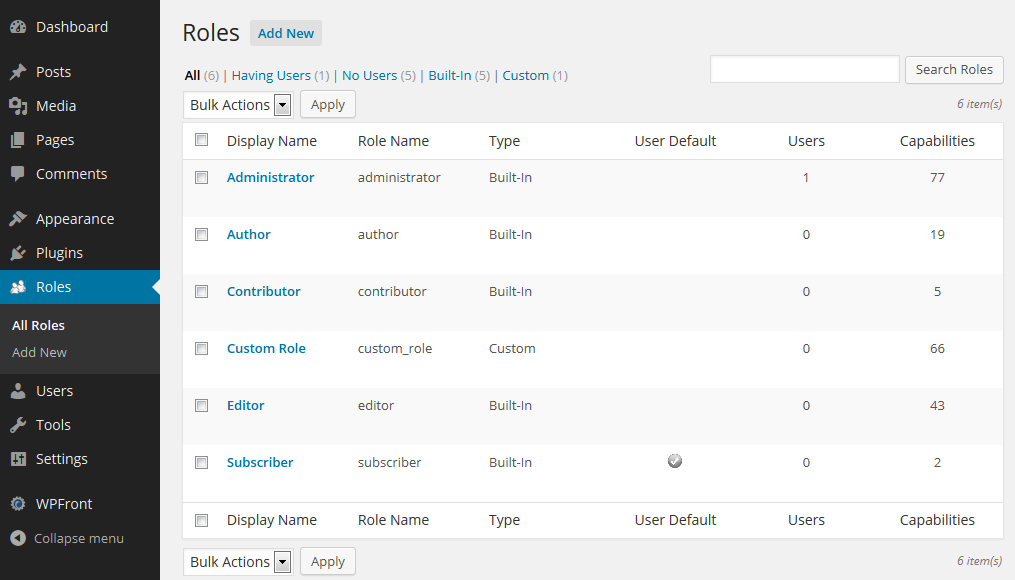
Creating custom roles in WordPress is easy. You can make roles fit your needs. Think about what each user should do. Assign permissions wisely. This helps keep your site safe. Be careful with admin rights. Only trusted users should have them. Custom roles can be changed. Update them as needed. This keeps your site secure.
Plugins help manage roles. They make tasks simple. Choose plugins with good reviews. They offer many features. Some plugins are free. Others cost money. Read their descriptions. Pick the one that fits your needs. Install the plugin from the WordPress store. Follow instructions to set it up. Check if the plugin updates regularly. This ensures it works well. Keep your site running smoothly with the right tools.
Role Management Best Practices
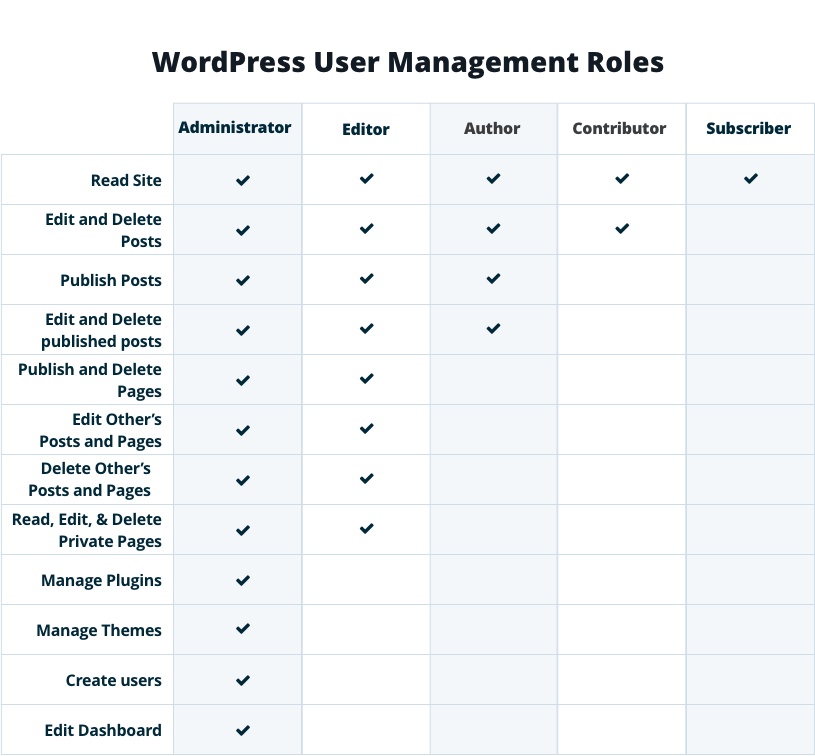
Protecting your site is vital. Every user should have the right role. This limits what they can do. Admins have full control. They handle settings and plugins. Editors manage posts and pages. Authors write and publish their own posts. Each role has specific duties. This helps keep things secure.
Assigning roles wisely is key. Start by understanding each user’s task. Pick a role that matches their duties. Regularly check roles. People’s jobs change. Update roles as needed. Keep roles simple. Only assign what’s needed. Fewer roles mean less confusion. Training is important. Teach users about their roles. They should know their limits. This keeps your site running smoothly.
Credit: wpengine.com
Frequently Asked Questions
What Are WordPress Roles?
WordPress roles are predefined permissions for users. They determine what actions users can perform on a site. Common roles include Administrator, Editor, Author, Contributor, and Subscriber. Each role has specific capabilities, like managing content or publishing posts. Understanding roles helps in efficiently managing website access and responsibilities.
How Can I Change A User’s Role?
To change a user’s role, go to the WordPress dashboard. Navigate to “Users” and select the user whose role you want to change. Click “Edit” and choose the desired role from the dropdown menu. Finally, click “Update User” to save changes.
This process helps manage user permissions effectively.
What Is The Administrator Role In WordPress?
The Administrator role has full access to a WordPress site. Administrators can manage settings, users, themes, and plugins. They have the highest level of permissions. This role is responsible for overall site management and security. It’s essential to assign it carefully to avoid unauthorized changes.
Can I Create Custom Roles In WordPress?
Yes, you can create custom roles in WordPress. Use plugins like “User Role Editor” to add custom roles. These plugins allow you to define specific capabilities and permissions. Custom roles help tailor user access to your site’s needs. This flexibility enhances site management and security.
Conclusion
Understanding WordPress roles is crucial for managing your website effectively. Each role has specific permissions. These control what users can or cannot do. Assign roles based on user needs and responsibilities. This enhances security and workflow. Admins have full control, while contributors have limited access.
Choose roles wisely to maintain site safety. Regularly review user roles as your site grows. This ensures everyone has the right access level. WordPress roles help create a structured, secure environment. Using them correctly boosts productivity. And keeps your website running smoothly.


