
Have you ever wondered how some WordPress sites showcase their work so beautifully? If you’re looking to create a stunning display of your projects, then understanding portfolio items in WordPress is essential.
These are not just ordinary posts; they are tailored entries that allow you to highlight your best work in a visually appealing way. Imagine being able to present your photography, design projects, or any creative endeavor in a format that truly captures the essence of your craft.
You can captivate your audience, turning casual visitors into loyal followers and potential clients. By mastering portfolio items, you unlock the potential to transform your website into a dynamic showcase that speaks volumes about your skills and creativity. Curious to know how? Keep reading to discover how portfolio items can elevate your WordPress site from ordinary to extraordinary.
Understanding Portfolio Items
Portfolio items in WordPress are used to showcase work or projects. They help organize content effectively. Each item can include images, descriptions, and links. This makes it easy for visitors to view your work. Portfolio items are often part of themes that support portfolios. Themes allow users to display their work in creative ways. Users can add categories or tags to help organize items. This makes it easier for visitors to find specific projects. Portfolio items help display your talents and skills.
Some plugins offer extra features for portfolios. These plugins can add filters, lightboxes, or sliders. They enhance how visitors view your work. Adding a portfolio to your site can increase engagement. Visitors enjoy browsing through well-organized portfolios. It helps them understand your abilities. Portfolio items are important for artists, designers, and creatives. They offer a way to share creativity and style.
Importance Of Portfolio Items
Portfolio items show your best work on your website. They help people see what you can do. These items are very useful for artists, designers, and freelancers. Visitors can look at your work easily. A good portfolio attracts new clients. It also helps in building trust. Your work gets showcased in an organized way. This makes it easy to understand. Adding images to portfolio items is important. Pictures speak louder than words. Make sure to use high-quality images. Descriptions should be short and clear. Each item should have a unique description. This helps in understanding the work better.
Portfolio items also help in SEO. Adding keywords can improve search results. Titles of portfolio items should be catchy. Keep them relevant to the work. This helps in grabbing attention. Your portfolio is like a digital gallery. Keep updating it with new work. Fresh content keeps visitors interested.
Setting Up Portfolio Items
Choosing a theme is important for your portfolio. Some themes support portfolios. Check theme details before choosing. Look for features like layout options. Also, consider design flexibility. Themes offer different styles. Some have grid layouts. Others have list views. Choose what suits your needs best.
Activate the portfolio feature in WordPress settings. Some themes need this step. Go to theme options. Find the portfolio section. Enable the feature there. After activation, portfolio items appear. You can add images and text. Organize them by categories. This helps visitors see your work.
Creating Portfolio Content
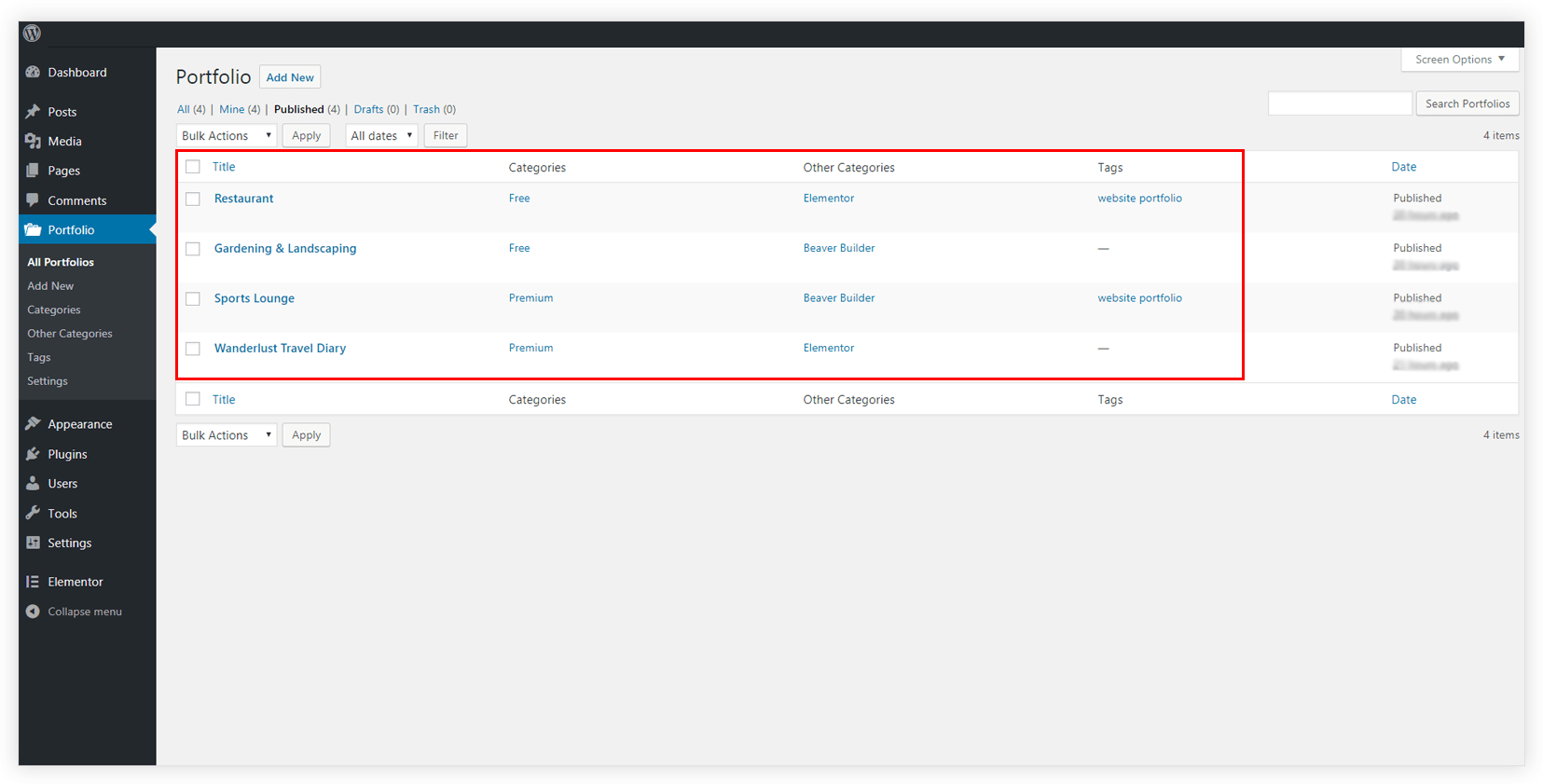
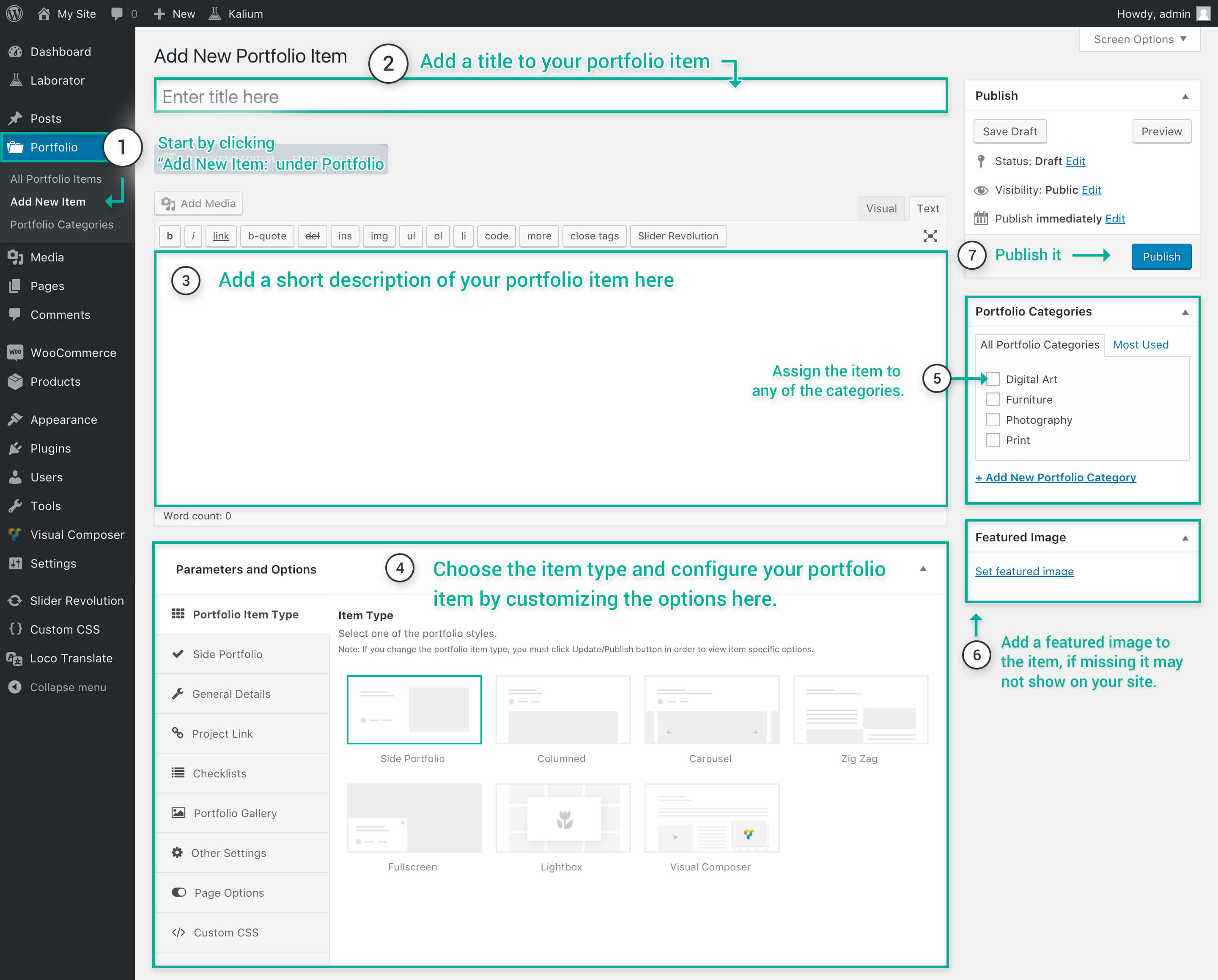
In WordPress, you can create portfolio items to showcase your work. These items help you display projects or achievements in an attractive way. First, go to the WordPress dashboard. Find the Portfolios section and click on Add New. Here, you can enter the title and description of your project. Don’t forget to add images or videos. They make your portfolio look lively. Always preview your work before publishing. This helps in checking any mistakes.
Categories and tags help in organizing your portfolio. Categories are like big boxes. They hold similar projects. Tags are like labels. They describe project details. For instance, if you have a painting project, you can use “Art” as a category. Use “Watercolor” as a tag. Always choose the right category and tags. This makes it easy for people to find your work. It also improves your website’s searchability.
Customizing Portfolio Appearance
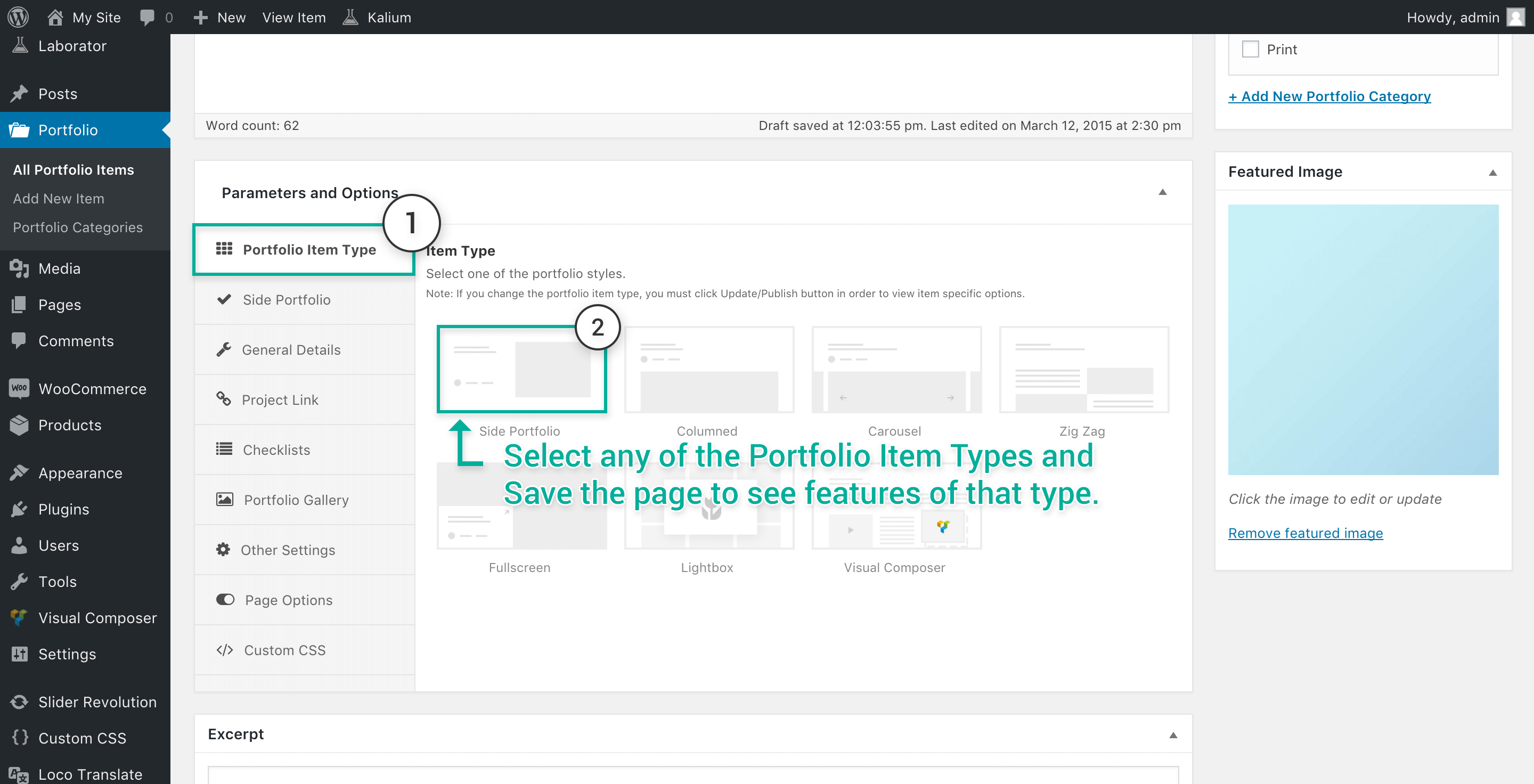
Choosing the right layout for your portfolio is important. Layouts can be grid, masonry, or carousel. Each gives a different feel. The grid layout is simple and tidy. The masonry layout looks creative. Carousels are more dynamic.
Adjust your portfolio layout to fit your style. It’s easy to change in WordPress settings. Click and explore layout options.
Adding pictures makes your portfolio look nice. Use high-quality images for a strong impact. Pictures tell your story better.
You can add videos too. Videos show your work in action. This keeps viewers interested. Make sure to keep it simple. Too many elements can confuse.
Credit: wpportfolio.net
Showcasing Portfolio On Website
Portfolio items can be added to pages easily. This helps in organizing them neatly. You can use the block editor in WordPress. Just insert a portfolio block and choose your items. This makes your work stand out on pages. Visitors will see your best works without searching. It looks professional and is easy to set up.
Shortcodes are tiny pieces of code. They help display portfolio items anywhere. You just copy and paste them into a page. Widgets are tools on the sidebar. They let you show portfolio items there. This is helpful for quick access. It makes your website look interesting. Both ways are simple and effective.
Best Practices For Portfolio Items
Portfolio items in WordPress showcase work samples or projects. They enhance your site’s visual appeal. Display images, descriptions, and links to attract visitors.
Optimizing For Seo
Use keywords wisely. Place them in titles and descriptions. This helps search engines find your items. Choose words that fit your content. Keep your titles short and clear. Avoid complicated language. Write with simple words. Use alt text for images. This helps people who cannot see images. It also helps search engines.
Maintaining Consistency
Keep your style the same. This makes your work look neat. Use the same fonts and colors. It helps people know your brand. Check your writing. Make sure it is error-free. Use the same layout for each item. This makes it easy to read. Consistent design makes your portfolio look good. People will enjoy browsing it.
Credit: documentation.laborator.co
Troubleshooting Common Issues
Portfolio items in WordPress showcase your work or projects. They help organize and present content attractively. Easily manage and display items using built-in templates and tools.
Resolving Display Problems
Portfolio items might not show up. Check if the theme supports portfolios. Activate the correct theme. Often, themes need manual setup. Try refreshing the page. Clear your browser cache. Sometimes, plugins cause conflicts. Disable plugins one by one. See if the issue persists. Update WordPress and all plugins. Outdated versions can cause problems. Ensure your portfolio items are published. Draft items won’t display.
Fixing Functional Errors
Sometimes, portfolio items don’t work right. Links might be broken. Check the URL paths. Ensure they are correct. Images might not load. Check the image paths. Ensure images are uploaded correctly. If items don’t update, check permissions. Ensure you can edit items. Plugins can interfere with functions. Disable new plugins. Test if the error stops. Always back up your site. This prevents data loss.
Credit: documentation.laborator.co
Frequently Asked Questions
What Are Portfolio Items In WordPress?
Portfolio items in WordPress are custom post types used to showcase projects or work samples. They help organize and display creative work effectively. You can use them to highlight your skills, achievements, or services. Portfolio items enhance visual appeal and improve user engagement on your website.
How Do I Create Portfolio Items In WordPress?
To create portfolio items, install a theme or plugin supporting portfolios. Navigate to the portfolio section in your dashboard. Click “Add New” to start adding items. Customize each item with images, descriptions, and categories. Publish your portfolio to share your work with visitors.
Can I Customize Portfolio Items?
Yes, you can customize portfolio items extensively. Use themes and plugins to change layouts, colors, and styles. Add custom fields for additional details. Tailor each item to match your branding and design preferences. Ensure your portfolio reflects your unique style and professionalism.
Why Should I Use Portfolio Items?
Portfolio items effectively showcase your work, attracting potential clients or employers. They organize projects for easy navigation and improve visual appeal. Using portfolio items enhances your online presence, demonstrating your skills and expertise. They help establish credibility and build trust with your audience.
Conclusion
Portfolio items in WordPress simplify showcasing your work online. They help organize projects neatly. You can display images, descriptions, and links easily. This feature aids in highlighting your skills effectively. It also boosts your website’s visual appeal. Customization options allow personalized design.
Enhancing user experience becomes straightforward. This tool supports your growth as a creator. You can attract more visitors with engaging content. Simple setup saves time and effort. Perfect for artists, freelancers, and businesses alike. Start using portfolio items to present your best work now.
Improve your online presence effortlessly.


