
Are you struggling to manage contact forms on your WordPress site? You’re not alone.
Many website owners find themselves tangled in the web of plugins and complex setups. But what if there was a simpler, more efficient way to handle your forms? Enter Pirate Forms, a WordPress plugin designed to streamline your contact form needs.
This tool promises to make your life easier, offering a straightforward solution without unnecessary bells and whistles. Imagine having a reliable contact form system that just works, freeing up your time to focus on what truly matters — growing your business or blog. Dive into this article to discover how Pirate Forms can revolutionize the way you connect with your audience.
Pirate Forms Overview
Pirate Forms is a WordPress plugin. It helps you make contact forms. These forms are easy to use. They let people send messages to you. You can also get email notifications. Pirate Forms is simple. It does not have many complex features. It is good for beginners. People use it to collect basic information. You can customize fields. Add name, email, and message areas. It keeps spam away. It uses CAPTCHA for security. Pirate Forms is free. But there is a paid version too. The paid version has more features. Pirate Forms has a user-friendly interface. It is easy to understand. Even kids can use it. Pirate Forms supports multiple languages. So people from different countries can use it.
Credit: wpforms.com
Features Of Pirate Forms
Pirate Forms helps make contact forms easily. You can create simple forms. It is easy to use. Forms can be added anywhere on your site. Drag-and-drop features make it simple. Choose from various form fields. Name, email, message—add these easily. Customize your form’s look. Pick colors and styles. Add fields like phone numbers or addresses. Pirate Forms makes it easy for visitors to contact you.
Receive instant email alerts. Get notifications when someone fills a form. Stay updated on new messages. Choose who gets these emails. Set it up with your email address. Notifications help you respond quickly. You will not miss any important messages. Customize your email settings. Choose subject lines and email content. Keep your inbox organized with Pirate Forms.
Protect your forms from spam. Pirate Forms uses captcha for security. Stop bots from sending fake messages. Captcha is simple for real users to solve. Keep your inbox clean. Block unwanted messages. Use extra spam filters. Ensure only real people fill out forms. Keep your site safe and secure with Pirate Forms.
Installation Process
Find the Pirate Forms plugin in the WordPress store. Click on the download button. Wait for the download to finish. The plugin will save on your computer.
Go to your WordPress dashboard. Click on Plugins. Now, click Add New. Choose the Pirate Forms file you downloaded. Click Install Now. Once installed, click Activate.
After activation, go to the settings page. Enter your email address. Choose a form template. Customize the form fields as needed. Save your changes. Your form is now ready for use.
Customization Options
Pirate Forms lets you change form fields easily. You can add text boxes, checkboxes, and more. Remove any fields you don’t need. Make forms fit your needs with a few clicks. It’s easy for anyone to use.
With Pirate Forms, design changes are simple. Pick colors that match your site. Adjust the layout for a neat look. Choose fonts that are clear to read. Create forms that fit your website style.
Pirate Forms works well with other plugins. Connect to email services like Mailchimp. Use with security plugins for added safety. Easy to link with other tools you use. This makes your forms more powerful.
Common Issues And Troubleshooting
Sometimes, forms do not send emails. This can be due to server issues. Check if the email server is working. It must be set up correctly. Verify the SMTP settings. They are crucial for sending emails. Incorrect email addresses can also cause problems. Always double-check them for errors.
Many emails are caught by spam filters. This stops them from reaching inboxes. Using a simple subject line can help. Avoiding trigger words is also important. These words make emails look like spam. Test the form with different email providers. This can help find the problem.
Forms can look different than planned. This is due to styling conflicts. Check your site’s CSS files. They might affect form styles. Plugins can also cause issues. Deactivate them one by one to find the issue. Use developer tools to see the problem. Fix it by adjusting the styles.
Advantages Of Using Pirate Forms
Pirate Forms offers a simple design. Easy to use for all ages. Beginners love it because of its simplicity. No coding skills needed. Just install and start using. The interface is clean and straightforward.
Pirate Forms is free for basic use. Premium features are affordable. Great value for the price. Many features included at low cost. Saves money for small businesses. Perfect for personal blogs.
Support is always available. Helpful team ready to assist. Quick responses to inquiries. Many guides and tutorials online. Users can find help easily. Community forums offer great advice.
Alternatives To Pirate Forms
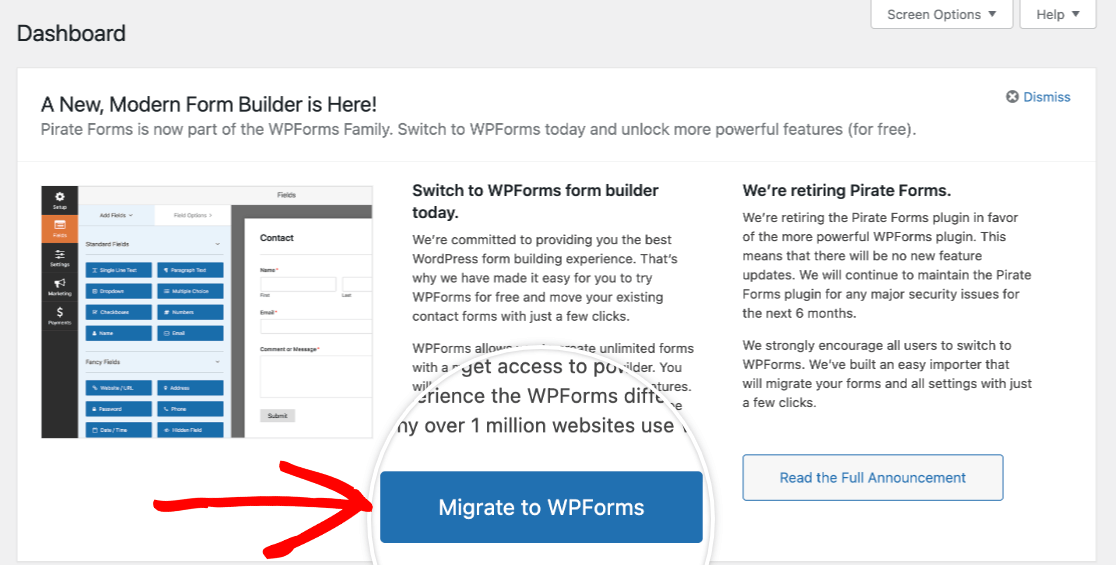
Contact Form 7 is a simple plugin. It is free and easy to use. Many people like its basic features. But it can be slow sometimes. WPForms is another choice. It is user-friendly with a drag-and-drop feature. But it is not free. Some features need payment. Ninja Forms is good for beginners. It is easy to set up. But some advanced features cost money. Formidable Forms offers great tools. It is good for complex forms. But it might confuse new users.
| Plugin | Pros | Cons |
|---|---|---|
| Contact Form 7 | Free, Simple | Can be slow |
| WPForms | User-friendly, Drag-and-drop | Not free |
| Ninja Forms | Easy for beginners | Advanced features cost |
| Formidable Forms | Great tools, Complex forms | Confusing for new users |
Credit: wpforms.com

Credit: wordpress.org
Frequently Asked Questions
What Are Pirate Forms Used For?
Pirate Forms is a WordPress plugin designed for creating contact forms easily. It offers simple setup, allowing users to build forms without coding. With its user-friendly interface, it supports email notifications and spam protection, enhancing communication between website owners and visitors.
Its straightforward approach makes it ideal for beginners.
How To Install Pirate Forms On WordPress?
To install Pirate Forms, navigate to your WordPress dashboard. Click ‘Plugins’ and then ‘Add New. ‘ Search for ‘Pirate Forms,’ click ‘Install Now,’ and activate it. After activation, you can configure settings and create forms using its intuitive interface, enhancing your website’s communication capabilities.
Is Pirate Forms Plugin Free?
Pirate Forms offers a free version with essential features for creating contact forms. It includes spam protection, email notifications, and customizable fields. For advanced features, users can opt for premium plans, providing additional functionality like integrations and enhanced customization options, ensuring flexibility for various needs.
Can Pirate Forms Prevent Spam?
Yes, Pirate Forms includes built-in spam protection features. It uses CAPTCHA technology to ensure only genuine submissions are received. This helps prevent unwanted or automated submissions, keeping your inbox clean. Its efficient spam filtering makes it a reliable choice for maintaining the integrity of your contact forms.
Conclusion
Pirate Forms offer a simple solution for WordPress contact forms. Easy to install. Easy to use. Ideal for beginners. No coding skills needed. Customization options allow personal touch. Secure and reliable, ensuring user data safety. Integrates smoothly with WordPress sites.
Affordable for small businesses. Enhances user interaction efficiently. Provides essential features without complexity. It’s a helpful tool for website communication. Consider trying it on your WordPress site. Experience its benefits firsthand. Streamline your contact form process today. Your website’s communication needs can be met effectively.
Simple steps lead to great results.


