
Have you ever wondered how connecting your WordPress website to others can boost your online presence? Welcome to the world of outbound links.
As a website owner or blogger, you might have come across the term “outbound links” but aren’t quite sure what they are or how they can benefit you. These links are like digital bridges that lead your visitors from your site to other valuable content across the web.
By understanding and utilizing outbound links effectively, you can enhance your website’s credibility, improve SEO rankings, and provide your readers with enriched content. But there’s more to it than just inserting links randomly. Discover how strategic outbound linking can transform your WordPress site into a trusted and authoritative source in your niche. Keep reading, and unlock the secrets to optimizing your website with outbound links today!

Credit: www.wptasty.com
Understanding Outbound Links
Outbound links are links that send users away from your site. They connect to other websites. These links help search engines understand the content better. They show that your site is part of a bigger web. Outbound links can improve your site’s reputation. Search engines like Google value these links. They see them as a sign of trust. Links to high-quality sites are the best. They can make your site more trustworthy. Always check where your links go. Ensure they lead to safe and reliable sites. Outbound links are important for SEO. They help your site rank better in search results.
Importance Of Outbound Links
Outbound links can help with SEO. They connect your site to others. This shows search engines your site is part of a network. Search engines like sites with useful links. Google rewards sites that link to good sources. It sees them as helpful and trustworthy.
Links to other sites help users find more info. They can read more about a topic. This keeps users happy. They spend more time on your site. A happy user might come back later. Users like sites that guide them well.
Linking to trusted sites builds credibility. It shows you care about good info. People trust sites that link to experts. They believe your site shares true facts. Trust leads to more visitors. More visitors help your site grow.
Creating Outbound Links In WordPress
First, open your page or post. Highlight the text you want to link. Click the link button in the toolbar. Paste the URL you want to link to. Press Enter or click the apply button. Your text is now an outbound link.
Select the block where you want the link. Highlight the text for the link. Click the link icon in the menu. Enter the URL in the box. Click the apply button. Your link is active now.
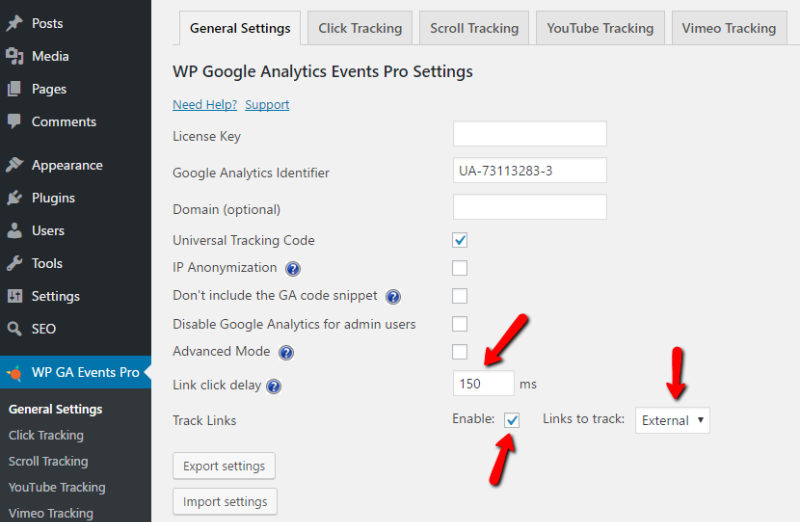
Some plugins help with links. Install a link management plugin. Open the plugin settings. Set options for outbound links. Plugins can make links open in a new tab. This keeps users on your site longer.
Credit: wpflow.com
Best Practices For Outbound Links
Choose links that are relevant to your topic. Readers should find the link useful. It should add value to your content. Make sure the linked content fits well with your post. This helps readers learn more. Proper context enhances understanding.
Set outbound links to open in new tabs. This keeps visitors on your site longer. They can explore other content without losing your page. It improves user experience. Readers can navigate back easily. Using new tabs is a friendly choice.
Conduct regular link audits to check your outbound links. Ensure they work and lead to correct pages. Broken links frustrate readers. Update links that change or expire. Consistent audits maintain site quality. Fixing links keeps your site trustworthy.
Monitoring Outbound Links
Tracking outbound links is easy with analytics tools. Google Analytics is popular. It shows where users click. This helps understand link performance. There are other tools too. Some are free. Others need payment. Choose tools that fit your needs. Watch how links work over time. Adjust if needed. This keeps your site healthy. Regular checks are important. They show trends. They highlight issues. Fix problems quickly. This improves user experience.
Common Mistakes To Avoid
Many overlook the importance of linking to reputable sources. Carelessly chosen links can harm credibility. Ensure links open in new tabs to retain visitors. Avoid linking to competitors; it might divert traffic away from your site. Regularly check for broken links to maintain a smooth user experience.
Overloading With Links
Filling your page with too many links can be a mistake. Too many links make your page confusing. Readers may feel lost. This can make your page look messy. Always choose quality over quantity. Use links that are meaningful. This helps the reader. It also improves your page’s user experience.
Ignoring Link Quality
Not all links are good. Some links can harm your page. Low-quality links can hurt your page’s rank. Choose links that are reliable and trustworthy. Make sure the source is reputable. This makes your page more valuable. Good links improve trust with readers. They also help your page rank better in search engines.

Credit: linkwhisper.com
Frequently Asked Questions
What Are Outbound Links In WordPress?
Outbound links in WordPress are hyperlinks that direct visitors to external websites. They help enhance your site’s credibility by linking to authoritative sources. These links can also improve user experience by providing additional information. Additionally, search engines might value your site more when you link to relevant, high-quality external content.
How Do Outbound Links Affect Seo?
Outbound links can positively impact SEO by showing search engines your site is connected to reputable sources. This can enhance your site’s authority and trustworthiness. However, it’s crucial to link to relevant and high-quality sites to avoid negative effects. Proper use of outbound links can improve your site’s overall SEO performance.
How To Add Outbound Links In WordPress?
To add outbound links in WordPress, highlight the text you want to link. Click the link icon in the editor, and paste the URL of the external site. Ensure you select the option to open the link in a new tab to maintain user experience.
Click ‘Add Link’ to finish.
Should I Use Nofollow For Outbound Links?
Using nofollow tags for outbound links can control link equity flow. It’s recommended for paid links, sponsored content, or less credible sources. By doing this, search engines won’t pass authority to the linked site. However, trusted, reputable sites should generally be linked without nofollow to maintain authority.
Conclusion
Outbound links boost your website’s credibility. They connect readers to valuable resources. This helps build trust and authority. Search engines value these links, improving your site’s ranking. Readers appreciate useful content and reliable references. It’s essential to link to high-quality sites.
Ensure your links are relevant and enhance user experience. Balance outbound links with internal links. This keeps visitors engaged longer. Regularly check link health to prevent broken paths. Thoughtfully used, outbound links enrich your content. They create a more informative and engaging website.
Always prioritize quality and relevance.


