
Are you trying to update your WordPress site but keep bumping into a wall with something called FTP credentials? You’re not alone.
Understanding FTP credentials is a crucial skill for any WordPress user, whether you’re managing a personal blog or a business website. It can seem daunting at first, but grasping this concept is simpler than you think—and it can save you a lot of headaches.
Imagine having the power to swiftly upload files, troubleshoot errors, and enhance your site’s security, all at your fingertips. Intrigued? Stay with us as we break down what FTP credentials are and how they can empower you to take control of your WordPress site like never before.
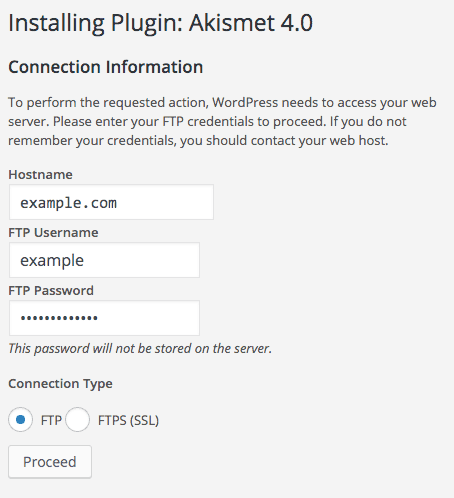
Credit: hackrepair.com
Ftp In WordPress
FTP is a tool for moving files online. It’s like a bridge between your computer and the web. In WordPress, FTP helps manage website files. You can upload, download, or delete files. It works even when the WordPress dashboard is down. This makes it a valuable tool for website management. With FTP, you can fix website problems. It’s an easy way to change site files without logging into WordPress. Many website owners use FTP for this reason.
FTP is used for many tasks. You can upload themes and plugins. It helps fix errors by changing files. You can back up your site data. This ensures safety if something goes wrong. FTP also allows quick file edits. You can even change permissions for files. These tasks keep your site running smoothly. Using FTP makes managing a site much easier.
Understanding Ftp Credentials
FTP credentials are like keys to your website. They help you access the server where your website files are stored. You need three main components: host name, username, and password. The host name is like the street address of your site. The username is like your name on the list. The password is your secret key.
These credentials help you connect to your site’s server. Without them, editing or uploading files is tough. They are essential for website maintenance. Using them, developers can fix site issues. It’s important to keep them safe.
FTP credentials keep your site safe from strangers. They act as a shield for your website files. Only those with the right credentials can access the files. This ensures your data is protected. Always keep your credentials private. Change them often to keep your site secure.
Locating Ftp Credentials
FTP credentials are usually found in hosting accounts. Hosting providers show these details in the account settings. First, log into your hosting account. Then, look for a section named FTP Accounts or FTP Settings. Here, you will find your username and password for FTP access. Some providers also show the FTP server address. Keep these details safe and secure.
Some WordPress plugins help with FTP access. They show FTP details in the plugin settings. File Manager is a popular plugin for this. It allows users to connect easily. After installing, check the plugin settings. Find the section labeled FTP or Connection. Note down the details shown. Always verify the credentials before use.

Credit: www.youtube.com
Setting Up Ftp For WordPress
To start, download an FTP software like FileZilla. It’s free and easy to use. Open the software after installation. You will see a space to type your FTP details. This includes the server, username, and password. These details let you connect to your website. Be sure to keep them safe.
Enter your server address in the host box. Type your username and password in the next boxes. Choose the port number. Usually, it’s 21. Click connect to access your site files. You can upload and download files now. Always log out when done. This keeps your site secure.
Troubleshooting Ftp Issues
FTP connection problems can be frustrating. A wrong username or password often causes issues. Check if the host address is correct. Some errors occur due to a firewall blocking the connection. In such cases, adjust the firewall settings. Make sure to use the right FTP port. Usually, it’s port 21. Sometimes, the server might be down. Wait a bit and try again.
Permission errors stop you from uploading files. This happens if your account lacks the right access level. Contact the host if unsure about your permissions. Check if the file ownership is correct. Use an FTP client to change file permissions. Set them to 755 for folders and 644 for files. This often fixes the problem. Be careful not to change permissions too much. It can make your site unsafe.
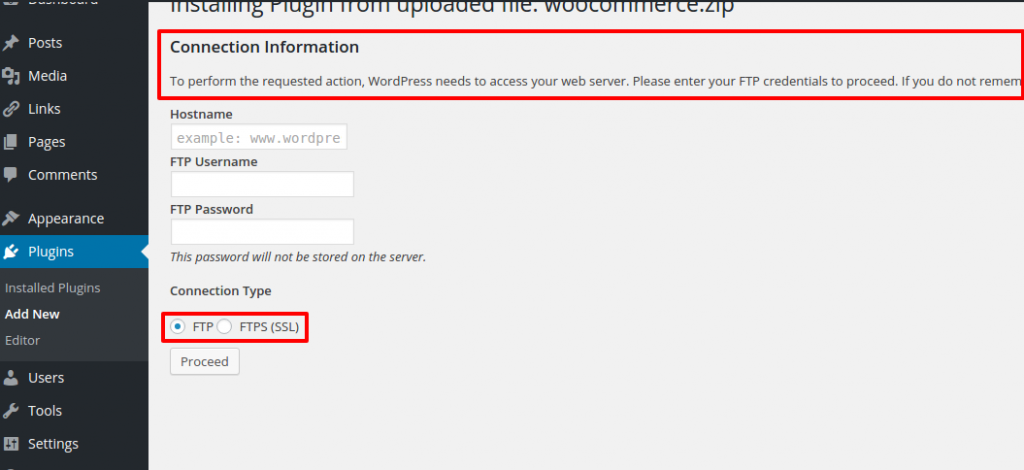
Credit: support.inspirythemes.com
Security Best Practices
Keep FTP credentials safe. Don’t share them with others. Use strong passwords. Mix letters, numbers, and symbols. Change passwords often. This keeps your site secure. Be careful with public Wi-Fi. It’s not safe for FTP. Use secure connections like SFTP. It’s safer than FTP. Always log out after use. This stops others from accessing your account. Stay alert. Watch for unusual activity. Report anything strange right away.
Updating passwords is important. Do it every few months. Make passwords hard to guess. Avoid using common words. Use random combinations. This makes your account safer. Never reuse old passwords. They might be compromised. Write new passwords down. Keep them in a safe place. Use password managers. They help you keep track. They also suggest strong passwords. Don’t ignore password updates. They are key to security. Stay protected by being proactive.
Frequently Asked Questions
What Are Ftp Credentials In WordPress?
FTP credentials are login details used to access your website files. They typically include a username, password, host address, and port number. These credentials allow you to connect to your WordPress site’s server via an FTP client, enabling file uploads and modifications.
How Do I Find My WordPress Ftp Credentials?
Your FTP credentials are usually provided by your hosting provider. You can find them in your hosting account’s control panel under FTP settings. If you can’t locate them, contact your hosting support for assistance in retrieving your FTP details.
Why Do I Need Ftp Credentials For WordPress?
FTP credentials are essential for managing your WordPress site files. They allow you to upload, edit, and delete files directly on the server. This is helpful for troubleshooting, installing plugins, themes, and making manual changes that can’t be done via the WordPress dashboard.
Can I Use Ftp Without Credentials?
No, you cannot use FTP without credentials. FTP credentials are necessary for authenticating your access to the server. Without them, you cannot connect to your site’s server to manage files. Always ensure you have the correct credentials for secure access.
Conclusion
Understanding FTP credentials in WordPress is crucial for website management. They allow you to access and modify files. This ensures smooth website operations. Without them, troubleshooting becomes challenging. Securely storing these credentials is vital. It protects your website from unauthorized access.
Regular updates to your credentials enhance security. A secure site builds trust with your visitors. Always keep a backup of your credentials. This helps in case of loss or mishap. Stay informed about FTP best practices. It ensures your website remains functional and secure.


