
Have you ever wondered how to make your WordPress site more user-friendly and engaging? Custom links might be the answer you’ve been searching for.
They can transform the way visitors interact with your site, guiding them smoothly to the content they crave. Imagine having the power to direct your audience exactly where you want them to go, enhancing their experience and increasing your site’s efficiency.
By understanding and utilizing custom links, you can unlock new potential in your website’s design and functionality. Curious about how this works and how it can benefit you? Keep reading to discover the magic of custom links and how they can revolutionize your WordPress site.
Custom Links Basics
Custom Links in WordPress help you connect to any URL. They make navigation easy. You can add links to pages, posts, or other websites. These links are flexible. Users can set them up without much effort. A menu can have many custom links. This helps users find important information fast. Custom Links are part of the WordPress menu system. They allow you to improve your site’s structure. This makes your site more user-friendly.
Adding custom links can make your site better. It helps you guide visitors to the right content. Organizing these links well is key. Custom Links are a simple tool. They offer great benefits for site owners.

Credit: docs.presscustomizr.com
Creating Custom Links
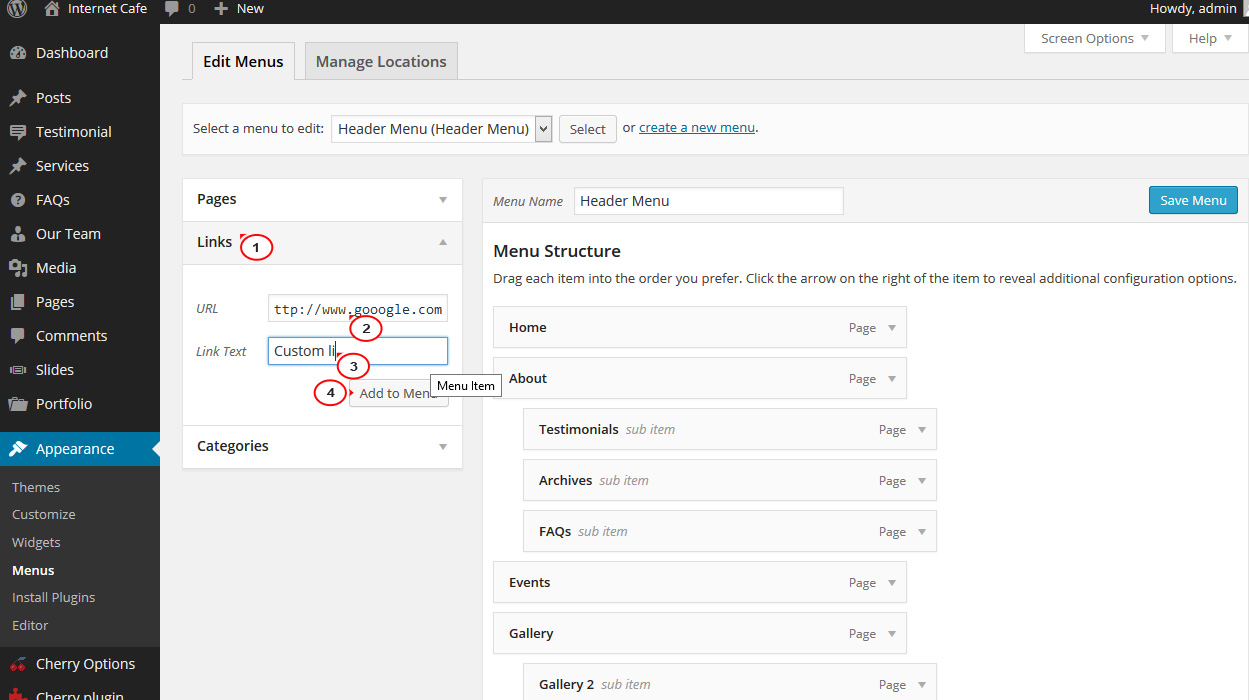
To make a custom link, first find the Menu Editor. This tool helps you change your site menu. You can find it in the Dashboard. Look for Appearance and click on Menus. This opens the Menu Editor. Now, you can add or change links. It is easy to use.
Click on Custom Links in the Menu Editor. You will see two boxes. One is for the URL. The other is for the Link Text. Type the website address in the URL box. Type the name you want for the link in the Link Text box. Press Add to Menu. Your new link is now in your menu. This makes your site more useful.
Benefits Of Custom Links
Custom links make your website easy to use. They help visitors find what they need. Clear paths guide users to important pages. With custom links, users don’t get lost. They know where to go next. This keeps them on your site longer. Organized navigation makes a website feel friendly.
Good user experience matters. Custom links improve this. Users click on links and find relevant content fast. This keeps them happy. No one likes to search too long. Simple navigation helps users feel at home. They enjoy their time on your site. Happy users may return again.
Custom Links In Menus
Custom links help organize the menu. They make it neat and tidy. Visitors can find things quickly. You can add links to pages or posts. You can also link to categories. This keeps everything in its place. Custom links show what is most important. They guide users to the right spot. Menus look better with custom links. They help with navigation. It’s like a map for your site.
Custom links can send visitors to other sites. They are helpful for sharing resources. You can link to your social media. Add links to partner sites. You can also link to news articles. Custom links make sharing easy. They give visitors more choices. They can learn more about topics. External links connect your site to the world. They expand your site’s reach. Custom links provide extra information. They make your site more useful.
Seo Advantages
Custom links help improve your site’s search rankings. These links tell search engines what your page is about. This helps them rank your page better. It’s like giving search engines a hint.
The better your rankings, the more people visit your site. More visitors mean more success for your site. Custom links make your content easier to find.
Custom links can include important keywords. Keywords are words people use to search online. Use them in your links to help people find your site.
This makes your site more relevant. Relevant sites rank higher in search results. A higher rank means more traffic to your site. More traffic means more success.
Credit: www.templatemonster.com
Customization Options
Custom Links in WordPress offer flexibility in website navigation. They help create personalized menus and improve user experience. Adding external URLs or linking to specific pages enhances site organization and accessibility.
Styling Custom Links
Custom links can be styled with CSS. Users can change colors. Add borders or backgrounds. Make links stand out. Use different fonts for links. Add hover effects. This makes links more interactive. Styling links is simple. Just add CSS to your theme. This can be done in the customizer. Or directly in the stylesheet. Make sure to preview changes. So links look good on all devices. This ensures good user experience.
Adding Icons And Labels
Icons can be added to links. This makes links more visually appealing. Use icon libraries like FontAwesome. It’s easy to add icons. Just use the right HTML code. Labels are also useful. They tell users what links do. Labels can be added next to icons. Or above links. Be clear and concise with labels. This helps users understand links. Good icons and labels improve navigation. They enhance user engagement. Users find information quickly.
Common Mistakes
Mistakes often occur when using custom links in WordPress. Users might forget to set the correct URL, leading to broken links. Failing to update permalinks after changing URLs can also cause navigation issues.
Broken Links
Many websites have broken links. These links take users nowhere. This frustrates visitors. It can also hurt your site’s SEO. Some links lead to deleted pages. Others have wrong URLs. Always check your links. Fix them quickly. Use tools to find these broken links.
Overloading Menus
Menus should be simple. Too many links confuse users. They don’t know where to click. This can make visitors leave. Keep your menu clean. Show only the most important pages. Use submenus if needed. This helps users find what they want easily. A clean menu improves user experience. It also makes your site look professional.

Credit: wordpress.org
Best Practices
Custom links need to stay relevant to your content. Use links that fit the topic. This makes your site more useful. People find what they need quickly. Search engines also like this. They rank your site better.
Avoid adding too many links. It can confuse readers. Choose links that add value. This keeps your site clean and focused. Always check links. Make sure they are working. Broken links can be bad for your site.
Links can change over time. Some might stop working. Update your links often. This keeps your site fresh. People trust sites that work well.
Check links every few months. Replace broken links fast. This shows you care about your site. Updated links help with SEO too. Search engines notice when you update links. They might rank your site higher.
Frequently Asked Questions
What Are Custom Links In WordPress?
Custom Links in WordPress allow you to create personalized URL paths. They can link to external websites or specific internal pages. This feature enhances site navigation and user experience. You can easily add them through the WordPress menu settings, offering flexibility in how visitors interact with your site.
How Do I Create Custom Links In WordPress?
To create Custom Links, go to Appearance > Menus in your WordPress dashboard. Select “Custom Links” from the menu options. Enter the URL and link text, then click “Add to Menu. ” Arrange the menu order as desired and save.
This process is simple and enhances navigation.
Why Use Custom Links In Menus?
Using Custom Links in menus improves site navigation and user engagement. They allow direct access to specific pages or external resources. Custom Links provide flexibility, making it easier for visitors to find relevant information. This feature can enhance your site’s usability and overall user experience.
Can Custom Links Improve Seo In WordPress?
Custom Links can improve SEO by enhancing site navigation. They guide users to relevant content, reducing bounce rates. Linking to authoritative external sites can boost credibility. Internal linking through Custom Links improves site structure, making it easier for search engines to index your pages effectively.
Conclusion
Custom links in WordPress enhance website navigation. They guide visitors efficiently. Users enjoy a tailored browsing experience. Businesses can highlight important pages or offers. These links boost user engagement. They also improve website structure. Easy to create and manage. Custom links offer flexibility in design.
They can also improve SEO visibility. A simple way to enhance your WordPress site. Optimize your site with smart link placements. Custom links cater to specific user needs. They elevate the overall user experience. Start using custom links today. Enhance your WordPress site effectively.


