
Are you setting up a website using WordPress and wondering about the confirmation emails? You’re not alone.
Knowing where these emails come from is crucial, especially if you’re waiting on vital information or trying to troubleshoot an issue. Whether you’re managing subscriptions, handling user registrations, or resetting passwords, understanding the source of these emails can make your life much easier.
Dive into the details and discover exactly what address sends these confirmation emails from WordPress. This insight could save you from missed messages and ensure smooth communication with your audience. Let’s get into it!
WordPress Email System
WordPress uses its own email system to send notifications. These emails often come from a default address. The address usually looks like wordpress@yourdomain.com. This means the sender appears as WordPress, linked to your domain. Some may find this address confusing. It’s essential to recognize that this is a normal part of WordPress.
Changing the email address is possible. Plugin solutions exist for customization. These tools help modify the sender’s email address. They make emails more personal. Users can replace the default address. This enhances email communication.

Credit: wordpress.stackexchange.com
Default Email Address
WordPress uses a specific email address for confirmation emails. By default, emails come from wordpress@yourdomain.com. This address is set during installation. It is used for various notifications.
Many users find this confusing. They may not recognize the sender. Changing the address is possible. Admin settings allow modifications. This ensures emails are easily identified. Use a familiar name or domain. This helps in building trust with recipients.
Always check settings after installation. Confirm the email address is correct. This avoids any delivery issues. Keep it simple and memorable. Recipients appreciate clarity in communication.
Customizing The Sender Address
Many plugins help change the email sender address in WordPress. WP Mail SMTP is a popular choice. It makes email sending easy. You can set a custom email address. Post SMTP is another useful tool. It offers many settings for email handling. Both plugins have free versions. They also have premium features if needed. Plugins are simple to install. Go to the plugin menu in WordPress. Search for your chosen plugin. Click install. Then, activate it. Now, you can set your sender address easily. Plugins are user-friendly. Many have guides for setup. This makes them great for beginners.
Changing the sender address can also be done via PHP files. Functions.php is a key file for this. It is in your theme’s folder. Open this file with care. A small mistake can break your site. Add a code snippet to change the email address. Many sites offer example codes. Copy and paste these carefully. Always back up your site first. This saves you if something goes wrong. PHP editing is for those who know coding basics. It gives more control than plugins. Yet, it requires caution.
Credit: cinchws.com
Common Issues
Many users find their emails in the spam folder. This can be frustrating. Email providers sometimes see WordPress emails as spam. This happens due to generic sender addresses. Users might miss important emails. Checking the spam folder is a good habit. Marking emails as “not spam” helps too.
Some emails never arrive. They fail to deliver. This can be due to incorrect settings. Server issues might also cause this. It’s important to check email settings. Ensure the SMTP settings are correct. Double-checking helps prevent failures. This ensures all emails reach their destination.
Best Practices
Picking the right email provider is key. Reliable providers ensure your emails are sent on time. They offer good support and security. Popular choices include Gmail and Outlook. Many people trust them. These providers have strong spam filters. This helps emails reach inboxes. You want your messages to be read. Avoid unknown providers. They might not be safe. Always check reviews before choosing.
Deliverability means emails reach the inbox. Use a trusted email address. This helps avoid spam folders. Update your sender information regularly. Keep email content clean and clear. Avoid using too many links. Too many links can look like spam. Use a simple subject line. It should match the email content. People open emails with clear subjects. Test emails before sending. This checks if they look right.
Security Considerations
WordPress sends emails to users for various reasons. These emails must be secure to protect user data. Strong encryption keeps emails safe from hackers. Users’ personal details need this protection. Sensitive information should never be shared in emails. Keeping information safe is a top priority. Always ensure email servers are secure.
Email spoofing tricks people into believing false emails are real. It can cause security issues. Use DKIM and SPF records to stop spoofing. These records verify the sender’s address. They confirm that the email is genuine. Check these records regularly for safety. WordPress can help prevent spoofing by using these methods.
Troubleshooting Tips
Ensure your server has the correct settings. Check the SMTP configuration. Make sure it’s set to the right email address. Sometimes, the default email address can be wrong. This can cause issues with emails.
Also, ensure the server is not blocking emails. Firewalls or security settings can block them. This will stop emails from sending. Verify these settings to ensure everything is correct.
Email logs help you find issues. Check the logs for error messages. These messages can show why emails are not working. Look for any failed email attempts. The logs can also show if emails were sent successfully.
Logs can be found in your server’s control panel. Some hosting providers offer easy access to logs. Make sure to check them regularly. This helps in identifying and fixing problems quickly.

Credit: formidableforms.com
Frequently Asked Questions
What Is The Default Email Address For WordPress Confirmations?
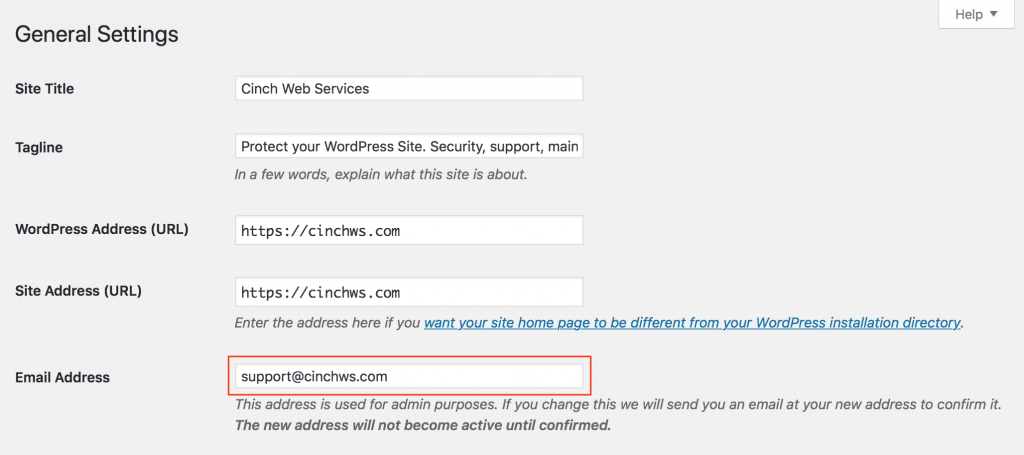
The default email address for WordPress confirmations is typically “wordpress@yourdomain. com”. This can be changed in your WordPress settings. Navigate to Settings > General to update the email address. Ensuring the correct email address helps with better communication and user trust.
Can I Change The WordPress Confirmation Email Address?
Yes, you can change the WordPress confirmation email address. Go to Settings > General in your WordPress dashboard. Update the “Email Address” field to your preferred email. This ensures you receive important notifications and improves email deliverability.
Why Do WordPress Emails Go To Spam?
WordPress emails may go to spam due to incorrect email settings or server issues. Ensure your email is properly configured. Use plugins like WP Mail SMTP to improve deliverability. Check your email server’s reputation and settings to prevent spam issues.
How To Fix WordPress Email Deliverability Issues?
To fix WordPress email deliverability issues, use SMTP plugins like WP Mail SMTP. Configure your email settings properly. Verify your domain’s DNS records, such as SPF and DKIM. This helps improve email deliverability and ensures users receive confirmation emails.
Conclusion
Understanding where WordPress confirmation emails come from is important. It helps you manage your inbox better. Keep an eye on your spam folder. Sometimes emails end up there. Knowing the sender address makes it easy to spot important emails. You can avoid missing them.
This saves time and reduces frustration. Always check for updates on WordPress email settings. They might change occasionally. Stay informed to keep your email communications smooth. Remember, a well-organized inbox leads to better productivity. With this knowledge, you can handle WordPress emails confidently and efficiently.


