Are you managing a WordPress site and wondering who can view your form submissions? It’s a crucial question, especially if you’re handling sensitive data or trying to maintain a streamlined workflow.
Understanding access levels not only protects your information but also empowers you to delegate tasks efficiently. You’ll discover exactly who can access form submissions on WordPress and how to control these permissions. By the end, you’ll have the confidence to manage your site’s data securely and effectively.
Dive in, and unlock the secrets to safeguarding your WordPress site today!

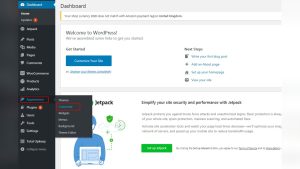
Credit: ninjaforms.com
Understanding Access Levels
WordPress has different roles for users. Each role has specific tasks. Administrator is the top role. They can do everything on the site. Editor can modify posts and pages. They cannot change site settings. Author can write and publish their own posts. They cannot edit others’ posts. Contributor can write but not publish. Their posts need approval.
Roles have different powers. Administrators can view all submissions. Editors cannot see form submissions. Authors and Contributors cannot access form data. To view submissions, users need higher access. Subscriber is the lowest role. Subscribers can only read posts. They cannot see form submissions.
Form Submissions In WordPress
WordPress plugins make handling forms easy. Popular ones include Contact Form 7 and WPForms. These plugins help you create forms without coding. They offer drag-and-drop features. Users can customize forms easily. Other plugins like Gravity Forms provide advanced options. Many plugins have free versions. Some offer premium features for a fee. These plugins store submissions securely. Users can view them from the dashboard. Access levels for viewing forms vary.
Forms collect user information. They are important for businesses. Forms help in collecting feedback. They capture leads and inquiries. Submissions provide valuable data. Data helps in making decisions. They improve customer service. Forms are easy to use. Everyone can fill them. They save time for users. Forms are essential for any site.
Viewing Form Submissions
In WordPress, default access is set for form submissions. Usually, only admins can see all submissions. This helps keep data safe. Editors might see some forms but not all. Authors and contributors often do not have access. They focus on writing posts, not managing forms. Subscribers have no access to form submissions. They read and comment on posts. This setup keeps form data secure and organized.
Each role in WordPress has its own access level. Admins manage the site and see all data. Editors can edit pages and might view some forms. Authors write content, so they have less access. Contributors help with drafts but don’t manage forms. Subscribers are regular users with basic rights. They have the least access. Understanding these roles helps in managing form submissions.

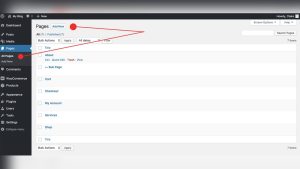
Credit: docs.themeisle.com
Customizing Access Levels
In WordPress, adjusting permissions can help manage who sees form submissions. Admins usually have full access. Editors might see submissions too. Contributors and subscribers may have limited access. Access control is essential for privacy. Settings can change who views these forms. Always check the user roles. Different roles have different permissions. Properly set access levels prevent unauthorized views.
Plugins are helpful for managing access levels in WordPress. Some plugins allow detailed control over form submission visibility. They offer options for customizing who can view forms. Using plugins is simple. Most plugins have easy settings. Choose the right plugin for your needs. Plugins can limit access to certain users. This helps protect sensitive information. Ensure plugins are updated regularly. Updated plugins work better and keep your site secure.
Best Practices For Access Management
Limit who can view form submissions in WordPress. Only give access to trusted users. Use strong passwords. Change them often. Keep your WordPress updated. Updates fix security holes. Install a security plugin. These plugins protect your site. Remove unused plugins and themes. They can be a security risk.
Respect user privacy. Do not share form data without permission. Use HTTPS. It keeps data safe during transfer. Regularly check who has access. Remove users who no longer need it. Encrypt stored data. Encryption adds an extra layer of security. Inform users about data usage. Transparency builds trust.

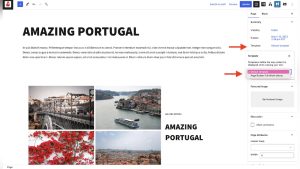
Credit: academy.bricksbuilder.io
Troubleshooting Access Issues
Determining who can view form submissions in WordPress depends on user roles. Administrators have full access to all submissions. Editors and authors may not always have this level of access, depending on your settings. Adjust roles to ensure the right people can view necessary information.
Common Problems
WordPress users often face issues with form submission access. Not everyone can view the submissions. Some users may not have the right permissions. This can cause frustration and delays. Certain roles, like administrators, typically have access. Others, like editors, might not. Changes in settings or updates can alter access levels. Knowing your role is crucial for resolving access problems.
Effective Solutions
Check user roles first. Administrators usually have full access. Review permission settings. Sometimes settings change after updates. Ensure everyone has the correct role. Update plugins regularly. This can fix many access issues. Use plugins to manage roles and permissions. Plugins help streamline access settings. They make it easier to adjust who can view submissions.
Frequently Asked Questions
Who Can View Form Submissions In WordPress?
In WordPress, only users with specific access levels can view form submissions. Typically, administrators have the ability to access all submissions. However, depending on your plugin settings, editors or other roles may also be granted permission. It’s crucial to check your plugin documentation for detailed access control options.
Can Editors Access Form Submissions?
Editors usually do not have permission to view form submissions in WordPress by default. However, some plugins offer settings to customize user access. Administrators can modify these permissions to allow editors or other roles to view submissions, ensuring flexibility in managing access levels based on needs.
How To Manage Form Submission Access?
Managing form submission access in WordPress involves adjusting user roles and permissions. Most form plugins provide settings to control who can view submissions. Administrators can customize these settings to allow specific roles to access form entries, ensuring secure and efficient management of form data.
Do Plugins Affect Form Submission Access?
Plugins greatly influence form submission access in WordPress. They often come with built-in settings that define which user roles can view submissions. Administrators can adjust these settings to control access levels, ensuring that the right users have appropriate permissions to view form data.
Conclusion
Understanding who can view form submissions in WordPress is crucial. It helps manage access and protect data. Typically, admin users have full access. They can view and edit submissions. Editors may see some submissions based on settings. Always check plugin documentation for details.
Control access wisely to maintain privacy. Using these insights ensures better data security. Keep your WordPress site secure and user-friendly. Regularly review user roles and permissions. This practice safeguards sensitive information. Stay informed and keep your site safe. Remember, clear roles prevent data mishaps.