
Are you struggling with uploading large data into your MySQL database? You’re not alone.
Managing vast amounts of information can feel like trying to fit a mountain into a backpack. Yet, with the right approach, you can streamline this process and ensure your data lands exactly where it needs to be. Imagine the possibilities when your data flows smoothly and efficiently.
Your website runs faster, your users have a seamless experience, and you have more time to focus on what truly matters—growing your online presence. We’ll break down the steps you need to take to effortlessly upload large data into your MySQL database. You’ll discover techniques that are not only effective but also easy to implement, even if you’re not a tech wizard. Ready to transform how you manage your data? Let’s dive in.
Choosing The Right Hosting Service
Shared hosting means sharing space with others. It is cheap and easy. But, it can be slow. Many websites use the same server. This can make your site slow. Dedicated hosting means you have your own server. It is fast and strong. But, it costs more money. Choose shared hosting for small sites. Use dedicated hosting for big sites.
Cloud hosting is modern and flexible. It uses many servers. Your site can grow and shrink easily. You pay for what you use. This saves money. If one server breaks, others help. This keeps your site online. Cloud hosting works well for many websites. It is good for big sites and small ones too.
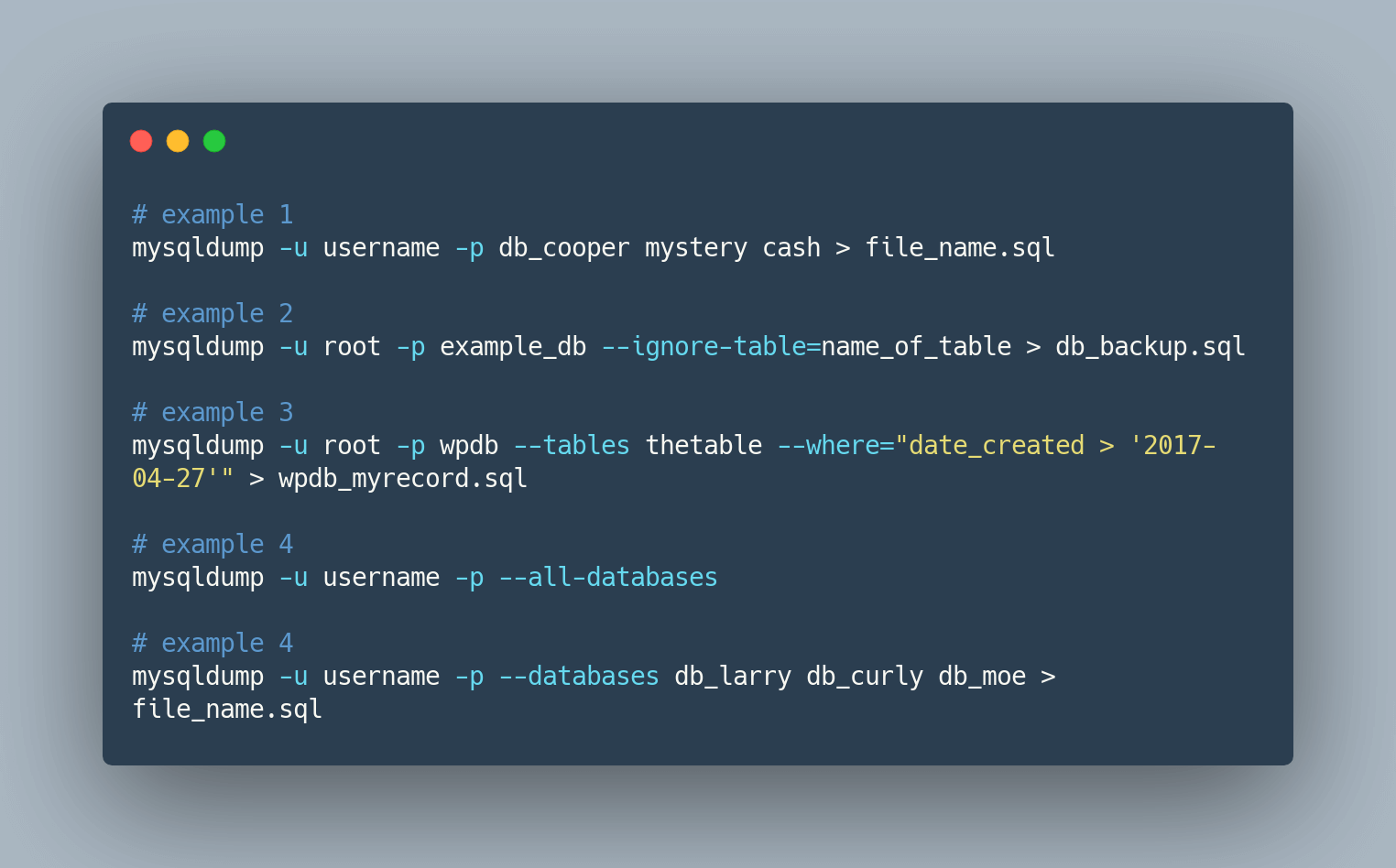
Credit: simplebackups.com
Preparing Your Data
Cleaning data is very important. Remove extra spaces in text. Delete unnecessary symbols. Fix spelling errors. Make sure numbers are correct. Check for duplicate entries and remove them. This will keep your database neat.
Organize data by categories. Group similar items together. Use clear and simple names. This helps find things easily. Sorting data makes it ready for upload.
Choose the right file format. Use CSV for simple text and numbers. JSON is good for complex data. These formats are easy to read and write. They work well with databases.
Avoid using PDFs or Word documents. They are hard to process. Stick to formats that are easy to work with. This makes uploading large data simpler.
Configuring Mysql For Large Data
Large data needs special settings. MySQL server settings must be adjusted. Server Memory plays a crucial role. Check your server’s memory limit. Increase it for better performance. Disk space is also important. Make sure you have enough space. CPU power impacts speed. A faster CPU processes data quickly. Server location affects connection speed. A closer server means faster uploads.
Packet size affects data transfer. Larger packets carry more data. MySQL default packet size is small. Increase it for large data uploads. Packet size changes in MySQL configuration file. Find the max_allowed_packet setting. Increase its value. This helps with large data uploads. Restart server after changes. New settings take effect.

Credit: www.oneschema.co
Uploading Data Via Command Line
MySQL client is a useful tool. It helps upload large data. Open your command line tool. Log in with your MySQL username and password. Next, use the LOAD DATA INFILE command. It will upload your data file. Make sure the file is on your server. Also, remember to set correct permissions. This allows MySQL to read your file. Sometimes, you may need to adjust the buffer size. This helps with very large files.
SSH is a secure way to connect to your server. First, open your terminal. Then, type the SSH command. It will connect to your server. Once connected, use MySQL commands to upload data. SSH makes the process safe. It also keeps your data private. Always check your server settings. This helps prevent errors.
Utilizing Mysql Workbench
MySQL Workbench has a tool called Importing Data Wizard. It helps upload data easily. First, open the wizard. Choose the file you want to import. It could be a CSV or SQL file. Then, follow the steps on screen. This tool is very helpful. It makes uploading big data simple. Ensure the file format is correct. If not, it might fail to upload.
Sometimes, there might be connection issues. Check your internet first. Make sure it is stable. If the problem is not fixed, check your server settings. It might be wrong. Also, verify your login details. Wrong username or password can cause problems. Restarting your computer might help. Try it if nothing works.
Scripting Bulk Uploads
Python is a great tool for automating tasks. It helps with uploading large data to MySQL. Use Python scripts to ease the process. First, install the MySQL connector in Python. It helps connect to the database. Then, write a script to read your data file. Use a loop to insert data row by row into MySQL. This makes the upload efficient and fast. Large files can be tricky. But Python makes it easier.
Batch processing can handle huge datasets. It splits data into smaller parts. This helps in smooth uploads. Create a script that reads data in chunks. Upload each chunk to MySQL. This reduces errors. It also prevents server overload. Use Python’s libraries for easy batch processing. They provide tools for managing large data. Always test your script with small data first. Ensure everything works well. Then, move to larger files.
Dealing With Common Errors
Handling large data uploads into MySQL can be tricky. Increase the `max_allowed_packet` size to allow bigger file uploads. Adjust `upload_max_filesize` in `php. ini` for efficient data import.
Troubleshooting Timeouts
Uploading large data can cause timeouts. This happens if the server takes too long to process. To fix this, you can increase the timeout settings. Check your server configuration. Look for options like max_execution_time. Set it to a higher value. This will give the server more time to work.
Another way is to break data into smaller parts. Upload each part one by one. This reduces the load on the server. It helps in completing the upload smoothly. Always monitor the process. Make sure the server is not overloaded.
Resolving Data Truncation
Data truncation means losing data. This happens if the data size is too big for the field. To fix, check your database schema. Ensure fields are large enough for your data. You can change the field type to store more data. For text, use VARCHAR or TEXT. They hold more information.
Be careful with numeric data. Ensure the field size matches your numbers. Always back up data before changes. This prevents data loss. Double-check after uploading. Make sure all data is intact.
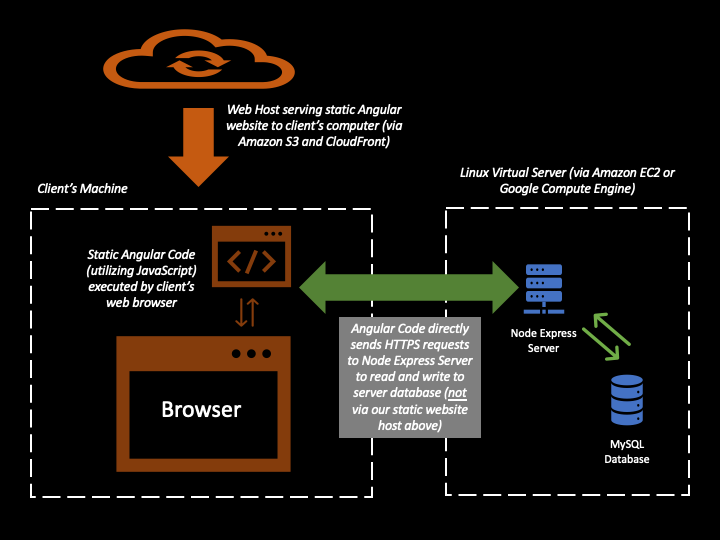
Credit: ashok-khanna.medium.com
Optimizing Performance
Indexes help find data fast. They act like book contents. Use unique indexes for special data. Make sure each index is needed. Too many indexes slow things down. Composite indexes can be handy. Combine fields for better speed. Keep indexes up-to-date for best performance.
Queries fetch data from databases. Simple queries run faster. Avoid wildcard searches. Use selective fields to get data. Order data with efficient queries. Check query execution plans. Look for bottlenecks and fix them. Cache results for repeated queries. Test queries often. Make sure they work well.
Frequently Asked Questions
How To Import Large Data To Mysql?
Use MySQL’s LOAD DATA INFILE command for efficient bulk data import. Ensure the file is properly formatted. Adjust max_allowed_packet and other relevant MySQL settings for large files. Consider using MySQL Workbench or scripts for automation. Always backup data before importing to prevent loss.
How To Insert 10 Million Records In Mysql?
Use MySQL’s LOAD DATA INFILE for bulk inserts. Optimize by disabling indexes temporarily and using transactions. Ensure sufficient memory and adjust buffer settings for faster processing. Consider partitioning tables to manage large datasets effectively.
How Do I Insert A Lot Of Data Into Mysql?
Use `INSERT INTO` with multiple rows syntax for bulk data entry. Utilize `LOAD DATA INFILE` for larger datasets. Optimize database indexing before insertion. Ensure data format matches table schema. Consider using transactions for atomic operations.
What Is The Maximum File Size For Mysql Database?
MySQL can handle up to 256 terabytes depending on the operating system and file system. Factors like table type and storage engine affect limits. Always check with your system specifications for precise limitations.
Conclusion
Uploading large data into a MySQL database can seem challenging. By following the steps outlined, the process becomes manageable. Always ensure data integrity and backup before starting. Use the right tools and scripts to streamline the upload. Practice makes perfect, so don’t hesitate to try different methods.
With these tips, your data upload tasks will become smoother over time. Remember to keep learning and adapting to new MySQL features. Your database will thank you for the attention to detail. Happy uploading!


