
Ever wonder what happens behind the scenes when you visit a website? The magic of the internet often feels instant, but there’s a whole world working tirelessly to bring that website to your screen.
Understanding web hosting is like discovering the backstage of a theater show. It’s where all the hard work happens to deliver the seamless performance you enjoy upfront. You don’t need to be a tech wizard to grasp these concepts. With this guide, you’ll learn how web hosting works in simple terms.
Imagine unlocking a door to a clearer, more insightful internet experience. Curious? Let’s dive in and unveil the secrets of web hosting, making the digital world a little less mysterious for you.
Credit: computer.howstuffworks.com
Basics Of Web Hosting
Web hosting is like renting a spot online. Your website needs space on a server. This space stores all your files and data. It lets people visit your site on the internet. There are different types of hosting. Shared hosting is one option. It means sharing a server with others. Another type is VPS hosting. You get a part of a server just for yourself.
Dedicated hosting means the whole server is yours. It’s for big sites with many visitors. Hosting companies offer these services. They help keep your site running smoothly. Choosing the right hosting is important. It affects how fast your site loads. It also impacts how safe your site is.
Types Of Web Hosting
Shared hosting is when many websites use one server. It is cost-effective. Great for small websites. Resources like CPU and RAM are shared. If one site is busy, others may slow down. It’s easy to set up. Beginners often choose this. Basic support is included.
VPS stands for Virtual Private Server. It’s like shared hosting but better. Websites have their own part of the server. This means more control and freedom. You can install custom software. It’s more secure than shared hosting. Costs more than shared hosting.
Dedicated hosting means you get the whole server. No sharing with others. It is ideal for large websites. Very secure and fast. You have full control over settings. More expensive than VPS and shared hosting. Requires technical knowledge to manage.
Cloud hosting uses many servers. Your site can use resources from all of them. If one server fails, others help. It is reliable and scalable. Great for sites with changing traffic. You pay for what you use. Easy to add more resources when needed.
Key Features To Consider
Choosing the right bandwidth and storage is crucial for your website. Bandwidth affects how much data can transfer. If your site gets lots of visitors, you need more bandwidth. Storage affects how many files you can keep on the server. More storage means more space for your website’s content. Make sure your hosting plan offers enough bandwidth and storage.
Uptime is the time your site is live. A good host offers high uptime. Look for hosts with at least 99% uptime guarantee. This ensures your site is always accessible. A site that is often down can lose visitors. So, uptime is very important.
Customer support helps when you face issues. A host with 24/7 support is best. You can get help anytime. Email, chat, and phone support are common. Good support makes website management easier. Choose a host with reliable customer support.
Keeping your site safe is important. Strong security features protect your data. Look for hosts with SSL certificates. Firewalls and backups add extra protection. Hackers try to attack sites. Security features prevent these attacks. A secure host gives peace of mind.
How Domain Names Work
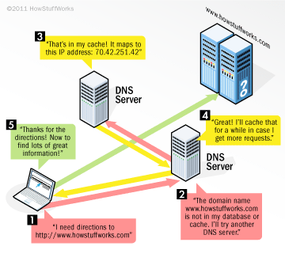
Every website has a unique name. This name is called a domain name. It helps people find websites easily. Imagine the domain name as a house address. Without it, finding the website would be hard. Computers use numbers to find websites. These numbers are called IP addresses. Domain names are easier for humans to remember than numbers.
Special computers store domain names. They are called domain name servers. When you type a domain name, these servers find the right website. They match the domain name to its IP address.
Domain names have parts. The last part is the extension. Examples are .com, .org, and .net. Each extension has a purpose. Choosing the right domain name is important. It helps your website stand out.
Setting Up Your Website
Pick a name that is easy to remember. It should be short and simple. Avoid using numbers or special characters. Check if the name is available. Use domain name search tools. Make sure it reflects your brand or idea. A good domain name helps people find your website easily.
Choose a provider with good reviews. Look for reliable uptime. Make sure they offer customer support. Check if they have security features. Compare different plans. Affordable options are available. Ensure the provider has scalable plans. This helps as your website grows.
Select a CMS that is easy to use. WordPress is popular. It has many themes and plugins. Follow the installation steps carefully. Make sure to configure settings. Learn how to update and manage content. A CMS helps you control your website easily.

Credit: en.wikipedia.org
Managing Your Hosting Account
Understanding how web hosting works can simplify managing your hosting account. It involves organizing files, configuring settings, and monitoring performance. A clear grasp of these tasks ensures your website runs smoothly and efficiently.
Control Panel Overview
The control panel is your dashboard. It helps manage your hosting account. Most control panels have icons and easy menus. You can see website stats and email settings here. Change passwords and manage user access too. It’s like the control center of your website. Simple and user-friendly for everyone.
Managing Files And Databases
Files are stored in a file manager. You can upload or delete files here. Databases keep important information safe. Use the database manager to control data. Both are easy to manage with clear instructions. Always back up your data. This keeps it safe and sound.
Monitoring Performance
Check how your website is doing. The performance monitor shows site speed. It tells you how fast your site loads. See visitor numbers and traffic sources. Use this to keep your website healthy. You want your site to be fast and smooth. Everyone loves a quick website.
Cost Considerations
Prices for web hosting can be different. Some are cheap. Others cost more. Look at what you get for the price. Cheaper plans might offer less. More expensive ones might have extra features. Always check if the features fit your needs.
Hidden fees can surprise you. Some companies add costs later. Maybe for extra storage or support. Always read the fine print. Know what you are paying for. This helps you avoid surprises.
Good value means getting what you need for the price. Check if the hosting is fast. Is the support team helpful? Does it have enough storage? A good deal is not just about the price. It’s about the full package.
Common Challenges And Solutions
Downtime can be frustrating. Websites go offline. This affects users and owners. Regular server maintenance helps reduce downtime. Backups are important. Always have a backup plan. Choose a reliable hosting provider. They offer better uptime.
Sudden traffic spikes can slow websites. Websites might even crash. Scalable hosting plans help. They manage increased traffic well. Use Content Delivery Networks (CDN). This speeds up content delivery. Load balancing also helps. It spreads traffic evenly.
Security is a big concern. Hackers can attack websites. Use strong passwords. Change them often. Install firewalls. They block unwanted access. Keep software updated. Updates fix security holes.

Credit: computer.howstuffworks.com
Frequently Asked Questions
What Is Web Hosting How Does It Work?
Web hosting is a service that stores website files on servers, making them accessible online. Users enter a URL, which directs them to the server, displaying the website’s content. Hosting providers manage server performance and security, ensuring websites run smoothly.
Reliable hosting improves site speed and user experience.
How Does The Internet Work In Howstuffworks?
The internet works through a network of servers and routers. Data travels via protocols like TCP/IP. Users connect using ISPs and devices. Websites are accessed through browsers, utilizing domain names and IP addresses. Information is transmitted efficiently across global networks for seamless connectivity.
How Does A Webserver Work?
A webserver stores and delivers web content like HTML pages. It processes client requests and serves files via HTTP. Users access websites by entering URLs, triggering the webserver to fetch and display the requested pages. Efficient webservers handle multiple requests simultaneously, ensuring fast and reliable website access.
What Is The Web Server Protocol?
A web server protocol is a set of rules for data exchange over the internet. Common protocols include HTTP and HTTPS, which facilitate web page requests and data security. These protocols ensure efficient communication between web servers and clients, enabling seamless browsing experiences.
Conclusion
Understanding web hosting is key for online success. It’s the backbone of your website. Choosing the right host impacts speed and reliability. Knowing how hosting works helps in making informed decisions. This knowledge empowers better website management. You can ensure a smoother user experience.
Web hosting is not just technical; it’s essential. Start with basics, then explore advanced options. You’ll save time and avoid pitfalls. With this foundation, you’re ready to dive deeper. Your website can thrive with the right hosting choice. Keep learning, and your online journey will flourish.


