
Are you curious about what happens behind the scenes when you visit a website? If you’ve ever wondered how your favorite pages appear on your screen in the blink of an eye, you’re in the right place.
Understanding web hosting is the first step to unlocking the mysteries of the internet. It’s like discovering the backstage secrets of a magic show. Imagine having the power to make your website accessible to anyone, anywhere, at any time. Intrigued yet?
We’ll demystify web hosting, showing you exactly how it works and why it’s crucial for your online presence. Whether you’re planning to launch your own site or just want to satisfy your curiosity, keep reading to uncover the essentials of web hosting and how it can work for you.
Credit: blog.gotmyhost.com
Types Of Web Hosting
Shared hosting means many websites use one server. It’s like sharing a room. Each site gets a part of the space. It’s cheap and good for small websites. But, if one site uses too much space, others slow down. It’s easy to set up. Best for beginners.
VPS hosting gives more control than shared hosting. You get a virtual space. It’s like renting an apartment. Other sites do not affect your site. It’s more expensive but faster. Good for growing websites needing more space.
Dedicated hosting gives you a whole server. It’s like owning a house. No sharing with others. It’s fast and secure. Perfect for big websites with lots of visitors. But, it costs more. You need to manage it yourself.
Cloud hosting uses many servers to host your site. It’s like using many computers at once. If one fails, others help. It’s flexible and reliable. You pay for what you use. Best for sites with unpredictable traffic.

Credit: www.hostinger.com
Key Components Of Web Hosting
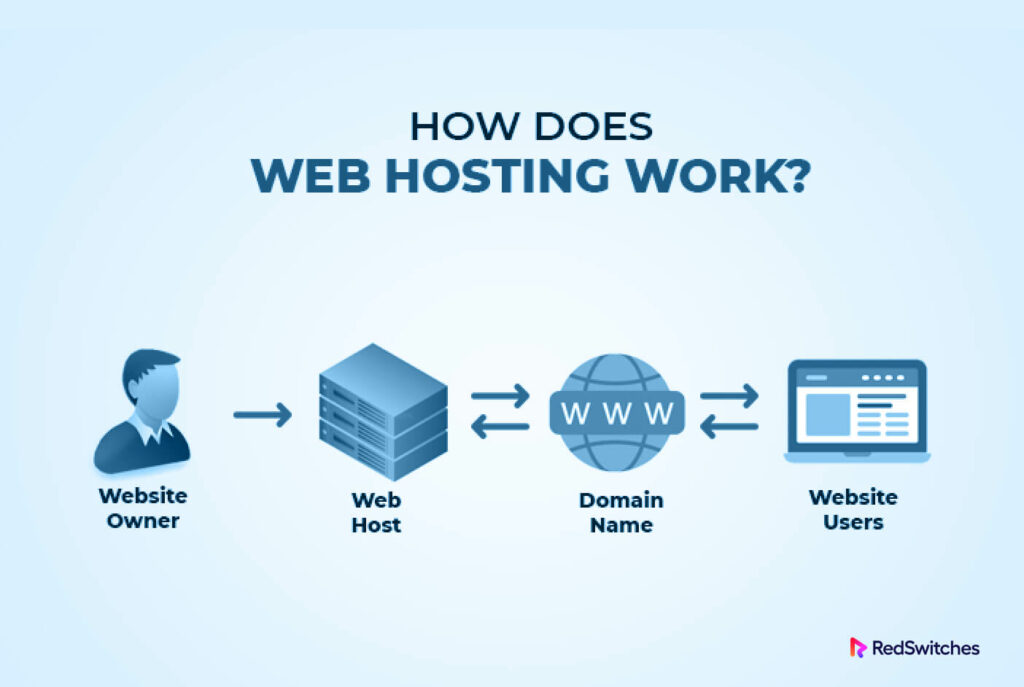
Servers are like big computers. They store your website’s files. When someone visits your site, the server shows them these files. This makes the site appear on their screen. Servers need to be strong and fast. This helps your site load quickly. Fast loading is important for happy visitors.
Data centers are buildings with many servers. They keep servers safe and cool. This helps them work well. Data centers need power all the time. This ensures websites are always online. Strong security protects the servers from harm.
Bandwidth is like a road. It lets data travel to and from the server. More bandwidth means more data can move at once. It helps your site run smoothly, even with many visitors. Websites with videos need more bandwidth.
Storage holds all your website files. It includes text, pictures, and videos. More storage means more space for these files. Websites with lots of content need more storage. Choose storage based on your site’s needs.
Domain Name And Dns
A domain name is your website’s online address. People type it in a browser to find your site. Domain registration is the first step. You choose a name and register it with a registrar. This name should be unique. Popular registrars include GoDaddy and Namecheap. You pay a fee to keep the name. If you don’t renew, someone else can take it. Always remember to renew on time.
DNS stands for Domain Name System. It helps connect domain names to IP addresses. Think of it as a phone book for the internet. You type a name, and DNS finds the right server. Configuring DNS ensures your site is reachable. Changes may take time to spread. This is called propagation. Always double-check your DNS settings. Mistakes can cause your site to go down.
Hosting Features And Tools
Control panels help manage your website easily. Tools like cPanel or Plesk offer simple interfaces. They let you handle your files, emails, and domains. You can also manage databases and install software. These tools make website management simple and quick.
Email hosting provides you professional email addresses. They match your domain name. This looks more professional. You get features like spam filters and antivirus protection. It ensures your emails are safe and clean. Email hosting also offers large storage. You can store many emails without worry.
Security is vital for web hosting. SSL certificates protect your data. They ensure safe connections. Firewalls block harmful traffic. They keep hackers out. DDoS protection prevents attacks. It keeps your site online. Security features help protect your website and users.
The Process Of Setting Up Hosting
Picking the right hosting provider is very important. It affects your site’s performance. Reputation and customer reviews help in choosing. Pricing and features matter too. Providers offer shared, VPS, and dedicated hosting. Each has its own benefits. Shared hosting is cheaper but less powerful. Dedicated hosting is costly but offers more control.
After choosing a provider, select a hosting plan. Plans differ in storage, bandwidth, and support. Basic plans suit small sites. Advanced plans fit larger sites. Compare plans carefully. Choose the one that meets your needs. Think about future growth too.
Upload website files using FTP or the provider’s panel. FTP is a tool to transfer files. Many panels offer easy upload options. Ensure files are in correct format. Check permissions for each file. Proper uploads make the site work well. Test your site after uploading. Fix any errors found.
Maintenance And Management
Monitoring performance is key to a healthy website. Keep an eye on load times. Check for errors often. A slow site can lose visitors fast.
Regular backups are a must. Save copies of your site often. If something breaks, you can restore it. This saves time and stress.
Software updates keep your site safe. New versions fix bugs and improve security. Always update your software when new versions come out. This helps protect your data.
Common Issues And Troubleshooting
Downtime can be very frustrating. It happens when servers stop working. Websites become unreachable during downtime. This can cause loss of visitors. Regular maintenance helps reduce downtime. Always check server status. Use reliable hosting services. These steps can keep your site online.
Slow websites can annoy users. They might leave quickly. Large images can slow down sites. Optimize images to fix this. Too many plugins can also slow down speed. Remove unused plugins. Fast websites make users happy. They also rank better in search engines.
Websites must be safe from attacks. Hackers look for weak spots. Strong passwords help protect sites. Always update software and plugins. Use SSL certificates for secure connections. Back up data regularly. This keeps your information safe. Protect your website to keep users safe.
Future Trends In Web Hosting
Web hosting evolves with cloud solutions and AI integration. These innovations enhance speed and security for websites. Understanding web hosting helps in grasping its future potential.
Green Hosting
Green hosting uses less energy. It helps the planet stay clean. Solar energy powers many servers today. Wind energy is also popular. Green hosting saves money and helps the Earth. Many people choose green hosting now. It is a smart choice for the future.
Ai And Automation
AI helps web hosting work better. It fixes problems fast. Automation does tasks quickly. No human needed. AI learns and gets smarter. It makes hosting easy. More hosts use AI every year. It saves time and effort.
Edge Computing
Edge computing is fast. It works near users. It cuts down travel time for data. Web pages load quickly. Edge computing helps with big data. Many websites use it now. It is a trend for web hosting. It keeps websites running smooth.

Credit: www.znetlive.com
Frequently Asked Questions
How Does The Web Hosting Work?
Web hosting stores website files on servers. These servers deliver files to users when they access the site. Hosting providers manage server maintenance, security, and uptime, ensuring site accessibility. Different hosting types include shared, VPS, and dedicated hosting, each offering varying levels of control and resources.
How Much Do I Pay To Host A Website?
Website hosting costs vary from $2 to $100+ monthly. Prices depend on hosting type, features, and provider. Shared hosting is cheapest, while dedicated servers are more expensive. Evaluate your needs to choose the right plan for your budget. Always compare options before making a decision.
Can I Run My Website Without Hosting?
Websites need hosting to be accessible online. Hosting provides server space for website files. Without hosting, a website cannot function or be visited by users. To ensure your site runs smoothly, choose reliable hosting services for optimal performance and security.
What Are The Three Types Of Web Hosting?
The three types of web hosting are shared hosting, dedicated hosting, and VPS hosting. Shared hosting is cost-effective, offering resources on a single server. Dedicated hosting provides exclusive server access, ensuring high performance. VPS hosting offers a balance, using virtual partitions on a single server for flexibility.
Conclusion
Web hosting makes websites accessible to everyone online. It stores your website files on powerful servers. These servers deliver your site to users when they type its address. Different hosting types suit different needs and budgets. Shared hosting is cost-effective, while dedicated hosting offers more control.
Cloud hosting ensures reliability with multiple servers. Choosing the right host boosts website performance and security. Understand your hosting needs before selecting a plan. A good host supports your growth and keeps your site running smoothly. Web hosting is key to your online presence.


