
Have you ever wondered what actually happens behind the scenes when you type in a website address and hit enter? Understanding how web hosting works can seem a bit daunting at first, but it doesn’t have to be.
Imagine having a visual diagram that breaks down the process step by step, making it as simple as following a treasure map. By the end of this article, you’ll have a clear picture of how your favorite websites come to life on the internet.
Whether you’re a curious internet user, a budding entrepreneur looking to launch your own site, or just someone who loves learning new things, this easy-to-follow guide will unravel the mystery of web hosting for you. Dive in and discover the hidden world that powers the web pages you visit every day.
What Is Web Hosting?
Web hosting is like renting space on the internet. It helps websites go online. Think of it like a library. Each website is a book. Hosting keeps the book safe and accessible.
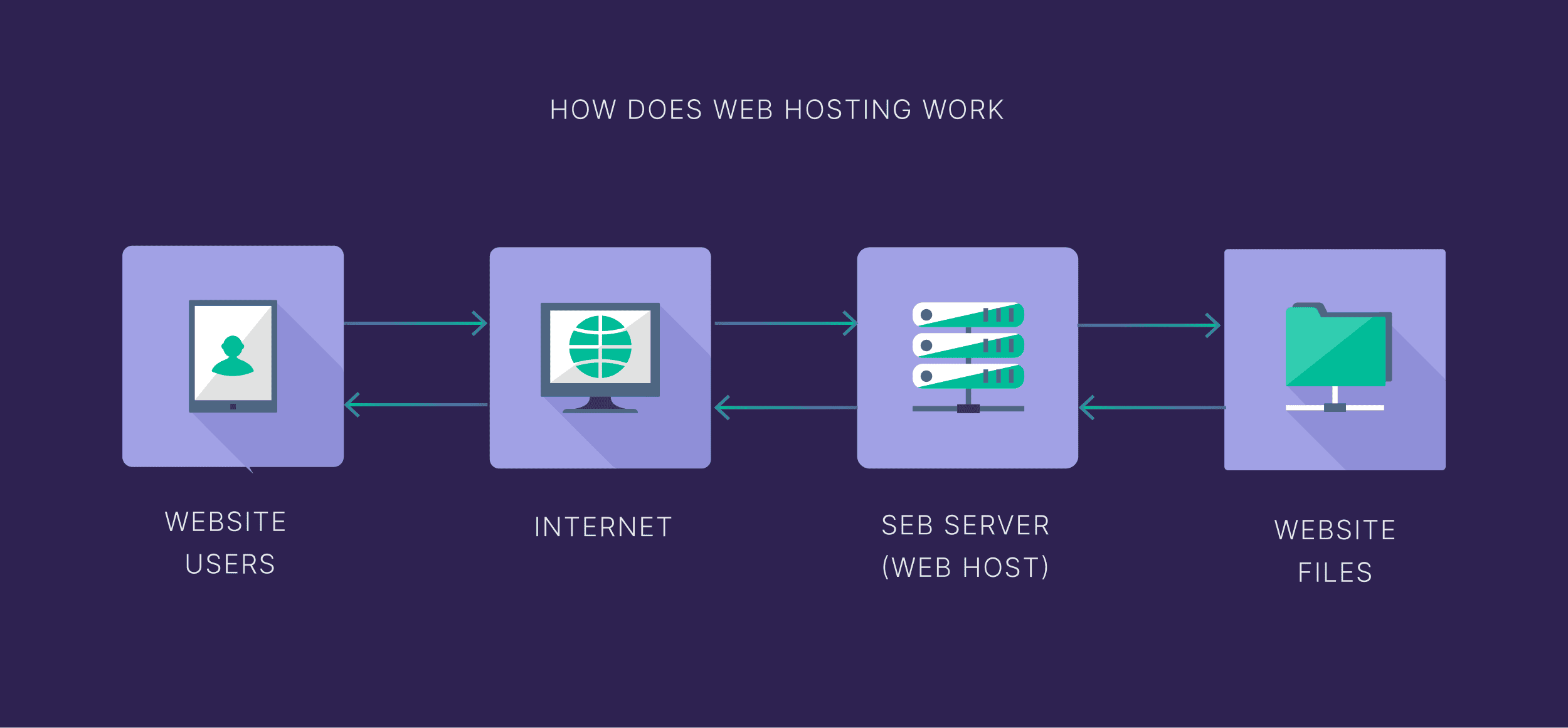
Web hosting stores files and data. These files make up your website. When someone visits your site, hosting sends the files to their browser. This process makes your website visible.
There are different types of hosting. Shared hosting is like sharing a house with others. It’s cheap but has limits. Dedicated hosting is like owning a house. It’s more private and powerful.
Choosing the right hosting is important. It affects site speed and security. Good hosting keeps your site fast and safe. This ensures a better experience for visitors.
Types Of Web Hosting
Shared hosting is like sharing a room. You share resources with others. This includes CPU, RAM, and disk space. It is usually the cheapest option. Good for small websites. But, if one site is busy, yours may slow down.
VPS stands for Virtual Private Server. It is like having an apartment. You get your own space. More control than shared hosting. Better performance too. Good for growing websites. Costs more than shared hosting.
Dedicated hosting gives you a whole server. No sharing with others. You have full control. Best for big websites. Offers high performance and security. But, it is expensive. Needs technical skills to manage.
Cloud hosting uses many servers. If one server fails, others help. Offers great flexibility and scalability. You pay for what you use. Good for websites with changing traffic. It is reliable and fast.
Key Components Of Web Hosting
A web server stores your website files. It delivers them to users who visit your site. Think of it as a big computer. This computer is always on, ready to send information. It keeps your website running smoothly.
Datacenters are large facilities. They house many web servers. These centers have strong security and cooling systems. They keep servers safe and working well. Datacenters ensure your website is always accessible.
The Domain Name System translates web addresses. It turns easy names into computer-friendly numbers. This system lets users find your site using a simple URL. Without DNS, searching websites would be hard.
A Content Delivery Network helps load web pages faster. It stores copies of your website in different places worldwide. When someone visits your site, CDN sends them data from the nearest server. This reduces wait time.
Credit: www.researchgate.net
How Websites Are Stored
Websites live on special computers. These are called servers. A server stores all the website files. These files include pictures, text, and videos. When you visit a website, your computer talks to the server. This happens through the internet. The server sends the website files to your computer. Then, your browser shows the website on your screen.
Web hosting companies own many servers. They rent space on these servers to website owners. This is called web hosting. Hosting plans can be small or big. Small plans are for simple websites. Big plans are for websites with many visitors. Web hosting keeps websites online. It helps people around the world see them.
Process Of Accessing A Website
DNS stands for Domain Name System. It finds the website’s server. The DNS matches the domain name with the server’s IP address. This makes sure you reach the right website. DNS servers are like phone books. They store many domain names and IP addresses.
The IP address is a unique number. It tells where the server is located. Your computer asks the DNS for this number. The DNS sends back the correct IP address. With this address, your computer can connect to the website’s server.
Data moves between your computer and the server. HTTP or HTTPS is used for this transfer. Your computer sends a request to the server. The server sends back the website data. This includes text, images, and videos. The browser shows the data on your screen. This process is fast and happens in seconds.

Credit: www.geeksforgeeks.org
Security Measures In Web Hosting
SSL Certificates are important for website safety. They make sure data stays private. Without SSL, data can be stolen. SSL encrypts data. This means it is hard to read by outsiders. Websites with SSL show a padlock icon. This tells users the site is safe.
Firewalls act as guards for websites. They block bad traffic. Only good traffic gets through. Firewalls stop hackers from entering. They keep websites safe from attacks. This protection is crucial for all websites.
Regular backups save website data often. If something goes wrong, backups help. They restore lost data quickly. Backups are like a safety net. They make sure data is not lost forever. Every website needs regular backups.
Common Challenges In Web Hosting
Downtime means your website is not working. Visitors get frustrated. Businesses can lose money if the site is down. Regular downtime damages your site’s reputation. Monitoring tools help reduce downtime. Choose a reliable host to avoid this issue.
Bandwidth is the data your site uses. More visitors mean more bandwidth. Exceeding limits can slow down your site. Slow websites annoy users. Check your hosting plan for bandwidth limits. Opt for plans with higher bandwidth if needed.
Websites grow over time. More content, more traffic. Scalability becomes a concern. Hosting must adapt to this growth. Some hosts offer limited resources. Upgrade plans if your site grows big. Scalable hosting ensures smooth growth.
Credit: backlinko.com
Future Trends In Web Hosting
Web hosting is going green. Green hosting uses less energy. Servers run on clean energy. This helps the Earth. More people want eco-friendly options. Green hosting is the answer. Many companies are adopting this trend. Future servers will be more efficient. This is good for everyone.
Automation makes web hosting easy. Tasks are done by machines. This saves time and money. People do not need to do boring tasks. Errors are less because machines follow rules. More companies use automation. It makes web hosting smooth and fast.
Security is very important. Enhanced security protocols keep data safe. Bad people cannot steal information. Web hosting companies work hard on this. They use strong tools and software. New methods are coming every day. This keeps websites and data safe.
Frequently Asked Questions
What Is Web Hosting And How Does It Work?
Web hosting stores your website files on a server, making them accessible online. Hosting providers maintain these servers, ensuring your site runs smoothly and remains available to users. You choose a hosting plan based on your needs, and the provider handles the technical aspects.
How Does Web App Hosting Work?
Web app hosting stores your app on servers, making it accessible via the internet. Hosting providers offer server space and manage resources, ensuring availability and performance. You select a plan based on your app’s needs, and the provider handles technical aspects like security and updates.
What Is Web Hosting In Simple Terms?
Web hosting is a service that allows individuals and businesses to make their websites accessible online. It involves storing your website’s files on a server so that users can access it via the internet. Essentially, it is like renting space on the internet for your website.
How Does A Web Hosting Server Work?
A web hosting server stores and manages website files. When a user enters your website’s URL, the server retrieves and displays those files on the user’s browser. It handles requests and ensures that your website is accessible 24/7 to anyone who wants to visit it.
Conclusion
Understanding web hosting is easier with visual diagrams. They simplify complex processes. These diagrams show how data travels. From servers to your screen. Each step is clear. Learning visually helps grasp concepts faster. It makes the internet less mysterious. For beginners, this is crucial.
It’s like seeing the unseen. Now, you’re ready to explore web hosting further. Remember, it’s all about connections. Between servers, websites, and users. Simple, yet powerful. Keep exploring and learning. The web is vast. But with knowledge, you can navigate it confidently.
Happy learning and hosting!


