
Are you curious about how your WordPress website is performing? Understanding your site’s statistics is key to improving your online presence and reaching your goals.
When you view stats on WordPress, what exactly does that include? You might be wondering what numbers really matter and how they can influence your content strategy. Imagine having the ability to see which of your blog posts captivate the most readers, discover where your traffic is coming from, and identify the best times to publish your content.
These insights can transform your blogging experience and help you connect with your audience more effectively. We’ll break down the essentials of WordPress stats, showing you exactly what they include and why they matter to you. Keep reading to unlock the potential of your website and take the guesswork out of your online strategy.

Credit: jetpack.com
WordPress Stats Overview
WordPress stats help you know your blog’s performance. You can see how many people visit. Stats show you which posts are popular. You learn what content readers like. It can show visitors’ location. This helps you understand your audience. You can track referrals. This tells you where visitors come from. It could be social media. Or search engines. It helps in improving your site. You can see clicks on your links. This helps in knowing what interests people. Stats show what devices visitors use. Mobile or desktop. Important for design. Stats are a tool for growth. They are simple to use.
Traffic Sources
Search engines are tools like Google or Bing. They help people find your website. Your site gets visitors from these places. These visitors are called organic traffic. They are very important for your site. Search engines look at your content. Then, they decide if your site is useful. This helps your site get more visitors.
Social media platforms are places like Facebook or Twitter. People share your content there. When they do, others see it. This brings social traffic to your site. It is fun to see who shares your posts. More shares mean more visitors. Social media helps your site grow.
Direct traffic comes when people type your site name. They go straight to your site. This means they know your website. Direct traffic shows you have loyal visitors. These visitors often return. It’s good to have direct traffic.
Referrals happen when other sites link to you. Someone clicks a link on another site. Then, they visit your site. These visitors are called referral traffic. It’s nice when other sites talk about you. Referrals help your site gain trust. More referrals mean more visitors.
Visitor Details
WordPress stats show where visitors come from. This is called location insights. You can see which countries or cities your audience is from. This helps understand where your blog is popular. You might notice many visitors from one place. That might mean your content is liked there. Knowing locations helps make content better for those areas. Adjust topics or language to connect more with them.
WordPress also shows which devices visitors use. Some use computers. Others use phones or tablets. This info helps make your blog better. If many use phones, make sure your site is easy to see on small screens. Device usage helps you know how visitors view your content. Make sure your blog works well on all devices. This ensures everyone can read your posts easily.
Content Performance
WordPress helps you know which posts are popular. You can see the Top Posts and Pages. This tells you what readers like most. It shows which pages get the most visits. You can use this information to create similar content.
Engagement metrics show how readers interact with your site. They include likes, comments, and shares. These metrics are key to understanding your audience. If many people like a post, it means they enjoy it. Comments show that people want to talk about your content.
Site Activity
Understanding comments and interactions on your WordPress site is important. Comments show how readers feel about your posts. They share thoughts and ask questions. This helps you know what they like. Responding to comments builds a strong community. It makes readers feel valued and connected.
Interactions also include other actions. These are clicks on links or buttons. Each action tells you if content is interesting. It helps in creating better posts. Keeping track of interactions helps improve engagement.
Likes and shares show how popular your content is. A post with many likes is well-received. Shares mean readers want others to see it too. This spreads your content to more people. Watching likes and shares helps you understand what readers enjoy. It guides you in making great content.
Timing Analysis
Understanding peak visit times helps you know when your blog is busy. This means more people are reading at the same time. It is usually during lunch breaks or evenings. Knowing this can help you post at the right time. More visitors can make your blog grow.
Daily and weekly trends show how your blog does each day. You may notice more visits on weekends. Or maybe weekdays are more popular. These trends help you plan better. You can see if a special event boosts visits. Patterns can change, so check often. This helps keep your blog successful.
Tools For Tracking Stats
WordPress offers tools for tracking stats that include page views, visitor counts, and traffic sources. These insights help users understand audience behavior, popular content, and peak visit times. Such data is essential for enhancing website performance and engagement.
Jetpack
Jetpack is a popular tool for WordPress. It helps track website stats. With Jetpack, you can see how many people visit your site. You can also see which posts are popular. This helps you know what your readers like. Jetpack can show you daily, weekly, and monthly stats. It’s easy to use. The setup is quick. Even beginners can use it. Jetpack also offers other features. It can help keep your site safe. This makes it a useful tool.
Google Analytics
Google Analytics is another tool. It is very detailed. You can see where your visitors come from. It shows which countries or cities they are from. You can also learn what devices they use. This helps you understand your audience better. Google Analytics is free. Many people use it. It’s a bit complex. But, it offers much information. This tool is very helpful for website owners.
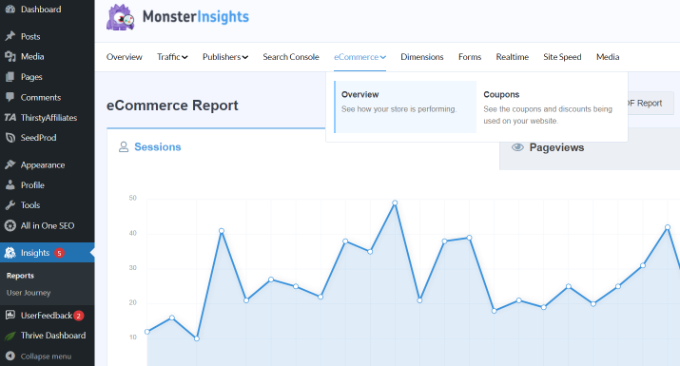
Credit: www.wpbeginner.com

Credit: jetpack.com
Frequently Asked Questions
What Do WordPress View Stats Include?
WordPress view stats include data on page views, unique visitors, and popular content. It helps you understand user behavior and engagement. You can track which posts attract the most attention. This insight can guide your content strategy and improve user experience on your site.
How Can I Access WordPress View Stats?
To access WordPress view stats, log into your WordPress dashboard. Navigate to the “Site Stats” or “Stats” section. Here, you can view detailed statistics about your website’s performance. This area provides insights into visitor numbers, popular posts, and traffic sources.
Why Are WordPress View Stats Important?
WordPress view stats are crucial for understanding your audience. They help you identify popular content and visitor trends. With this data, you can tailor your content strategy. It enhances user engagement and boosts your site’s performance, leading to better search engine rankings.
Can WordPress Stats Track Visitor Locations?
Yes, WordPress stats can track visitor locations. They provide geographical data about where your visitors come from. This information helps you understand your audience better. You can tailor your content to meet the needs of specific regions, enhancing user engagement and relevance.
Conclusion
Exploring WordPress stats gives you valuable insights. You learn about visitor behavior. Understand which posts attract the most attention. Track the number of views easily. Find out where your traffic comes from. Discover the best times for your content. Use this data to improve your blog strategy.
Write better, more engaging posts. Increase your audience’s interest. Enhance your site’s performance with informed decisions. Keep an eye on trends. Stay ahead in the blogging world. With WordPress stats, you gain knowledge. Create content that truly resonates with your readers.


