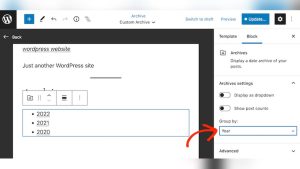
Unlocking the power of featured posts in WordPress can transform your website from mundane to mesmerizing. Imagine having your most compelling content front and center, grabbing your readers’ attention the moment they land on your page.
This isn’t just about aesthetics; it’s about strategy. You want to guide your visitors to your best work, the posts that truly reflect your brand and message. But how do you make your posts stand out in a sea of content?
The answer lies in understanding the art and science of making posts featured in WordPress. In this guide, you’ll discover simple steps and insider tips to elevate your content. Dive in and learn how to captivate your audience with the right featured posts.
Understanding Featured Posts
Featured posts draw attention. They appear at the top of your blog. This helps them get more views. You can choose which posts to feature. It’s easy to do in WordPress.
You must first log into your WordPress dashboard. Find the post you want to feature. Click the “Edit” button. Look for the “Visibility” option on the right. Check the box that says “Stick this post to the front page”. This makes your post featured.
Featured posts keep your important content visible. They highlight your best work. They also make it easy for readers to find key information. Try making posts featured today.

Credit: docs.themeisle.com
Benefits Of Featured Posts
Featured posts stand out on your website. They catch the eye of visitors fast. This makes more people click on them. More clicks mean more views. This boosts your content’s visibility. It helps your post reach a larger audience.
People like engaging content. Featured posts often get more comments and shares. This increases interaction with your audience. It makes your readers feel involved. Engaged readers often return for more. Your site becomes a favorite.
Google loves popular content. Featured posts can improve your SEO. They bring more traffic to your site. More traffic can lead to better search rankings. High-ranking posts are seen by more people. Better rankings mean more visitors.
Selecting The Right Posts
Choose posts with clear and simple ideas. Readers enjoy content that is easy to read. Ensure your post has a strong and clear message. Use good images to make the post more engaging. Good images help tell the story. Review grammar and spelling for errors. Correct errors quickly.
Know what your readers like. Write about topics they care about. Keep the content relevant to their interests. Make sure it answers questions they have. Engage with your audience through comments. Listen to their feedback to improve posts.
Look at the time of year. Seasonal content can attract more readers. Plan posts around holidays or events. Create content that fits with current trends. Trends change often. Update posts regularly to stay fresh.

Credit: community.make.com
Using WordPress Features
WordPress has a feature called Sticky Posts. It helps you keep important posts at the top. This makes sure your readers see them first. To use this feature, go to your post settings. Check the box that says “Stick this post to the front page.” Easy, right? Now your post stays at the top.
A Featured Image makes your post stand out. It grabs attention quickly. To add a featured image, look for the “Set Featured Image” option. Click it. Choose a nice picture that matches your post. Images tell a story too. They make your post look more interesting.
WordPress lets you create Custom Post Types. These help organize your content better. Not just regular posts. You can have types like portfolio or testimonials. Use plugins or coding to set them up. They give your site a unique feel. Your visitors will find what they need fast.
Plugins For Featured Posts
Featured posts make your blog stand out. Many plugins can help. Jetpack is popular. It offers many tools. MonsterInsights is another choice. It helps you see what posts people like. WP Featured Content is simple and neat. Each plugin has its own features. Choose what fits your needs best.
Installing plugins is easy. Go to your dashboard. Click on Plugins. Choose Add New. Search for the plugin name. Hit Install. Then, Activate it. Follow the setup steps. Each plugin may have different steps. Read carefully. You can always ask for help if stuck.
Plugins offer many customization options. You can change colors. You can choose which posts to feature. Some plugins let you add images. Others give you layout choices. Jetpack has many options. MonsterInsights helps track post performance. Make your blog unique with these features.
Credit: firstsiteguide.com
Designing Featured Post Layouts
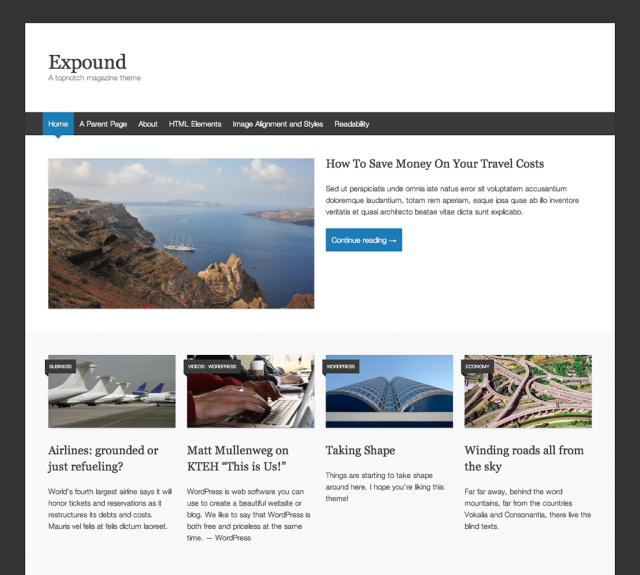
Not every theme supports featured posts. Always check your theme’s documentation. Some themes have built-in features for this. You may need to customize your theme. It’s important to ensure your layout matches the theme.
Widgets help add featured posts easily. You can drag and drop them in your sidebar. Shortcodes are also useful. They allow you to place featured posts within content. Both are simple to use.
Featured posts should look good on all devices. Always test on phones and tablets. Responsive design is key. Use CSS for better alignment and spacing. This ensures a smooth user experience.
Promoting Featured Posts
Share featured posts on Facebook, Twitter, and Instagram. Use eye-catching images and short captions. Ask friends to like and share the posts. This helps reach more people.
Include featured posts in your newsletter. Use a brief summary. Tell readers why the post is important. Use bold text for key points. Encourage subscribers to read and share. This keeps your audience engaged.
Collaborate with other bloggers. Share each other’s featured posts. Use guest posts to reach new audiences. Link to each other’s content. Boosts visibility for both parties. Helps build a strong community.
Analyzing Featured Post Performance
Discover how to feature posts effectively in WordPress by analyzing their performance. Improve visibility by selecting engaging content that captures attention. Monitor metrics to ensure your featured posts resonate with your audience.
Tracking Metrics
Knowing which metrics to track is key. Focus on views, clicks, and shares. These numbers tell if a post is popular. If a post has many views, it is doing well. Low clicks might mean the title needs work. Shares show if the content is engaging. Use these metrics to measure success.
Utilizing Google Analytics
Google Analytics is a great tool. It shows you how people find your post. Check the traffic sources to see if it’s from search engines or social media. Look at the bounce rate. A high rate means people leave quickly. This might mean the content needs improvement. Use this data to make decisions.
Adjusting Strategies Based On Data
Data helps you improve your strategies. If views are low, try a new title. If the bounce rate is high, update the content. Always be ready to change. Testing new things can help your post perform better. Keep checking the numbers. Make changes based on what the data shows.
Frequently Asked Questions
How Do I Feature A Post In WordPress?
To feature a post in WordPress, use the “Sticky Posts” option. Navigate to your post editor, click on “Edit” under visibility, and check “Stick to the front page. ” This will keep your post prominently displayed on your homepage.
Can I Feature Multiple Posts Simultaneously?
Yes, WordPress allows you to feature multiple posts at once. Simply mark each post as “Sticky” through the post editor. This method ensures all selected posts appear prominently on your homepage, providing equal visibility to each.
Do Featured Posts Affect Seo?
Featured posts can positively impact SEO by increasing visibility and engagement. Sticky posts draw more user interaction, which can improve search rankings. They help highlight important content, encouraging backlinks and social shares.
Is There A Plugin For Featured Posts?
Several plugins can help manage featured posts. Plugins like “WP Featured Content and Slider” enhance control over featured content. These tools provide additional customization options, making it easier to highlight posts effectively.
Conclusion
Creating featured posts in WordPress is simple and effective. These posts grab attention and boost engagement. Start by selecting key content to feature. Use WordPress tools to highlight these posts. Customize the display to fit your site’s design. Regular updates keep your content fresh.
Featured posts guide readers to important information. They enhance your site’s look and feel. With these tips, you can easily showcase your best work. Experiment and find what works best for your audience. Enjoy the benefits of featuring posts effectively.