
Are you wondering how long it takes for Namecheap to update DNS settings? Navigating the world of domain names and DNS can feel like a daunting task, especially when you’re eager to see your changes take effect.
You’ve made the necessary updates, but the waiting game begins. How long will it actually take for everything to sync up and start working as expected? This is a question that many domain owners ask, and understanding the timeline can save you from unnecessary stress and confusion.
We’ll break down the DNS update process with Namecheap, giving you clear insights and practical tips to help ensure a smooth transition. Read on to discover what happens behind the scenes and what you can do to speed up the process.
Dns Update Process
Understanding the DNS update process is crucial for website management. DNS, or Domain Name System, is like the internet’s phone book. When you update DNS settings, changes may not be immediate. This delay can impact how quickly your website is accessible. Namecheap, a popular domain registrar, plays a key role in DNS management. Let’s explore how Namecheap handles DNS updates.
What Is Dns?
DNS stands for Domain Name System. It translates domain names into IP addresses. This translation helps browsers load websites. Without DNS, remembering IP addresses would be difficult. It’s an essential part of the internet infrastructure. It ensures websites are accessible to users worldwide.
Role Of Namecheap In Dns Management
Namecheap manages your domain’s DNS settings. When you register a domain, Namecheap handles its DNS records. These records are essential for directing internet traffic. Namecheap provides tools to edit these settings easily. Users can update DNS records through their Namecheap account. This updates the domain’s IP address and other data.
After making changes, DNS propagation begins. This process updates DNS servers worldwide. It may take 24 to 48 hours. This delay is due to how DNS servers refresh their data. Patience is key during this period.

Credit: landingi.com
Factors Affecting Dns Update Time
Understanding the factors affecting DNS update time is crucial. Every website owner knows how vital DNS updates are. They ensure your site is accessible after changes. Namecheap DNS updates can vary in speed. Several elements influence this timing. Let’s delve into these factors for clarity.
Propagation Time
Propagation time is essential in DNS updates. It’s the period DNS changes spread across the internet. Global DNS servers need to receive and apply the new data. This process can take hours or even days. The speed depends on server locations and network efficiency.
Server Configuration
Server configuration impacts DNS update time significantly. Different servers have unique settings and protocols. These configurations determine how fast DNS changes are recognized. Well-optimized servers update faster. Conversely, outdated servers might lag in applying changes.
Ttl Settings
TTL settings directly affect DNS update timing. TTL stands for Time-to-Live. It’s a value set in DNS records. It dictates how long servers should cache the DNS information. Shorter TTL means quicker updates. Longer TTL results in slower propagation. Adjusting TTL can optimize update speed.
Typical Update Duration
DNS updates with Namecheap usually take 24 to 48 hours to fully propagate. During this time, changes gradually spread across global servers. This means some users might see updates faster than others.
When you’re updating DNS settings, one of the most crucial questions that pop up is: how long will it take? Understanding the typical update duration can save you from unnecessary frustration. Whether you’re launching a new website or tweaking settings for better performance, knowing the timeline helps you plan effectively.Expected Time Frame
The usual time for DNS updates through Namecheap is between 24 to 48 hours. However, this isn’t a hard and fast rule. Sometimes changes take place much quicker, within just a few hours. Picture this: you’ve just changed your domain’s nameservers and are eagerly waiting to see your new site live. It’s like waiting for a train that may arrive sooner than expected—or might just take its sweet time. Why such a range in time? DNS propagation is influenced by several factors. These include the TTL (Time to Live) settings and how quickly your ISP refreshes their DNS cache. Have you ever refreshed your browser multiple times, hoping for your changes to appear instantly? You’re not alone. Patience is key, but staying informed about these time frames can ease your anticipation.Comparing With Other Registrars
How does Namecheap stack up against other registrars? Generally, Namecheap’s update duration is on par with competitors like GoDaddy and Bluehost. They also claim a similar 24 to 48-hour window. But sometimes, registrars have faster propagation due to more frequent cache updates. Imagine switching from another registrar to Namecheap and noticing a quicker DNS update. It’s like moving to a neighborhood with better public transport—you just get where you need to go faster. However, some registrars offer features to speed up propagation, like DNS acceleration tools. If you’re managing a business site, every second counts. Would you consider paying extra for faster DNS updates? Ultimately, choosing the right registrar involves weighing these factors. Are you more concerned about speed or price? Understanding these elements can guide your decision-making process and help you maintain your online presence seamlessly.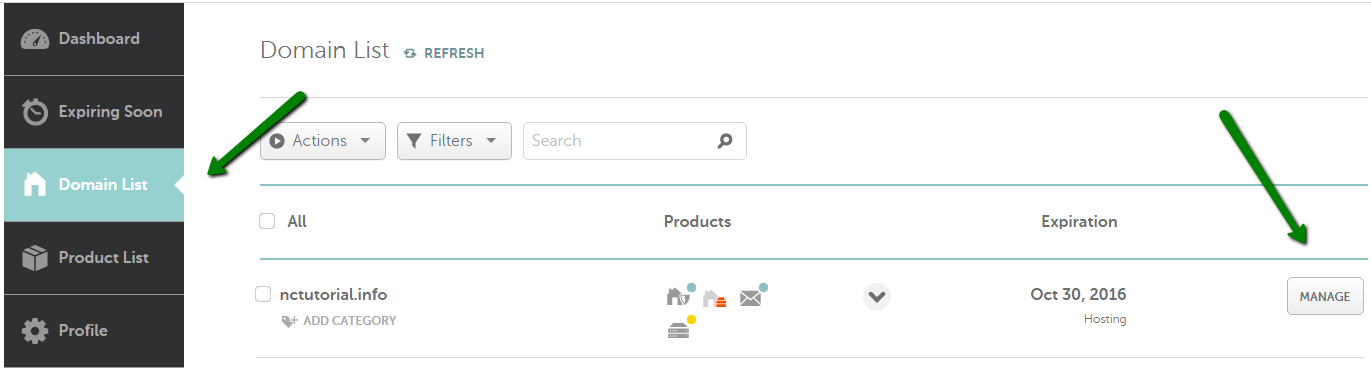
Credit: www.namecheap.com
How To Check Dns Status
Checking DNS status with Namecheap involves patience. DNS updates usually take 24 to 48 hours. Use tools like DNS Checker to track changes.
Checking the DNS status is essential for seamless website operation. When you update DNS settings on Namecheap, knowing how to verify these changes is crucial. This section guides you through the process of checking the DNS status effectively.Tools And Methods
Several tools help monitor DNS status. Online DNS checkers are popular for their simplicity. Simply enter your domain name to see DNS changes. Tools like DNS Checker or WhatsMyDNS provide quick insights. Command-line tools are available too. For Windows users, the “nslookup” command is useful. Mac and Linux users can use “dig” for detailed DNS information. These commands reveal DNS propagation status. Web hosting dashboards often have DNS status features. Log into your Namecheap account for real-time updates on DNS settings. This is a convenient method for users familiar with their hosting dashboard.Interpreting Results
Understanding DNS results is vital. When using online tools, look for consistent DNS records across global servers. If records match, DNS propagation is complete. Command-line results need careful reading. For “nslookup” and “dig,” check for expected IP addresses. If they appear, DNS changes are successful. In hosting dashboards, verify DNS settings against expected values. Differences may indicate incomplete propagation. Double-check settings if discrepancies exist. Monitoring DNS status ensures your website functions properly. With these tools and methods, checking DNS is straightforward.Troubleshooting Delays
Updating DNS settings on Namecheap often takes 24 to 48 hours. Factors like registrar changes can affect this timeline. Patience is key during this period to ensure smooth domain functionality.
Troubleshooting DNS update delays can be frustrating, especially when you’re eager to see your website live. You might have waited patiently, yet your changes aren’t visible. It’s essential to understand why these delays happen and how you can resolve them efficiently.Common Issues
Several factors can cause DNS update delays with Namecheap. One frequent issue is propagation time, which can vary across different regions and ISPs. Typically, DNS changes take 24 to 48 hours, but sometimes it might take longer due to caching. Another common problem is incorrect DNS settings, which can prevent updates from taking effect. Sometimes, external factors like network congestion or server issues can also play a role. Have you ever experienced a sudden slowdown in your internet speed? It might be affecting DNS updates too.Steps To Resolve
Start by checking your DNS settings for accuracy. Ensure that you’ve entered the correct IP addresses and nameservers. This might sound basic, but it’s surprising how often simple errors cause delays. Next, clear your browser cache and DNS cache. This is a quick fix that can help you see the latest changes. You can do this by typing specific commands in your computer’s terminal or command prompt. If issues persist, contact Namecheap support for assistance. They can provide insights into any server-side problems or delays. Have you ever wondered if reaching out to support could speed things up? It often can, especially if the problem is on their end. By addressing these common issues and following these steps, you can often expedite DNS updates. What steps will you take next to ensure your DNS settings are optimal?
Credit: tobu.ai
Tips For Faster Dns Updates
Updating DNS settings with Namecheap can sometimes take longer than expected. Fast DNS updates are crucial for seamless online experiences. Understanding how to optimize these settings can save valuable time. Let’s explore some effective tips for quicker DNS updates.
Optimizing Settings
Start by checking your DNS records. Ensure they are accurate and up-to-date. Incorrect information can cause delays. Use Namecheap’s dashboard to verify your entries. Choose a low TTL (Time To Live) value. This setting dictates how long DNS information stays cached. Lower TTL allows faster propagation of updates. Aim for a value between 300 to 600 seconds.
Best Practices
Plan changes during off-peak hours. This reduces server load and speeds up updates. Avoid multiple changes at once. This can overwhelm the system and slow down the process. Test DNS changes in a controlled environment first. Use tools to verify settings before finalizing. Regularly monitor DNS performance. Address issues promptly to maintain speed.
Frequently Asked Questions
How Long Does It Take For A Dns Record To Update?
DNS record updates typically take 24 to 48 hours. Changes propagate globally across servers. Some updates may complete faster, depending on DNS server settings and cache duration. Always plan for potential delays to ensure accurate website functionality.
How Long Does It Take For Domain Com Dns To Update?
Domain. com DNS updates usually take between 24 to 48 hours. Factors like TTL settings can influence this timeframe. Ensure proper DNS configuration for smooth propagation. Keep checking DNS status for updates.
How Long Does It Take To Fix A Dns Issue?
Fixing a DNS issue can take anywhere from a few minutes to 48 hours. The time depends on factors like the complexity of the issue and propagation time. Quick fixes might resolve within an hour, while more complex problems or global updates may take longer.
How Long Should A Dns Request Take?
A DNS request typically takes between 20 to 120 milliseconds. Factors like network speed and server location can affect this time. For optimal performance, ensure your DNS server is reliable and close to your location.
Conclusion
Updating DNS with Namecheap takes time. Usually, it completes within 24 hours. Patience is key when waiting for DNS changes. Regularly check to confirm your updates. DNS settings affect website accessibility. Ensure correct entries for seamless browsing. Mistakes can lead to downtime.
Contact Namecheap support for any issues. They provide helpful guidance. Always double-check your settings. Proper updates ensure smooth online presence. Stay informed about DNS processes. This knowledge can save time. Understanding DNS helps manage your domain better. Keep learning and improving your skills.
Your website’s success depends on these details.


