
Imagine a world where every user on your WordPress site sees only the content that matters to them. Sounds perfect, right?
Whether you’re running a membership site, managing a team blog, or simply want to offer a personalized experience, controlling what posts different users can see is crucial. If you’ve ever felt overwhelmed by the idea of managing user access, you’re not alone.
The good news? It’s easier than you think. By the end of this article, you’ll discover simple strategies and tools to limit what posts WordPress users can see, enhancing both security and user experience. You’ll gain the power to tailor your content to specific audiences, ensuring they see only what’s relevant to them. Ready to transform the way you manage your WordPress site? Let’s dive in and unlock the secret to seamless content control.
Credit: stablepoint.com
Role-based Content Access
WordPress lets you assign roles to users. Each role has different powers. Administrators can see and edit everything. Editors can change posts but not settings. Authors write and manage their own posts. Subscribers can only read content. By setting roles, you control what users see.
Plugins help manage user access easily. Use them to set who sees what. They let you hide posts from some users. Restrict Content Pro is a popular choice. It gives you control over post visibility. This way, you can protect private content.
Limiting access keeps content safe. Members feel special seeing exclusive posts. This builds trust with your audience. Also, it keeps your site tidy and organized. Users only see what is meant for them. This makes browsing simple and fun.
Custom User Permissions
Setting custom user permissions is simple in WordPress. It helps control what users can see. Different users have different roles. Each role has its own permissions. You can use plugins to adjust these settings. Popular plugins make this task easy. Admins have full access. They can change anything. Editors can edit and publish posts. Authors can write and manage their posts. Contributors can write, but need approval to publish. Subscribers can only read posts.
Customizing permissions can make your site more secure. It ensures the right people see the right content. This keeps your site organized. It also prevents errors from happening. Always check your settings after changes. This ensures everything works correctly.
Using Plugins For Content Control
Plugins help manage who sees your content. They are easy to use. You can choose specific users or groups. This helps keep some posts private. Not everyone will see them.
Some plugins are free. Others need payment. Free ones are good for basic needs. Paid ones offer more options. They help with complex tasks. Pick one that fits your needs.
Setting up is quick. Most plugins have guides. Follow the steps carefully. Your posts will be safe. Only chosen users can view them. This keeps your site secure.
Creating Private Pages
Making a page private is easy. First, open your WordPress dashboard. Next, find the page you want to keep private. Click to edit that page. On the right side, you will see a box named “Visibility.” Click on it. Then, choose “Private.” Finally, click on “Update” to save your changes.
Now, only admins can see the page. Regular users cannot see it. This is useful if you have a special page. Maybe it is for members only. Or perhaps it is still being worked on.
Restricting Categories And Tags
Limiting what posts users can see is easy. Use plugins to control this. Plugins help filter posts by category and tag. Only show users what you want.
Each user can have a different view. Admins can set this up quickly. WordPress plugins like “Restrict Categories” can help. They are simple to install.
Set rules for each user group. Control their access to posts. This keeps your site clean and organized. No extra posts in users’ views.

Credit: creativeminds.helpscoutdocs.com
Managing User Groups
Assigning users to different groups helps control what they see. Each group can have its own permissions. This means some users see more than others. For example, you might have a group for editors. They can see and edit all posts. Another group might be for subscribers. They see fewer posts.
User groups make managing posts easier. You can change permissions as needed. This flexibility helps keep your site organized. It’s important to assign users to the right groups. It keeps your content safe and accessible.
Advanced Content Restriction Techniques
WordPress can restrict content access. It’s easy with plugins. Use them to limit who sees what. User roles help in this. Assign them to users. Control their access.
Categories also play a part. Hide specific posts. Only allow certain users. Password-protect posts for extra security. Share passwords with select users.
Use shortcodes for more control. Embed them in posts. Customize content visibility. Each method has its benefits. Choose what fits your needs best.
Monitoring User Activity
WordPress lets you watch what users do. You can see which posts they view. This helps you know what users like. It keeps your site safe too. You can find out if someone is doing something wrong. Plugins like Activity Log can help. They show all user actions. You can see who logged in and what they did. This helps in keeping your site secure. Regular checks on user logs are wise. It keeps your site healthy and safe. Knowing user activity is key. It helps in running a smooth site.
Troubleshooting Access Issues
User roles are important in WordPress. They decide what users can see. Each role has a different level of access. Admins can see everything on the site. Editors can manage posts, but not everything. Authors can write and manage their posts. Subscribers can only read content. It is important to set the right roles. This helps limit what users see.
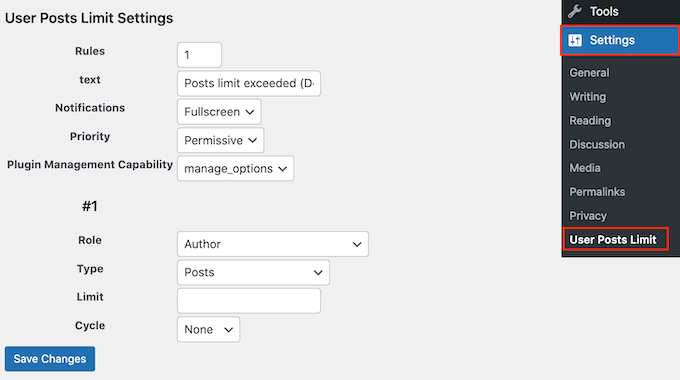
Permissions help control what users can do. WordPress has settings for this. Use these settings to limit access. You can use plugins to help. They make it easier to manage permissions. Always check settings after changes. This makes sure everything works well. Users should only see what they need.
Credit: www.wpbeginner.com
Frequently Asked Questions
How Can I Restrict Post Visibility In WordPress?
You can restrict post visibility by using plugins like User Role Editor or by customizing user roles. These tools allow you to set permissions, ensuring only specific users can see certain posts. Adjusting these settings helps maintain privacy and control over content access.
What Plugins Help Limit WordPress Post Access?
Plugins like User Role Editor and Members help limit post access in WordPress. They provide advanced user role management, enabling you to assign specific permissions. This ensures that only authorized users can view particular content, enhancing your site’s security and content control.
Can I Limit Posts By User Roles In WordPress?
Yes, you can limit posts by user roles in WordPress. By customizing user roles, you can assign specific access permissions. This allows only certain users to view specific posts, enhancing content privacy and management efficiency on your WordPress site.
How Do I Create Private Posts In WordPress?
To create private posts, set the visibility option to “Private” in the post editor. This ensures only authorized users can view the content. Private posts are not visible to the public or search engines, maintaining content confidentiality.
Conclusion
Limiting post visibility enhances user experience. It creates a focused environment. Users see only relevant content. This improves engagement and satisfaction. Tools in WordPress make this easy. Customize settings to fit your needs. Control access with simple steps. Keep your site organized.
Protect sensitive information effortlessly. A streamlined approach benefits everyone. Explore these options for better site management. Ensure your audience connects with the right content. A little effort goes a long way. Foster a user-friendly space. Gain more control over your website’s content visibility.


