
Choosing the right platform for your website can make or break your online success. If you’re torn between WordPress and Wix, especially when it comes to SEO, you’re not alone.
Your website’s ability to rank higher on search engines depends a lot on the tools and features your platform offers. But which one truly gives you the edge? By the end of this article, you’ll know exactly which platform suits your SEO needs and helps your site stand out.
Keep reading—your website’s future depends on it.
Credit: www.codecaste.com
Seo Basics For Websites
SEO is important for every website. It helps your site appear in search results. More visitors find your site this way. SEO involves many small steps. Each step makes your site easier to find and understand by search engines. Knowing the basics of SEO helps you choose the right platform for your website.
Good SEO starts with clear structure and fast loading times. Using the right keywords in your text also matters. Search engines look for these signals to rank your site higher. Simple navigation helps users and search engines explore your site well. These basics set the foundation for strong SEO performance.
Key Seo Factors
Search engines check many things on a website. Keywords in titles and headings are important. Fast page speed improves user experience and ranking. Mobile-friendliness is a must since many visit from phones. Clear URLs with keywords help search engines understand pages. Quality content that answers user questions is valuable. Proper use of images with alt text also supports SEO.
Why Platform Choice Matters
Not all website platforms handle SEO the same way. Some give more control over SEO settings. Others may limit customizations or add extra code. The platform affects how easily you can add keywords and meta tags. It also impacts your site’s loading speed and mobile design. Choosing the right platform helps you manage SEO better and reach more visitors.
Credit: kinsta.com
WordPress Seo Features
WordPress offers strong SEO features that help websites rank well on search engines. It gives users control over many technical SEO aspects. This control improves site visibility and user experience. WordPress works well for beginners and experts, making it a popular choice for SEO-friendly sites.
Customization And Plugins
WordPress allows deep customization for SEO needs. Users can add plugins to enhance SEO easily. Popular plugins like Yoast SEO and All in One SEO guide content creation. These tools help with meta tags, sitemaps, and keyword optimization. Custom settings let users tailor SEO to their specific goals.
Url Structure And Permalinks
WordPress enables clean and readable URL structures. Users can create custom permalinks that include keywords. This makes URLs easier for search engines and visitors to understand. Proper URL structure improves site indexing and ranking. WordPress also supports automatic redirects to avoid broken links.
Content Optimization Tools
WordPress plugins provide tools to optimize content effectively. They analyze readability, keyword use, and meta descriptions. These tools offer suggestions to improve SEO scores. Users can preview how pages appear in search results. Regular content checks help maintain high SEO standards.
Mobile And Speed Performance
WordPress supports responsive themes that work on all devices. Fast loading times are essential for SEO success. Many themes and plugins optimize site speed automatically. Users can also use caching and image compression tools. Mobile-friendly and fast sites rank better on search engines.
Wix Seo Features
Wix offers several SEO features that help websites rank better on search engines. These tools are built into the platform and aim to make SEO easier for beginners. Wix focuses on simplifying the process while keeping important elements in place. Below, explore key Wix SEO features that support website growth and visibility.
Built-in Seo Tools
Wix includes SEO tools directly in its editor. Users can edit meta titles and descriptions for every page. It also supports custom URLs and alt text for images. Wix provides an SEO wizard that guides through optimization steps. The platform helps create a sitemap automatically. These tools cover basic SEO needs without extra plugins.
Ease Of Use And Setup
Wix is designed for users without technical skills. The SEO setup process is clear and simple. Users follow a checklist to improve their site’s SEO. The interface is friendly and easy to navigate. Changes appear quickly on the live website. This ease makes Wix a good choice for beginners.
Mobile Optimization
Wix ensures websites look good on mobile devices. It offers mobile-friendly templates that adapt automatically. Mobile optimization is important for SEO rankings. Wix allows users to edit mobile versions separately. This feature helps improve user experience on phones and tablets.
Page Speed And Performance
Wix works on improving website speed. Fast loading times affect search rankings positively. The platform uses caching and image optimization tools. Users can compress images directly in the editor. Wix monitors site performance to ensure smooth browsing. These efforts support better SEO results.
Content Management And Flexibility
Content management and flexibility are key for SEO success. Your website needs easy editing tools and options to grow. Both WordPress and Wix offer ways to manage content but differ in flexibility. Understanding these differences helps pick the right platform for SEO.
Content updates should be quick and simple. Design choices must support your brand and SEO goals. The platform should allow growth without limits or complex changes.
Editing And Publishing
WordPress gives full control over content editing. You can customize posts with many SEO plugins. The editor supports text, images, and media easily. Publishing is flexible with scheduling and drafts. Changes reflect quickly on your live site.
Wix uses a drag-and-drop editor. It is user-friendly for beginners. Editing content feels visual and direct. Publishing is simple but less customizable. SEO features are built-in but limited compared to WordPress.
Template And Design Options
WordPress offers thousands of templates, both free and paid. Themes can be customized deeply to fit SEO needs. You can change layouts, colors, and fonts easily. The flexibility helps create unique, SEO-friendly designs.
Wix provides hundreds of templates with modern looks. Customization is simple with drag-and-drop tools. Templates are mobile-friendly by default. Design options are good but less flexible than WordPress themes.
Scalability For Growth
WordPress scales well with large websites. It supports many pages, users, and content types. SEO plugins help manage large sites efficiently. Hosting choices allow upgrades as traffic grows.
Wix suits small to medium sites best. It handles moderate content without issues. Large websites may face performance limits. Upgrading Wix plans increases features but not full scalability.
Technical Seo Capabilities
Technical SEO is crucial for website performance on search engines. It involves behind-the-scenes settings that help search engines understand and rank your site. Both WordPress and Wix offer tools to manage these settings. Let’s explore their capabilities in key technical SEO areas.
Schema Markup And Metadata
Schema markup helps search engines read your content better. WordPress users can add schema using plugins or custom code. This gives more control and options for different types of content. Wix provides built-in schema features but with fewer customization choices. Metadata like titles and descriptions are easy to edit on both platforms. WordPress allows detailed editing per page or post. Wix keeps it simple with a straightforward interface.
Sitemaps And Indexing
Sitemaps list all important pages for search engines. WordPress automatically creates sitemaps with SEO plugins. You can customize which pages to include or exclude. Wix generates sitemaps automatically without user input. Both platforms notify search engines about sitemap updates. WordPress gives more control over indexing rules. Wix handles indexing in the background, which suits beginners.
Ssl And Security Features
SSL certificates secure your website with HTTPS. WordPress sites need SSL set up through hosting providers or plugins. Wix includes free SSL on all plans by default. Security affects SEO because search engines prefer safe sites. WordPress offers many security plugins to protect your site. Wix manages security updates and backups for you. Both platforms support safe browsing experiences, which benefits your ranking.
User Experience And Seo Impact
User experience (UX) plays a key role in SEO. Search engines prefer websites that visitors find easy to use and fast. Good UX helps keep people on your site longer. It also guides them to find what they want. Both WordPress and Wix offer tools for UX, but their impact on SEO varies. Let’s explore how navigation, mobile responsiveness, and load time affect SEO in these platforms.
Navigation And Site Structure
Clear navigation helps users and search engines. WordPress allows full control over menus and links. This control helps create a logical site structure. Wix uses drag-and-drop tools, which can limit complex navigation setups. WordPress sites often have better internal linking. Proper linking helps search engines find and rank pages. Easy navigation reduces bounce rates and improves SEO.
Mobile Responsiveness
Mobile-friendly websites rank higher on search engines. WordPress offers many responsive themes. These themes adjust smoothly to any screen size. Wix also has mobile-friendly templates. However, customization options for mobile views in Wix are limited. WordPress lets developers optimize mobile experience deeply. A well-optimized mobile site improves user satisfaction and SEO.
Load Time And Performance
Fast websites get better SEO rankings. WordPress sites can be optimized with caching and plugins. Hosting choices also affect WordPress speed. Wix sites load well but have less speed control. Large images or complex Wix designs may slow load times. WordPress users can fine-tune performance settings. Faster load times lower bounce rates and boost SEO.
Pricing And Seo Value
Pricing plays a big role in choosing between WordPress and Wix for SEO. It affects the tools you get, hosting costs, and long-term benefits. Understanding these costs helps you decide which platform offers better SEO value for your budget.
Cost Of Seo Tools
WordPress offers many free SEO plugins like Yoast and Rank Math. These tools help optimize your site easily. Some advanced features may require paid versions. Wix includes built-in SEO tools at no extra cost. However, these tools are less flexible than WordPress plugins. WordPress allows more control with premium SEO tools if you want them.
Hosting And Maintenance
WordPress needs separate hosting, which can cost $3 to $30 monthly. You must manage updates and backups. Wix includes hosting in its plans, simplifying site management. Wix plans start around $14 per month. WordPress hosting costs vary based on your needs. Wix handles site maintenance, saving time and effort.
Long-term Investment
WordPress requires more setup but offers greater SEO control over time. You can customize SEO deeply as your site grows. Wix is easier to start but can limit SEO options later. WordPress sites tend to perform better in search rankings long-term. Wix suits small sites or beginners who want simple SEO tools.

Credit: www.searchenginejournal.com
Real-world Seo Results
Real-world SEO results show how WordPress and Wix perform in actual use. Metrics like traffic, ranking, and visibility reveal their strengths and weaknesses. This section explores case studies and compares organic traffic growth for both platforms.
Case Studies With WordPress
Many businesses using WordPress report steady growth in search rankings. They benefit from strong SEO plugins and customizable features. One company saw a 60% increase in organic traffic within six months. They optimized content and site speed using WordPress tools.
Another example includes a blog that doubled its visitors in a year. Clear URLs and mobile-friendly design helped improve rankings. WordPress allowed easy integration of keywords and metadata. These factors contributed to better search engine visibility.
Case Studies With Wix
Wix users also experience positive SEO results, especially small businesses. One local store increased web traffic by 40% in four months. Wix’s built-in SEO guides helped improve site structure. Simple tools made it easy to update titles and descriptions.
A portfolio website using Wix gained top rankings for niche keywords. The drag-and-drop editor allowed quick content updates. Wix’s automatic mobile optimization helped improve user experience. These changes led to better search engine performance.
Comparing Organic Traffic Growth
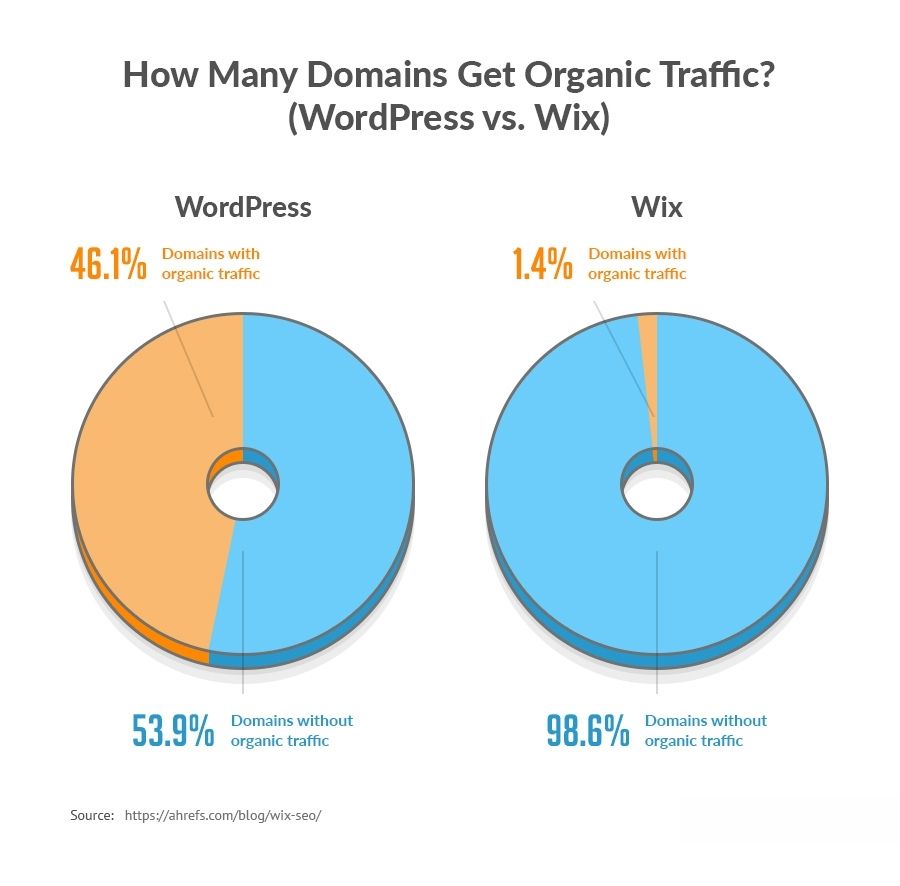
WordPress often shows faster organic traffic growth for larger sites. Its flexibility allows deep SEO customization and plugin support. Wix suits small to medium sites with straightforward SEO needs. It offers easy setup but less control over advanced SEO.
Both platforms can drive solid SEO results. Choice depends on site size, skill level, and goals. WordPress may require more effort but offers greater potential. Wix delivers quick setup and steady growth for simpler sites.
Choosing The Right Platform
Choosing the right platform affects your website’s SEO success. It shapes how easy it is to create and manage content. It also impacts site speed, mobile usability, and search engine ranking. Picking between WordPress and Wix depends on your needs and skills. Each platform offers unique tools and challenges. Understanding these helps you build a site that grows with your goals.
Best For Beginners
Wix provides simple drag-and-drop tools. It lets you design pages without coding knowledge. The platform includes built-in SEO guides for beginners. You can add meta tags and alt text easily. Wix handles hosting and security automatically. This reduces technical tasks for new users. It suits people who want a quick start.
Best For Developers
WordPress offers full control over site customization. Developers can edit themes, plugins, and code freely. It supports advanced SEO plugins like Yoast or Rank Math. This allows for detailed optimization and tracking. Developers can also improve site speed and structure. WordPress fits those who want flexibility and power.
Future-proofing Your Site
WordPress has a large community and constant updates. This keeps the platform secure and compatible with new SEO trends. It supports many integrations and custom features. Wix also updates regularly but has fewer customization options. WordPress sites can grow with your business needs. Choosing a platform that adapts helps protect your SEO investment.
Frequently Asked Questions
Which Platform Offers Better Seo Customization, WordPress Or Wix?
WordPress provides more SEO customization with numerous plugins and flexible coding options. Wix offers built-in SEO tools but is less customizable. For advanced SEO needs, WordPress is generally preferred due to its extensive control and plugin support.
Can Wix Compete With WordPress In Seo Performance?
Wix has improved its SEO capabilities significantly but still lacks some advanced features. WordPress outperforms Wix with better plugin options and full control over SEO elements. However, Wix is suitable for beginners needing simpler SEO setups.
How Do WordPress And Wix Differ In Page Speed For Seo?
WordPress allows extensive optimization for faster page loading through caching and hosting choices. Wix’s speed depends on its infrastructure, which is decent but less flexible. Faster page speed on WordPress often results in better SEO rankings.
Is It Easier To Manage Seo On Wix Or WordPress?
Wix offers user-friendly SEO tools with guided setups, ideal for beginners. WordPress requires more SEO knowledge but offers greater depth and customization. Wix is simpler, while WordPress is better for advanced SEO management.
Conclusion
Both WordPress and Wix offer solid SEO tools for websites. WordPress gives more control and flexibility for advanced SEO needs. Wix provides a simpler setup with good basics for beginners. Choosing depends on your skills and goals. Think about ease of use versus customization options.
Either platform can help your site rank well if used correctly. Focus on creating quality content and following SEO best practices. Your choice should match your comfort level and long-term plans.


