
Wondering if WordPress is truly free? You’re not alone.
Many people want to build a website but worry about hidden costs or complicated fees. The truth is, WordPress offers a free platform to get you started—but there’s more to the story. Understanding what’s free and what might cost you can save you time and money.
You’ll discover how WordPress works, the difference between free and paid features, and how to make smart choices for your website. Keep reading to unlock the secrets of building your site without unexpected expenses. Your perfect WordPress site might be closer than you think!
WordPress Software
WordPress software is a popular tool for creating websites. It offers flexibility and power for all users. Many wonder if WordPress is free and what that means. Understanding the software itself helps answer this question.
Open-source Nature
WordPress is open-source software. This means anyone can use, change, and share it for free. Developers around the world contribute to improving it. The code is available for anyone to download and modify. Open-source makes WordPress flexible and widely accessible. It also allows users to customize their sites fully without cost for the software.
WordPress.org Vs WordPress.com
WordPress.org offers the free open-source software. Users must find their own hosting and domain. This gives full control over the website and its features. Costs come from hosting, domains, and optional add-ons.
WordPress.com is a hosting service using WordPress software. It has free and paid plans. The free plan has limitations like ads and no custom domain. Paid plans remove limits and offer more features. WordPress.com handles hosting and maintenance, making it easier for beginners.
Free Features
WordPress offers several free features that help beginners start a website quickly. These features cover essential needs without any initial cost. Many users find the free plan useful for basic online presence. Here, we explore some of these key free features.
Basic Website Setup
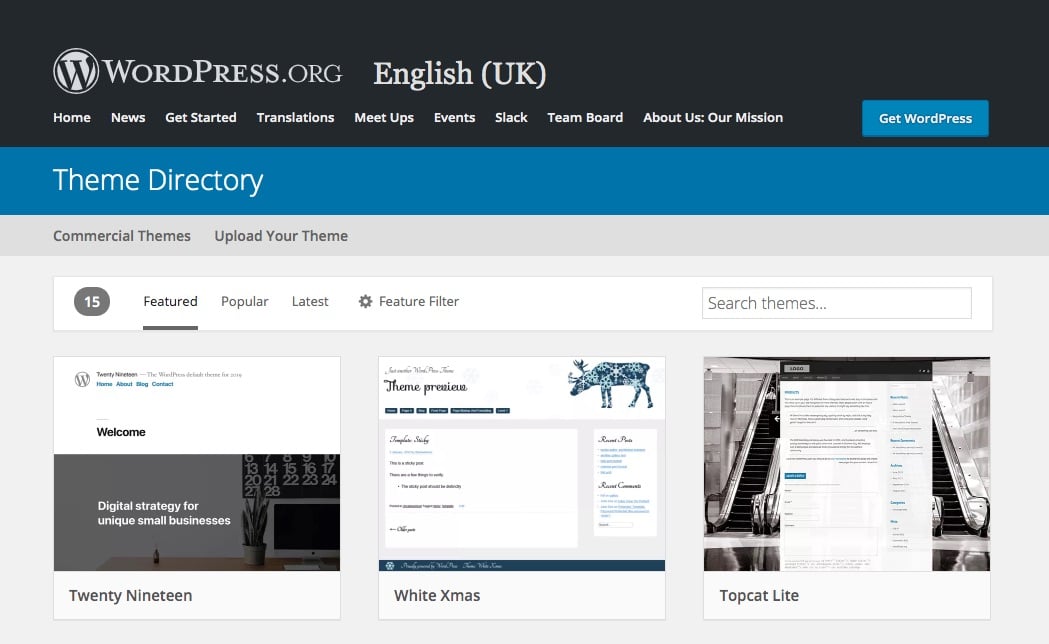
WordPress provides an easy-to-use setup process at no charge. Users can create pages, posts, and menus with simple tools. The platform includes free themes to design your site’s look. Basic customization options let you change colors and fonts. This setup is ideal for blogs, portfolios, or small business sites.
Included Hosting And Subdomain
The free WordPress plan includes hosting on their servers. This means no extra cost for website storage or bandwidth. You also get a WordPress.com subdomain, such as yoursite.wordpress.com. This subdomain helps launch your site without buying a custom domain. Hosting and subdomain together simplify getting your website online fast.
Costs To Consider
WordPress software itself is free. You can download and install it without cost. But running a website involves other expenses. These costs vary based on your needs. Understanding these helps plan your budget better.
Domain Name Expenses
A domain name is your website’s address on the internet. It usually costs around $10 to $15 per year. Prices depend on the domain extension, like .com or .net. Some domain names are more expensive due to popularity or uniqueness. You must renew your domain yearly to keep it active.
Hosting Services
Hosting stores your website files on a server. Hosting service prices vary widely. Shared hosting can cost as low as $3 to $10 per month. Managed WordPress hosting is more expensive but offers better support and speed. Good hosting ensures your website runs smoothly and loads fast.
Premium Themes And Plugins
Free themes and plugins come with WordPress, but premium ones offer more features. Premium themes cost between $30 and $100. Plugins can be free or require a one-time fee or subscription. Choosing premium options can improve your site’s design and functionality. These costs are optional but often worth it for a professional website.
Credit: kinsta.com
Free Hosting Options
Free hosting options make WordPress accessible to many users. They allow you to create and publish a website without upfront costs. These options are ideal for beginners or those testing ideas. You get basic features to run a WordPress site without paying. Free hosting can be a good starting point but comes with some limits. Knowing these helps you decide if free hosting suits your needs.
Cloudaccess.net Free Hosting
CloudAccess.net offers a free WordPress hosting plan. It lets you launch a site quickly and without fees. The plan includes automatic WordPress installation and access to a control panel. You get a temporary domain name to start your website. CloudAccess.net supports backups and site migration options. Their free plan is useful for learning WordPress or small projects.
Limitations Of Free Hosting
Free hosting often has limits on storage and bandwidth. You may see slow site speeds during high traffic. Ads placed by the host can appear on your website. Custom domain names usually require a paid plan. Support options can be limited or slower than paid services. These restrictions might affect your site’s growth and professionalism.
Security Concerns
Security is a key concern for anyone using WordPress. The platform is popular, making it a common target for hackers. Many security issues come from outdated software and poor hosting choices. Protecting your site needs attention to updates and the right server environment. Understanding these risks helps keep your WordPress site safe and running smoothly.
Risks With Outdated Plugins
Plugins add features to WordPress sites. But old plugins can have security holes. Hackers exploit these weaknesses to break into websites. Regular updates fix bugs and close these gaps. Using unsupported or rare plugins increases the risk. Always check plugin sources and update them often. This simple step helps protect your site from attacks.
Importance Of Proper Hosting
Hosting affects your site’s security and speed. Poor hosting can leave your site vulnerable. Reliable hosts offer security tools and regular backups. They monitor servers for threats and fix problems fast. Choosing a good host helps prevent hacks and data loss. It also improves site performance and uptime. Invest time in finding the right hosting for your WordPress site.
Alternatives To WordPress
Exploring alternatives to WordPress helps you find the best fit for your website needs. Different platforms offer various features and ease of use. Some are fully free and simple, perfect for beginners. Others provide more control but may require some learning. Below are some popular free alternatives worth considering.
Google Sites
Google Sites offers a straightforward way to build websites without any cost. It integrates well with other Google services like Drive and Calendar. The platform focuses on simplicity, making it easy to create basic websites quickly. Its drag-and-drop editor requires no coding skills. Google Sites is ideal for small projects, portfolios, or event pages.
Other Free Website Builders
Several free website builders exist besides Google Sites. Platforms like Wix, Weebly, and Carrd provide user-friendly tools. They include templates and customization options for various website types. Most offer free plans with basic features and branded domains. These builders suit users who want design flexibility without technical hassle. Always check each platform’s limits before choosing.
Making WordPress Affordable
WordPress itself is free to use. The real costs come from extras like hosting, themes, and plugins. You can keep your site budget-friendly by choosing wisely. Small decisions add up and affect your total expense.
Smart choices help you build a quality website without spending too much. This section explains how to save money on plugins and themes.
Choosing Cost-effective Plugins
Many plugins offer free versions that cover basic needs. Start with free plugins to avoid unnecessary costs. Look for plugins with good reviews and regular updates. They tend to be more reliable and secure.
Only add plugins you really need. Too many plugins can slow your site and cause conflicts. Focus on plugins that improve your site’s performance and user experience. This keeps your site fast and affordable.
Using Free Themes Wisely
Free themes are a great way to start without spending money. Pick themes from trusted sources like the official WordPress theme directory. These themes are tested for quality and security.
Customize free themes carefully. Avoid heavy modifications that require extra plugins or coding help. A clean, simple design often works best and keeps costs low. Update your theme regularly to stay secure and compatible.

Credit: www.youtube.com
Credit: www.elegantthemes.com
Frequently Asked Questions
Can I Use WordPress Without Paying?
Yes, WordPress. org is free to download and use. Hosting, domain, and premium features may cost extra.
Why Are People Moving Away From WordPress?
People move away from WordPress due to security risks, frequent updates, complex management, and the rise of simpler, more secure website builders.
What Website Builder Is 100% Free?
Google Sites offers a 100% free website builder with no hidden fees or limits. WordPress is free to use but requires paid hosting and domain.
How Do I Host My WordPress Website For Free?
Host your WordPress website for free using platforms like WordPress. com’s free plan or CloudAccess. net’s free hosting. Use a free subdomain and avoid paid themes or plugins. This lets you launch and manage your site without upfront costs.
Conclusion
WordPress itself is free to download and use. Costs come from hosting, domain names, and extra features. You can start with a free plan on WordPress. com. But paid plans offer more control and customization. Choosing the right option depends on your website needs.
Many users begin free and upgrade later. This makes WordPress flexible for beginners and experts alike. Understanding these basics helps you make smart choices. Your website journey can start without big expenses. Simple and clear—WordPress offers options for every budget.


