
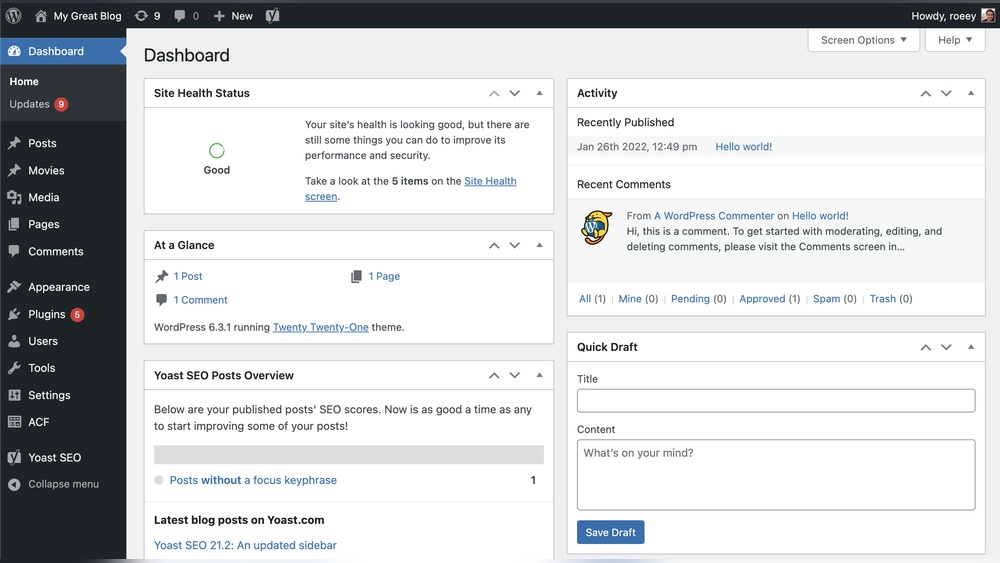
Are you thinking about building a website but aren’t sure where to start? You’ve probably heard about WordPress, but is WordPress really a CMS?
Understanding this can make a big difference in how you manage your site. Imagine having a tool that lets you easily create, edit, and organize your content without needing to be a tech expert. That’s exactly what a CMS does—and WordPress might be the perfect fit for you.
Keep reading to discover how WordPress works as a content management system and why it could be the key to making your website simple, powerful, and easy to control.
Credit: www.wpbeginner.com
What Is WordPress Cms
WordPress offers a range of features that make it a popular choice for websites. These features help users build sites easily and effectively. Understanding these key features can show why WordPress stands out as a content management system.
User-friendly Interface
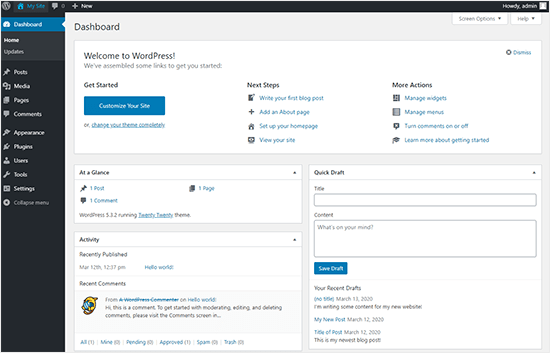
WordPress has a simple and clear dashboard. Users can add new pages, posts, and images without hassle. The editing tools are easy to use, even for beginners. The interface guides users step-by-step through site management tasks. This makes WordPress accessible for those with little technical knowledge.
Customization Options
WordPress allows users to change the look and feel of their site. Themes control the design and layout with many free and paid options. Users can also edit colors, fonts, and menus. This flexibility helps create unique websites that fit different needs and styles. Customization does not require coding skills.
Plugin Ecosystem
Plugins add extra features to WordPress sites. There are thousands of plugins available for free and paid use. These can add contact forms, galleries, security tools, and more. Installing plugins is simple and fast. The plugin system lets users expand site functions without coding.
Seo-friendly Structure
WordPress is built with search engines in mind. It uses clean code and supports SEO plugins for better ranking. Users can edit titles, descriptions, and URLs easily. This helps websites get noticed by search engines. An SEO-friendly structure improves site visibility and traffic.
Key Features Of WordPress
WordPress offers many benefits for building and managing websites. It suits beginners and experts alike. Users can create simple blogs or complex business sites with ease.
The platform is flexible and adapts to different needs. It also saves time and money. These qualities make WordPress a popular choice worldwide.
Cost-effectiveness
WordPress is free to use. You only pay for hosting and domain names. Many themes and plugins are also free. This lowers the initial cost of building a website.
Small businesses and individuals can start without a big budget. The platform helps reduce ongoing expenses too. No need for expensive software or developers.
Scalability
WordPress grows with your website. Start with a small blog and add features over time. You can create online stores, portfolios, or forums easily.
The system handles more visitors and content without problems. It supports many plugins to add new functions. This makes WordPress suitable for any project size.
Community Support
A large community backs WordPress. Thousands of users and developers share advice and solutions. You can find help through forums, tutorials, and blogs.
This support speeds up problem-solving. It also encourages learning and improvement. New users feel welcomed and guided by the community.
Regular Updates And Security
WordPress releases frequent updates. These improve performance and fix bugs. Security patches protect your site from threats.
Keeping the platform updated reduces risks. It ensures your website stays safe and runs smoothly. Many plugins also receive regular updates for extra protection.
Benefits Of Using WordPress For Your Website
Choosing the right WordPress theme is key to building a great website. The theme affects how your site looks and works. It also influences user experience and site speed. Picking a theme that fits your needs saves time and effort later. Focus on themes that offer flexibility and solid design. Consider your website goals before making a choice.
Free Vs Premium Themes
Free themes are a good start for new sites. They cost nothing and are easy to find. Many have basic features suitable for blogs or simple sites. Premium themes come with more features and support. They often include better designs and customization options. Premium themes usually get regular updates for security and performance. Choose based on your budget and the features you need.
Customization And Responsiveness
Customization lets you change colors, fonts, and layouts. A good theme should offer easy customization tools. This helps your site look unique and match your brand. Responsiveness means your site works well on phones and tablets. Responsive themes adjust to different screen sizes automatically. This improves user experience and helps your site rank better in search engines.
Compatibility With Plugins
Plugins add extra functions to your WordPress site. Your theme must work well with popular plugins. Check if the theme supports page builders, SEO tools, and contact forms. Compatibility avoids site errors and slow loading times. Test the theme with your needed plugins before finalizing your choice. This ensures smooth site operation and better user experience.
Credit: www.django-cms.org
How WordPress Boosts Website Performance
Plugins are tools that add features to your WordPress website. They help make your site better and easier to manage. Some plugins improve how your site works. Others protect your site or help track visitors. Choosing the right plugins is key to a smooth website.
Seo Plugins
SEO plugins help your site show up in search engines. They guide you to use keywords well. They also help create good titles and descriptions. These plugins make your site easier for people to find online.
Security Plugins
Security plugins protect your website from hackers and viruses. They monitor your site for threats. They also block bad traffic and keep data safe. Using these plugins keeps your site secure and trusted.
Caching Plugins
Caching plugins make your website faster. They save parts of your site so pages load quickly. Faster sites keep visitors happy and reduce bounce rates. These plugins improve user experience by cutting wait times.
Analytics Plugins
Analytics plugins track visitor behavior on your site. They show where visitors come from and what they do. This data helps you understand your audience better. You can make smart decisions to grow your website.
Choosing The Right WordPress Theme
Keeping a WordPress website in good shape needs regular care. Small tasks done often help avoid big problems later. This section shares simple tips to maintain your site smoothly and safely.
Regular Backups
Backups protect your site from data loss. Save your website files and database often. Use plugins or your hosting service for automatic backups. Store copies in a different location than your server. This step ensures you can restore your site quickly after issues.
Updating Themes And Plugins
WordPress themes and plugins need updates to work well. Updates fix bugs and add new features. Outdated tools can cause errors or security holes. Check for updates regularly and install them as soon as possible. This keeps your site running smoothly and safely.
Monitoring Website Security
Security keeps your site safe from hackers and malware. Use security plugins to scan for threats. Set strong passwords and change them often. Limit login attempts to stop unauthorized access. Watching your site’s activity helps catch problems early.

Credit: en.wikipedia.org
Frequently Asked Questions
What Is WordPress Cms Used For?
WordPress CMS is used to create and manage websites easily. It supports blogs, business sites, and online stores. Its user-friendly interface helps beginners build websites without coding knowledge.
Is WordPress Cms Free To Use?
Yes, WordPress CMS is free and open-source. You can download, install, and customize it without cost. However, hosting and premium themes or plugins may have fees.
How Secure Is WordPress Cms?
WordPress CMS is generally secure with regular updates. Using strong passwords and trusted plugins improves security. Always keep your site updated to prevent vulnerabilities.
Can WordPress Cms Support E-commerce Websites?
Yes, WordPress supports e-commerce through plugins like WooCommerce. It enables product listings, payments, and inventory management. This makes it ideal for online stores of any size.
Conclusion
WordPress CMS offers a simple way to build websites. It suits beginners and experts alike. Many themes and plugins help customize sites easily. You control your content without technical skills. The platform supports blogs, shops, and portfolios well. Updates keep it secure and running smoothly.
It works for small projects and big businesses. Choose WordPress if you want flexibility and ease. It remains one of the most popular CMS options today.


