
You’ve just installed WordPress, and you’re staring at your screen thinking, “Now what?” First of all, congratulations!
You’ve taken the first step toward launching your own website. But if you’re feeling a bit overwhelmed, you’re not alone. Many people find themselves at this exact crossroads, unsure of what to do next. The good news? You’re in the right place to figure it all out.
Imagine turning your vision into a live website that attracts visitors, engages them, and achieves your goals. The potential is limitless, but it begins with the right moves. This guide will walk you through the essential steps you need to take after installing WordPress. From customizing your site to ensuring it’s secure and optimized, we’ve got you covered. Stick with us, and by the end of this article, you’ll not only know what to do next, but you’ll feel confident taking those steps. Ready to transform your blank canvas into a thriving online presence? Let’s dive in!
Credit: www.elegantthemes.com
Setting Up Your WordPress Dashboard
The WordPress dashboard is your control center. Here, you can find tools and options. Posts, Media, and Pages are important sections. Use these to add content. Appearance lets you change the look of your site. Check out Plugins to add new features. Settings help you manage site details. Explore each section slowly. Learn what each does. Practice makes perfect.
Your profile is your personal space. You can change your name and email here. Add a profile picture to make it yours. Write a short bio. This tells visitors about you. Update your password often. Keep it safe and strong. This helps protect your site. Make sure your information is correct. Check it twice.
Choosing The Right Theme
Free themes offer a good starting point for beginners. Many free themes are simple and easy to use. They help create basic websites without spending money. Some free themes have limited customization options. It’s important to check the theme’s ratings and reviews. This helps in choosing a theme that suits your needs. Free themes are great for small blogs or personal sites. They work well for those who want a quick setup. Free themes usually have basic support and updates.
Premium themes provide more features and better support. They often come with advanced customization options. Premium themes can make your website look professional. They usually include regular updates and dedicated support. These themes often have high-quality designs. They are suitable for business or large websites. Premium themes may offer more security features. They can be a good investment for serious websites. Premium themes often have built-in SEO tools.
Essential Plugins To Install
Keeping your site safe is very important. Wordfence helps protect your site from hackers. Sucuri watches for any bad activity. iThemes Security offers many tools to keep your site secure. These plugins make sure your site stays safe.
Getting found online is key. Yoast SEO helps improve your site’s visibility. It gives tips to improve your content. All in One SEO Pack is another great choice. It helps you manage your SEO settings easily. These plugins make sure your site ranks well.
Fast sites keep visitors happy. WP Super Cache speeds up your site. W3 Total Cache helps reduce load times. Autoptimize optimizes your site’s files. These plugins help your site run smoothly.
Creating Your First Post
Start with a clear title for your post. Use simple words. Next, write your first sentence. It should tell what your post is about. Keep sentences short. Use paragraphs to organize ideas. This helps readers. Add bold to important words. Use bullet points for lists. They make information easy to read. Add a fun fact or question. This keeps readers interested.
Images make posts fun. They help explain ideas. Pick clear pictures. They should match your topic. Add them in the right places. This makes the post look nice. Use small image sizes. This helps the page load fast. Add alt text to each image. It tells what the picture shows. Videos are good too. They show things in action. But keep them short. This keeps readers happy.
Customizing Site Appearance
Start by visiting the WordPress dashboard. Click on Appearance, then Customize. Here, you can change the header and footer. Add your own logo or site title. Change the menu items or add new links. You can also change the background color. Pick colors that match your brand. Make sure your header is easy to read. The footer is also important. Add contact information or social media links. This helps people find more about you.
Widgets add extra features to your site. Go to the Widgets section under Appearance. Drag and drop widgets into your sidebar or footer. Use widgets for search bars, recent posts, or social media feeds. They help visitors find what they need. Keep widgets simple and useful. Too many widgets can slow down your site. Make sure they look good on phones and tablets.
Credit: www.hostgator.com
Managing User Roles
User roles control what users can do on your site. Give each user a role based on their tasks. The Administrator role has full control. It is best for site owners. Editors can change and publish content. Authors can write and manage their own posts. Contributors can write but not publish. Subscribers can only read content.
Permissions need careful setting. Too many permissions can cause problems. Check permissions regularly. Use plugins to manage roles if needed. Plugins can make role management easy. Always keep user data safe. Change passwords often. Lock accounts if needed.
Organize users in groups. Groups help manage large numbers of users. Set clear rules for each group. Keep user information up-to-date. Review user activity often. Remove inactive users. Train users on site rules. Use strong passwords for all accounts. Keep passwords secret. Limit access to sensitive data. Always log user activity. Use alerts for unusual activity. Check logs regularly.
Enhancing Site Security
Regular backups keep your site safe from data loss. Use a reliable backup plugin to automate this process. Select daily or weekly backup schedules. Store backups in secure locations. Cloud services or external drives work well. Test your backups regularly. Ensure they restore files properly. This practice prevents headaches later.
Strong passwords protect your site from hackers. Use a mix of letters, numbers, and symbols. Avoid simple words or phrases. Longer passwords are better. Consider using password managers. They generate and store passwords safely. Change passwords every few months. This keeps your site secure. Encourage users to follow this practice. Everyone benefits from better security.
Credit: www.wonderplugin.com
Optimizing For Search Engines
SEO plugins help your site rank better. The most popular one is Yoast SEO. It’s user-friendly and offers great features. It guides you to write better content. Another good plugin is All in One SEO Pack. It is simple and effective. Both plugins help with meta tags and keywords. They also check for good readability. Install one of these plugins to get started with SEO.
Good content is key to SEO success. Use clear and simple words. Keep sentences short. Use keywords wisely. Do not overuse them. Make sure your content is engaging. Add headings and subheadings. This helps readers and search engines. Always use images with descriptions. This makes your content more appealing. Keep your readers in mind when you write.
Monitoring Site Performance
Analytics tools are important for checking your site’s health. These tools help you see how people use your website. Google Analytics is one such tool. It shows how many visitors your site gets. You can see which pages they visit most. This helps you understand what content works best. You can also track where visitors come from. Maybe they find you through search or social media. Knowing this helps you plan better.
With Google Analytics, you can see which pages load slowly. Slow pages make visitors leave your site. Fixing these issues can improve user experience. Analytics tools also show user behavior. Learn what people do once they are on your site. Do they click links or read your posts? This info helps you make your site better.
Fast loading is important. Use small images to speed up your site. Large images slow it down. Clean up your code too. Remove unused plugins and scripts. These make your site heavy. Consider using caching plugins. They store data to help pages load faster. A faster site means happy visitors. Happy visitors stay longer.
Frequently Asked Questions
How To Configure WordPress Settings?
After installing WordPress, access your admin dashboard. Navigate to “Settings” for essential configurations like site title and timezone. Adjust reading settings for homepage display. Customize permalinks for SEO-friendly URLs. Regularly update WordPress settings to ensure optimal performance and security.
Which Plugins Should I Install First?
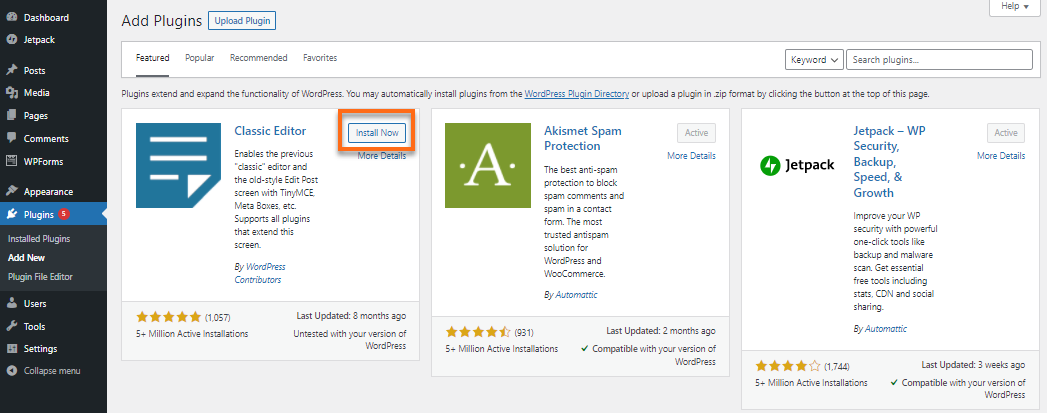
Start with essential plugins like Yoast SEO for optimization and Akismet for spam protection. Consider installing a caching plugin for speed enhancement. Backup plugins like UpdraftPlus are crucial for data safety. Choose plugins that align with your site’s purpose and functionality.
How To Choose A WordPress Theme?
Select a theme based on your site’s niche and functionality needs. Ensure the theme is responsive and mobile-friendly. Check for regular updates and support. Look for themes that are SEO-optimized and customizable. Test theme demos to assess design and usability.
How To Improve WordPress Site Speed?
Optimize images using plugins like Smush. Implement caching with tools like WP Super Cache. Minimize CSS and JavaScript files. Choose a reliable hosting provider. Regularly update WordPress and plugins to ensure smooth functionality and enhanced speed.
Conclusion
Now that WordPress is installed, explore the many themes available. Choose one that fits your style. Plugins can enhance your site’s functionality. Consider adding security plugins. Regular updates keep your site running smoothly. Create compelling content to engage your visitors.
Write posts that are clear and concise. Images and videos can make posts more engaging. Monitor your site’s performance. Use analytics tools to understand your audience. Keep learning and experimenting. The more you know, the better your site becomes. Stay curious and enjoy the journey with WordPress.


