
If you’re planning to set up your own website, WordPress is likely one of the first platforms you’ll consider. It’s user-friendly, flexible, and powers over 40% of websites on the internet.
But as you dive into the installation process, you might find yourself asking, “What exactly is a directory in WordPress? ” This question is crucial, and understanding directories can significantly impact how you manage and grow your site. Imagine directories as the organizational backbone of your WordPress site, akin to the filing system on your computer.
Knowing how they work can make the difference between a smooth setup and a chaotic mess. If you’re eager to avoid common pitfalls and ensure your WordPress site runs efficiently, this guide is for you. We’ll break down everything you need to know about directories in simple terms, empowering you to install WordPress with confidence. Ready to unlock the full potential of your website? Let’s dive in!
Credit: verpex.com
Installing WordPress
Start by picking a trusted hosting provider. This company keeps your website online. Look for one that offers WordPress support. Check their reviews and pricing. Make sure they have good customer service.
Go to the WordPress site. Click the download button. Save the file to your computer. This file is a ZIP file. You will need it later.
Log into your hosting account. Find the database section. Create a new database. Name it something you can remember. Write down the username and password. You will need them.
Use an FTP client like FileZilla. Connect to your server. Find the public_html folder. Upload the WordPress files there. This process may take some time.
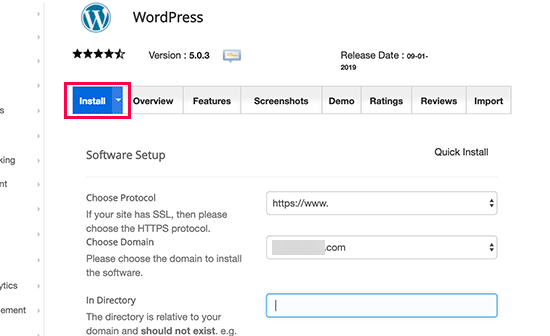
Open your web browser. Go to your website. Follow the on-screen instructions. Enter your database details. Click the install button. Your WordPress site is ready.

Credit: www.youtube.com
Understanding Directories
A directory is like a folder on your computer. It holds files and other folders. These folders help keep things organized. Each directory has its own name. It helps you find your files easily. Imagine a big box with smaller boxes inside. Each small box has a label. This label is the directory name. It tells you what is inside. Directories make it easy to find stuff.
In web hosting, directories keep files in order. They help websites run smoothly. Your website is a collection of files. These files need a home. Directories give them that home. They make sure files do not get lost. The main directory is like a front door. It leads to all other rooms. Each room has its own purpose. Some rooms hold images. Others hold text files. Keeping files in the right place is key.
WordPress uses many directories. Each has a special job. The wp-content directory holds themes and plugins. The wp-admin directory is for site management. Wp-includes is for core files. These directories work together. They help WordPress run. They keep everything in order. Moving files can break things. So, be careful with them.
WordPress Directory Structure
The wp-content directory holds your themes and plugins. You can also find uploads here. This is where you can customize your site. Changes made here affect your site’s look and features. Themes change the design. Plugins add functions. Keep this directory safe. It is important for your site.
The wp-admin directory is the heart of the WordPress dashboard. It lets you manage your site. You can edit posts here. Manage comments and settings here too. It controls user access. Only trusted people should enter here. Keep your login details safe. This directory is crucial.
The wp-includes directory holds vital files. These files make WordPress work. They are the core of WordPress. You should not edit these files. Changing them may break your site. Updates to WordPress affect this directory. It must stay intact for WordPress to function properly.
Managing Directories
Installing WordPress involves understanding directories, crucial for organizing files and managing website structure. These directories store essential components like themes, plugins, and media files. Proper management ensures smooth website performance and easy navigation.
Accessing Directories Via Ftp
FTP helps you see WordPress files. FTP stands for File Transfer Protocol. It lets you connect to your website. You need an FTP client like FileZilla. First, open the client and enter your website details. Then, you can see your files. It is like a magic door to your website. Use it with care.
Modifying Files Within Directories
Change files to make your site better. But be careful. Open the file you want to change. Edit it and save. Always keep a backup. This is very important. Mistakes can break your site. Use a text editor to help. It shows you the code clearly. Try not to change too many things at once.
Securing WordPress Directories
Keep your files safe from bad people. Use strong passwords for your FTP. Also, update WordPress often. This closes any holes in security. Use plugins to help protect your site. Plugins like Wordfence are good. They guard your site. Never share your FTP details. Keep them secret. Be smart and stay safe.
Credit: www.blogtyrant.com
Frequently Asked Questions
What Is A Directory In WordPress Installation?
A directory in WordPress installation is a folder on your server. It contains the essential files and data needed to run your WordPress site. Directories help organize files, making it easier to manage and update your website. Common directories include ‘wp-content’, ‘wp-admin’, and ‘wp-includes’.
How Do I Find The WordPress Installation Directory?
To find the WordPress installation directory, access your server via FTP or cPanel. Navigate to the root directory where WordPress files are stored. Look for folders like ‘wp-content’, ‘wp-admin’, and ‘wp-includes’. This root directory is your WordPress installation directory.
Why Is The WordPress Directory Important?
The WordPress directory is crucial for website functionality and management. It stores core files, themes, plugins, and media uploads. Proper organization within the directory ensures smooth operation and easier troubleshooting. Understanding directory structure helps in customizing and securing your WordPress site effectively.
Can I Change The WordPress Directory Location?
Yes, you can change the WordPress directory location, but it requires careful steps. You need to update the WordPress Address and Site Address in the settings. Additionally, move files to the new location and update the ‘wp-config. php’ file. Ensure all links and paths are correctly adjusted.
Conclusion
Understanding the directory structure is crucial for WordPress success. It organizes files efficiently. It keeps everything running smoothly. This helps in troubleshooting issues quickly. Knowing where each file lives is important. You can easily manage your site. You can also enhance security.
Better file management means fewer headaches. It simplifies updates and backups. This saves time and effort. A well-organized directory boosts performance. It ensures your site operates at its best. Dive into WordPress directories today. You’ll find it rewarding. Happy managing!


