
Have you ever considered how your web hosting account impacts your online success? If you’re looking to improve your website’s performance, security, and SEO ranking, understanding the ins and outs of your hosting service is crucial.
A well-chosen web hosting account can be the backbone of your digital presence, ensuring your site runs smoothly and efficiently. Dive into this article to discover the secrets behind optimizing your web hosting account and unlock the potential for a faster, more secure, and higher-ranking website.
Don’t miss out on transforming your online experience—read on to learn how your web hosting account plays a pivotal role in your digital strategy.
Choosing The Right Web Hosting Plan
Shared hosting means sharing a server with others. It’s budget-friendly and simple. Perfect for small websites. But, shared resources can slow down your site. If your neighbors use too much bandwidth, your site might lag. Ideal for beginners. Not great for heavy traffic sites.
VPS stands for Virtual Private Server. It’s more reliable than shared hosting. You get your own space on a server. Better performance and control. Costs more than shared hosting. Good for growing websites. Offers more security and flexibility.
Dedicated hosting means having your own server. No sharing with others. It’s fast and very secure. Great for big websites with lots of traffic. Costs are higher, but worth it for big businesses. Offers full control over server settings. Requires technical skills.
Cloud hosting uses many servers. If one fails, others keep your site running. It’s flexible and scalable. You pay for what you use. Good for sites with changing traffic. Less downtime and fast load times. Perfect for modern websites needing reliability.
Setting Up Your Hosting Account
First, choose a domain name for your website. Make it short and easy to remember. Visit a domain registrar website. Type your desired name to check its availability. If it’s available, you can purchase it. This step is crucial for your website’s identity. Remember, a good domain is like your online address.
After registering, log into your hosting account. Find the control panel or cPanel section. This is where you manage your website. Here, you can install software, create emails, and more. It’s like the control room of your website. Keep your login details safe and secure.
DNS settings connect your domain to your hosting. Go to the DNS section in your control panel. Enter the correct DNS information from your host. This ensures your website appears online. Changes may take a few hours to update. Patience is key here.
Managing Your Hosting Resources
Bandwidth tells you how much data your site uses. Check bandwidth regularly to avoid slow speeds. High traffic can use up bandwidth fast. Use tools to see which pages use the most bandwidth. Optimize images to save bandwidth. Big images use a lot of data. Reduce video size for faster loading. Smaller files help your site run better.
Storage space is where your site keeps its files. Assign storage based on your site’s needs. Images and videos need more space. Text files need less space. Clear old files to free up space. Organize files by type or date for easy access. Keep backups of important files. This helps if something goes wrong.
One account can host many sites. Share resources wisely between sites. Check each site’s needs first. Some sites need more bandwidth. Others need more storage. Use tools to track each site’s usage. Balance resources for best performance. Regular checks keep all sites running well.
Enhancing Website Security
SSL certificates keep data safe. They make sure it travels securely. This process stops hackers. SSL means Secure Sockets Layer. It encrypts information. Websites with SSL have a lock icon. This builds trust. Visitors feel safe.
Firewalls act like guards. They block harmful traffic. This keeps your site safe. Firewalls watch data going in and out. They stop unwanted access. Every website needs a firewall. It helps protect your data.
Backups save copies of your data. They are important. Problems happen. Data can be lost. Regular backups help. They keep your website safe. You can restore lost data. This makes recovery easy.
Improving Website Performance
Caching saves website data for quick access. This makes pages load faster. Users love quick websites. Caching is like a memory box. It keeps pages ready to show. Browsers use cache to speed up things. This reduces loading time. Visitors stay longer on fast sites.
Databases store information. Optimizing databases is important. It helps sites work better. Clean and organize data regularly. This makes searches faster. Slow databases can make sites lag. Quick searches make users happy. Happy users come back often. Use simple tables for easy data access.
CDNs are networks that deliver content. They use servers worldwide. CDNs make sites load faster. Content reaches users from nearby servers. This speeds up delivery. Fast delivery keeps users engaged. They like smooth browsing. Using CDNs improves performance. Choose a good CDN for your site.
Credit: www.hostinger.com
Troubleshooting Common Issues
Downtime can be very frustrating. Check your server status first. Make sure it’s up and running. Restart the server if needed. Sometimes, this solves the problem. Contact your hosting provider for help if the issue persists. They might have more info. Always keep a backup of your site. It helps if something goes wrong.
Check your email settings first. Sometimes, wrong settings cause problems. Make sure your login details are correct. Update your password if needed. Ask your host for support if emails are not coming through. They can guide you with settings. Check for any spam filters that might block emails.
Security is very important. Change your passwords often. Use strong ones. Update your software regularly. This keeps hackers away. Install security plugins. They help protect your site. If you suspect a breach, contact your host. They can help secure your account. Always have a backup. It keeps your data safe.
Scaling Your Hosting Needs
Websites grow and need more resources. Start with a basic plan. Upgrading helps when traffic increases. Choose plans with more storage and bandwidth. This keeps your site fast and smooth. Always check your hosting provider for options. Some offer easy upgrades without downtime.
Third-party services improve site features. Examples include payment systems and chat tools. Integration should be smooth and simple. Ensure your hosting supports these services. Read reviews about compatibility issues. Test each service before using it live. This keeps your site reliable and user-friendly.
Traffic surges can slow down your site. Plan for these with scalable hosting. Choose plans that allow quick resource boosts. Alert your hosting provider before big events. They can help manage extra traffic. Prepare your site to handle more visitors without issues.
Credit: www.hostinger.com

Credit: www.malcare.com
Frequently Asked Questions
What Is A Web Hosting Account?
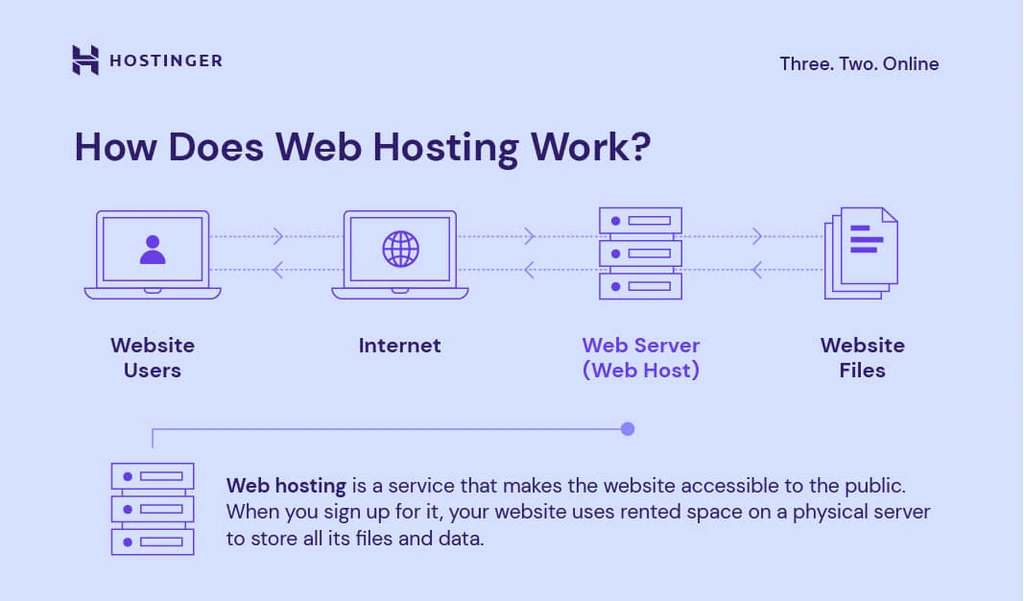
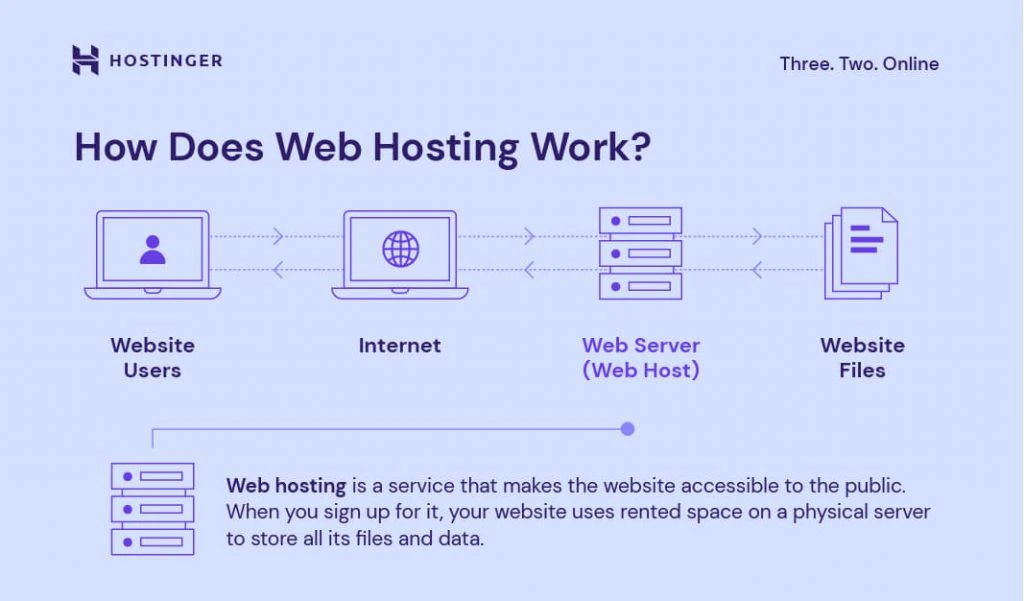
A web hosting account provides space on a server for your website. It enables your site to be accessible online. You receive server resources, such as storage and bandwidth, to manage your website’s files and data efficiently. Web hosting is essential for maintaining a reliable online presence.
How Do I Find My Hosting Account?
Log into your hosting provider’s website. Access the client dashboard or account section. Check for “My Services” or “Hosting Accounts” tab. You can find details of your hosting account there. Contact customer support if you encounter issues.
Can I Host My Website Myself?
Yes, you can host your website yourself. You’ll need a server, technical skills, and reliable internet. Consider security, backups, and maintenance for smooth operation. Using a hosting provider can simplify these tasks.
How Do I Set Up A Web Hosting?
Choose a hosting provider and sign up for a plan. Register a domain name. Connect your domain to the hosting server. Set up your website using a content management system like WordPress. Configure settings and launch your site.
Conclusion
Choosing the right web hosting account boosts your website’s performance. It impacts speed, security, and reliability. A good hosting provider offers strong support and resources. This ensures your site runs smoothly and effectively. As your website grows, consider upgrading your hosting plan.
This helps meet increasing demands and keeps visitors satisfied. Remember, a reliable web hosting service is crucial for your online success. Prioritize research and make informed decisions. Your website deserves the best foundation for growth and stability.


