
Have you ever tried running multiple web services from the comfort of your home or small office, only to be stopped by the confusing maze of network settings? You’re not alone.
Navigating the world of port forwarding can feel like trying to solve a complex puzzle without knowing what the picture looks like. But here’s the good news: mastering the art of hosting multiple web services is simpler than you might think, and it starts with understanding port forwarding.
Imagine having the power to manage your online presence effortlessly, whether it’s a personal blog, a gaming server, or a collaborative work tool, all running seamlessly from the same network. By the end of this article, you’ll be equipped with the know-how to set up and manage your web services efficiently, transforming your digital capabilities. Let’s unravel the mystery of port forwarding together, and unlock a world of possibilities for your web services.
Understanding Port Forwarding
Port forwarding lets you send data from one network to another. It is like opening a door for information. This process helps in hosting many web services. Routers play a key role in this. They direct the traffic to the correct device. Each service uses a unique port number. These numbers help in routing the data correctly. With port forwarding, users can access services from outside networks. It is essential for gaming servers, web hosting, and more. It provides more control over your network. Safety is crucial. Always use strong passwords and firewalls. Keep your router’s software updated. This ensures a secure and smooth operation.

Credit: www.noip.com
Benefits Of Hosting Multiple Services
Hosting multiple services saves money and resources. You use one server for many tasks. It is efficient. It reduces costs. You can manage services easily. This setup improves performance. You can access different services quickly. Your users will be happy. They get fast responses.
Port forwarding helps with security. You control which services are public. It keeps your data safe. Only trusted people can access important parts. This setup is flexible. You can add or remove services easily. Your server adapts to your needs. It grows with your business.
Setting Up Your Network
Routers have a special page called the admin panel. Find your router’s IP address. Type it in the browser. Look for the port forwarding section. It’s in the advanced settings. Each router brand is different. Check the manual if needed. Port forwarding lets you direct traffic. This helps in hosting multiple services. It’s important to set it up correctly. Follow each step carefully. Don’t skip any instructions.
Each service needs a unique port. Common ports include 80 for web servers and 443 for secure sites. Some services need special ports. Check your service documentation. Avoid using ports below 1024. These are reserved for system processes. Choose ports above 1024. Make sure they are not used by other programs. Keep a list of all used ports. It helps prevent conflicts.
Configuring Port Forwarding Rules
First, connect to your Wi-Fi network. Open a browser on your computer. Type your router’s IP address in the address bar. A login page will appear. Enter the username and password. Usually, this is on a sticker on the router. If not, check the manual. After logging in, you can see the router’s settings. Be careful when changing these settings. Some changes can affect your network.
Every service needs a unique port number. This number helps data reach the right service. Think of it like a mailroom number. To assign a port, find the Port Forwarding section in the router settings. Enter the port number for the service. Also, enter the local IP address of the device running the service. Save the changes. Now, your service is ready to use.
Securing Your Setup
Firewalls act as a shield for your web services. They control which data can pass through. It is vital to set strict rules. Allow only necessary traffic. Block all other connections. This will keep hackers out. Always update your firewall settings. New threats come often. Regular updates are crucial. This way, your setup stays safe.
Passwords are your first line of defense. Always use strong passwords. Combine letters, numbers, and symbols. Longer passwords are better. They are harder to guess. Avoid using simple words. Change your passwords often. This makes it difficult for anyone to break in. Use a password manager. It helps you remember complex passwords. Keep your web services secure.
Testing And Troubleshooting
Open a web browser. Type your server’s IP address followed by the port number. Press enter. You should see your web service. If it loads, port forwarding works. Check different services too. Each should use its own unique port. This makes sure all settings are correct.
Sometimes, port forwarding doesn’t work. First, check the router settings. Make sure they are correct. Next, see if the firewall is blocking ports. Turn off the firewall briefly to test. If it works, change firewall settings. Also, double-check the IP address. It should be the right one for your device.
Managing Multiple Web Services
Web services need constant checks. Monitoring helps keep them running well. Use tools to watch the performance. They show you if something is wrong. You can fix issues quickly this way. It keeps websites fast and reliable. Happy users come back often.
Websites get busy. Traffic means many people visit at once. Handling this is important. Servers might slow down with more users. Balancing the load helps. It shares the work between servers. This keeps sites from crashing. Users have a good experience. They come back because it works well.

Credit: documentation.meraki.com
Advanced Port Forwarding Techniques
Dynamic DNS helps in managing changing IP addresses. You don’t need to worry about your IP changing. It automatically updates your domain name with the new IP. This means you can always reach your server by its domain name. Easy and efficient.
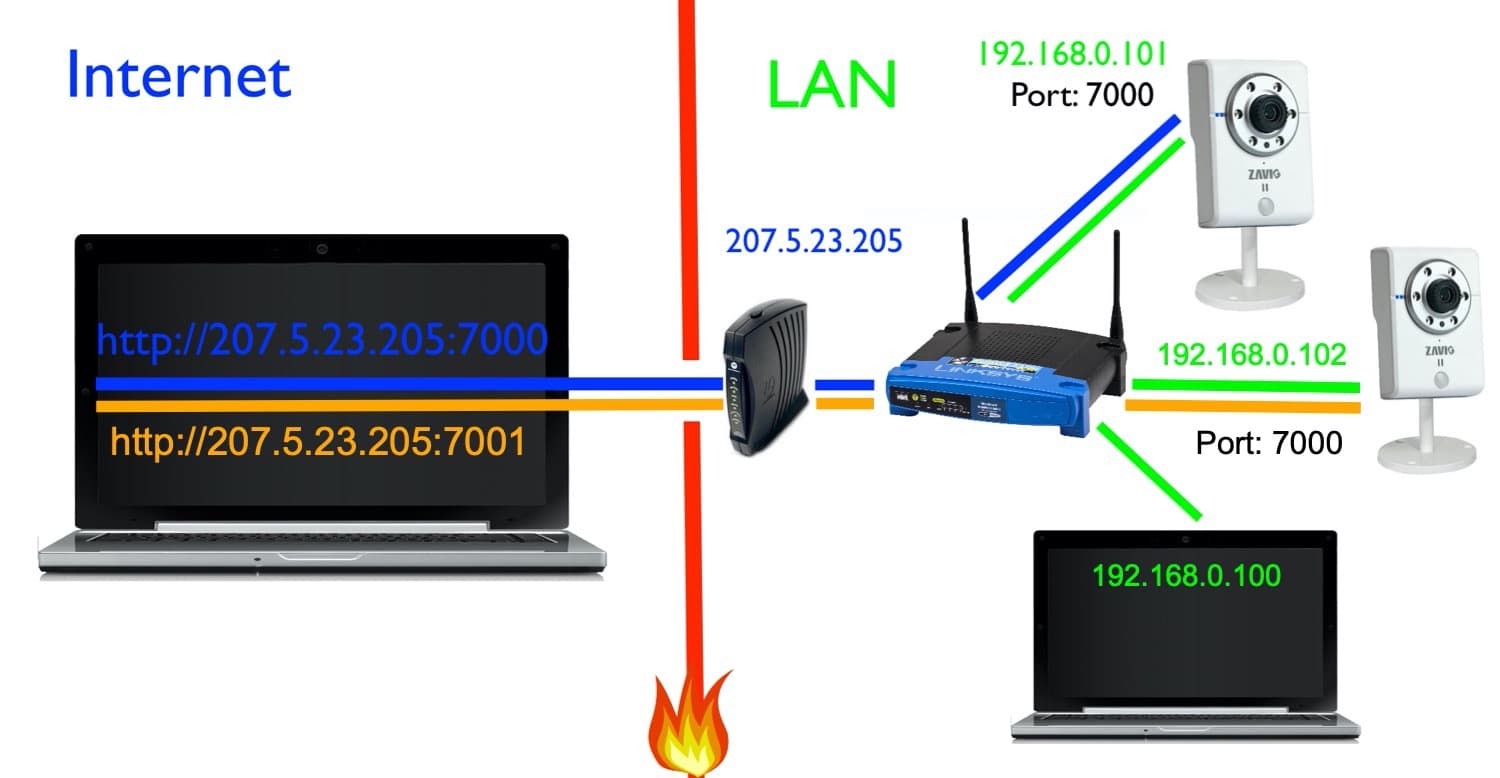
Virtual servers are useful for hosting many services. Each service can have its own port. This means you can run multiple web services on a single machine. Just configure each service with a unique port. It’s like having separate rooms for each service.
Credit: videos.cctvcamerapros.com
Frequently Asked Questions
Can Multiple Services Run On Same Port?
No, multiple services cannot run on the same port simultaneously. Each service requires a unique port to function correctly. Sharing a port leads to conflicts, causing malfunctions. Use a load balancer or proxy to handle multiple services efficiently. Managing ports properly ensures optimal network performance and security.
How Do I Host A Website With Port Forwarding?
To host a website with port forwarding, configure your router to forward port 80 to your server’s IP address. Ensure your server is running and accessible. Use a static IP or dynamic DNS for consistent access. Test connectivity from an external network to confirm successful configuration.
Can You Port Forward Multiple Devices?
Yes, you can port forward multiple devices. Assign unique internal IP addresses to each device. Ensure each device uses different external ports to avoid conflicts. Proper configuration is essential for successful port forwarding. Check your router settings and device compatibility to streamline the process.
Can We Have Two Web Servers On The Same Ip And Same Port?
No, two web servers cannot share the same IP and port. Each server needs a unique combination to function. You can use different ports or IPs for multiple servers on the same machine. Consider virtual hosts or reverse proxy for managing multiple domains efficiently.
Conclusion
Hosting multiple web services with port forwarding is essential. It maximizes server potential. Simplifies access and management for users. Begin by understanding your network setup. Assign unique ports for each service. Check security settings to protect your data. Practice regularly to improve skills.
This ensures a smooth experience. Troubleshoot any issues promptly. Keep your services running efficiently. Always monitor your network for unusual activity. This helps maintain security and performance. Regular updates are crucial. They protect against vulnerabilities. With these steps, hosting becomes manageable.
Enjoy the benefits of organized web services.


