
Are you ready to launch your very own website but feeling overwhelmed by the technical jargon and endless options? You’re not alone.
Many aspiring website owners find themselves lost in the sea of web hosting choices. The good news is, with GoDaddy, hosting your website can be a straightforward process. Imagine having a reliable platform that supports your online presence and grows with your needs.
We’ll guide you through the simple steps of web hosting with GoDaddy, ensuring you have all the tools and knowledge to get started right away. Whether you’re a small business owner, a blogger, or just someone with a great idea, knowing how to effectively use GoDaddy’s hosting services can be a game-changer. So, let’s dive in and explore how you can make the most of GoDaddy’s offerings to bring your website to life!
Choosing The Right Hosting Plan
Shared Hosting is great for small websites. It is cost-effective. Many sites share one server. This keeps prices low. But, it can be slow. If one site gets busy, others might slow down.
VPS Hosting is more powerful. It acts like a personal server. Fewer sites share resources. This means better speed and control. It costs more than shared hosting.
Dedicated Hosting is the best choice for big sites. You get a whole server. No sharing. It offers top speed and control. But, it is expensive.
WordPress Hosting is special for WordPress sites. It makes setup easy. It has tools just for WordPress. It helps with updates and security.
Setting Up Your Account
First, visit the Godaddy website. Look for the sign-up button. Click on it to start. Fill in your name, email, and password. Make sure your password is strong. Check your email for a confirmation link. Click it to verify. Your account is now ready!
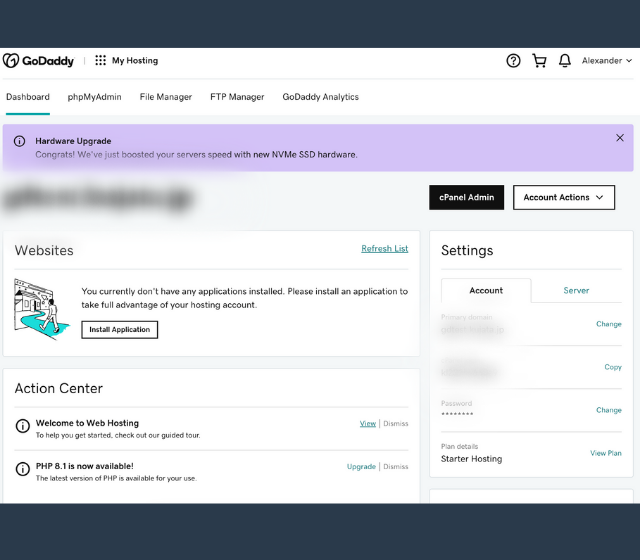
After login, you see the dashboard. It’s like your control center. Find the hosting tab on the left. Click on it to explore options. You can see your domains and services. Check the help section if needed. It’s easy to use and helps manage your site.
Domain Name Registration
Choosing the right domain name is important. It should be easy to remember and simple to spell. Short names are often better. Think about what your website is about. Your domain should match your content. Avoid numbers and hyphens. They can be confusing. Make sure your domain is unique. Check if it’s available before you decide. A good domain name helps people find your website.
Once you pick a domain name, it’s time to register. Godaddy makes this easy. First, search if your domain is available. If it is, you can buy it. Follow the steps on Godaddy’s website. Fill in your information. Pay for the domain. After payment, your domain is yours. Now, you can start building your site. Remember to renew your domain. Keep it registered so you don’t lose it.
Credit: www.godaddy.com
Installing Your Website
Setting up web hosting on GoDaddy simplifies launching your website. First, choose your hosting plan. Then, use the intuitive dashboard to upload files and manage your site effortlessly.
Using Website Builder
Godaddy provides a Website Builder tool. This tool helps create sites easily. First, log into your Godaddy account. Then, find the Website Builder option. Choose a template for your site. It should match your style. Now, start adding content like text and pictures. Make sure everything looks neat. Preview the site before publishing. You can change things anytime. Editing is simple. Just click on the part you want to change. Once satisfied, hit the publish button.
Installing WordPress
WordPress is a popular site tool. Start by logging into your Godaddy account. Go to the hosting dashboard. Find the WordPress installer option. Click to start the installation. Follow the steps on the screen. Choose a name for your site. Pick a theme that suits you. Themes give your site a unique look. After installation, log into the WordPress dashboard. Here, you can add content, plugins, and widgets. Plugins add special features. Widgets help with layout. WordPress makes site building fun!
Configuring Your Hosting Settings
Creating an email account is simple on GoDaddy. First, log into your account dashboard. Find the email section and click “Add Email”. Choose the desired email address. Fill in the basic details. Select a password that is strong. Click “Create” to finish. Now your email is ready. You can access it anytime. Check the settings for customization.
DNS settings are crucial. Start by accessing the DNS management area. Look for the domain you want to configure. Click on “Manage DNS”. Add or edit DNS records as needed. Be careful with changes. They affect your website’s visibility. Save the changes once done. You can also set TTL values. This helps with loading times.
SSL certificates keep data secure. Begin by purchasing an SSL from GoDaddy. Next, navigate to the SSL page. Click on “Install” next to your certificate. Follow the steps to complete installation. Ensure all details are correct. Check if your site is now HTTPS. This boosts security and trust. Regular checks keep it active.

Credit: www.godaddy.com
Managing Your Website
cPanel helps manage your website easily. Log in to your GoDaddy account. Click on Web Hosting, then Manage. Find the cPanel button and click it. cPanel will open. You can see many tools there. Choose the tool you need. Make changes to your site easily. It’s simple and quick!
Site speed matters. Check it often. Find the Site Performance tool in cPanel. It shows site speed and errors. Fix any problems fast. Slow sites lose visitors. Keep your site running well. Happy visitors stay longer.
Backups are important. They save your data. Use the Backup Wizard in cPanel. Click on it to start. Follow the steps to backup. If things go wrong, use Restore. It brings back your site. Safe and easy. Protect your work!
Troubleshooting Common Issues
Facing issues with web hosting on GoDaddy? Learn to identify common problems and apply simple solutions. Get your website running smoothly without expert assistance.
Resolving Hosting Errors
Hosting errors can be frustrating. Make sure your internet is stable. Check if your website is down for everyone or just you. Use online tools for this. Clear your browser cache. Sometimes this solves the problem. Also, ensure your domain is pointing correctly to your hosting server. Double-check DNS settings. Incorrect settings can cause issues.
Review any recent changes made to your website. They might have caused the error. Revert back if needed. If the problem persists, look into your website’s error logs. These logs provide clues to fix the issue.
Contacting Godaddy Support
Sometimes problems need expert help. Godaddy support is available 24/7. Visit their website to find the contact page. You can call them directly. They also offer chat support. This can be quicker. Explain your issue clearly. Provide any error messages you see. This helps them help you faster. Be patient while they check your issue.

Credit: www.godaddy.com
Enhancing Website Security
Keeping your website safe is very important. Start by using a strong password. Make it hard to guess. Use letters, numbers, and symbols. Update your passwords regularly. Use a secure connection like HTTPS. This keeps data safe. Install a firewall. It protects from bad traffic. Keep all software updated. Updates fix security holes.
Regular checks help find problems. Use tools to scan your site. Look for weak spots. Fix them quickly. Check permissions on your files. Ensure they are correct. Review user access. Limit who can change things. Make a list of security tasks. Do them every month. This helps keep your site secure.
Frequently Asked Questions
How To Host A Website From Godaddy?
To host a website on GoDaddy, purchase a hosting plan. Access the dashboard, add your domain, and upload website files using the file manager or FTP. Configure necessary settings and publish your site. Use GoDaddy’s support if needed for detailed guidance.
Is Godaddy Good For Website Hosting?
GoDaddy offers reliable hosting with good uptime and customer support. It provides various hosting plans to suit different needs. Its user-friendly interface simplifies website management, making it suitable for beginners. While some users find it pricey, its wide range of features often justifies the cost.
Do I Need Web Hosting For My Domain?
Yes, web hosting is necessary to make your domain visible online. It stores your website files and allows users to access them via the internet. Without hosting, your domain remains inactive and cannot display any content. Choose a reliable hosting provider to ensure optimal website performance and security.
How Much Does Web Hosting Cost Per Month?
Web hosting costs range from $3 to $30 per month. Prices depend on the hosting type and features. Shared hosting is the cheapest, while dedicated servers cost more. Consider your website’s needs to choose the best plan.
Conclusion
Setting up web hosting with GoDaddy is straightforward. Choose a plan that fits your needs. Follow the steps to purchase and set up. Be sure to check domain availability. Secure your site with SSL for user trust. Explore GoDaddy’s support for any questions.
Their resources are helpful. Managing your web hosting is easier with their tools. Keep your website updated. Regular maintenance ensures smooth operation. With GoDaddy, you have reliable hosting. Your online presence is ready to grow. Enjoy building your site. Happy hosting!


