
Are you feeling overwhelmed by the prospect of setting up your first website? You’re not alone.
Choosing and using a web host can seem like a daunting task, especially if you’re new to the digital landscape. But what if I told you that mastering this process is simpler than it seems? Imagine the satisfaction of having full control over your online presence, knowing you can update and customize your site whenever you want.
In this guide, you’ll discover straightforward steps to confidently use a web host and unlock the full potential of your website. Ready to transform your online ambitions into reality? Let’s dive in and make web hosting work for you!
Credit: docs.aws.amazon.com
Choosing The Right Web Host
Think about what you need. How many visitors will come to your site? Do you need lots of space or just a little? You may want extra features like email or backups. Knowing this helps you pick the best host.
There are different types of hosting. Shared hosting is cheap but crowded. VPS hosting gives more space. Dedicated hosting gives a whole server to you. Cloud hosting is flexible. Each type has pros and cons. Choose the one that fits your needs.
Read about different providers. Check their reputation and reviews. Look at pricing and features. Some offer good support. Some have fast speeds. A few have strong security. Make sure you pick a reliable host.
Setting Up Your Account
First, pick a name for your website. Choose a name that is easy to remember. Check if the name is available. Use a domain registrar to register it. This step is important. A domain is like your website’s address. Without it, people can’t visit your site.
The control panel helps you manage your website. Find the control panel login on your host’s site. Learn where important tools are. Check settings for your website. Use the panel to add features and make changes. Explore different options available. This helps keep your site running well.
Installing A Website Platform
Setting up a website platform starts with choosing a reliable web host. This host stores your site data and ensures accessibility. Use the host’s control panel for easy installation and management of your website.
Using One-click Installers
One-click installers make setup easy. They save time and trouble. Many web hosts offer this feature. It’s user-friendly and quick. Just find your platform and click install. The system does the rest. No need for deep tech skills. Beginners love this tool. It simplifies website creation. Choose your platform wisely. Ensure it’s compatible with your host. Check for updates regularly. They improve security and features. Always backup your site first. Safety comes first. One-click installers are a great help. They make life easier.
Manual Installation Process
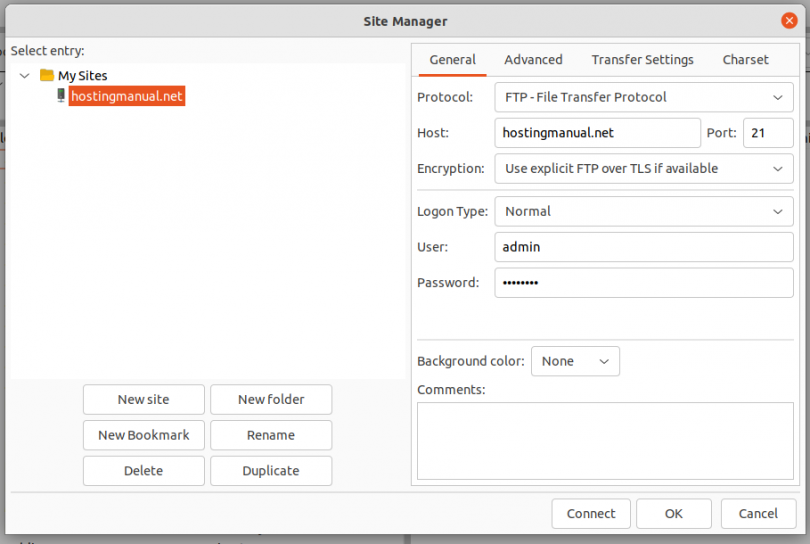
Manual installation needs more steps. You have to download files. Then, upload them to your server. Use FTP for this task. Follow instructions carefully. Each platform has unique steps. Look for guides online. They provide clear directions. Manual setups offer more control. You can customize settings. This method suits advanced users. They enjoy the extra options. Always check file permissions. Wrong settings can cause issues. Manual installation takes longer. But it’s worth it for control.
Credit: www.hostingmanual.net
Managing Website Files
FTP stands for File Transfer Protocol. It helps move files from your computer to the web. You will need a special program called an FTP client. Some popular ones are FileZilla and Cyberduck. First, open the FTP client. Then, type your website’s address and login details. Drag your files into the client. Wait for the transfer to finish.
Most web hosts have a File Manager tool. It is usually in the control panel. This tool helps you upload and organize files. Click on the File Manager icon. Then, select the Upload option. Choose the files from your computer. Click Open to start the upload. Your files will show up in the list.
Configuring Website Settings
Navigating web host settings allows you to customize your website. Adjust domain, email, and security features easily. Explore control panel options to enhance site functionality efficiently.
Setting Up Email Accounts
Email accounts help you stay connected. Log into your web hosting panel. Look for the Email section. Click on it. You can create new email addresses there. Enter your desired email name. Choose a password. Your email is now ready. Check the settings. You might need to update them. Some web hosts offer extra tools. Use them to manage your emails.
Customizing Dns Settings
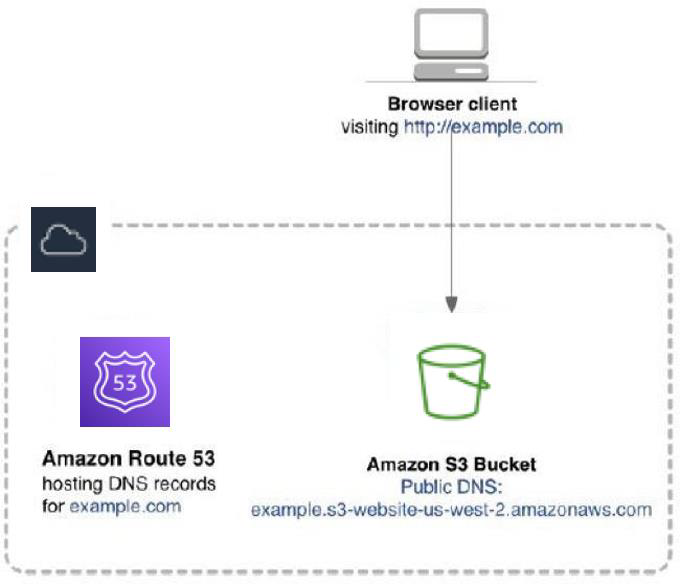
DNS settings let your site connect to the web. Open your hosting dashboard. Find the DNS settings. Look for the DNS configuration section. Here, you can change records. Update A records for your site’s address. Modify MX records for mail delivery. Make sure to save changes. DNS changes may take time. Wait a few hours to see effects. Your site will be live soon.
Credit: medium.com
Ensuring Website Security
SSL certificates are very important. They keep data safe. Without SSL, hackers can steal information. It’s like a secret key. Only the right people can see the data. Websites with SSL show a padlock icon. This builds trust. Users feel safe. Many web hosts offer free SSL. Always make sure to enable it. It’s easy and quick.
Security plugins help protect websites. They block bad actions. Some plugins even scan for viruses. They alert you if something is wrong. Always choose popular plugins. They get regular updates. This keeps them strong. Check your plugin settings. Make sure they are active. It’s like a shield for your website.
Monitoring Website Performance
Watching your website’s traffic helps you understand visitors. Use tools like Google Analytics for this. They show how many people visit your site. You can see which pages they like most. This information helps improve your site. More visitors can mean more business. It is like knowing what your friends like to play. Then, you can offer the right games.
Fast websites make visitors happy. Slow sites can make them leave. You can check your site’s speed with tools. They show what slows it down. Try to make images smaller. This helps your site load faster. Remove extra stuff that is not needed. Think of it like cleaning a messy room. A clean room looks better and works well.
Troubleshooting Common Issues
Facing issues while using a web host can be frustrating. Learn to identify and fix common problems easily. Improve your website’s performance with simple troubleshooting steps.
Resolving Hosting Errors
Hosting errors can be frustrating. They often occur due to misconfigured settings. Always check your server configuration first. Ensure your file permissions are correct. Wrong permissions can block access. Review your error logs regularly. They provide clues about problems. Logs help identify missing files or scripts. Sometimes, errors arise from plugin conflicts. Disable plugins one by one. This helps find the faulty plugin. Update your software often. Outdated software can lead to errors. Keep backups of your data. They are useful during recovery.
Dealing With Downtime
Downtime affects website availability. It can result from server overload. Reduce load by optimizing your database. Use efficient queries and indexed tables. Caching is important too. It stores data temporarily. This reduces server requests. Monitor your server’s performance regularly. Be aware of usage spikes. Notify your hosting provider about frequent downtimes. They might offer solutions. Consider using CDN services. They distribute content across servers. This enhances site stability. Ensure your site is secure. Malware attacks can lead to downtime. Regular security checks prevent this.
Frequently Asked Questions
How Does A Web Host Work?
A web host stores website files on servers, making them accessible online. It manages domain names, provides bandwidth, and ensures security. Users access your site via the internet, while hosting plans vary based on space, speed, and support. Reliable hosting enhances website performance and uptime.
How To Host A Website On Webhost?
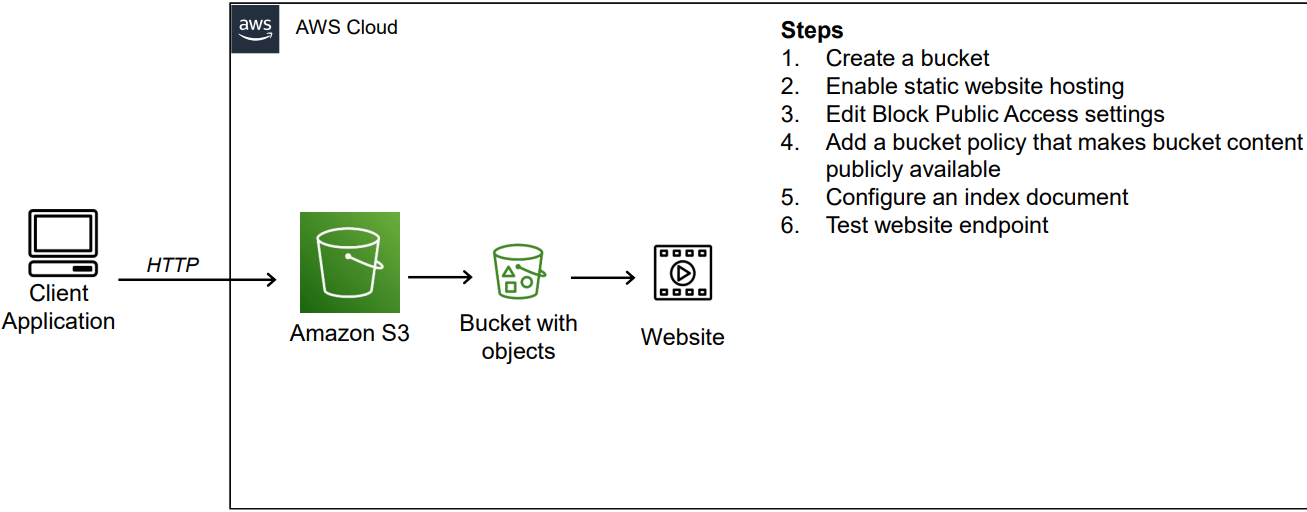
Sign up for a Webhost account. Choose a hosting plan. Register a domain or use an existing one. Upload your website files using the control panel or FTP. Configure DNS settings. Test your website to ensure everything works correctly.
Can You Do Web Hosting Yourself?
Yes, you can host a website yourself. Set up a server, install software, and maintain it regularly. Ensure strong security measures to protect data. This approach requires technical knowledge and time commitment. Many prefer using professional hosting services for convenience and reliability.
How Do I Start Using My Hosting?
Begin by logging into your hosting account. Access the control panel to manage settings. Upload your website files using FTP. Configure domain settings for website visibility. Regularly update and backup your site for security.
Conclusion
Understanding how to use a web host is crucial for website success. Start by choosing the right provider. Focus on features that meet your needs. Ensure your host offers good customer support. Learn to navigate the control panel effectively. Regularly update your site for optimal performance.
Back up your data to prevent loss. Keep an eye on your website’s speed and uptime. These steps ensure your site runs smoothly. With practice, managing web hosting becomes second nature. Enjoy the process and watch your website thrive.


