
Are you ready to launch your website but feel overwhelmed by the technical details? You’re not alone.
Choosing the right web hosting service is crucial, and GoDaddy is a popular choice for many. But how exactly do you use GoDaddy’s web hosting service effectively? With so many features and options, it can seem like a daunting task.
Don’t worry; we’re here to make it simple for you. By the end of this article, you’ll have the knowledge and confidence to navigate GoDaddy like a pro. Imagine the satisfaction of seeing your website live, running smoothly, and attracting visitors. Intrigued? Let’s dive into the nuts and bolts of using GoDaddy Web Hosting Service to turn your website dreams into reality.

Credit: www.godaddy.com
Choosing The Right Hosting Plan
Shared Hosting lets many websites share one server. It is the cheapest option. Good for small sites. Easy to use and set up. Not much control over server settings. Performance might drop if others use too much space.
VPS Hosting offers more control. A virtual server on a physical machine. Costs more than shared hosting. Better for growing sites. You can change server settings. Resources are shared but managed better.
Dedicated Hosting means one server for your site. No sharing with others. Best for big sites with lots of traffic. Full control over server settings. More expensive than other plans. Offers maximum performance and security.
Setting Up Your Account
Start by visiting the Godaddy website. Click on the Sign Up button. Enter your email address and choose a password. Make sure it’s easy to remember. Fill in your personal details like name and phone number. Choose to receive updates if you want. Click Create Account to finish. You now have a Godaddy account.
Log in to your account. Go to the Domain Search bar. Type in your desired domain name. Godaddy will show if it’s available. Choose the one that fits your needs. Add it to your cart. Review your choice and click Proceed to Checkout. Complete the purchase. Your domain is now ready to use.
Navigating The Godaddy Dashboard
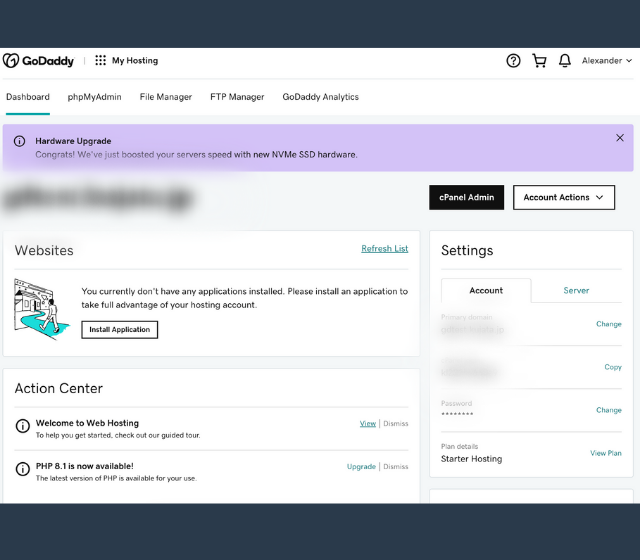
The Godaddy control panel is easy to use. It helps manage your website. Find the control panel on your dashboard. It shows your hosting details. Look for sections like domains and email. Check each section carefully. You can make changes to your site easily.
Hosting features are important. They help your website run smoothly. Click on the hosting tab. It shows all the features. You can add new features here. Find options like storage and security. Make sure to check them regularly. It keeps your site safe and fast.
Installing WordPress
Godaddy makes installing WordPress easy. Use the One-Click Install feature. First, log into your Godaddy account. Find the hosting option. Click on the Install WordPress button. Follow the steps. Enter your site name. Choose a username and password. Press Install. In minutes, your WordPress is ready.
After installation, it’s time to customize. Start with choosing a theme. Go to the WordPress dashboard. Click on Appearance. Browse and select a theme. Add your own logo and pictures. Change the colors to match your style. Add plugins for extra features. Always save your changes. Your site should look unique and fun.
Managing Email Accounts
Godaddy web hosting simplifies managing email accounts. Users easily set up and access emails with intuitive tools. Enjoy seamless integration and efficient organization for all your communication needs.
Creating Email Addresses
Start by logging into your Godaddy account. Find the email section. Click on “Create Email.” Type the desired email name. Choose your domain name. Set a strong password. Click “Create.” Your new email is ready to use. It’s that easy!
Setting Up Email Forwarding
Go to your email settings. Look for “Email Forwarding.” Click on it. Enter the email address to forward messages to. Save the changes. Now, emails will go to your chosen address. This helps keep everything organized.

Credit: www.godaddy.com
Configuring Security Settings
Secure your GoDaddy hosting by configuring essential security settings. Protect data with strong passwords and enable two-factor authentication. Regularly update software to guard against vulnerabilities.
Enabling Ssl Certificates
SSL certificates keep websites safe. They protect information. First, log into your Godaddy account. Find the SSL section. Click to enable it. Follow the steps given. SSL helps in making your site secure. It shows a lock symbol in the address bar.
Setting Up Firewalls
A firewall is like a guard. It keeps bad guys out. Go to your hosting dashboard. Look for the firewall settings. Click to turn it on. Choose the right options. Firewalls protect your site from attacks. They are important for safety.
Optimizing Performance
Godaddy web hosting boosts website speed and reliability. Adjust server settings and use caching tools effectively. Regularly update software to ensure top performance.
Improving Site Speed
Faster websites make users happy. Happy users stay longer. Site speed is important. Godaddy offers tools to help. Use these tools to make your site faster. Image sizes can slow down pages. Resize images to load quicker. Use less plugins. Too many plugins make sites slow. Check your site’s speed often. Use speed tests to find problems. Fix these problems for a faster site.
Utilizing Caching Tools
Caching helps your site load faster. It saves data for later use. Godaddy has caching options. Use these to speed up your site. Cached pages load quicker. They use saved data instead of fetching new. Check your cache settings regularly. Make sure they are updated. Caching makes users’ experience better. They will return to your site again.
Credit: www.godaddy.com
Troubleshooting Common Issues
Facing problems with GoDaddy web hosting? Quick fixes can help. Ensure your domain is connected. Check server settings. Update DNS records. Regular maintenance keeps your website running smoothly.
Resolving Hosting Errors
Many users face hosting errors on Godaddy. Start by checking your website’s settings. Incorrect settings often cause problems. Ensure your domain is connected to the hosting account. Look at the DNS records to make sure they are correct. Sometimes, plugins can cause issues. Disable them one by one to find the culprit. If your site is slow, consider optimizing images and reducing scripts. Backup your website before making changes. This keeps your data safe.
Contacting Godaddy Support
Godaddy Support is available 24/7. To contact them, visit the support page. Choose the help option that fits your issue. You can chat online or call them. Have your account details ready. This helps speed up the support process. Explain your problem clearly. This makes it easier for them to help. Keep a note of the solutions they provide. It helps if the problem returns.
Exploring Additional Godaddy Services
Enhancing SEO is crucial for your website. Godaddy offers tools to help. Use their SEO services to improve your site’s rank. Better rank means more visitors. The tools are easy to use. You can find keywords that work best. These keywords help search engines find you. Optimize your site with just a few clicks. It’s that simple.
Utilizing Marketing Tools can boost your website’s reach. Godaddy provides easy marketing options. Email marketing is one of them. Send emails to your customers. Keep them updated with news and offers. Another tool is social media integration. Link your website to social platforms. Share your content easily. This helps to grow your audience. These tools are built to make marketing simple.
Frequently Asked Questions
How To Connect To Godaddy Hosting?
To connect to GoDaddy hosting, log into your GoDaddy account, access the hosting dashboard, and find connection details. Use FTP software like FileZilla to enter your server IP, username, and password for access. Ensure you have the necessary credentials and permissions for a smooth connection process.
How Do I Use Web Hosting?
Choose a hosting provider and plan. Register a domain name. Upload your website files via the control panel or FTP. Configure DNS settings and email accounts. Monitor website performance and security using provided tools.
How Do I Host My Domain On Godaddy?
To host your domain on GoDaddy, log into your account. Navigate to “My Products” and select “Domains. ” Choose the domain, click “Manage,” and adjust settings as needed. Connect to hosting by following the prompts. Ensure the DNS settings match your hosting provider’s requirements for proper functionality.
Should I Use Godaddy To Host My Website?
GoDaddy offers reliable hosting with various plans. It’s user-friendly and ideal for beginners. Consider your specific needs and budget before deciding. Compare features and customer support with other providers for the best choice.
Conclusion
Navigating Godaddy’s web hosting is simple and efficient. Start by choosing the right plan for your needs. Set up your domain and explore the easy-to-use dashboard. Use the available tools for building and managing your site. Need help? Godaddy’s support is ready to assist.
With these steps, your website will be up and running smoothly. Godaddy offers a reliable option for beginners and pros alike. Remember, good hosting is key to your online success. Stay patient and keep learning. Your website journey is just beginning.
Enjoy the process and watch your site grow.


