
Are you ready to take control of your online presence with your own code? Using GoDaddy web hosting, you can bring your unique ideas to life on the internet.
With its user-friendly interface and powerful features, GoDaddy makes it easy for you to host your custom code and manage your website effortlessly. But if you’re feeling a bit overwhelmed or unsure about where to start, don’t worry. This guide will walk you through the essentials of using GoDaddy web hosting for your own code projects.
By the end, you’ll feel confident and empowered to launch your website. Let’s dive in and unlock the potential of your creativity!
Credit: www.godaddy.com
Choosing The Right Hosting Plan
Shared hosting is cheaper but shares space with others. It’s good for small projects. Dedicated hosting gives you a whole server. It’s more expensive but offers better speed and security. Think about your budget and needs. If your site is big, consider dedicated hosting.
Decide how much space your code needs. Traffic matters too. More visitors need more power. Check if you need special tools or software. Godaddy offers different plans. Pick one that fits your requirements. Review what you need before buying.
Credit: www.godaddy.com
Setting Up Your Account
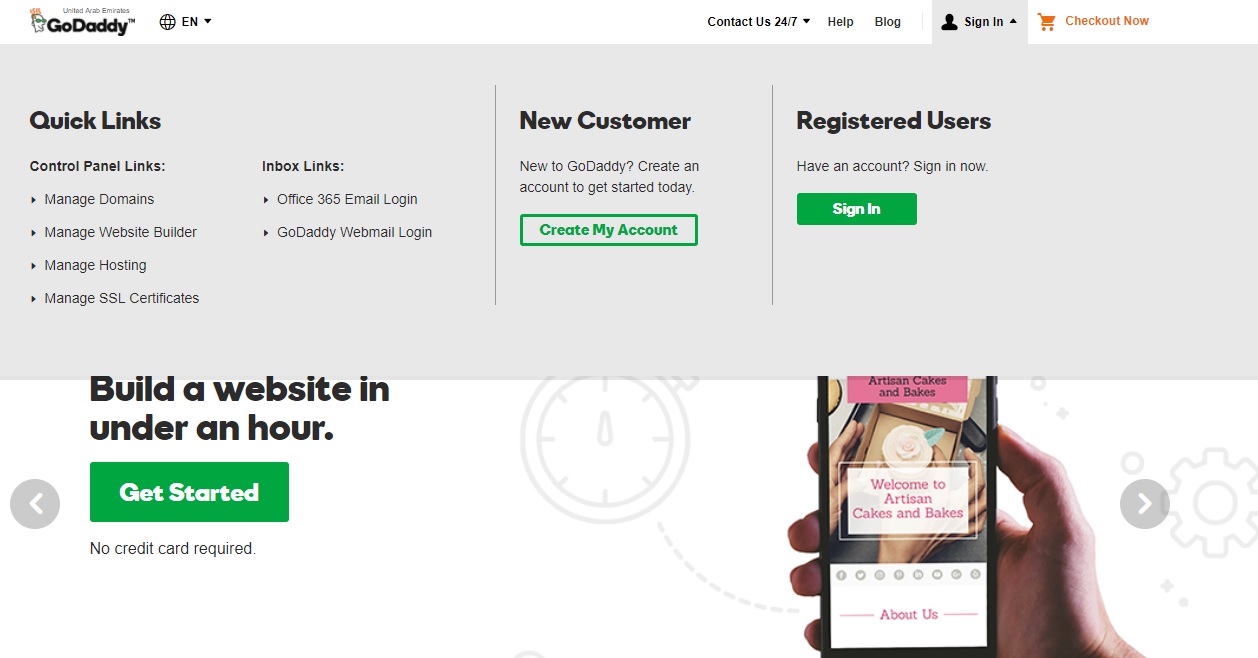
Start by visiting the Godaddy website. Click on the “Sign Up” button. Fill in your email address and password. Make sure your password is strong. You can use numbers and symbols. Agree to the terms. Click “Create Account” to finish. Now you have a Godaddy account. It’s easy!
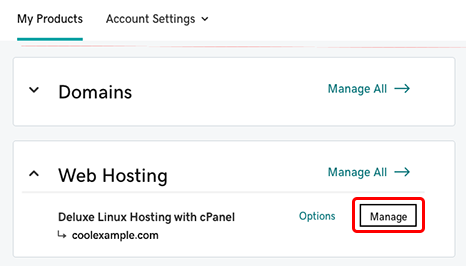
After logging in, find the Control Panel. It’s the main dashboard. The panel has many options. You can see domains and hosting plans. Click on “My Products” to view details. Use the menu to explore settings. The panel is user-friendly. It’s easy to navigate for beginners.
Uploading Your Code
Godaddy web hosting simplifies uploading your code. Start by accessing your account, then use the file manager. Drag and drop files directly into the server, ensuring smooth deployment.
Using Ftp For File Transfer
FTP helps move files to your website. Godaddy offers FTP access to upload your code. FTP clients like FileZilla make this easy. First, connect to your server using the FTP details from Godaddy. Drag and drop your files into the server. This sends your code to the website. It’s fast and simple. FTP connections are safe and secure. Always check your files after uploading.
File Manager Features
Godaddy’s File Manager is helpful. It works like a computer folder. You can upload, delete, or edit files here. Click on ‘Upload’ to add your code. You see your files listed. Use ‘Edit’ to change code quickly. File Manager saves time. It’s easy to access from the control panel. Always remember to save changes.
Configuring Server Settings
Godaddy hosting makes it easy to change PHP settings. Go to the control panel. Look for the PHP version option. Click on it. A new window will open. Here, you can change settings. For example, increase the memory limit. Or change the upload size. Remember to save changes. It is important to refresh the page after saving.
Creating and managing databases is simple. Use the cPanel for this. Click on the MySQL Databases option. Here, you can create a new database. Give it a name. You can also add users. Assign them to the database. Use phpMyAdmin to manage data. You can import and export data easily. Always keep a backup.
Testing Your Website
Checking Compatibility is essential for a smooth website experience. Make sure your site works on different browsers. Test it on Chrome, Firefox, and Safari. Don’t forget mobile devices. Many people browse on phones. Use responsive design. This helps your site look good everywhere. Check your website’s speed. Slow sites make visitors leave. You can use online tools to test speed. Fix any slow parts quickly. This keeps users happy.
Debugging Common Issues can save you time. First, look for broken links. These frustrate users. Use a link checker tool. Next, check for missing images. Make sure all pictures load correctly. If some don’t, fix them. Sometimes, scripts can cause problems. Check JavaScript and CSS files. Ensure they load without errors. Always keep backups. This helps if something goes wrong. Regular checks keep your site healthy.
Enhancing Performance
Fast websites make users happy. Load speed is very important for this. Use tools to check your website speed. Reduce image sizes to make pages load faster. Smaller images help a lot. Also, keep code clean and simple. This helps the site work better.
Caching saves time. It keeps web pages ready for users. This makes the site faster. Use browser caching to store parts of the site. It helps users see pages quickly. Server caching is also useful. It stores data on the server. Both caching methods help in speeding up websites.
Ensuring Security
Implementing SSL Certificates is important for security. SSL encrypts data between users and websites. This keeps information safe from hackers. Godaddy makes it easy to add SSL. It protects your site and builds trust. Visitors know their data is secure. Check Godaddy for SSL options. Follow steps to install SSL on your site. Make sure your site shows “HTTPS” in the address bar. This means SSL is working well.
Regular Security Audits help keep your site safe. Check your site often for weak spots. Look for updates in security plugins. Fix any problems you find quickly. Use strong passwords for your accounts. Change passwords regularly. Godaddy offers tools for security checks. Use these tools to keep your site healthy. Stay alert to new threats online. Protect your site with regular checks and fixes.
Maintaining Your Site
Godaddy Web Hosting simplifies managing your own code with user-friendly tools. Upload files easily and configure hosting settings through the intuitive control panel. Ensure optimal performance by regularly updating your code and monitoring server resources.
Scheduling Backups
Backup your site regularly. This keeps your data safe. Set up automatic backups. Use GoDaddy’s tools for this task. Choose weekly or monthly backups. Store backups in a secure place. Make sure you can access them easily. Check backup settings often. This ensures backups work correctly.
Updating Software
Keep your software up to date. Updates fix bugs and improve security. Check for updates weekly. Use GoDaddy’s update tools. Update plugins and themes regularly. This prevents issues and keeps your site running smoothly. Review update settings often. Ensure your site is always secure and current.
Credit: www.godaddy.com
Frequently Asked Questions
Can I Use My Own Code On Godaddy?
Yes, you can use your own code on GoDaddy. Their hosting platforms support various programming languages. Deploy your code easily with provided tools. Ensure your code aligns with GoDaddy’s technical requirements. Explore their documentation for guidance. Enjoy flexibility and control with GoDaddy hosting services.
How To Deploy Code On Godaddy?
Deploy code on GoDaddy by accessing your hosting account. Use FTP or File Manager to upload files. Configure settings in the control panel. Test the website to ensure everything works. Check GoDaddy’s documentation for detailed instructions.
Can I Upload My Own Website To Godaddy?
Yes, you can upload your own website to GoDaddy. Use their hosting services for easy uploads. Employ GoDaddy’s File Manager or an FTP client to transfer your files. Ensure your domain is correctly pointed to your hosting account. Contact GoDaddy support if you face any issues.
How Do I Add Html Code To A Website?
Open your website’s HTML file using a text editor. Locate where you want the code added. Paste your HTML code in the desired section. Save the changes and upload the updated file to your web server. Refresh your website to see the changes.
Always backup files before editing.
Conclusion
Godaddy makes hosting your own code easy. It offers reliable services. You can set up your website in a few simple steps. Managing your code is straightforward with their tools. Support is available if you need help. Godaddy ensures your website runs smoothly.
Security features protect your data. You get good value for your investment. Use Godaddy to take your website live. Start hosting your code today. Enjoy creating and sharing your web projects. Godaddy helps you with your web journey. Your code deserves a great home.
Choose Godaddy for a hassle-free experience.


