
Imagine having the power to manage your website’s files with ease, keep track of changes, and collaborate seamlessly with your team. That’s what using Git with a web-hosting service can do for you.
Whether you’re a developer, a designer, or a business owner looking to streamline your online presence, understanding how Git integrates with your web-hosting can transform your workflow. You might be wondering how to get started or why it’s even necessary.
By the end of this article, you’ll have a clear understanding of how Git can be your ally in web management, ensuring your website runs smoothly and efficiently. So, let’s dive into the world of Git and discover how it can revolutionize the way you handle your web-hosting.
Setting Up Git On Your Local Machine
First, download the Git software from the official website. Choose the version for your operating system. Follow the installation guide on the site. This makes it easy. After downloading, start the installer. Follow the steps. Select default options if unsure. Finish the setup by clicking “Install.”
Open the command line or terminal. Type git config --global user.name "Your Name". Press enter. Then, type git config --global user.email "you@example.com". Press enter again. This sets your name and email. These details appear on your commits. Keep them correct. This is important.
Credit: docs.plesk.com
Creating A New Git Repository
Open your terminal on your computer. Type git init to start a new repository. This creates a hidden folder called .git. It tracks your project changes.
Ensure your project folder is ready. Check it contains all your files. You can now start adding files.
Use the command git add to include files. For all files, use git add .. This marks changes for the next commit.
Confirm added files with git status. It shows the staged files in green. Now your files are ready for a commit.
Connecting Git To Web Hosting
First, pick a web hosting service. Choose one that supports Git integration. Some hosts provide guides on this. Check if the host offers SSH access. It’s important for secure connections. Look for reviews online to find reliable hosts.
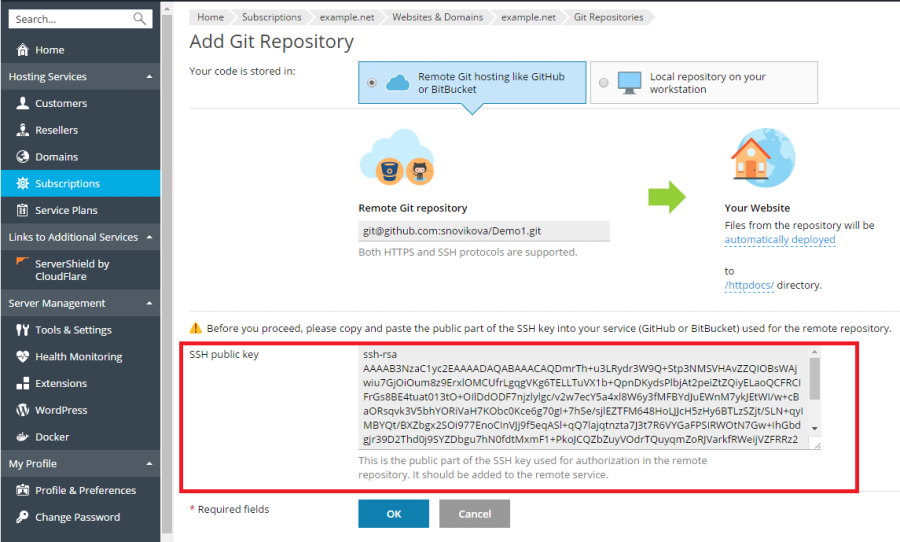
SSH keys are like special passwords. They help your computer talk to the host safely. Create a key using a program called ssh-keygen. It makes a public and private key. Keep the private key safe. Add the public key to your hosting account. This step is crucial for security.
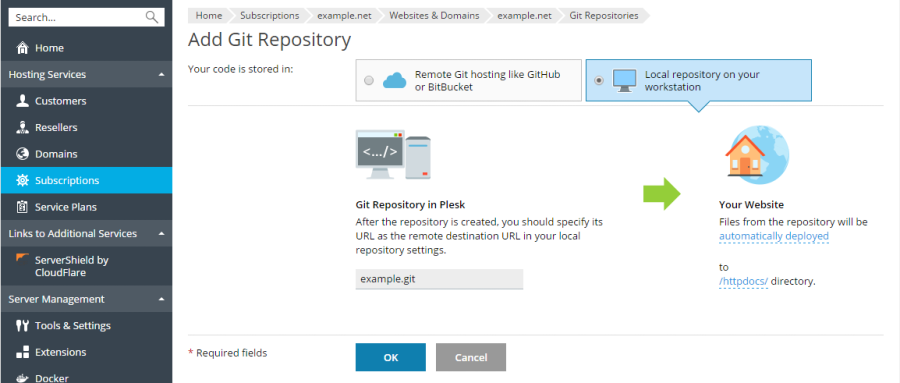
Start by opening your terminal. Navigate to your Git repository. Use the git remote add command. This links your repository to the web host. Check the connection with git push. This sends your files to the server. Always verify changes on the host.
Credit: docs.plesk.com
Deploying Code To Web Hosting
Git helps send changes to a remote server easily. First, make sure your code is ready. Next, use the command git add to stage changes. Then, commit these changes with git commit. This saves a snapshot of your code. Finally, push changes using git push. The code will move to the server. It is important to check if everything works as expected.
Automatic deployment saves time. Set it up with a service like GitHub Actions or GitLab CI/CD. Create a script that runs after each push. This script should build and deploy your code. It makes sure your website is up-to-date. Keeping your code fresh is important. Automatic deployment ensures this without much effort.
Managing Versions And Branches
Git helps you create branches easily. Use the command git branch branch-name. This creates a new branch. To switch branches, use git checkout branch-name. This command changes your working branch. It’s like changing lanes on a road. Very simple. No traffic jam here. Always remember to save your work before switching. It keeps your changes safe. You can have many branches. Each branch can have different features. Work on one feature at a time.
Merging combines different branches. Use git merge branch-name to merge. This command brings changes together. It’s like mixing colors. Sometimes, conflicts happen. Git will tell you if there is a conflict. Don’t worry. Resolve conflicts carefully. Then save and commit changes. Keep your main branch clean. Merging helps keep work organized. Teams can work better together. Everyone’s changes come together smoothly.

Credit: pages.github.com
Troubleshooting Common Issues
Using Git with a web-hosting service can have issues like authentication errors or syncing problems. Ensuring correct SSH key setup and verifying repository URLs often resolves these challenges.
Resolving Merge Conflicts
Merge conflicts can be confusing. They happen when two changes clash. Understanding the conflict is the first step. Look for conflict markers in the code. These markers show where the conflict is. Edit the code to fix the conflict. Make sure to keep the changes you need. After editing, test the code to ensure it works. Finally, commit the resolved changes. This will update the repository. Remember, practice helps in handling conflicts better.
Handling Deployment Errors
Deployment errors can stop your project. Check error messages first. They often point to the problem. Verify configurations to ensure they are correct. Sometimes settings are missing or incorrect. Look at server logs for more details. Logs can show hidden issues. Test locally to see if the issue occurs. This helps to isolate the problem. Fix identified issues and deploy again. Keep your hosting environment updated to avoid errors.
Frequently Asked Questions
How To Host A Website Using Git?
Use GitHub Pages for free website hosting. Create a repository, push your site’s files, and enable GitHub Pages in settings.
Does Github Allow Website Hosting?
Yes, GitHub allows website hosting through GitHub Pages. Users can host static websites directly from their repositories. It’s free and easy to set up, making it ideal for personal, project, or organization sites. Use your own domain or a GitHub subdomain for your hosted website.
Is An Online Hosting Service For The Git Repository?
Yes, an online hosting service for Git repositories provides a platform to manage and collaborate on code projects efficiently. Popular services include GitHub, GitLab, and Bitbucket, offering features like version control, issue tracking, and team collaboration. They enhance productivity and streamline development processes for individuals and teams.
What Is The Best Git Hosting Service?
GitHub is the most popular Git hosting service. It offers extensive collaboration tools and a vast community. GitLab is another excellent choice, known for its CI/CD features. Bitbucket is great for teams using Atlassian products. Choose based on your project’s specific needs and integrations.
Conclusion
Mastering Git with your web-hosting service simplifies your workflow. This tool helps in managing code efficiently. It reduces errors and enhances collaboration with team members. You now have the basics to integrate Git into your hosting service. Start practicing the steps regularly.
This will build your confidence. Soon, version control will become second nature. Keep exploring Git’s features and improve your skills. The more you use it, the easier it gets. Enjoy the benefits of streamlined web development. Your projects will run smoothly, and you’ll save time.
Dive in and make the most of Git today!


