
Are you looking to boost your website’s performance without breaking the bank? Imagine a world where your website loads at lightning speed, handles traffic like a pro, and stays secure.
This isn’t just a dream. By using Amazon Web Services (AWS) for web hosting, you can make it a reality. AWS offers a powerful and flexible solution that can scale with your needs. Whether you are running a personal blog or a large e-commerce platform, AWS has the tools to help you succeed.
Ready to unlock the full potential of your website? Dive into this guide to learn how AWS can transform your web hosting experience.
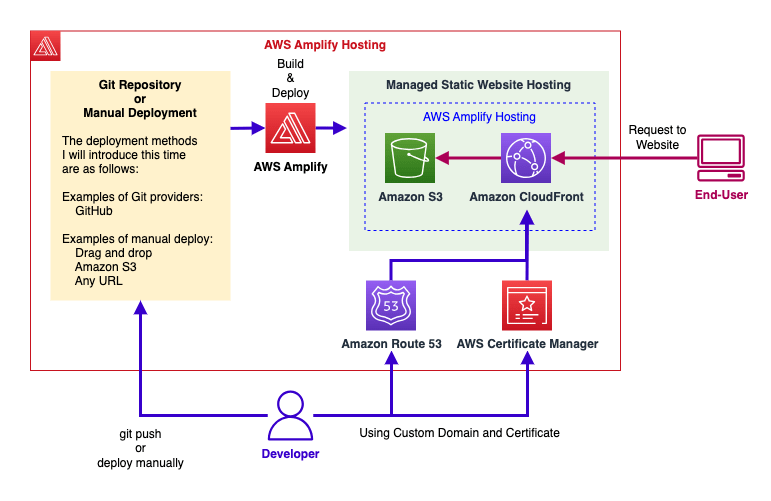
Credit: hidekazu-konishi.com
Aws Web Hosting Basics
AWS offers many benefits for web hosting. It is very reliable. Websites stay online almost all the time. AWS is also scalable. It grows as your site grows. You only pay for what you use. This can help save money. Security is a top priority. AWS protects your data well. It also offers a wide range of services. You can choose what you need.
| Feature | Description |
|---|---|
| Elastic Compute Cloud (EC2) | Provides resizable compute capacity. |
| Simple Storage Service (S3) | Stores large amounts of data. |
| RDS | Managed database service. |
| CloudFront | Delivers content fast. |
Choosing The Right Aws Service
EC2 is a great option for hosting. It allows you to scale your website. You can add or remove servers as needed. This helps in managing traffic easily. Cost is another factor. You only pay for what you use. There is a choice of operating systems. Choose from Windows or Linux. This makes it versatile for many users.
Elastic Beanstalk is like a helper. It manages your web app automatically. You don’t need to worry about servers. Deployment is easy. Just upload your code. Elastic Beanstalk handles everything else. It supports multiple languages. Java, Python, and Ruby are a few examples. This makes it flexible for developers.
S3 is perfect for static websites. It stores files safely. You can host images, HTML, and CSS. Cost is low because you pay only for storage used. Setup is simple. No servers needed. Just upload your files. It’s fast and reliable. Visitors get quick access to your site. This makes S3 a smart choice for simple websites.
Setting Up Aws Infrastructure
Start by logging into the AWS console. Navigate to the EC2 dashboard. Click on “Launch Instance”. Choose the Amazon Machine Image (AMI). Select an instance type that fits your needs. Configure the instance settings. Launch the instance. Make sure to set up key pairs. You need these for secure access. This step is important for security.
Elastic Load Balancing helps manage traffic. Go to the Load Balancer section. Click “Create Load Balancer”. Choose a load balancer type. Configure listeners and security groups. This will direct traffic to your instances. Ensure it is set up correctly. It improves availability and reliability.
Auto Scaling adjusts your instances. Go to the Auto Scaling section. Click “Create Auto Scaling Group”. Select your EC2 instance. Define scaling policies based on needs. Set minimum and maximum instance limits. This helps manage traffic changes. It ensures your site runs smoothly.

Credit: aws.amazon.com
Domain And Dns Management
AWS Route 53 is a tool that helps with DNS. It makes sure your website name points to the right place. First, you need a domain name. You can buy one from AWS or another service. After you have a domain, use Route 53 to manage it. You set up a hosted zone for your domain. This helps Route 53 know where to send people.
Route 53 works with many record types. These records tell the internet where your website lives. Common records are A records and CNAME records. A records link your domain to an IP address. CNAME records help with subdomains.
To link your domain to AWS, change your domain’s name servers. Use the ones from Route 53. This tells the world that AWS handles your DNS. It’s like changing your address with the post office. Now, your domain and AWS work together. This setup makes your website easy to find.
Security Best Practices
IAM Policies help manage access to AWS resources. Create strong policies to protect your account. Limit permissions to only what is necessary. Use roles instead of users for applications. This improves security. Regularly review and update policies. Ensure they meet current needs. Audit policies to find any weaknesses. Fix them quickly. This keeps your resources safe.
Security Groups act like virtual firewalls. They control inbound and outbound traffic. Set rules to allow only necessary traffic. Block all other traffic. Regular updates to these rules are important. Check logs for any unusual activity. Respond to threats immediately. This prevents unauthorized access. Always use least privilege principles. Allow only what is needed. This maintains strong security.
Monitoring And Optimization
CloudWatch helps you see what’s happening in your AWS services. It shows metrics like CPU usage, memory, and more. This helps you keep your site running smoothly. You set alarms to get alerts when things go wrong. Logs in CloudWatch tell you what happened. You can fix problems faster with these details.
AWS can get expensive if you’re not careful. Use budgets to set spending limits. Check your usage reports to know where money goes. Turn off services you don’t need. Reserved instances can save you money. They cost less than on-demand instances. Spot instances are cheaper but less reliable. Always keep an eye on costs.
Troubleshooting Common Issues
Setting up AWS for web hosting can be tricky. Common issues include configuration errors and security settings. Troubleshooting requires checking instance settings and ensuring proper permissions.
Resolving Connectivity Problems
AWS can have connectivity issues. Check your network settings first. Make sure your firewall rules allow traffic. Look at your DNS settings too. Sometimes, restarting your instance helps. If problems persist, verify your IAM permissions. Wrong permissions can block access.
Addressing Performance Bottlenecks
Slow website? Check your server load. High load can cause lags. Use AWS tools to monitor your resources. Look at CPU and memory usage. Too high? You might need to upgrade your instance type. Consider using Elastic Load Balancing. It helps in distributing traffic. This keeps your site fast and smooth. Remember, regular checks are key.

Credit: www.youtube.com
Frequently Asked Questions
Can I Use Aws To Host My Website?
Yes, AWS can host your website. It offers scalable solutions like EC2, S3, and CloudFront for hosting. You can choose different configurations based on your needs and budget. AWS provides reliable infrastructure and extensive tools to manage your website efficiently.
Is Aws Good For Web Hosting?
Yes, AWS is excellent for web hosting. It offers reliable infrastructure, scalability, and security. Users benefit from flexible pricing and a vast array of services. AWS supports various web applications, ensuring optimal performance. Its global reach enhances accessibility and speed, making it a preferred choice for businesses worldwide.
Is Aws Free For Web Hosting?
AWS offers a free tier for web hosting with limited resources. It includes 12 months of free usage. Charges apply if your usage exceeds these limits. Always check current AWS pricing for accurate details.
Which Aws Service Will Be Used To Host Web Application?
AWS Elastic Beanstalk is ideal for hosting web applications. It automates deployment, scaling, and management. AWS EC2 is also popular, providing customizable compute capacity. For serverless applications, AWS Lambda is a great choice. Choose based on your application’s requirements and scalability needs.
Conclusion
AWS simplifies web hosting for everyone. You can manage resources easily. Choose AWS for reliable performance. Enjoy flexible pricing options. Scale as your website grows. With AWS, security is a priority. Protect your data with strong measures. Support is available whenever needed.
AWS services are user-friendly. Beginners and experts can navigate them. Hosting with AWS is cost-effective and efficient. Invest in quality hosting for your site. Elevate your online presence today. Start with AWS and see the difference. Happy hosting!


