
Are you feeling overwhelmed by the process of updating your WordPress theme through Envato Market? You’re not alone.
Navigating through theme updates can feel like a daunting task, especially when you’re juggling other responsibilities. But imagine the satisfaction of having a site that’s not only visually stunning but also secure and up-to-date. The secret to achieving this lies within just a few simple steps, and we’re here to guide you through them.
You’ll discover a straightforward approach to updating your WordPress theme using Envato Market. We’ll break down each step, ensuring you have the confidence to handle future updates effortlessly. By the end, you’ll not only have a refreshed website but also a newfound sense of control over your digital space. Ready to transform your site and enhance your online presence? Let’s dive in.
Benefits Of Updating WordPress Themes
Updating themes keeps your website safe. New updates fix bugs and security holes. This helps keep hackers away.
Fresh updates bring new features. These features make your site better. They help your site look modern. Users like new and fresh sites.
Improved speed is another perk. Updates make your site run faster. Fast sites keep visitors happy. Visitors stay longer on fast sites.
Compatibility is crucial. Themes need to work with plugins. Updates ensure everything works well together. This prevents site crashes.
Accessing Envato Market
Start by visiting the Envato Market website. Click on the Sign Up button. Fill in your name, email, and password. Agree to the terms. Click Create Account. Check your email for a confirmation link. Click the link to activate your account. You are now ready to explore!
Once logged in, find the search bar at the top. Type the theme name you want. Press Enter to see results. Use filters to narrow choices. Choose a theme and click on it. Read descriptions and check ratings. Click Buy if you like it. Follow the prompts to make a purchase. Now, you can download and update your theme.
Installing Envato Market Plugin
First, visit the Envato Market website. Look for the plugin section. Click to download the Envato Market Plugin file. Save it to your computer. Remember the location. You will need it soon.
Open your WordPress dashboard. Go to the plugins section. Click “Add New”. Then click “Upload Plugin”. Select the downloaded file from your computer. Click “Install Now”. Wait a moment. After installation, click “Activate Plugin”. Now your plugin is ready. You can update your theme with ease.
Connecting Your Envato Account
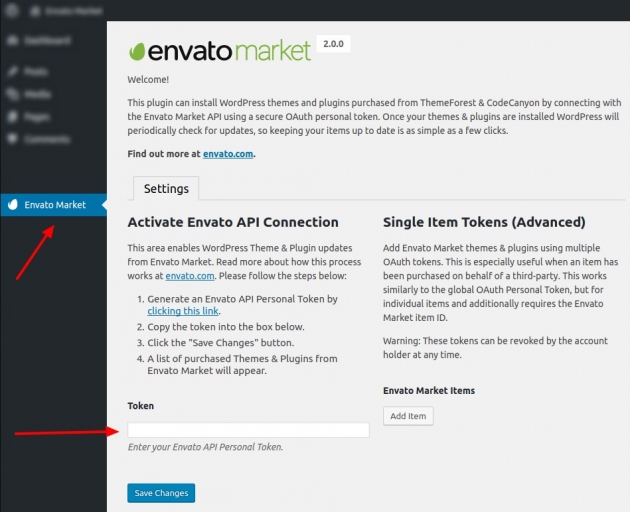
Generating API Tokens is an important step. Start by logging into Envato. Then, go to your account settings. Look for the API Tokens section. Click to create a new token. Give your token a name. Check all required permissions. Make sure you save your token safely. It is unique and important.
Linking Tokens to WordPress is easy. Open your WordPress dashboard. Install the Envato Market plugin. Find the plugin settings. Enter your API token there. This connects your WordPress to Envato. Now, you can update themes automatically. No need to worry about manual updates. Everything becomes simple and fast.
Locating Purchased Themes
Find your purchased themes in the Envato Market account. First, log in using your username and password. Then, click on the “Downloads” section. This section shows all items bought. Look for the theme you want to update. Each theme has a download button. Clicking it gives you the latest version. This helps keep your site fresh and secure.
Viewing Purchase History
Your purchase history is easy to access. Log into Envato Market. Click on “Downloads” in the menu. A list of your purchases appears. Find the theme you need. Each entry has details like purchase date. This helps you track past purchases. Keeping track helps manage themes better.
Finding Theme Updates
Theme updates appear in the “Downloads” section. Log in to your Envato account. Visit the “Downloads” area. Updated themes have a download link. Click it to get the latest version. Updates fix bugs and add new features. Regular updates keep your site running well.
Credit: mekshq.com
Updating Themes Via Envato Market
First, go to the Envato Market website. Log in using your account details. Click on the “Downloads” tab to find your purchased theme. Next to the theme, click on the “Download” button. Choose “Installable WordPress file only” to get the latest files.
Open your WordPress dashboard. Go to the “Themes” section under “Appearance”. Click “Add New” and then “Upload Theme”. Select the downloaded file and click “Install Now”. Once done, activate the theme to complete the update.
After updating, check if your website looks good. Visit the homepage and other important pages. Ensure all features work fine. If something seems off, clear your browser cache. Sometimes old settings can cause issues.
It’s also a good idea to review the theme’s settings. Check for any new options or updates. Adjust them if needed. This way, your site stays fresh and up-to-date.
Troubleshooting Common Issues
Updating your WordPress theme through Envato Market can fix common issues. Start by installing the Envato Market plugin. Connect your account to access and update your purchased themes with ease.
Failed Update Solutions
Updates can fail due to internet problems. Check your connection first. Make sure the download speed is good. A slow speed can cause issues. Another reason could be low server space. Free up some space. This might help the update process. Restart the update after checking these issues.
Addressing Compatibility Problems
Themes might not work with some plugins. This is a compatibility problem. Disable all plugins first. Then, enable them one by one. This helps find the problem plugin. Also, check the theme version. Old versions might have issues. Update the theme for better compatibility.

Credit: www.envato.com
Best Practices For Theme Updates
Always create a backup before updating your theme. It keeps your data safe. Use plugins like UpdraftPlus or BackupBuddy. Save the backup on an external drive or cloud. This way, you can restore your website if something breaks.
Test updates on a staging site. A staging site is a copy of your website. It lets you check changes without affecting the real site. If the update works fine, apply it to your live site. Use plugins like WP Staging to make a staging site easily.
Credit: www.wpexplorer.com
Frequently Asked Questions
How Do I Update My WordPress Theme Via Envato Market?
To update, first install and activate the Envato Market plugin. Then, connect your Envato account and API token. Once connected, navigate to the Envato Market tab in your WordPress dashboard. Here, you’ll see available updates. Click the ‘Update’ button next to your theme.
Can I Update Themes Without Losing Customizations?
Yes, you can. To preserve customizations, use a child theme. This way, updates won’t overwrite your changes. It’s also advisable to back up your theme before updating. This ensures you can restore previous versions if needed.
Why Use Envato Market For Theme Updates?
Envato Market simplifies theme updates by automating the process. It ensures you’re using the latest version with security patches and new features. This reduces manual effort and potential errors. Additionally, it provides a centralized location for managing multiple themes.
Are Theme Updates Necessary For WordPress?
Yes, updates are crucial. They ensure your theme is secure and compatible with the latest WordPress version. Regular updates also fix bugs and improve functionality. Ignoring updates can lead to vulnerabilities and performance issues.
Conclusion
Updating your WordPress theme using Envato Market is simple. Follow the steps carefully. Ensure your theme stays current and secure. Regular updates enhance site performance. They also fix bugs and improve features. Keeping themes updated helps attract visitors. It maintains your website’s professional look.
Envato Market makes updates straightforward. Use it for a smooth experience. Your site will benefit from timely updates. Stay ahead in the digital world. Always check for new versions. Keep your WordPress theme fresh. Enjoy the ease of Envato Market’s services.
Your website deserves the best care.


