
Transferring your domain to a new web host might seem like a daunting task, but it doesn’t have to be. Whether you’re looking for better performance, more features, or improved customer service, making the switch can offer numerous benefits.
But how exactly do you move your domain without disrupting your website or losing valuable data? You might be wondering if you need technical expertise or if it’s a complicated process. Fear not, because this guide is here to simplify every step for you.
Imagine the relief of knowing your website is in better hands, with seamless access and enhanced capabilities. By following these straightforward steps, you can ensure a smooth transition, minimize downtime, and keep your website running flawlessly. Dive into the article to discover how easy it is to transfer your domain and unlock new possibilities for your online presence.
Credit: www.godaddy.com
Preparing For The Transfer
Domains must be more than 60 days old to move. Check if yours is eligible. Some domains have transfer locks. Unlock these first.
Log into your domain account. Find the settings section. There you can unlock the domain. This is needed for the transfer.
Get the authorization code from your domain provider. This code is essential for transferring. Write it down carefully. You will need it for the new host.

Credit: www.domain.com
Choosing A New Web Host
Transferring your domain to a new web host involves a few key steps. First, unlock your domain at the current registrar and obtain an authorization code. Then, initiate the transfer request through your new host, following their specific instructions for a seamless transition.
Evaluate Hosting Features
Check storage and bandwidth options. Are they enough for your needs? Look at the server speed. Fast servers make websites load quickly. Does the host offer SSL certificates? SSL keeps your site safe. See if they support daily backups. Backups protect against data loss. Ensure they have easy-to-use control panels. Control panels help manage your site.
Compare Pricing Plans
List all the plans. See what each plan offers. Compare prices for each plan. Lower prices are good, but check features too. Sometimes more expensive plans have better features. Look for discounts or promotions. These can save money.
Assess Customer Support
Check if they offer 24/7 support. This helps solve problems fast. Do they have live chat? Live chat is quick and easy. Are there phone support options? Phone calls can be more personal. Look for good reviews about their support. Reviews show how helpful they are.
Initiating The Domain Transfer
First, log into your domain account. Find the domain management section. It’s where you control your domain. Look for the transfer option. This allows you to move your domain.
Get the authorization code from your current host. This code is like a key. You need it for the transfer. Enter this code in the new host’s panel. Keep it safe and secure.
Check your email for a transfer request. You must confirm the request to start the transfer. Click the link in the email. This approves the transfer process. Wait for the process to complete.
Monitoring The Transfer Progress
Check the status of your domain transfer. Visit your new host’s website. Log into your account. Go to the domain section. Look for the transfer status. It should show as “in progress” or “completed”. If it says “pending”, wait for updates.
Problems can happen during transfer. Check your email for alerts. The host might ask for more info. Give them what they need quickly. This helps fix issues fast. If the transfer takes too long, contact the host. Ask for help to speed it up.
Make sure the domain is yours. The host may ask for proof. Use a utility like WHOIS. It shows who owns the domain. If your name isn’t there, you might need to update it. This step is vital to complete the transfer.
Post-transfer Steps
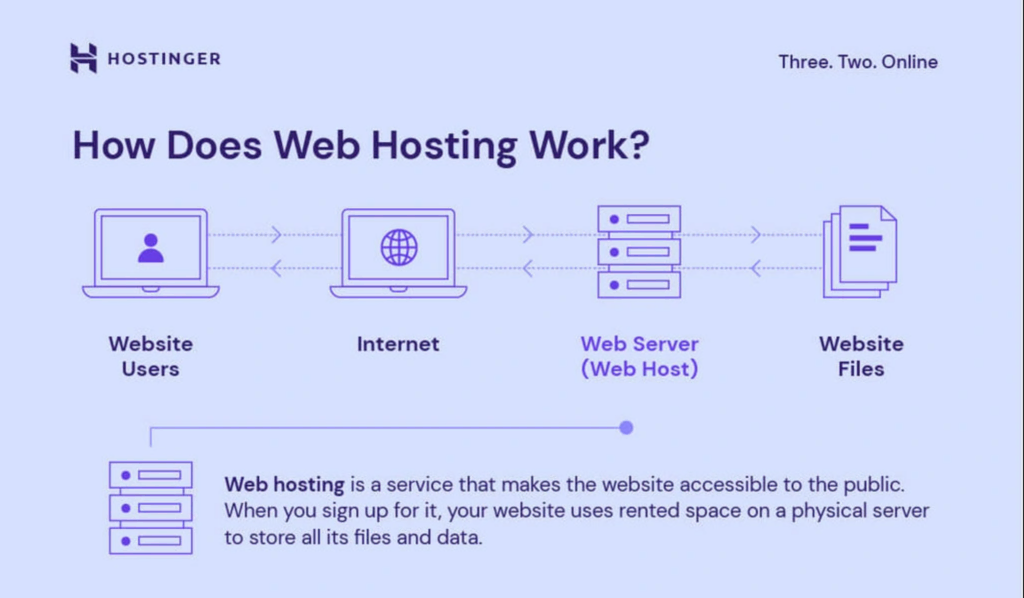
After moving your domain, update the DNS settings. These settings tell the internet where to find your site. Visit your new host’s control panel. Look for the DNS section. Enter the new details given by your host. It can take up to 48 hours for changes to work.
Visit your website. Ensure everything looks right. Check images and links. Test forms and other features. Make sure your site works well. If you see problems, fix them quickly. Your visitors want a smooth experience.
Keep your domain safe. Check your registration date. Renew it before it expires. You can do this through your domain registrar. Make sure to use correct payment details. This ensures no loss of your domain.
Credit: www.hostinger.com
Troubleshooting Common Problems
Transferring a domain to a new web host involves several key steps. Ensure your domain is unlocked and get the authorization code from your current registrar. Update DNS settings to point to the new host, allowing seamless access for users.
Address Transfer Delays
Transfer delays can be frustrating. Check your email for any needed approvals. Verify contact information with your current registrar. Ensure all details are correct. Patience is key during this process.
Fix Dns Errors
DNS errors can cause issues. Double-check your DNS settings. Make sure they match the new host. Update your DNS records with the new IP address. Changes might take some time. Usually, it’s a few hours.
Handle Registrar Disputes
Disputes with registrars can arise. Read terms and conditions carefully. Contact customer support if needed. Keep all communication records. Documentation helps in resolving disputes.
Frequently Asked Questions
Can I Transfer My Domain Name From One Web Host To Another?
Yes, you can transfer your domain name to another web host. Unlock the domain and get an authorization code. Start the transfer process with your new host, and confirm the transfer through your email. Ensure domain privacy settings allow transfers.
The process typically takes a few days.
How Do I Transfer A Domain Name To A New Website?
To transfer a domain, unlock it and obtain an authorization code. Initiate the transfer with your new registrar. Confirm the transfer request via email. Ensure DNS settings are updated on the new host. Completion usually takes 5-7 days.
How Do I Transfer A Domain To A New Provider?
Unlock your domain at your current registrar. Obtain the authorization code. Initiate the transfer with your new provider. Confirm the transfer request via email. Wait for the transfer to complete.
Can I Keep My Domain But Change Host?
Yes, you can keep your domain and switch to a different host. Update your domain’s DNS settings to point to the new hosting provider. This process is straightforward and ensures your website remains accessible. Always backup your data before changing hosts to prevent any loss.
Conclusion
Transferring a domain to a new web host is straightforward. Follow the steps carefully. Ensure all details match correctly. Double-check your domain settings. Keep your website downtime minimal. This process improves site performance and management. Make sure your domain is unlocked.
Update your DNS settings promptly. Contact your new host if issues arise. Enjoy the benefits of better hosting. Your website deserves a reliable home. A smooth transition keeps your visitors happy. You’re now ready for a fresh start. Embrace the change confidently.
Your online presence is crucial. Make every step count.


