
Are you ready to take control of your online presence by transferring your domain name to a new web host? Maybe you’re looking for better features, improved performance, or just a fresh start.
Whatever your reason, moving your domain doesn’t have to be a daunting task. In this guide, we’ll walk you through the process step-by-step, ensuring a smooth transition without any hassle. Imagine the relief of knowing your website is in good hands, with a host that meets all your needs.
Stay with us, and by the end of this article, you’ll be equipped with the knowledge and confidence to transfer your domain effortlessly. Don’t let your domain’s potential be held back—let’s get started on unlocking new possibilities for your website today!

Credit: designpowers.com
Understanding Domain Names
A domain name is your website’s address on the internet. It’s what people type to visit your site. Think of it as your online home address. Each domain name is unique. No two websites can have the same domain name. It’s like how every house has its own address. Without a domain name, people can’t find your site easily.
Domain names come in different types. Some are .com, .org, and .net. These are common and easy to remember. There are also country-specific ones like .uk for the United Kingdom. Other examples include .de for Germany and .cn for China. Some domains show the type of business. For example, .edu is for schools. .gov is for government sites. Choosing the right one is important for your website.
Preparing For Domain Transfer
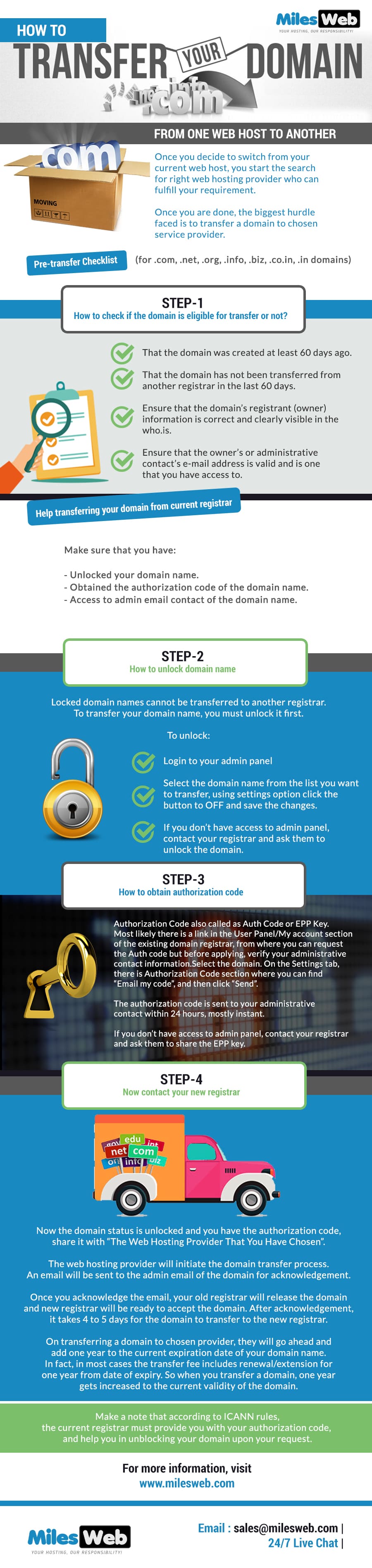
Make sure your domain is older than 60 days. Domains need to be 60 days old to transfer. Check if your domain is not locked. Unlocking the domain is important for transfer. Also, verify if your contact information is up to date. Your email must be correct. The new host will send a transfer code there. This step is crucial.
Log in to your domain registrar’s account. Navigate to the domain settings. Find the option to unlock your domain. It could be a switch or button. Click on it to unlock. This allows the domain to transfer. Keep it unlocked until the transfer is complete. After transfer, lock it again for safety.
Obtaining Domain Transfer Code
First, log into your domain account. Look for the domain management area. Find the section for transfer settings. Here, you can request an authorization code. This code is crucial. It allows you to move your domain to another host.
The transfer code acts like a key. It ensures your domain is safely moved. Without it, the transfer can’t happen. Keep this code safe and private. Sharing it carelessly can lead to issues. Always double-check the code before use.
Choosing A New Web Host
Choosing the right web host is important. First, think about the cost. It should fit your budget. Next, check the customer support. Help must be easy to get. Also, look at the server speed. Fast servers mean happy visitors. Don’t forget about security. Your site must be safe. Finally, check the features. They must meet your needs.
| Feature | Host A | Host B |
|---|---|---|
| Cost | $5/month | $10/month |
| Customer Support | 24/7 | Business Hours |
| Server Speed | Fast | Very Fast |
| Security | Basic | Advanced |
| Features | Basic | Advanced |
Initiating The Transfer Process
Begin by logging into your current domain registrar account. Locate the transfer option in the menu. Follow the steps carefully. It’s important to provide accurate information. This ensures a smooth transfer process. You may need an authorization code. This code verifies your ownership. Check your email for this code. Submit the code along with your request. Wait for confirmation from your registrar. They will notify you once it’s sent.
Double-check all details before confirming. Ensure your domain name is correct. Verify your contact information. Accurate details prevent errors. Confirm the expiration date of your domain. It should be more than 60 days away. Check that your domain is unlocked. Locked domains cannot be transferred. Finally, review all settings. Make sure everything is correct. This avoids potential issues.
Credit: www.milesweb.com
Monitoring Transfer Progress
Track your domain transfer to ensure everything goes smoothly. Regularly check status updates from your new web host. This helps avoid any potential issues or delays in the process.
Tracking Transfer Status
Keep an eye on the transfer progress. Check your email for updates. Most providers send updates by email. Look for any alerts or warnings. This helps you stay on track. Log into your account to see the status. Some hosts show a progress bar. This makes it easy to follow the steps.
Handling Common Issues
Sometimes, issues can appear during the transfer. Common problems include incorrect domain information. Check if nameservers are correct. Ensure the domain is not locked. An unlocked domain is easier to transfer. Contact support if problems continue. They can help solve complex issues. Follow their advice carefully. This ensures a smooth transfer.
Finalizing Domain Setup
Transferring a domain to a web host involves updating the domain’s DNS settings. This ensures the domain points to your new hosting provider. Follow the host’s instructions carefully to complete the setup smoothly.
Updating Dns Settings
First, log into your domain account. Find the DNS settings section. It’s usually under domain management. Look for nameserver settings. Change them to your web host’s nameservers. This links your domain to the host. Save the changes. Wait for the update. It can take 24 hours.
Testing Domain Connectivity
After updating DNS settings, test your domain. Open a web browser. Type your domain name. Press enter. Your website should appear. If not, wait a bit. DNS changes take time. Check again later. If issues persist, contact support. They can help resolve problems.

Credit: www.nexcess.net
Frequently Asked Questions
How Do I Transfer My Domain To A Host?
To transfer your domain, unlock it and get the authorization code. Update DNS settings at the new host. Initiate the transfer process with the new host using the code. Confirm the transfer via email. Wait for the process to complete, usually within 5-7 days.
How Do I Transfer A Domain Name To A New Website?
To transfer a domain name, unlock it with your current registrar. Obtain the authorization code. Initiate the transfer with your new registrar using the code. Confirm the transfer request via email. Wait for the transfer to complete, usually within 5-7 days.
How Do I Connect My Domain To My Web Host?
Update your domain’s DNS settings in your registrar account. Set nameservers to your web host’s provided values. Save changes. It may take up to 48 hours for propagation. Check connectivity using online tools. Contact support if issues persist.
How Difficult Is It To Transfer A Domain?
Transferring a domain is generally straightforward. Unlock your domain, obtain the authorization code, and initiate transfer with the new registrar. Ensure the domain isn’t expired or locked and complete the process within a few days. Follow instructions carefully for a smooth transition.
Conclusion
Transferring your domain name is straightforward with the right steps. First, check your domain’s eligibility for transfer. Gather necessary details from your current registrar. Then, initiate the transfer with your new web host. Follow their instructions carefully to ensure a smooth process.
Monitor the transfer status regularly. Finally, verify that everything works correctly after completion. This ensures your website remains accessible to users. With patience and attention to detail, your domain transfer can be successful. Now, your site is ready for its next chapter.
Enjoy the benefits of your new web host.


