
Have you ever wondered where a website’s DNS is actually hosted? Knowing this can help you troubleshoot issues, improve your site’s performance, and keep your online presence secure.
But finding out where a domain’s DNS lives isn’t always straightforward. Don’t worry—this guide will show you exactly how to discover where a domain has its DNS hosted, step by step. By the end, you’ll have the tools and confidence to check any domain’s DNS hosting quickly and easily.
Keep reading to unlock this essential skill!
Why Dns Hosting Matters
DNS hosting controls where your website points on the internet. Knowing where a domain’s DNS is hosted helps manage website settings and troubleshoot issues. It also ensures faster and more reliable access for visitors.
DNS hosting controls where your domain points on the internet. It helps browsers find your website by translating domain names into IP addresses. Without good DNS hosting, visitors may not reach your site quickly or reliably.
Fast DNS hosting improves website speed. Slow DNS servers can delay loading times. This can hurt user experience and search engine rankings.
Reliable DNS hosting ensures your site stays online. Downtime in DNS can cause your website to become unreachable. This can lead to lost visitors and potential customers.
DNS hosting also affects email delivery. Poor DNS setup may cause emails to bounce or be marked as spam. Proper DNS helps your communication run smoothly.
Security plays a key role in DNS hosting. Some providers offer protection against attacks. This keeps your website safe from hackers and downtime.

Credit: support.intermedia.com
Key Tools To Check Dns Hosting
Discovering where a domain’s DNS is hosted is easier with the right tools. These tools help you find important DNS details fast. You can use them to check who manages the DNS settings and where the domain points. This knowledge helps in managing websites and troubleshooting issues.
Here are some key tools to check DNS hosting. Each tool offers unique information about DNS providers and records.
Using Whois Lookup
WHOIS lookup shows domain registration details. It reveals the registrar and sometimes the DNS hosting provider. You only need the domain name to perform a WHOIS search. Several free websites offer this service. WHOIS data can include name servers and contact info. This tool is a quick first step to learn about DNS hosting.
Leveraging Dns Lookup Tools
DNS lookup tools let you query DNS records directly. They show where DNS records like A, MX, and CNAME are stored. These tools provide detailed information about DNS hosting. You enter the domain and receive instant DNS record results. They are essential for checking DNS configuration and hosting location.
Checking Ns Records
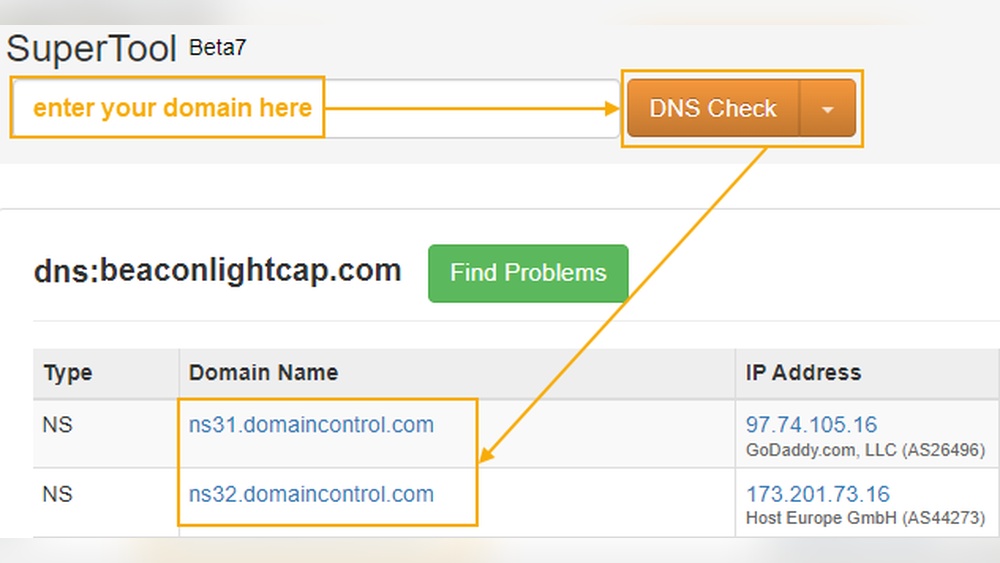
NS records indicate the name servers for a domain. These records point to the DNS hosting provider. Use command-line tools or online services to view NS records. The NS records show which servers respond to DNS requests. Knowing the name servers helps identify the DNS host clearly.
Step-by-step Dns Hosting Check
Checking where a domain’s DNS is hosted helps you manage websites better. It shows who controls the domain’s settings. The process is simple and can be done in a few steps. Follow these steps to find your domain’s DNS host clearly.
Find The Domain’s Nameservers
Nameservers tell where the DNS records are stored. Use a DNS lookup tool online. Enter the domain name and run the search. The tool will show the nameservers linked to the domain. Write down these nameservers for the next step.
Trace Nameserver Ownership
Nameservers often include the hosting provider’s name. Look at the nameserver addresses carefully. They usually contain the company’s brand or domain. If unsure, search the nameserver name on Google. This helps find which company owns them.
Confirm Dns Hosting Provider
Check the company’s website to confirm hosting services. Visit their site and look for DNS hosting info. Match the nameservers from step one with their records. This confirms the DNS hosting provider for the domain. Now you know where the DNS is hosted.

Credit: www.networksolutions.com
Common Dns Hosting Providers
Domains need DNS hosting to connect names with IP addresses. Various providers offer DNS services. Knowing common DNS hosts helps identify where a domain’s DNS is managed. This knowledge aids in troubleshooting and domain management. Below are typical types of DNS hosting providers.
Popular Cloud Dns Services
Cloud DNS services offer fast and reliable DNS management. They use global networks to speed up queries. Examples include Google Cloud DNS, Amazon Route 53, and Cloudflare DNS. These providers give easy control panels and strong security features. Many websites prefer cloud DNS for better uptime and quick updates.
Web Hosting Companies
Many web hosting companies include DNS hosting with their plans. Providers like Bluehost, HostGator, and SiteGround manage DNS for hosted domains. This option suits users who want simple, all-in-one services. Web hosts often provide user-friendly tools to update DNS records quickly. This setup works well for small and medium websites.
Specialized Dns Providers
Some companies focus only on DNS services. These specialized DNS providers offer advanced features. Examples are Dyn, NS1, and DNS Made Easy. They provide enhanced control, speed, and security. Businesses with complex DNS needs often choose these experts. Their services support high traffic and custom configurations.
Troubleshooting Dns Hosting Issues
Troubleshooting DNS hosting issues can be tricky. DNS controls how your domain connects to the internet. Problems here can cause your website to go offline or slow down. Understanding common DNS issues helps you fix them fast. This section explains how to spot and solve these problems.
Identifying Misconfigured Dns
Misconfigured DNS settings stop your site from loading properly. Check your DNS records for errors. Look for wrong IP addresses or missing entries. Use online tools to verify your DNS setup. Confirm the nameservers match your hosting provider. Fix any typos or incorrect data you find. Correct settings ensure your domain points to the right server.
Resolving Dns Propagation Delays
DNS changes take time to spread worldwide. This delay is called propagation. It can last from minutes to 48 hours. During this time, some users see the old site. Others see the new one. Be patient and avoid making repeated changes. Use tools to check propagation status globally. Wait until all servers update before testing your site fully.
Credit: learn.microsoft.com
Tips For Managing Dns Effectively
Managing DNS well keeps your website fast and safe. DNS controls how your domain connects to the internet. Small mistakes can cause big problems. Follow these tips to keep your DNS working smoothly and protect your site from threats.
Regular Dns Audits
Check your DNS records often. Make sure all information is correct and up to date. Old or wrong records can cause your website to break. Use simple tools to review your DNS settings. Fix any errors quickly to avoid downtime. Regular checks help spot problems early.
Securing Dns Settings
Protect your DNS from hackers. Use strong passwords and two-factor authentication for your DNS account. Limit who can change your DNS records. Enable DNSSEC to add a layer of security. Keep software updated to avoid vulnerabilities. Safe DNS settings reduce risks of attacks.
Frequently Asked Questions
How Can I Find Where A Domain’s Dns Is Hosted?
You can check DNS hosting by using online tools like WHOIS lookup or DNS checker. These tools reveal the authoritative nameservers linked to the domain, indicating where the DNS is hosted.
What Does Dns Hosting Mean For My Domain?
DNS hosting means storing your domain’s DNS records on a server. It controls how your domain points to websites and email services, ensuring proper internet routing.
Can I Change The Dns Host Of My Domain?
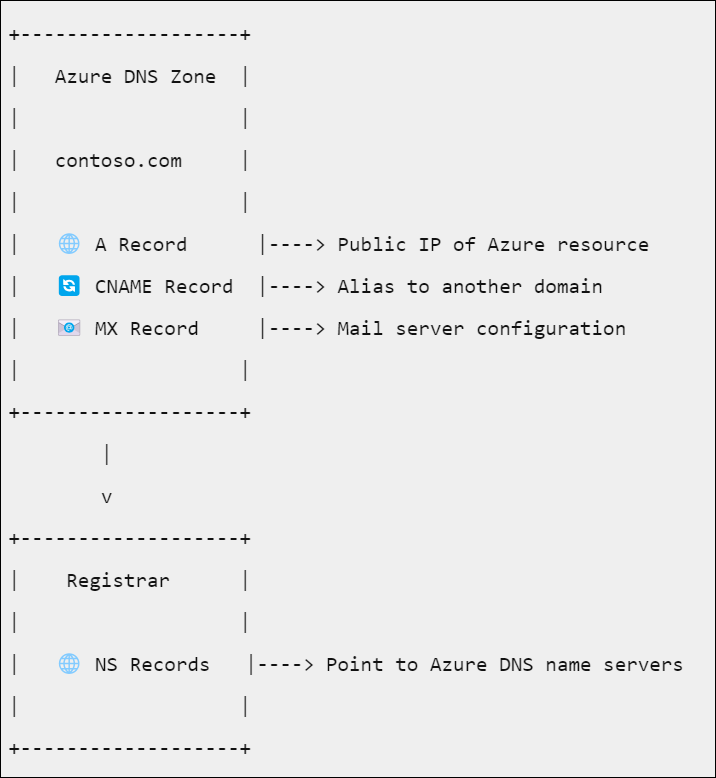
Yes, you can change your DNS host by updating the nameservers at your domain registrar. This switches your DNS management to the new hosting provider.
Why Is It Important To Know My Domain’s Dns Host?
Knowing your DNS host helps in troubleshooting website issues and managing domain settings effectively. It ensures you control where your domain directs traffic.
Conclusion
Knowing where a domain’s DNS is hosted helps manage your website better. It also helps solve problems faster. You can check DNS hosting with simple online tools. This knowledge keeps your site running smoothly and safely. Keep these steps handy for future use.
Understanding DNS hosting is easier than it seems. Take time to learn it well. It makes handling websites less stressful and more confident.


