
Have you ever stumbled upon a website that amazed you with its speed and reliability, making you wonder what web hosting service it uses? Whether you’re a budding entrepreneur planning to launch your own site or a seasoned webmaster looking to switch hosting providers, knowing what’s powering the websites you admire can be incredibly useful.
Imagine unlocking the secret behind their smooth performance and applying it to your own site. You’ll discover straightforward techniques to uncover the hosting provider behind any website. By the end, you’ll have the tools you need to make informed decisions about your own web hosting needs.
Get ready to dive into the world of web hosting detective work—you might be surprised at just how easy it is!
Identifying Web Hosting Services
Knowing which hosting provider a website uses can help in many ways. It helps in understanding site performance and security. This information is useful for businesses and web developers. It can also help in choosing the best host for your own website.
Common Reasons For Identification
Web developers need this info to fix website issues. It helps in checking if a site is hosted on a reliable platform. Businesses may want to know for competitive analysis. This helps in comparing features and services.
Methods For Discovering Hosting Providers
Online tools can help find a website’s host. Some popular tools are HostAdvice, WhoIsHostingThis, and SiteChecker. These tools are easy to use. Just enter the website URL. The tool will show the hosting provider. Most tools are free. They provide quick results. This method is simple and effective.
WHOIS records show details about a website. This includes the domain owner and the hosting provider. Visit a WHOIS lookup site. Enter the website’s domain name. You will see various details. Sometimes the host is hidden. But often, you can find the information you need. WHOIS is a reliable source.
DNS information can reveal hosting details. Use a DNS checker tool. Enter the website’s domain name. Look for the nameserver details. The nameserver often shows the hosting company. This method is technical but useful. It provides important clues. DNS checkers are available online.
Analyzing Website Source Code
Open the website in a browser. Right-click and select “View Page Source”. Look for words like “Hosting” or “Server”. These words often give hints. Sometimes, hosting tags are hidden in comments. Be patient and thorough. Check the top and bottom of the code.
Meta data can show hosting info. Find the “meta” tags in the source code. Sometimes they tell where the site is hosted. Look for lines that mention hosting companies. These lines might say “Hosted by” or “Server“. They help you know the host.
Credit: www.elegantthemes.com
Utilizing Hosting Checker Services
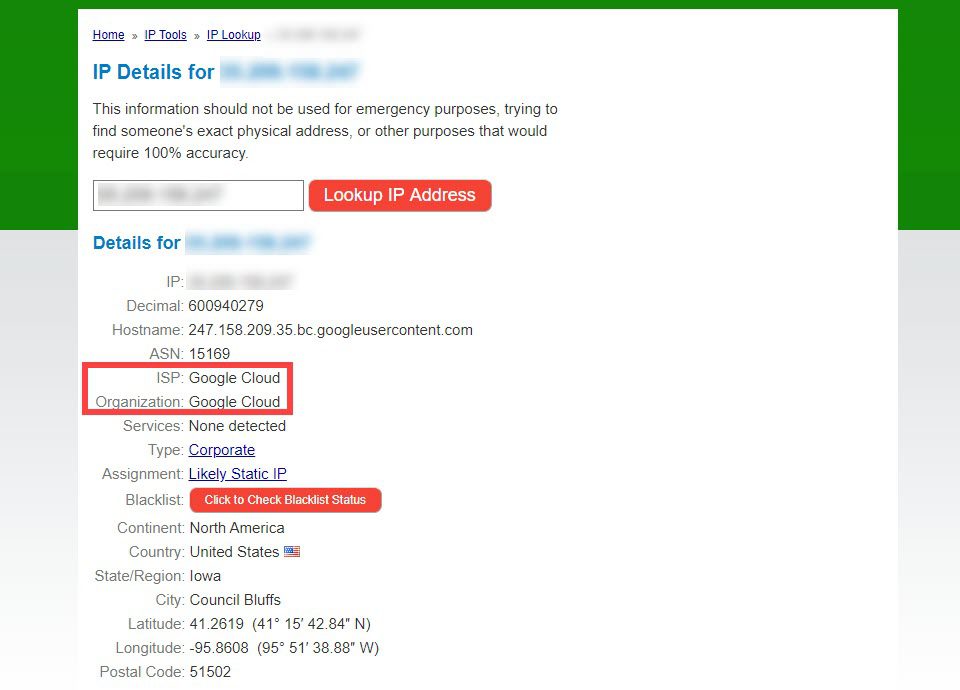
Hosting checkers help find out which hosting service a site uses. They offer quick and accurate results. You can learn about the server location. Know the IP address too. This helps in understanding the site’s performance.
Hosting checkers save time. No need to do manual checks. They are easy to use. Often, just enter the site’s URL. The tool does the rest. Reliable tools give you the right information.
| Tool Name | Features |
|---|---|
| WhoIsHostingThis | Simple and fast results |
| Site24x7 | Detailed hosting insights |
| HostAdvice | Free and easy to use |
Contacting Website Owners
Start with a friendly greeting. Keep your message short and clear. State your purpose clearly. Ask about the web hosting service they use. Be polite and respectful. Include your contact info. This helps them reply easily. Avoid asking too many questions. This can confuse the reader. Thank them for their time.
Some people value their privacy. They may not share hosting details. Respect their choice. Avoid insisting or pressuring. Offer a reason for your inquiry. Explain how it helps you. Ensure them their info remains confidential. Trust is key in communication.

Credit: www.couchdrop.io
Limitations And Challenges
Many tools claim to find web hosting services. But their accuracy varies. Some tools give wrong results. They might show old data. Or they may not detect hidden details. Sometimes, websites use CDNs. This can hide the hosting provider.
It’s also possible for websites to mask their details. They can use privacy services. This makes it hard to know the true host. Some hosts even offer private registration. This keeps the owner’s info secret. So, finding the right host can be tricky.
Many websites use private registration. This hides their hosting details. It keeps their owner’s identity secret. Some sites use reverse proxy services. This can also hide the real host.
These services protect websites from attacks. But they make it hard to know who hosts them. Some hosts also offer privacy tools. This makes the task even more challenging. Identifying the host requires careful checking. It’s not always easy.

Credit: innerbalanceaz.com
Frequently Asked Questions
How Do I Check The Hosting Provider Of A Website?
Use online tools like “WhoIsHostingThis” or “Hosting Checker” to find a website’s hosting provider. Enter the website’s URL, and the tool will display the hosting information quickly. These tools are user-friendly and offer accurate results.
How To Find Out What Platform A Website Is Hosted On?
Use online tools like BuiltWith or Wappalyzer to identify a website’s hosting platform. Inspect the website’s source code for clues about hosting services. Check the DNS records using tools like MXToolbox for hosting information. Contact the website owner for direct information about the hosting platform.
How Do You Tell What Server A Website Is Using?
Use tools like Netcraft or BuiltWith to identify a website’s server. Check HTTP headers via browser developer tools. Look for “Server” or “X-Powered-By” headers. Use online services like WhatRuns or Wappalyzer for additional insights. These methods help determine the server technology.
How Do I Find My Dns Hosting Provider?
To find your DNS hosting provider, perform a WHOIS lookup on your domain. Check the “Name Server” section for details. Alternatively, access your domain registrar’s account to view DNS settings. This will help identify your DNS hosting provider quickly and accurately.
Conclusion
Understanding web hosting is crucial for managing online presence. Identifying a site’s hosting provider can help in many ways. You can learn about the site’s reliability and speed. This knowledge aids in comparing hosting services. It simplifies decision-making when choosing a provider.
The process involves simple tools and techniques. You don’t need technical skills to start. With patience, anyone can discover this information. Explore hosting details and improve your web strategy. This insight supports informed choices and better planning. Happy hosting exploration!


