
Have you ever stumbled upon a website that loads like a dream and thought, “I wish my site could run like that?” You’re not alone.
Knowing what web hosting a site is using can unlock the secret sauce to its speed and reliability. Whether you’re a curious blogger or a business owner seeking to improve your online presence, understanding the hosting behind a successful website can provide valuable insights.
Imagine having the power to replicate that seamless user experience and boost your site’s performance. You’ll discover straightforward methods to uncover what web hosting a site is using, empowering you to make informed decisions for your own website’s future. Dive in, and let’s unravel the mystery together.
Importance Of Knowing Web Hosting
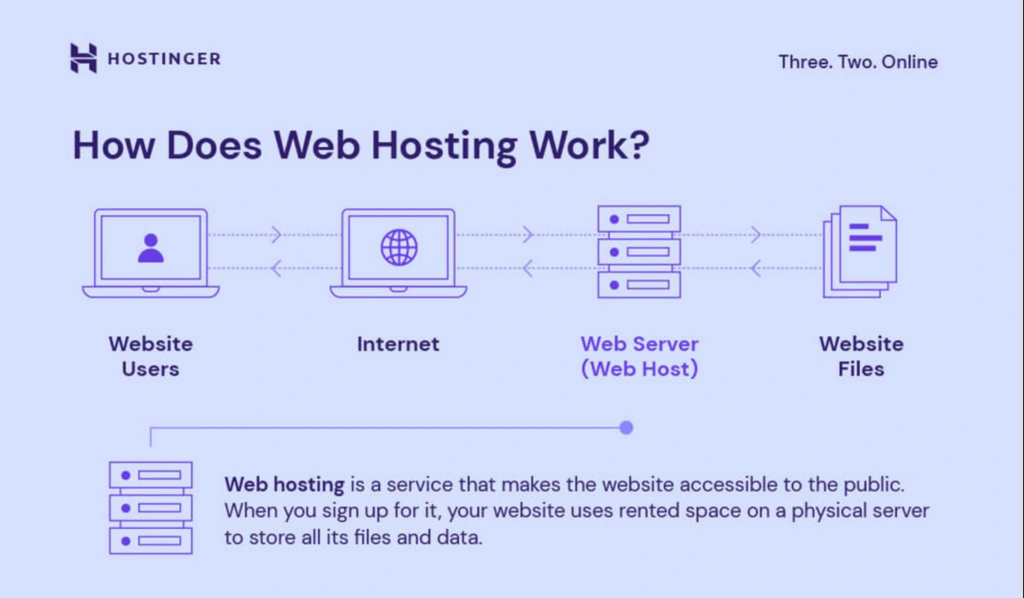
Web hosting keeps a site running smoothly. It affects speed and uptime. Knowing the host can help fix problems fast. It can guide decisions on moving to a better host. Some hosts offer great support. Others may have limited resources. Understanding the host can save time and money.
Security is another key reason. Good hosts protect data better. They help stop hackers. Knowing the host shows if the site is safe. It helps decide on backups and protection plans. This knowledge is vital for web owners.
Cost management is crucial too. Hosting affects monthly bills. Some hosts are pricey. Others are affordable. Knowing the host helps budget wisely. It ensures you get the best value for money.
Credit: www.hostinger.com
Manual Inspection Techniques
Check the domain name’s suffix. This can give clues about hosting. Some domains end with hosting company names. Look for patterns in the domain structure. Some might hint at the host. It’s like a puzzle. Every piece helps.
Find the site’s IP address. Use online tools for this. Enter the IP into a lookup service. This tells you the host’s name. Sometimes, hosts share IPs. So, it might not be clear. But it’s a good start.
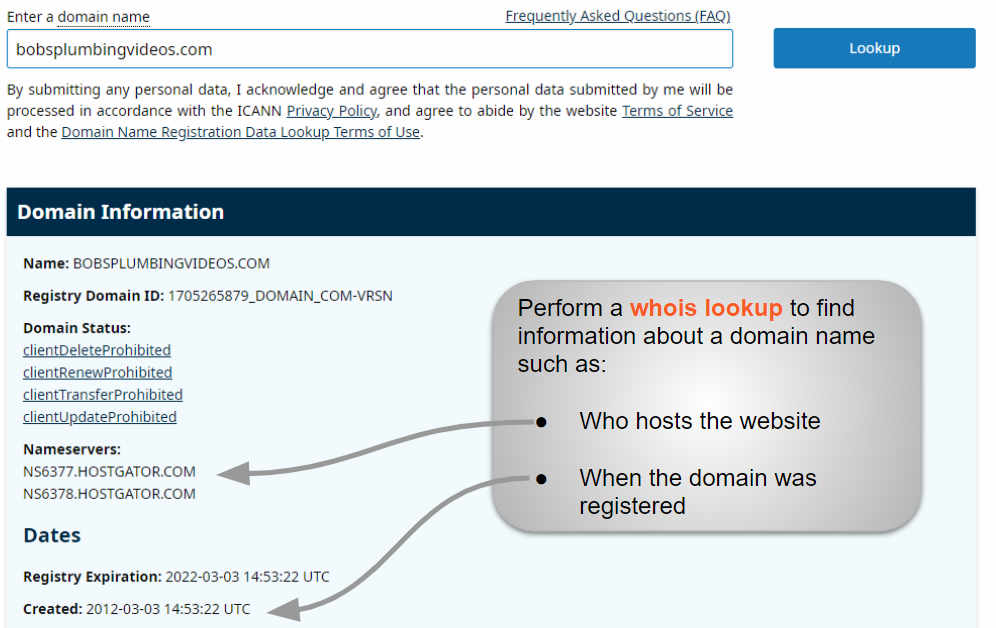
Use a WHOIS lookup tool. Enter the site’s domain name. Check the results for hosting info. Sometimes, it’s hidden. But other times, it’s visible. The registrar info can also help. It may list the host.
Online Tools For Detection
BuiltWith helps find out a site’s web hosting. Enter the website URL. Then, click on the search button. BuiltWith shows the hosting provider and other site details. It’s simple and fast. This tool is free to use. BuiltWith also gives more site data. This includes technology stacks and scripts.
Hosting Checker is another tool to find web hosting info. Type the website’s name. Hit the check button. It displays the hosting company and server location. Results come quickly. It is easy for anyone to use. The interface is clean and friendly. Hosting Checker provides accurate data. No sign-up is needed.
Wappalyzer offers a browser extension. It detects the hosting provider of any site. Install the extension on your browser. Visit any website. Click the Wappalyzer icon. It shows hosting and other technologies used. The extension works with Chrome and Firefox. It’s a handy tool for quick checks. The information is precise and useful.
Browser Extensions
Chrome has many extensions to find out web hosting. One popular tool is Wappalyzer. It tells what technologies a site uses. Another good choice is BuiltWith. It gives detailed hosting information. These tools are easy to use. Just install and click the icon. They show data in a few seconds. Very helpful for beginners.
Firefox has add-ons like Chrome. Wappalyzer is also available here. Another great add-on is HostAdvice. It reveals web hosting details. Netcraft is useful too. It shows many site details. Install the add-on, then click to get info. Quick and simple steps.
Analyzing Website Source Code
Look at the website’s source code. Right-click on the page. Select “View Page Source.” Search for hosting provider names. Some websites show their hosting services in the code. Check for any links or comments. These may hint at the host.
Some hosts use unique tags. These tags often appear in the website’s metadata. Search for tags like “hosted by” or “powered by.” They might be near the head section of the code. These tags can give clues about the hosting provider. Remember, not all sites have these tags. But they can be helpful if present.
Social Media And Community Insights
Forum Discussions can be helpful. People talk about web hosting often. They share their experiences. You can find out what hosting they use. Search in popular forums. Look for threads about hosting. Read the comments carefully. You might see the hosting name mentioned. This can be a good clue.
Social Media Queries can also help. Ask on Facebook or Twitter. People reply quickly. They love sharing tips. Use simple questions. “What hosting does this site use?” Many users will answer. They might know the hosting. You can gather useful insights. Social media is a great tool.
Contacting Site Owner
Discovering a website’s hosting provider can be simple. Use online tools like ‘Whois’ or ‘Hosting Checker’ to reveal hosting details. Check the website’s footer or contact page for clues about the hosting service. Understanding these methods helps in contacting the site owner with informed questions.
Reaching Out Via Email
Find the site’s contact email on their page. This email might be in the footer or “About Us” section. Write a simple email. Ask about their web hosting provider. Be polite and clear. Keep your message short. People are busy. They like quick emails. Thank them for their time.
Using Contact Forms
Some sites have contact forms. These are easy to use. Look for a “Contact Us” page. Fill in the form with your message. Ask who hosts their site. Remember to include your email for a reply. Some forms ask for more details. Only fill in the required fields. This makes the process faster and simpler.
Credit: www.boldgrid.com
Limitations And Challenges
Hidden hosting services can be tricky. Some sites use special tools. They keep their hosting details private. This makes it hard to find what hosting they use. These services protect site owners from prying eyes. They also keep competitors guessing. It’s a smart move for some businesses. But it poses challenges for curious users.
Hidden Or Private Hosting
Many sites use hidden hosting to keep details secret. This is done to protect privacy. It also keeps business strategies safe. But it makes it hard to find hosting details. Such sites use special tools and privacy services. These help in keeping details under wraps.
Third-party Services Involvement
Sites may use third-party services. These services manage hosting. They add another layer of complexity. Finding hosting details becomes harder. These services provide extra features. They help sites run smoothly. But they make hosting details hard to trace.
Ethical Considerations
Always keep privacy in mind when checking web hosting. Every website owner deserves to have their privacy respected. Avoid digging into personal details. Focus on the technical aspects only. Never misuse any information you find. Use the knowledge responsibly. Be mindful of the boundaries. Respecting privacy builds trust.
Avoid trying to gain unauthorized access to websites. It’s against the law. It can cause harm to the site. Always use legal methods to find information. There are many tools available. Use them wisely. Stay on the right side of the law. Ethical practices are important. They keep the internet safe for everyone.
Credit: www.hostinger.com
Frequently Asked Questions
How To Know Which Hosting A Website Is Using?
Use online tools like “WhoIsHostingThis” or “Hosting Checker” to identify a website’s hosting provider. You can also inspect the site’s source code for clues or contact the website owner directly for information. These methods help uncover hosting details easily.
How To Find Out What Platform A Website Is Hosted On?
Use online tools like BuiltWith or Netcraft to identify the hosting platform. Check the website’s source code for clues. Inspect the HTTP headers using browser developer tools for server details. Contact the website owner or administrator for hosting information.
How Do You Tell What Webserver A Website Is Using?
Use online tools like Netcraft or BuiltWith to identify a website’s webserver. Check HTTP headers via browser developer tools. These methods reveal server information, helping to determine what webserver is in use.
How To Find What Service Is Hosting A Website?
Use online tools like WHOIS Lookup to identify the hosting provider. Check DNS records for more insights.
Conclusion
Discovering a website’s hosting provider is quite simple. With online tools, anyone can find this information quickly. These tools offer insights into server details and hosting types. Understanding hosting can help improve your own website’s performance. It can also inform decisions about switching providers.
Remember, knowing the hosting can enhance your site’s strategy. It’s a useful skill for managing web projects. Keep exploring and learning more about web hosting options. Your site’s success might depend on it. Stay curious, and use these insights wisely for better online experiences.


