
Ever stumbled upon a website and wondered which web host it uses? You’re not alone.
Knowing the hosting provider behind a site can be a game-changer, especially if you’re planning to launch your own website or looking to switch hosts. Imagine having the power to uncover this information effortlessly. It could help you make informed decisions, avoid potential pitfalls, and even replicate successful website setups.
In this guide, you’ll discover simple, step-by-step methods to identify a website’s hosting provider. Unlock this knowledge, and you’ll be better equipped to enhance your online presence. Ready to dive in? Let’s uncover the secrets behind the sites you admire.
Credit: www.godaddy.com
Identifying Hosting Providers
Online tools can help find out a website’s host. One popular tool is WhoIsHostingThis. It tells you the hosting provider. You just enter the website address. Another tool is BuiltWith. It shows the site’s technology and hosting info. These tools are usually free. They are easy for everyone to use. Results come quickly, often in seconds. This makes checking hosts simple and fast.
Manual checks can also reveal the host. Look at the website’s nameservers. Nameservers often show the hosting provider. Use the command prompt for a ping test. This test can sometimes reveal host names. You can also check the website’s DNS records. DNS records might list the host’s details. Manual techniques need more time. But they are effective for deeper insights.
Examining Domain Details
The Whois Lookup tool helps find information about a domain. This tool shows registration details and ownership information. Use it to see the web host
DNS records show important data about a website. These records tell about the serverIP address. This address can reveal the host. CNAME records show aliases for domains. MX records give mail server
Inspecting Website Elements
Check the source code of a website to find hosting clues. Right-click on the page and select “View Page Source.” Look for comments or metadata. Sometimes, developers leave notes about the web host. Search for words like “hosted by” or “powered by.” This can reveal hosting information. Also, look at the URLs in the code. They might include hosting provider names. This is a good way to start your search. Understanding code can help, but no need to be an expert. Simple observations can be enough.
Server response headers can show the web host. Use a tool like cURL or a web browser extension. These headers often include server details. Look for phrases like “Server” or “X-Powered-By.” They may hint at the hosting provider. Headers are part of the HTTP response. They give technical details about the server. Some hosting providers add their names here. This makes it easier to identify them. A quick check can give you useful information.
Using Third-party Services
Many websites use hosting checker platforms. These platforms show which host a site uses. Simply enter the site’s URL. The tool then shows the hosting details. Some popular platforms are WhoIsHostingThis and HostAdvice. They are easy to use and provide fast results. Always make sure to use trusted platforms. This ensures you get the correct data about the host.
Browser extensions can help find a site’s host. These tools are added to your web browser. Once added, they can show hosting info with a single click. Wappalyzer and BuiltWith are well-known options. They not only show hosting data but also other site details. Install them and check a site’s host quickly. Always keep the extensions updated for best results.
Recognizing Common Host Signatures
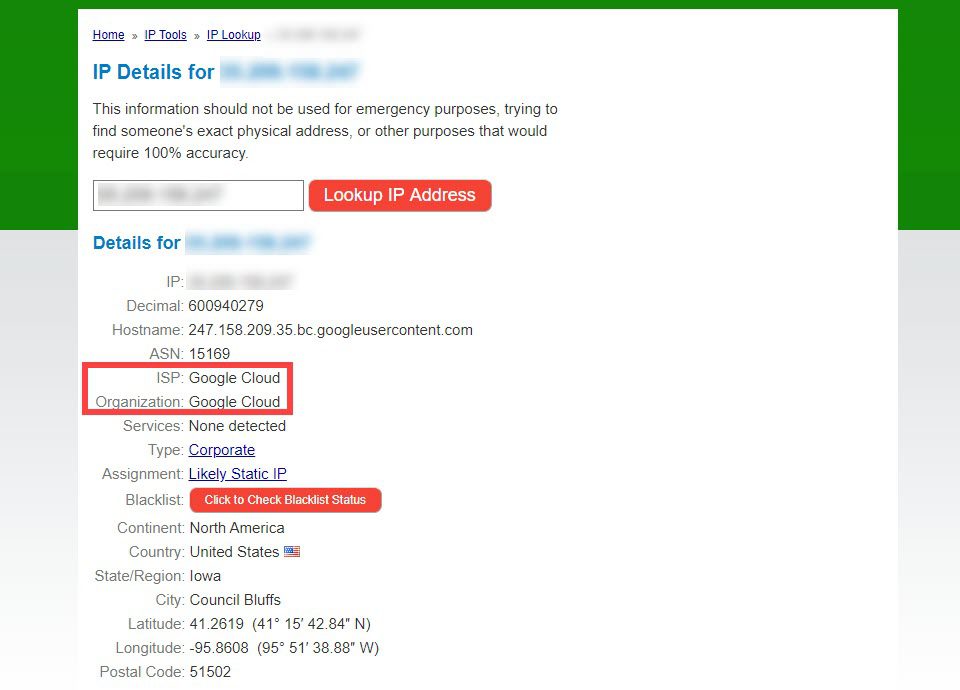
Websites often share common traits from their hosts. These traits can be unique patterns or default settings. Many hosts have their own default error pages. Some hosts use specific URLs for login pages. Checking the URL can give clues. The IP address can also reveal the host. Use online tools to check the IP address. Compare it with known host IP ranges. This helps find the web host used.
Default pages are often set by hosts. They show up when a site is new. These pages might have host logos. Or a message like “Website coming soon.” Some hosts display default error messages. Look for these signs to identify the host. Default pages are big clues about the hosting company.

Credit: www.crazydomains.com
Leveraging Social And Community Insights
Understanding what web host a site is using can offer valuable insights. Tools like Whois and online services reveal hosting details. These insights help in comparing hosting services and improving your website strategy.
Forums And Discussion Boards
Forums are filled with people who love to help. They share a lot of useful information. Ask questions about web hosts in these places. Someone might know the answer. Look for posts that talk about web hosting. People often discuss their own experiences. This can give clues about a website’s host. Pay attention to frequent mentions of a particular host. It might be a hint.
Social Media Queries
Social media platforms are great for quick answers. Post a question about a site’s web host. Your friends or followers might know. Join groups that talk about websites and hosting. Many experts love to share their knowledge. These platforms also have search features. Use them to find past discussions. You might find the answer you need.
Advanced Techniques For Experts
Reverse IP lookup helps find other websites on the same server. This technique gives clues about the web host. Use online tools to check the IP address. Enter the site’s URL to see results. Look for patterns or common hosts. Sometimes, many sites use the same hosting provider.
Network analysis tools dig deeper. They reveal a site’s infrastructure. Experts use these to find more details. Tools like Pingdom or Traceroute are popular. They show the server’s location and other technical data. This helps in guessing the web host. These tools are easy to use. Just input the URL and view the results.
Credit: www.elegantthemes.com
Frequently Asked Questions
How To Know Which Hosting A Website Is Using?
Use online tools like “WhoIsHostingThis” or “Hosting Checker” to identify a website’s hosting provider. Inspect domain records through WHOIS lookup. Check DNS settings using online DNS tools. Look for hosting clues in the site’s source code. These methods help discover the website’s hosting service efficiently.
How Do You Tell What Webserver A Website Is Using?
Use online tools like Netcraft or BuiltWith to identify a website’s webserver. Check HTTP headers using browser developer tools for server information. Look for “Server” header in the response, which often reveals the webserver used. Perform a WHOIS lookup for additional insights on hosting and server type.
How To Find Out What Platform A Website Is Hosted On?
Use tools like BuiltWith or Netcraft to identify a website’s hosting platform. Check DNS records for hosting clues. Inspect the site’s HTML source code for hosting details. Look for hosting provider badges or links on the website. Use WHOIS lookup services for domain registration information.
How Do I Find The Hostname Of A Website?
Find a website’s hostname by checking its URL. The hostname is the part between “https://” and “. com” or “. org”. You can also use online tools like “Whois” or command prompt commands like “ping” or “nslookup”. Simply input the website address, and the tool will display the hostname.
Conclusion
Discovering a site’s web host doesn’t have to be difficult. Use online tools to gather information quickly. Look at the site’s IP address for clues. Check WHOIS records for hosting details. These methods are simple and effective. Understanding web hosting helps in web development and analysis.
With practice, identifying hosting providers becomes easier. Keep exploring and learning to enhance your skills. Remember, information is power. Stay curious, and you’ll always find what you need. Happy hosting detective work!


