
Are you ready to take control of your online presence? Setting up your own web hosting server might sound like a daunting task, but it can be a game-changer for your website.
Imagine having complete control over your website’s performance, security, and customization. No more relying on third-party hosts who may not always meet your needs or expectations. By the end of this guide, you’ll know exactly how to set up your own web hosting server, allowing you to tailor every aspect to your unique requirements.
Let’s get started on empowering you to unleash the full potential of your website!

Credit: www.siteuptime.com
Choosing The Right Hardware
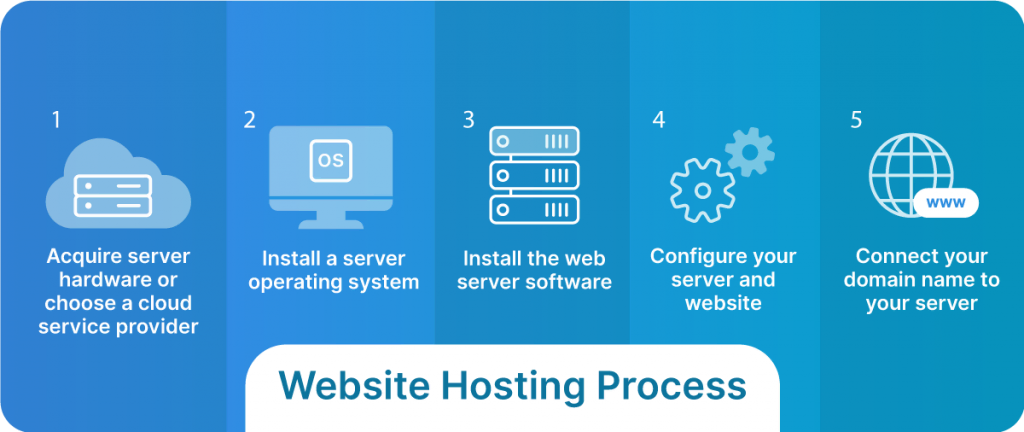
Server specifications are very important. Choose a fast processor. A multi-core processor is best. It helps with speed and performance. Aim for at least 8GB of RAM. More RAM helps your server run smoothly. It handles many requests easily. Hard disk space matters too. Ensure you have enough for all data.
Storage is a key consideration. Choose between HDD and SSD. SSD is faster but costs more. HDD is cheaper but slower. Data backup is crucial. Use external storage for backup. Cloud storage is another option. It keeps data safe and accessible.
A strong network is vital. High-speed internet is a must. Bandwidth should be high. It affects loading times. Network security is crucial. Protect your server from attacks. Use firewalls and encryption. Ensure your server is safe and reliable.
Selecting An Operating System
Linux is popular for web servers. It is free and open-source. Many developers love its flexibility. Windows is another option. It is user-friendly but costs money. Both have their strengths. Choose based on your needs and skills.
Linux supports many web technologies. It works well with PHP and MySQL. Windows is ideal for ASP.NET applications. Ensure your software works with your choice. Check all requirements before deciding.
Linux is known for strong security. It has regular updates. Windows also offers good protection. It has built-in security tools. Always update your system. Keep your server safe from threats.
Installing Web Server Software
Apache and Nginx are popular web servers. Apache is known for its flexibility. Nginx is fast and handles many connections. Both have pros and cons. Apache is easier for beginners. Nginx works well with static content. Choose based on your needs. Both have big communities. Many guides are available online.
Start with simple settings. Make sure the server is secure. Set up a firewall. Use strong passwords. Configure SSL for safety. Check for regular updates. Back up your data often. Use clear file paths. Organize your folders well. This helps in finding files easily.
Optimize your server for speed. Use caching to load pages fast. Limit the number of requests. Remove unused modules. Monitor your server’s health. Check resource usage regularly. Adjust settings as needed. Test your server under load. Ensure it can handle traffic spikes.

Credit: www.youtube.com
Setting Up Domain And Dns
First, choose a unique domain name. This name should be easy to remember. Use a domain registrar to buy your domain. They help you get the name you like. Some popular registrars are GoDaddy and Namecheap. Prices can vary, so compare them before buying. Remember to check if your domain is available. If it’s taken, try a different name.
The Domain Name System, or DNS, links your domain to your server. Go to your registrar’s website. Find the DNS settings section. Enter your server’s IP address here. This tells the domain where to point. Changes can take some time to update. Be patient, it may take a few hours.
Subdomains help organize your website. They act as smaller parts of your main domain. For example, blog.yoursite.com is a subdomain. You can create subdomains through your registrar. Navigate to the subdomains section. Enter the name you want. Then, link it to a specific page or folder on your server. This way, users can find different sections easily.
Implementing Security Measures
Firewalls protect your server from unwanted traffic. Configure rules to block harmful connections. Allow only safe ports. Check logs regularly for strange activity. Update firewall software often. Keep it strong and reliable.
SSL certificates keep data safe. They encrypt information between user and server. Purchase a trusted certificate. Install it correctly. Always check its validity. Renew before it expires. Keep user data private and secure.
Updates fix bugs and improve security. Install updates for your server software. Check for new updates weekly. Automate updates if possible. Stay alert for alerts. Keep your server safe and efficient. Regular updates protect against new threats.
Creating User Accounts
Admins need special rights. They control the server. Give them full access. Only a few people should have this access. It keeps the server safe.
Users need different rights. Some may upload files. Others may only view. Set permissions carefully. It helps in managing tasks smoothly.
Accounts should be easy to manage. Make sure passwords are strong. Update them regularly. Keep an eye on old accounts. Remove the ones not in use. It makes the server fast and safe.
Monitoring And Maintenance
Performance monitoring tools are vital for server health. They track server speed and usage. Some popular tools include Nagios, Zabbix, and New Relic. These tools check CPU, memory, and disk usage. They alert you to problems early. This prevents downtime and keeps your server running smoothly.
Automated backups protect data from loss. Set up regular backups to save important files. Use tools like Bacula or Duplicity for automation. Store backups safely on external drives or cloud services. Regular checks ensure backups are working. This keeps your data safe and secure.
Troubleshooting common issues can be simple. Start by checking error logs. Logs show what went wrong. Common problems include server overload or software bugs. Restarting services can fix minor issues. Contact support if problems persist. They help find solutions fast.
Credit: www.liquidweb.com
Optimizing Server Performance
Setting up your own web hosting server enhances control and flexibility. Optimize server performance by choosing efficient hardware and configuring software settings correctly. Regular monitoring and updates ensure smooth operation and security.
Load Balancing
Load balancing helps your server handle more requests. It spreads work across many servers. This stops any one server from getting too busy. Too much work can slow down a server. With load balancing, servers can share the load. This keeps them fast and responsive.
Caching Techniques
Caching saves copies of files and data. This helps your server deliver content faster. Browsers can show cached pages quickly. This means users don’t have to wait long. Caching reduces the work servers must do. It saves resources and improves speed.
Resource Allocation
Resource allocation is important for server health. Servers need enough RAM and CPU power. These resources help servers run smoothly. If a server has too little, it might slow down. Giving more resources can boost performance. This keeps your server efficient.
Scaling Your Hosting Server
Vertical scaling means adding more power to your server. You can add more RAM or a faster processor. This makes your server handle more tasks. Horizontal scaling means adding more servers. Each server handles part of the load. This method is useful for very large websites. Both methods help your server grow. Choose the one that fits your needs best.
Cloud integration connects your server with cloud services. This helps your server use cloud resources. You can store data on the cloud. Or use cloud computing power. It makes your server flexible and scalable. This means your server can handle more traffic. It is also easier to manage and maintain.
Plan for future growth with your hosting server. Think about your website’s needs next year. Consider traffic and data storage. Make sure your server can expand. Use tools to monitor server performance. Keep an eye on new technologies. This will help your server stay strong and ready.
Frequently Asked Questions
How Do I Create My Own Hosting Server?
Begin by selecting a reliable operating system for your server. Install server software like Apache or Nginx. Configure DNS settings for domain linking. Secure your server using firewalls and SSL certificates. Regularly update software to ensure optimal performance and security.
Can I Host My Website By Myself?
Yes, you can host your website yourself using a personal server or computer. Ensure you have a reliable internet connection, sufficient hardware, and security measures. Self-hosting requires technical expertise for setup and maintenance. Most opt for third-party hosts for convenience and support.
Can You Host A Server Yourself?
Yes, you can host a server yourself. It requires technical skills, reliable hardware, and a stable internet connection. Ensure you manage security, software updates, and backups effectively. Hosting a server independently provides control but demands ongoing maintenance and monitoring.
Can I Host My Website On My Home Server?
Yes, you can host your website on a home server. Ensure a stable internet connection and proper security measures. Use dynamic DNS for a consistent domain name. Check with your ISP for any restrictions. Consider professional hosting for better performance and reliability.
Conclusion
Setting up your own web hosting server can be a rewarding task. It provides control over your data and customization options. Start with reliable hardware and secure software. Learn about server management and maintenance. Regular updates keep your server running smoothly.
Backups protect your data from loss. Troubleshooting skills are essential for resolving issues. Seek help from online communities if needed. Practice makes perfect; the more you work, the better you get. Enjoy the journey of hosting your own websites. It might be challenging, but it’s worth the effort.
Your server, your rules.


